Most Polymarket bots that fail do not fail because the strategy was wrong. They fail because something around the strategy broke. An RPC endpoint that rate limited at the worst moment. A data feed that went quiet and never reconnected. A machine that rebooted overnight. A backtest built on midpoints, promising fills that were never available at that price.
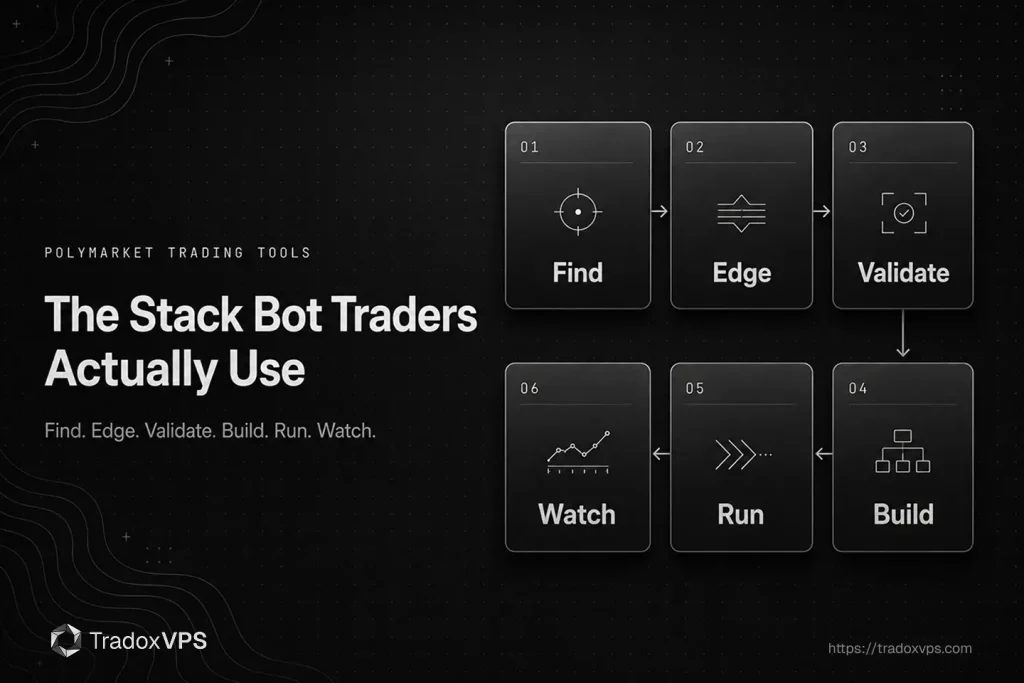
The trading logic is the part people spend their time on. The surrounding stack is the part that decides whether the logic ever gets a fair test. So this is a map of the Polymarket trading tools that make up that stack, organised by the stage of work each one belongs to rather than ranked into a top ten. For each one: what it does, what people actually use it for, what it costs, and one honest limitation. The limitation is the point. A list where everything is excellent tells you nothing.
One disclosure before the list. We run infrastructure and our own latency probes, and we trade these markets ourselves, so several of the tools below we know from our own use rather than only from their documentation. Where a judgment is experiential, which tools are actively developed, who a tool really suits, that is where it comes from. We have no affiliate relationship with any product on this page and none of them paid to be here.
The Polymarket trading tools stack at a glance
| Tool | Stage | Best at | Pricing |
|---|---|---|---|
| future.news | Monitoring | Full market data and trader monitoring | Free (no paid tier listed) |
| Hashdive | Edge finding | Whale tracking on high-volume markets | Free (no paid tier listed) |
| Gravia | Edge finding | Up/down trader and fee analytics | Free (no paid tier listed) |
| Polymarket Analytics | Edge finding | Trader history, whale tracking, copy tools | Free (no paid tier listed) |
| PolyBackTest | Backtesting | Largest published order book archive | Free, then $19.90 to $709.90/mo |
| PolyTest | Backtesting | BTC, ETH and SOL sub-second capture | Free, $29 and $49/mo, custom above |
| Polymarket Backtest | Backtesting | 200ms snapshots, strategy simulator | Free, $15 and $69/mo |
| Polymarket CLOB API | Building | Order entry and the live book | Free |
| Gamma and Data APIs | Building | Market metadata and positions | Free |
| Paid RPC endpoint | Running live | Polygon access you control | Metered by request |
| VPS hosting | Running live | Uptime and a stable network path | Varies by provider |
| PolyNode | Live data | Mempool detection for bot infrastructure | Free, $50 and $200/mo, custom above |
| polymark.et | Discovery | Finding tools this page does not cover | Free |
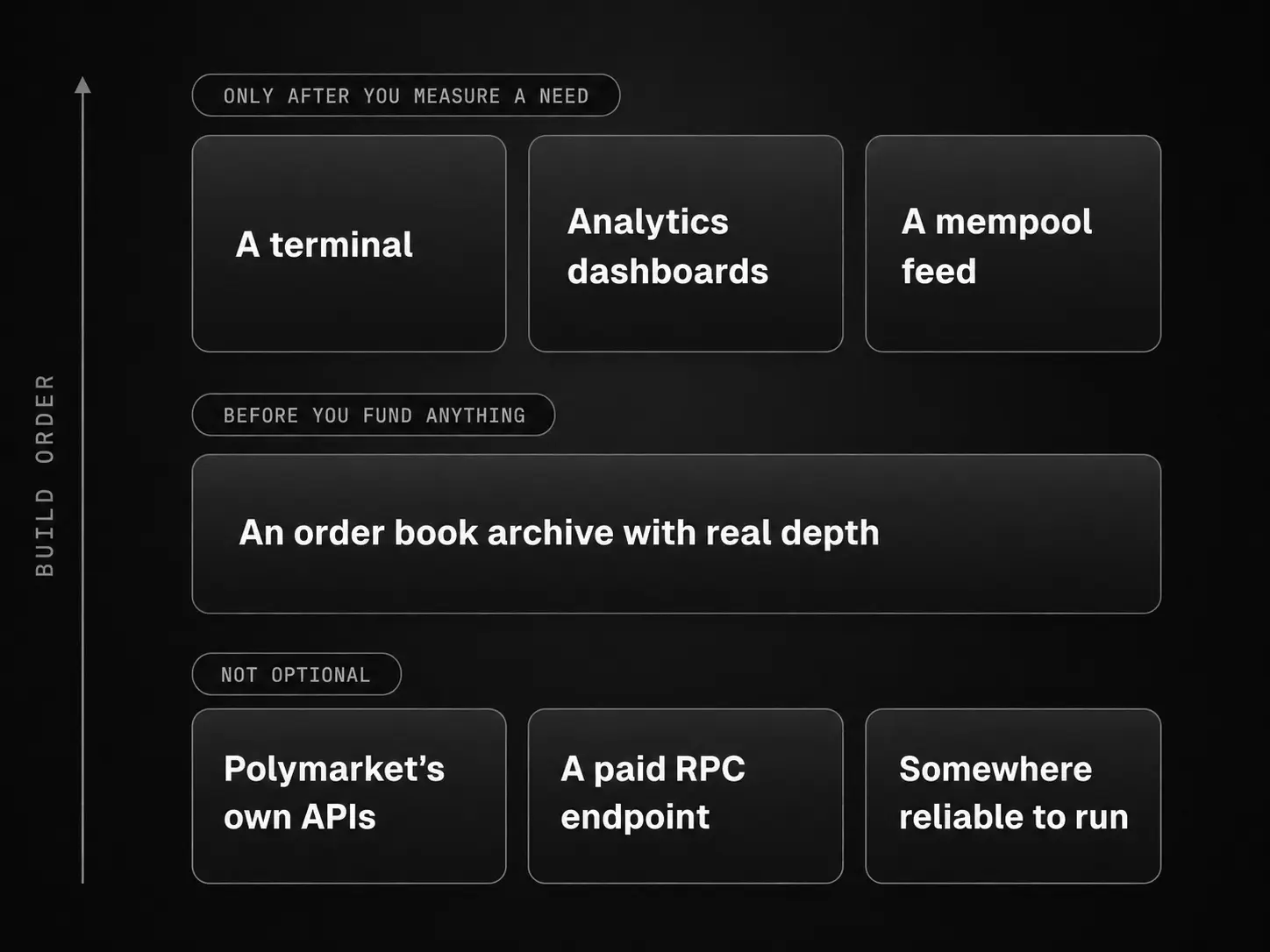
The short version, if you only read this far: the parts of that list which are not optional are Polymarket’s own APIs, a paid RPC endpoint, and somewhere reliable for the bot to run. A backtesting archive is close behind, because without order book depth you cannot tell whether your strategy ever had fills available at the prices it assumed. Everything else solves a problem you may not have yet.
Stage 1: Finding and monitoring Polymarket markets
Polymarket’s own interface is built for people who browse. If you are running a strategy, or choosing one, you want something that surfaces what matters without you watching for it.
future.news is a trading terminal from the GMGN team, and its strength is coverage: markets, trades, resolution sources, wallet tracking, leaderboards and the news flow, with sports and esports markets included. There is a Chrome extension and a Discord presence. Of the terminals in this space, it is the one that comes closest to having all of Polymarket’s data in one place.
Use it for: trader analysis and market monitoring, which is where that breadth pays. Beginners use the leaderboards to find out who is actually good here and watch how they trade, which is a faster education than trading blind. Copy traders use the wallet tracker twice: to screen a master address before following it, and to keep watching it afterwards, because a wallet that changes behaviour is the main thing a copier needs to catch early. News-driven discretionary traders get the one screen where the price and the story that moves it sit together. And the sports and esports coverage matters on its own, because most Polymarket tooling ignores those categories entirely.
The limitation: breadth has a cost. A terminal that aggregates everything inherits the latency of its slowest source, so treat it as situational awareness rather than a trading signal, and feed any automated decision from the CLOB WebSocket instead.
If you are automating, most of this stage eventually gets replaced by your own code reading the Gamma API. Terminals earn their place while you are still learning what the markets do.
Stage 2: Finding an edge with Polymarket analytics tools
This is where analytics tools live, and where you should be most sceptical, because “analytics” covers everything from useful microstructure data to a chart that tells you what already happened. The three below have distinct centres of gravity, and knowing which is which saves you from using the wrong one for the job.
Hashdive is one of the earliest analytics tools built for this niche, and its core is whale tracking: per-address performance scoring keyed to Polygon wallets, and coverage of the biggest-volume markets, alongside liquidity and volume tracking and AI-generated probability estimates.
Use it for: following the money. Watching what the largest wallets are doing on the highest-volume markets is its home ground. Copy traders screen master addresses with the same scoring, anyone can point it at their own wallet for a more honest performance review than memory provides, and studying who sits on the other side of a market you trade is a small habit that occasionally saves you from being someone’s exit. Treat the AI probabilities as a prompt to check your own number, not as a data source, since their inputs are not published and cannot be audited the way the on-chain data can.
The limitation, from our own use: development has slowed. Updates are infrequent now and rough edges have crept in, so it earns a place for what it already does well rather than for where it is going, and anything critical is worth verifying against the chain before you act on it.
Gravia is the opposite trajectory: young and moving fast. It is a terminal built on top of both Polymarket and Kalshi, focused on crypto up/down markets, and its real product is trader analytics: PnL, ROI, win rate, and how a trader’s logic actually behaves across markets.
Use it for: dissecting up/down traders before you copy them, compete with them, or fade them. It is also the only tool here that does the arithmetic almost nobody does by hand: exact fee, rebate and rewards calculations, which is the difference between a strategy that looks profitable and one that is, and pairs directly with how Polymarket’s liquidity rewards score resting orders if you quote as a maker. The dual-venue base helps anyone running crypto strategies across both platforms.
The limitation: the same speed that makes it improve week to week means the ground can shift under a workflow built on it, and with no published pricing its commercial model is still unwritten. A young tool is a risk you take knowingly rather than by accident.
Polymarket Analytics is one of the oldest and largest services in this space. Its core is history: an index of over a million traders and markets, past and present, with profit and loss visualisation, custom lists and filtering. Around that data it has grown execution features too, including a whale tracker and a copy trading bot.
Use it for: the past, which nothing else here covers as widely. Polymarket’s own feeds drop resolved markets, so this is where you study markets that no longer exist on the site: how similar events priced, how they resolved, who traded them well. Searching a million-plus wallets makes it the widest net for finding traders worth studying, custom lists work as a watchlist for your niche, and the P&L view does for any wallet, including yours, what a trade journal is supposed to do and rarely does. If you decide to follow a wallet, its copy bot means you do not have to build one, though the copier’s arithmetic of lag and fees applies to any copy execution, theirs included, and it is less friendly than it looks.
The limitation: data refreshes roughly every five minutes, and that interval defines the research side of the tool. Five minutes is fine for history and wallet study. It is useless for anything reacting to live market state, so keep it out of the decision loop even while its copy bot trades.
All three are strongest for discretionary work and for the research that informs an automated strategy. None of them is something your bot should call while it runs.
Stage 3: Validating the idea with Polymarket backtesting data
This is the stage most people skip and the one that determines whether anything else was worth doing.
Polymarket’s own API does not expose historical order book depth, and resolved markets drop out of public feeds. So if you want to know what your fills would have been rather than what the midpoint was, you need someone who was recording at the time.
PolyBackTest is the largest of these. It publishes a capture of 644,467,552 order book snapshots across more than 100,000 markets, with sub-second capture and full bid and ask depth, covering Bitcoin up/down markets at 5-minute, 15-minute, 1-hour, 4-hour and 24-hour expiries, with Ethereum and Solana at 5-minute, 15-minute and 1-hour. It exposes a REST API and a Python SDK, sources its reference prices from Chainlink to stay aligned with Polymarket’s settlement inputs, and offers a no-code strategy builder. Pricing is published and honest: a free Basic tier (Bitcoin only, a window of recent markets), Pro from $19.90 a month scaling with rate limits, an AI plan at $35 a month that runs around a hundred AI-built backtests, and an enterprise plan from $709.90 a month per coin on its own isolated infrastructure. It is an independent project with no affiliation to Polymarket.
The limitation: history depth. Paid plans carry 31 to 120 days of history depending on tier, so this is deep recent data rather than a multi-year archive, and a strategy that needs validation across regimes needs you to plan for that window. Coverage is crypto up/down only, so it does nothing for political or sports markets.
PolyTest covers BTC, ETH and SOL with sub-second snapshots and full depth, and markets itself at people building with AI coding tools. It runs a free tier limited to a handful of recent 5-minute and 15-minute markets, a $29 Builder tier with 14 days of history, a $49 Pro tier with full historical access, and custom plans above that. Polymarket Backtest offers 200-millisecond snapshot resolution with five levels of book depth across BTC, ETH, SOL and XRP, plus an algorithmic strategy simulator on its paid tiers: free with 3 days of history, $15 for six months, $69 for the full archive.
The limitation on both: smaller archives than PolyBackTest, and neither is long established. Notice also that every free tier in this category is short-memory by design, days of history or a handful of recent markets, which is enough to evaluate whether an archive suits you and not enough to validate a strategy on. The honest way to choose between the three is to pull the same historical window from two of them and compare, because an archive nobody has audited is a claim, not a dataset.
Use the whole category for: more than the obvious job. Validating a strategy before funding it is what these are sold for, but an archive is also how you post-mortem a live strategy that stopped working, by checking whether the book changed or your assumptions did. It is how you measure realistic fills at your actual size instead of at the midpoint. When the platform changes a rule, it is how you check what the change did to your edge, with data from both sides of it. And for someone who does not code yet, a no-code builder is a way to find out whether an idea deserves an engineer before hiring one, yourself included.
Whichever you use, the thing that makes any of them worth paying for is depth. A backtest built on midpoints will show you an edge that evaporates the moment you try to trade it, because it never asked whether there was size at your price.
Stage 4: Building the bot on Polymarket’s own API tools
Everything above is optional. This part is not.
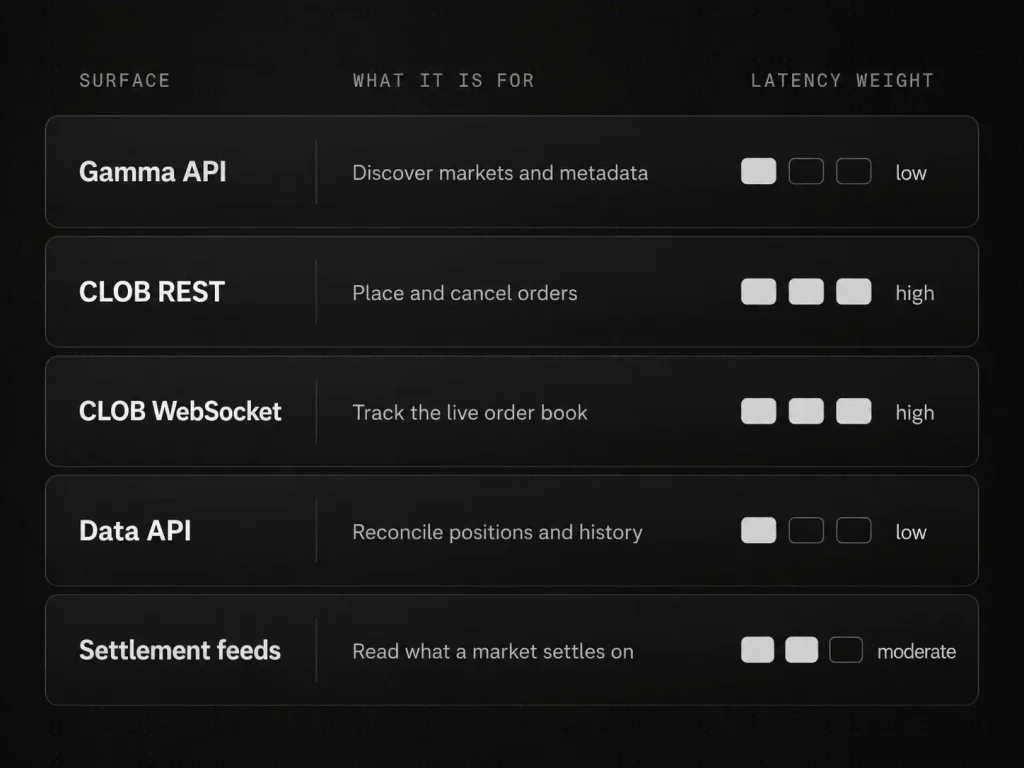
The CLOB API is the order book and the order entry path. This is where your trading actually happens, and the only part of the stack where latency is worth engineering around.
The Gamma API serves market metadata: what exists, what its identifiers are, when it resolves. Poll it to discover markets, not to track prices. A small script that watches Gamma for new markets in your niche and alerts you is the first useful bot most people build, and it replaces most of what a terminal was doing for you.
The Data API covers positions, trades and holders. Live decisions do not come from here, but three quieter jobs do: reconciling what your bot thinks it holds against what the chain says, pulling your own trade history for records and tax, and checking how a wallet you are studying actually behaved.
The CLOB WebSocket is the live book. If your bot polls REST for prices instead of subscribing here, that is usually the first thing to fix.
The settlement data feeds are the newest part of the toolset. Since August 2026, crypto up/down markets settle on Chainlink TWAP values, delivered through Chainlink Data Streams and through Polymarket’s real-time data service, which the docs now name as the production path. What that change means for strategies is its own subject, and we covered it separately. For tooling, the rule is short: take stream names, topics and SDK versions from Polymarket’s documentation and from the rules text of a live market you actually trade, not from any blog, this one included. The rules text is the binding source, anyone can read it, and not every market resolves from the same place, so a minute spent checking it is a minute well spent.
That is the map. The detail underneath it, the real published rate limits, the four WebSocket channels, the identifier model, and the reconnection logic, is its own subject and we covered it in the Polymarket API guide for trading bots. Read that before you write the client.
One version change still catches people. CLOB V2 shipped on 28 April 2026. New exchange contracts, a rewritten backend, and collateral moved from USDC.e to pUSD. The old py-clob-client was archived and V1-signed orders are rejected. If you are following a tutorial written before May 2026, it will produce orders the exchange refuses, and the error will look like a credentials problem rather than a version problem. Use the current official SDK for your language.
This bites hardest for people building with AI coding assistants, which in 2026 is a lot of people. Assistants trained on years of pre-V2 tutorials will confidently reproduce the archived client and V1 order signing, and the code looks right because it once was. Point them at the current documentation and the current SDK by name, and treat any generated Polymarket code older than the V2 cutover as suspect until it runs.
Stage 5: Running it live
This is the stage where working strategies go to die quietly, so it gets the most detail on this page. Three things decide whether a strategy that works keeps working: the RPC endpoint, the machine, and the boring operational habits around both.
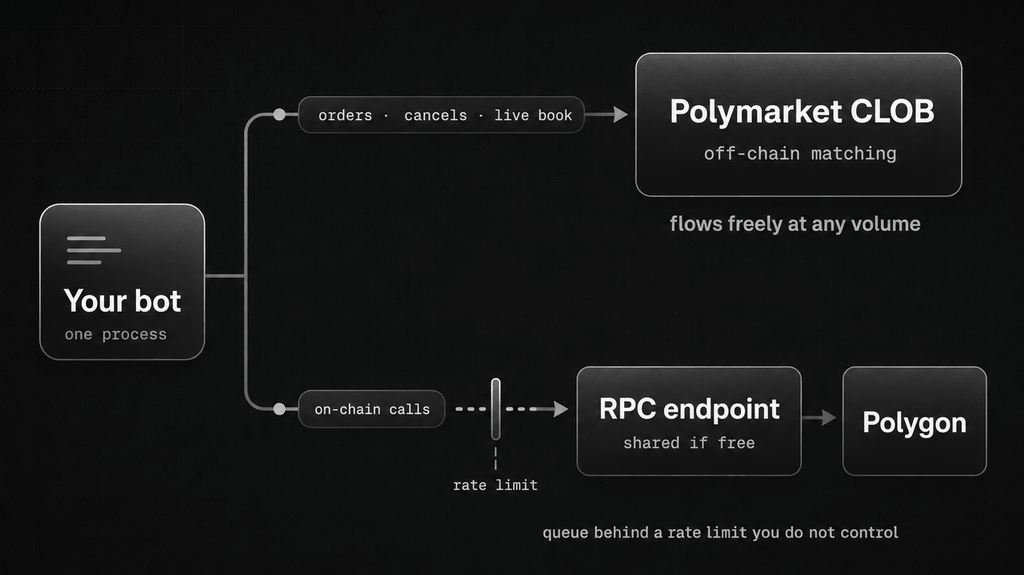
The RPC endpoint is the most under-appreciated failure point in this entire stack. Your bot talks to two different worlds, and people conflate them. Orders, cancels and the live book go to Polymarket’s CLOB. Everything on-chain goes over an RPC endpoint to Polygon: reading balances, setting the allowances that let the exchange move your collateral, and anything else a contract knows. A bot can have a clean path to the CLOB and still stall, because the on-chain half of its work is queuing behind a rate limit on a free endpoint shared with half the internet.
That is why the most common failure pattern is so confusing to debug. The strategy fires, the order path looks fine, and the bot still underperforms, because a balance read or an allowance check sat waiting on the RPC. When a bot is slow or intermittently failing and the trading path looks clean, this is the first place to look.
The fix is a paid provider with an endpoint sited near wherever your bot runs. Alchemy and QuickNode are the common choices and there are others. We are not naming a favourite, because the right answer depends on your call pattern and your location, and we have not benchmarked them against each other. Testing one yourself takes fifteen minutes: time the handful of calls your bot actually makes, a balance read is enough, against the free endpoint and against a trial endpoint, from the machine the bot runs on, at the hour it trades. The difference is usually not subtle. And keep a second provider configured as a fallback. It costs little, switching on failure is a few lines of code, and it turns a provider outage from an incident into a log line.
The limitation to plan for: paid RPC plans meter by request. A bot that polls aggressively can burn a month’s quota in days, so log your call count for a day before choosing a tier, and cache what does not change, because an allowance you set once does not need re-reading every loop.
Hosting is the other half. A strategy that has to be awake at 3am cannot live on a laptop and a home connection. Beyond that, the location question comes down to which venue you are closest to, and we have already answered it properly: our location guide covers where to sit for Polymarket, and our specs guide covers how much machine you need. Dublin and Amsterdam are where our Polymarket customers run.
One jurisdiction note that confuses people constantly. Ireland and the Netherlands are two of a small number of places where Polymarket restricts the website to closing positions while leaving the trading API unrestricted, as of August 2026. That is why a geoblock check from a Dublin or Amsterdam box returns blocked: true while a bot on the same box places orders normally: that endpoint reports the website’s status, not the API’s. We wrote the full explanation of that split, including the part where no server anywhere changes an account’s own eligibility.
The unglamorous part is keeping the process alive. A surprising share of “my bot stopped” turns out to be nothing more than the process dying quietly and nothing restarting it. Run the bot under a process manager, systemd with restart-on-failure or pm2 if you live in Node, so a crash becomes a restart instead of an outage. Write logs to a file with timestamps, because the only thing worse than a 3am failure is a 3am failure with no record of what happened. And keep the machine’s clock on UTC: market timestamps, candle boundaries and resolution times are UTC, and a box set to local time is how people end up convinced a market resolved early.
Two sentences on security, because bots get burned this way and it is entirely avoidable. Give the bot its own wallet holding only what the strategy needs, never a key that controls money you cannot afford to lose. Keep that key in an environment variable or a secrets file outside the repository, because keys pasted into code have a way of ending up on GitHub.
Stage 6: Live data feeds and watching it run
PolyNode is bot infrastructure more than a dashboard: its core is Polygon mempool detection, decoding transactions and settlements and delivering them over WebSocket and REST roughly five seconds before on-chain confirmation, alongside order book and on-chain event data. Pricing is published: a free tier, Starter at $50 a month, Growth at $200, and custom capacity above that.
Use it for: four different jobs, and the first is the one it does best. Copy traders live and die on detection lag, the gap between a master’s fill and the copier seeing it, and reading the master’s transaction in the mempool attacks exactly that gap at its source, seconds before the chain confirms it. Market makers use the same early knowledge defensively, pulling resting quotes before a settlement lands on them, which is risk control rather than a speed play. Reaction strategies use it offensively, acting on an outcome before confirmation. And at its simplest it is monitoring: knowing results early keeps your position accounting ahead of the chain instead of behind it.
The limitation: the free tier caps WebSocket sessions at an hour a day, so it is for evaluating the data, not running on it, and production use starts at $50. More fundamentally, seconds of head start only pay when your strategy makes a decision inside those seconds. If your loop reacts on a horizon of many seconds anyway, and there is a delay on the taker side of the order path that a faster feed does not remove, the edge changes nothing about your results. Identify the specific decision this data would change, then buy it, in that order.
For everything else, monitoring is mostly your own work, and it comes down to three alerts: one when the WebSocket stops delivering, one when order rejections spike, one when the machine stops answering. Those three catch the large majority of real incidents early. None of them needs a product.
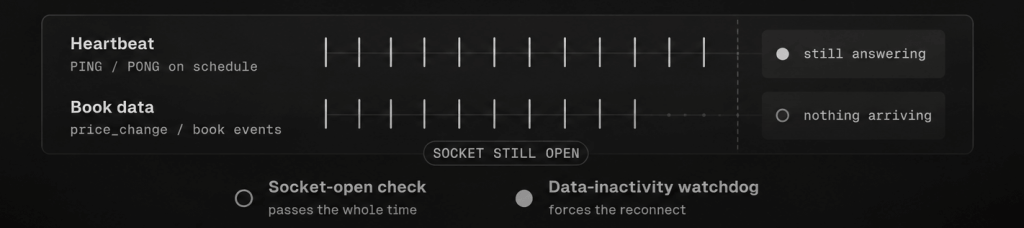
The first one has a trap in it worth knowing about. Polymarket’s CLOB WebSocket can sit in a state where it stays open, keeps answering your heartbeat, and delivers no data at all, sometimes for hours. Every socket-open check passes while your book quietly freezes. What catches it is a watchdog on time-since-last-data rather than time-since-last-heartbeat, and our API guide covers that pattern along with the reconnect logic it needs.
For the plumbing itself, nothing exotic is required. A heartbeat monitor, Healthchecks and UptimeRobot are the usual choices, catches a silent death because the bot stops checking in. A webhook posting failures into a private Telegram or Discord channel gets them in front of you. The process manager from the previous stage handles the restart. The Polymarket-specific part is not the plumbing, it is choosing what to alert on, and the three above are the ones that matter.
If your bot is rejecting orders and you want to know why, our diagnosis guide for orders that do not fill maps the error strings to causes.
polymark.et is a directory of Polymarket tools organised by category.
Use it for: everything this page does not cover, and for checking what has launched since it was written. A directory is broader than a map by design, and this space ships new tools monthly.
Where to start
If you are building now, the order matters as much as the list.
Backtest before you host, because there is no point paying for uptime on a strategy that never had an edge. Fix your RPC before you optimise anything else, because it is the most common bottleneck and the cheapest thing on this page to fix. Get your SDK on V2 before you debug anything else, because a version mismatch produces errors that look like credentials problems and people lose days to it.
If you are new to all of this, the same order holds with smaller steps. Watch the markets with a terminal or the site itself until you can say what you think is mispriced and why. Write the Gamma alert script before you write a trading bot, because it teaches you the API surface with nothing at risk. Backtest on a free tier before funding anything. Only when something runs unattended with real money does the rest of this page start costing money: the paid RPC, the hosting, the monitoring. Spending on infrastructure before you have an edge is buying uptime for a strategy that does not exist yet.
Either way, measure your own path rather than trusting anyone’s published figure, including ours. Our latency checker gives you a starting read from your browser, and our benchmarks show what we measure and the method we use, so you can reproduce it or disagree with it.
How we checked this
Platform facts on this page, meaning CLOB V2, settlement data delivery and the geoblock split, come from Polymarket’s own documentation and, where documentation and a live market disagreed, from the live market’s rules text, which is the binding source.
Pricing was read from each product’s live pricing page in August 2026. Four of these tools publish pricing and it appears here exactly as published. The others, future.news, Gravia, Hashdive and Polymarket Analytics, publish no pricing at all, so they are listed as free as of that date, which is the honest reading of a product with no paid tier, and dated because it can change.
Several of these tools we use in our own trading and research, and the judgments that come from use rather than documentation, which tools are actively developed, which have slowed, who each one really suits, are marked as such in the text. The parts that are entirely our own ground are hosting, RPC behaviour, day-to-day operations and latency measurement: we run probes on a published method and we run bots of our own, which is why Stage 5 is the most opinionated part of this page.
We have no affiliate relationship with any product on this page, and none of them paid to be here. If that ever changes, this paragraph changes with it.
Frequently Asked Questions
Polymarket’s own CLOB, Gamma and Data APIs, a paid RPC endpoint, and somewhere reliable for the bot to run. Backtesting data is close behind, because without order book depth you cannot tell whether a strategy had fills available at the prices it assumed. Terminals, analytics dashboards and pre-confirmation data feeds are useful additions rather than requirements.
Mostly, and more than you would expect: the APIs are free and the whole analytics layer currently has no paid tiers at all. Two exceptions. Backtesting free tiers are short-memory by design, a few days of history or a handful of recent markets, which is enough to evaluate an archive and not enough to validate a strategy on it. And the free public Polygon RPC is the one to replace first, because it is shared, rate limited, and the single most common cause of a bot that works in testing and fails in production.
In rough order: the RPC endpoint rate limiting or timing out, a WebSocket that disconnects and never reconnects, an outdated client library producing orders the exchange rejects, and the process or machine itself dying with nothing set to restart it. Strategy logic is rarely the first thing at fault, which is why the surrounding stack deserves as much attention as the signal.
Mostly they help the human building it. Tools refreshing every few minutes are valuable for research, wallet study and understanding market structure, and unsuitable for anything inside a live decision loop. Use them to form a hypothesis, then feed the bot from the CLOB WebSocket instead.
A wallet screener before you follow anyone, meaning future.news, Hashdive or Polymarket Analytics, and the discipline to keep watching the wallet after you commit, because masters change behaviour. On the execution side, detection lag is the copier’s real enemy: Polymarket Analytics ships a built-in copy bot, and PolyNode’s mempool feed exists to see a master’s fill seconds before the chain confirms it. The arithmetic of lag and fees still decides whether a profitable master is profitable for you, and no tool changes that.
Not for all of them. Terminals, analytics dashboards, no-code backtest builders and a hosted copy bot all work without writing anything, and that is enough to research markets, screen wallets and test simple ideas. Running your own automated strategy is different: once code trades unattended with real money, someone has to own that code. AI coding assistants lower the barrier but do not remove it, and they often generate outdated pre-V2 examples that the exchange rejects.
The April 2026 cutover replaced the exchange contracts, moved collateral to pUSD and archived the old Python client, so anything built from a pre-May 2026 tutorial produces orders the exchange rejects. Separately, crypto up/down settlement now arrives as a data feed your bot integrates rather than a price it reads, which is a build task on top of the client work. Both are covered in depth on their own pages.
For anything running unattended, yes, and it is usually the highest-value upgrade in the whole stack. The free public endpoint is shared infrastructure with rate limits you do not control. Paid providers let you site the endpoint near your bot and give you quota you can plan around. Measure your request volume first so you buy the right tier rather than the biggest one.
Because that endpoint reports the website’s status, not the trading API’s. Ireland and the Netherlands both restrict the frontend to closing positions while leaving the API unrestricted, as of August 2026, so a blocked: true response is expected and does not mean your bot cannot place orders. It also does not change the eligibility of the account you are trading with.
Corrections and additions
This page is maintained rather than published and forgotten. Prices change, tools launch, and several of the products listed here did not exist a year ago.
If you build one of these tools and something above is wrong, out of date or unfair, tell us and we will fix it. That includes the use cases: you know what your users actually do with your product better than anyone’s documentation does. If you have shipped something in this space that is not listed, the same applies. We are not running an affiliate programme on this page and there is nothing to sign, so the only thing on offer is an accurate description and a working link.
Tool descriptions on this page come from each product’s published pages and, for several of them, from our own use, checked in August 2026. Pricing was read from each product’s live pricing page on that date; products with no published pricing are described as free as of that date. We have no affiliate or commercial relationship with any product listed here. Polymarket’s own documentation and a market’s own rules text are always the current authority on its APIs and settlement. This is infrastructure and educational content, not trading or financial advice.