Most guides to the Polymarket API for trading bots skip the two things that actually decide whether your bot survives a week in production: how you handle rate limits, and how you handle a websocket connection that drops. This post is about those two things, plus the context you need around them so you are building on the right platform in the first place.
Here is the honest short version. There are now two separate Polymarkets. Most of what a bot does (reading order books, tracking prices, computing analytics) needs no authentication and runs from anywhere. Placing orders is the part that is geo-restricted and the part that needs signing. And a VPS earns its place on this workload through reliability, not through any latency number on a marketing page. We will get to all of that with real numbers pulled from Polymarket’s own documentation, not invented ones.
First, which Polymarket are you building on?
This is the question to answer before you write a line of code, because it changes your endpoints, your authentication, and whether you are even eligible to place orders.
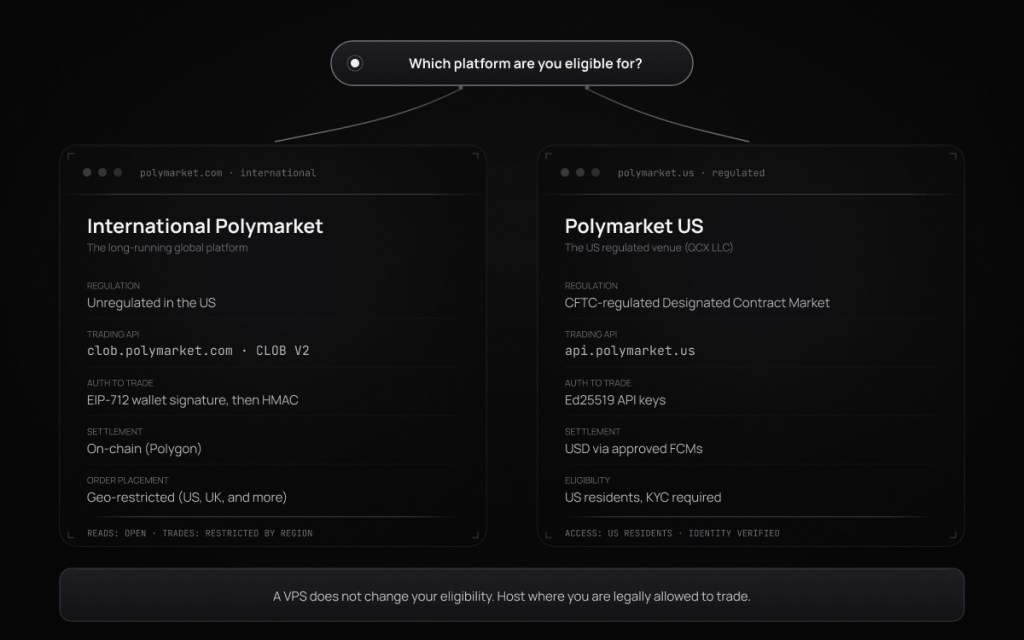
As of July 2026, there are two products:
| International Polymarket | Polymarket US | |
|---|---|---|
| Operator | Polymarket (offshore) | QCX, LLC (d/b/a Polymarket US) |
| Regulation | Unregulated in the US | CFTC-regulated Designated Contract Market (DCM) |
| Launched | Long-running | December 3, 2025 |
| Trading API | CLOB V2 at clob.polymarket.com | Separate API at api.polymarket.us |
| Auth for trading | EIP-712 wallet signature (L1) plus HMAC (L2) | Ed25519 API keys |
| Settlement | On-chain, Polygon | USD via approved FCMs |
| KYC to trade | Not required for wallet-based access where eligible | Required (government ID, proof of residency, and more) |
| Order placement | Geo-restricted (see below) | US residents, subject to state rules |
The international platform restricts order placement in a list of jurisdictions that has included the US, UK, France, Germany, Italy, the Netherlands, Belgium, and others. Reading market data through the public endpoints does not require authentication. The order-placement restriction is a compliance boundary tied to where you are legally allowed to trade, not a technical hurdle to route around.
We will say this plainly because a lot of VPS providers will not: a VPS is not a way around the geo-restriction. If you are a US resident, the venue you can lawfully use is Polymarket US, which is exactly why it exists as a CFTC-regulated entity. Renting a server in another country to appear as though you are somewhere else violates Polymarket’s terms, forfeits any recourse, and is not something we will help you do. As of July 2026 the picture can still move: Polymarket filed with the CFTC in late April 2026 seeking approval to reopen the international exchange to US traders, and a separate CFTC review opened in June 2026. Confirm the current status for your jurisdiction before you build.
With that settled, the rest of this guide focuses mainly on the international CLOB V2 API, because that is where the detailed public documentation for rate limits and websocket behavior lives. The principles transfer to Polymarket US, but confirm its specifics against its own docs.
The Polymarket API is actually three APIs (plus a fourth)
A common first-hour mistake is treating Polymarket as one API. It is not. Picking the right surface per call is the difference between clean code and a tangle of retries.
| API | Base URL | What it is for | Auth |
|---|---|---|---|
| Gamma | gamma-api.polymarket.com | Market and event discovery, metadata | None |
| CLOB | clob.polymarket.com | Order book, prices, and placing or cancelling orders | None to read, signing to trade |
| Data | data-api.polymarket.com | Positions, trades, historical analytics | None |
| Bridge | bridge.polymarket.com | Funding and deposits | Varies |
Reads on all three of the first surfaces are unauthenticated. Only CLOB trading requires a signature. That single fact shapes a lot of bot design: your data pipeline, your monitoring, your backtest data collection, and any cross-venue analysis can run with no keys at all.
The identifier model that trips everyone up
Before you subscribe to anything, you need the right IDs, and Polymarket’s model is not the one most exchange APIs use.
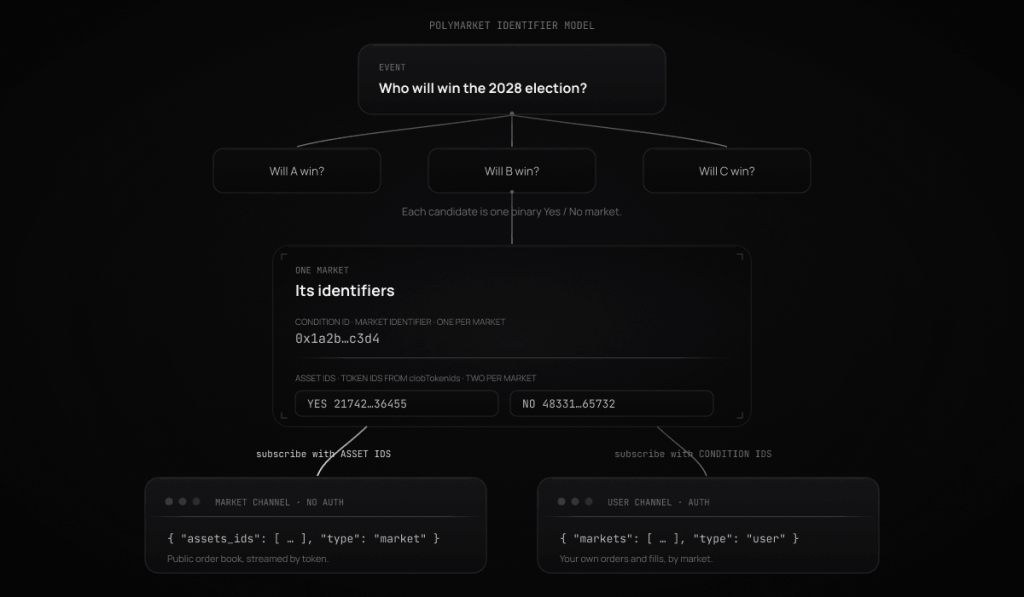
A real-world question (“Who will win the 2028 US presidential election?”) is an event. Each candidate is a market under that event, and each market is a binary Yes/No contract. Each market has:
- one condition ID (the market identifier, a
0x...value), and - two asset IDs, also called token IDs or CLOB token IDs (long numeric strings), one for the Yes token and one for the No token.
You get the asset IDs from the clobTokenIds field in the market’s Gamma metadata. This matters because the two websocket channels subscribe by different identifiers, and mixing them up is the single most common reason a subscription silently returns nothing.
Authentication, only where you actually need it
If your bot only reads data, skip this section. You need no keys to pull markets from Gamma, read the order book or prices from CLOB, or fetch positions and trades from the Data API.
To place or cancel orders on the international CLOB, you sign in two layers:
- L1 (EIP-712): you sign a message with your Ethereum or Polygon wallet key to derive a set of API credentials. This proves ownership of the address.
- L2 (HMAC): you sign each trading request with those derived credentials.
There are four signature types to match how your funds are held: EOA, POLY_PROXY, GNOSIS_SAFE, and POLY_1271. For new API users funding through a deposit wallet, POLY_1271 is the type Polymarket points you toward. The order owner has to match the owner of the API key, which is a frequent source of the 401 Invalid api key error.
Two quiet details worth pinning down in the authentication reference before you ship: the exact EIP-712 domain parameters your client signs with, and the timestamp units each field expects. Mixing seconds and milliseconds between request headers and the order struct produces confusing auth failures that look like network problems.
Rate limits, and the Cloudflare behavior that trips people up
Polymarket enforces every rate limit through Cloudflare’s throttling system, and the way it behaves is different from most APIs you have integrated.
When you exceed a limit, requests are delayed and queued rather than immediately rejected. Your calls slow down before they fail. If throttling is not enough to bring you under the limit, you eventually receive an HTTP 429, and here is the trap: that 429 carries no Retry-After and no X-RateLimit-* headers. A naive exponential-backoff loop that assumes standard rate-limit headers can actually make you slower, because it backs off on requests that were going to succeed anyway, just late. The right mental model is to treat a slow-but-eventually-200 response as success, and to reserve aggressive backoff for actual 429s.
The limits below are transcribed from Polymarket’s official rate-limit documentation and were re-checked against it on July 10, 2026: every figure matches the live docs as of that date. They can still change, so treat Polymarket’s docs page as the source of truth if you are reading this later.
Top-level caps, per API:
| Scope | Limit |
|---|---|
| General (all endpoints) | 15,000 requests / 10s |
| Gamma API, general | 4,000 requests / 10s |
| Data API, general | 1,000 requests / 10s |
| CLOB API, general | 9,000 requests / 10s |
| Bridge API, general | 50 requests / 10s |
CLOB market-data endpoints (the ones a data bot hits hardest):
| Endpoint | Limit |
|---|---|
/book (single) | 1,500 requests / 10s |
/books (batch) | 500 requests / 10s |
/price (single) | 1,500 requests / 10s |
/prices (batch) | 500 requests / 10s |
/midpoint (single) | 1,500 requests / 10s |
/midpoints (batch) | 500 requests / 10s |
/prices-history | 1,000 requests / 10s |
CLOB trading endpoints carry both a burst limit (short spikes) and a sustained limit (longer average):
| Endpoint | Burst | Sustained |
|---|---|---|
POST /order | 5,000 / 10s | 120,000 / 10 min |
DELETE /order | 5,000 / 10s | 120,000 / 10 min |
POST /orders (batch) | 2,000 / 10s | 21,000 / 10 min |
DELETE /orders (batch) | 2,000 / 10s | 15,000 / 10 min |
DELETE /cancel-all | 250 / 10s | 6,000 / 10 min |
DELETE /cancel-market-orders | 1,500 / 10s | 21,000 / 10 min |
For most strategies these ceilings are far higher than you will approach. If you are bumping them, the usual cause is polling for data you should be streaming instead. Which brings us to the part that actually breaks bots.
Practical rate-limit hygiene for a Polymarket bot:
- Stream, do not poll. Use the websocket for live order-book and price data instead of hammering
/bookand/price. This is the single biggest reduction in your request count. - Batch where an endpoint supports it, but note the batch limits are lower per request because each call does more work.
- Back off with jitter only on real 429s, and treat throttled-but-successful responses as normal, not as errors.
- Budget per endpoint, not globally. The sub-limits (for example,
/marketsat 300/10s on Gamma) bite long before the top-level cap does.
WebSocket behavior: the part that actually breaks bots
This is where a Polymarket bot lives or dies. The order book moves in real time, and the only sane way to track it is a websocket subscription. Here is exactly how Polymarket’s works, and where it fails.
The four channels
| Channel | Endpoint | Auth |
|---|---|---|
| Market | wss://ws-subscriptions-clob.polymarket.com/ws/market | No |
| User | wss://ws-subscriptions-clob.polymarket.com/ws/user | Yes |
| Sports | wss://sports-api.polymarket.com/ws | No |
| RTDS | wss://ws-live-data.polymarket.com | Optional |
The market channel streams public order-book data. The user channel streams your own orders and fills and requires your API credentials. The sports channel streams live game state for sports markets. RTDS (the Real-Time Data Socket) is a separate system for live price feeds like crypto and equity prices, and comments. For an order-book trading bot, the market and user channels are the core.
Subscribing
Each channel subscribes differently, and this is where the identifier model from earlier pays off.
Market channel subscribes by asset IDs (token IDs). Note the field name is assets_ids, with the double plural. That typo-looking spelling is correct and is a genuine source of broken subscriptions:
{
  "assets_ids": ["<yes_token_id>", "<no_token_id>"],
  "type": "market",
  "custom_feature_enabled": true
}
User channel subscribes by condition IDs (market identifiers), and includes your auth block:
{
  "auth": {
    "apiKey": "your-api-key",
    "secret": "your-api-secret",
    "passphrase": "your-passphrase"
  },
  "markets": ["0x...condition_id"],
  "type": "user"
}
The sports channel needs no subscription message at all: connect and you receive data for active sports events.
You can also modify subscriptions on an open connection without reconnecting, by sending a subscribe or unsubscribe operation. Use assets_ids for the market channel and markets for the user channel.
The events you will receive
Market channel:
| Event | Meaning | Custom feature |
|---|---|---|
book | Full order-book snapshot | No |
price_change | A price level changed (often an order placed or cancelled, not always a trade) | No |
tick_size_change | The market’s tick size changed | No |
last_trade_price | A trade executed (maker and taker matched) | No |
best_bid_ask | Best prices update | Yes |
new_market | A new market was created | Yes |
market_resolved | A market resolved | Yes |
The three events marked as custom features only arrive if you set custom_feature_enabled: true in your subscription.
User channel:
| Event | Meaning |
|---|---|
trade | Trade lifecycle updates (for example, matched then confirmed) |
order | Order placements, updates, and cancellations |
A useful distinction: price_change does not always mean a trade happened, it means a level in the book changed. last_trade_price is the event that fires when an actual trade prints. If you are logging fills, do not treat every price_change as volume.
Heartbeats, and why your connection keeps dropping
Polymarket’s heartbeat rules differ by channel, and getting them wrong produces a connection that dies roughly every ten seconds for no obvious reason.
- Market and user channels: you send
PINGevery 10 seconds, and the server repliesPONG. - Sports channel: the server sends a ping every 5 seconds, and you must reply
pongwithin 10 seconds or the connection closes.
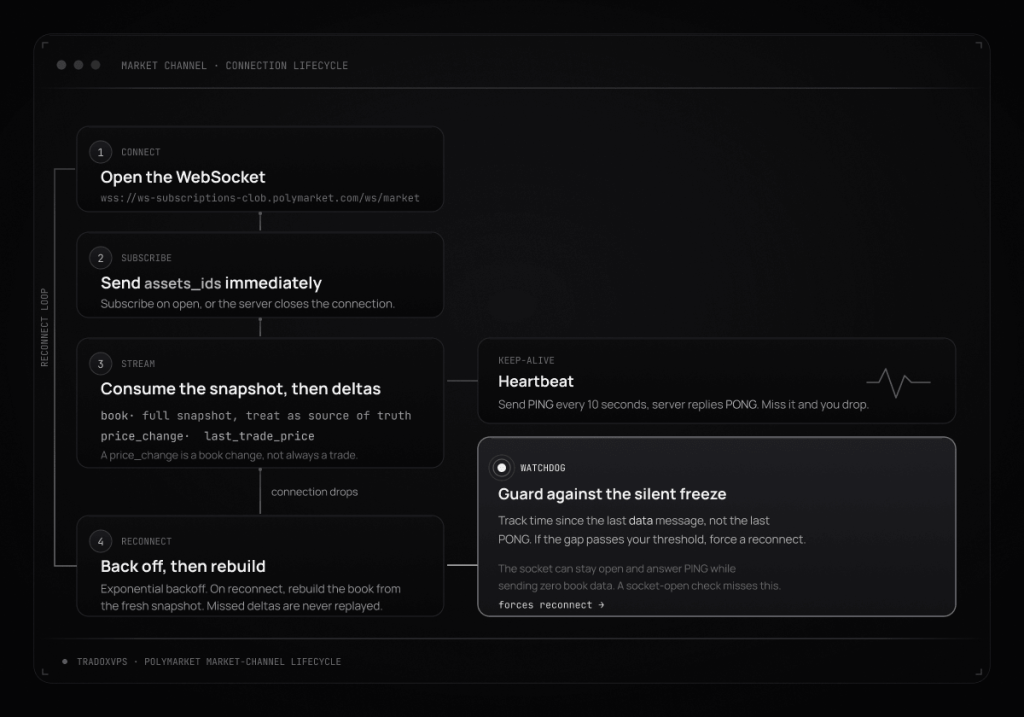
If your bot keeps dropping about ten seconds after connecting, the cause is almost always that you are not sending heartbeats. And if your connection closes the instant it opens, the cause is almost always that you did not send a subscription message immediately after connecting, since the server closes connections that do not subscribe within a short window.
Reconnection: the logic most bots get wrong
A websocket will drop. Your machine’s network hiccups, Polymarket restarts a node, a deploy cycles your process. What matters is what your bot does next.
The rule that catches people out: deltas you missed while disconnected are not replayed. If you reconnect and just keep applying incremental price_change events to your old local book, your book is now wrong and stays wrong. The correct pattern is to treat the book snapshot you receive on subscribe as your new source of truth on every reconnect, and to rebuild local state from it. If you ever suspect your book has desynced mid-session, re-fetch a fresh snapshot from GET /book (rate limit 1,500/10s) and rebuild.
The silent freeze, and why you need a watchdog
Here is the failure mode that a naive “is the socket still open?” check will never catch, and it is worth knowing about because it is documented in Polymarket’s own client issue tracker by operators running bots on real servers. The Polymarket CLOB websocket can enter a state where it accepts your connection, accepts your subscription, keeps answering your PING with PONG, and yet delivers zero book or price data, sometimes for hours. Every connection-level health check says the socket is fine. Your book is simply frozen.
The only reliable defense is a data-inactivity watchdog: track the time since the last data message (not the last PONG), and if that gap exceeds a threshold you choose, force a reconnect even though the socket looks healthy. Pair it with occasional REST spot-checks against /midpoint or /book to confirm your streamed prices still match reality.
Here is a compact skeleton of the full pattern for the market channel, in Python. It is illustrative, not production copy-paste, but it shows the four pieces that matter: subscribe immediately, PING on schedule, reconnect with capped backoff, and a watchdog on data silence.
import asyncio, json, time, websockets

WS = "wss://ws-subscriptions-clob.polymarket.com/ws/market"
TOKEN_IDS = ["<yes_token_id>", "<no_token_id>"]
SILENCE_LIMIT = 30  # seconds of no data before we force a reconnect

async def stream(on_event):
    backoff = 1
    while True:
        try:
            async with websockets.connect(WS, ping_interval=None) as ws:
                # 1. Subscribe right away, or the server drops you.
                await ws.send(json.dumps({
                    "assets_ids": TOKEN_IDS,   # note: assets_ids, double plural
                    "type": "market",
                    "custom_feature_enabled": True,
                }))
                backoff = 1
                last_data = time.monotonic()

                async def heartbeat():
                    while True:
                        await asyncio.sleep(10)
                        await ws.send("PING")

                async def watchdog():
                    while True:
                        await asyncio.sleep(5)
                        if time.monotonic() - last_data > SILENCE_LIMIT:
                            await ws.close()   # break the silent freeze
                            return

                hb = asyncio.create_task(heartbeat())
                wd = asyncio.create_task(watchdog())
                try:
                    async for raw in ws:
                        if raw == "PONG":
                            continue
                        last_data = time.monotonic()
                        msg = json.loads(raw)
                        # A "book" event is a fresh snapshot: rebuild local state from it.
                        on_event(msg)
                finally:
                    hb.cancel(); wd.cancel()
        except Exception as e:
            print("ws dropped, resync in", backoff, "s:", e)
            await asyncio.sleep(backoff)
            backoff = min(backoff * 2, 30)
That watchdog is the single most valuable piece of code in a long-running Polymarket bot, and it is the piece most tutorials leave out.
CLOB V2: do not follow a tutorial written for V1
If you are reading an older guide, check its date. Polymarket did a hard cutover to CLOB V2 on April 28, 2026, with no backward compatibility. The V1 SDKs and V1-signed orders stopped working on production at the cutover. If a tutorial references any of the following, it is V1 and its trading code will not run:
- the
@polymarket/clob-clientpackage without the-v2suffix, - the older
py-clob-clientrepository (now archived and read-only), - order fields like
nonce,feeRateBps, ortaker, or USDC.eas the collateral token.
If any of that matches your codebase, our Polymarket V2 migration guide walks through the cutover step by step. Build on the current official V2 clients: py-clob-client-v2 for Python and clob-client-v2 for TypeScript, with an official Rust client also listed on Polymarket’s Clients and SDKs page. V2 also changed the collateral token (to pUSD) and moved to a protocol-computed fee model where fees are not embedded in your signed order but calculated at match time. For most bots the headline is simpler: maker orders that add liquidity are free, and takers pay a per-category fee. Confirm the current numbers before you rely on them, because fee schedules move.
Where a VPS actually helps a Polymarket bot, and where it does not
We host trading VPS instances, so you would expect us to tell you that you need one. We would rather tell you the truth, because the honest version converts the right buyers and saves everyone else money.
A VPS is genuinely useful here for reliability, not latency. Break it into the parts:
- Data ingestion runs from anywhere, and it wants a machine that never sleeps. The market channel and the read endpoints need no authentication and no eligibility check. Streaming order books, tracking prices, building your backtest dataset, watching for cross-venue mispricings against a platform like Kalshi: none of that touches the order-placement restriction, and all of it breaks the moment a home laptop sleeps, reboots for an update, or drops its connection. This is the cleanest reason to run on an always-on server.
- The websocket needs babysitting that a home connection cannot reliably give it. PING every 10 seconds, reconnect with backoff, a fresh snapshot on every resubscribe, and the silent-freeze watchdog. A residential ISP hiccup drops the connection and your bot misses fills. A server on a datacenter network stays up and reconnects cleanly. On storage, the NVMe Gen4 in our plans helps your platform load faster, chew through backtest data, and write logs without stalling. It does not make orders execute faster, and we will not pretend it does.
- Latency is something you measure, not something we stamp on a page. You will see “sub-millisecond” and specific millisecond claims about Polymarket across the web. Ignore them. A ping is a network leg, not an order round-trip, and Polymarket’s order book is not sitting in a Chicago datacenter next to the futures exchanges. Its CLOB is an off-chain matching system, and settlement happens on the Polygon blockchain, which is a different and slower clock than any ping. The only number that means anything is the real round-trip from your server to Polymarket’s endpoints, measured from the location you are actually considering. Use our latency checker and measure it yourself. If you want the method, we wrote it up in how to test the latency of your Polymarket VPS.
- Host where you are legally allowed to trade, not to disguise where you are. For eligible international traders, pick a location with good measured routing to Polymarket and confirm it with the latency checker. For US residents, the venue is Polymarket US. A server in another country does not change your eligibility, and that is not a service we offer.
When you probably do not need a VPS: if you are backtesting offline, trading manually a few times a week, or running a short-lived cloud function that spins up, does one thing, and exits, a persistent VPS is overkill. The case for one is specifically the always-on, connection-holding, reconnecting workload described above.
If that is your workload, the best Polymarket VPS writeup covers plan selection, our guide to running a Polymarket bot 24/7 on a VPS covers the day-to-day operational side, and there is a companion guide if you also run Kalshi trading bots. Our public status page shows the uptime we actually run against a 99.999% uptime target, rather than a number we ask you to take on faith. Our Polymarket VPS plans run from Dublin, and current pricing is on the pricing page.
A pre-launch checklist
Before you point a Polymarket bot at real money, confirm:
- You know which platform you are on and that you are legally eligible to place orders on it.
- Your data pipeline uses the websocket, not REST polling, for live prices.
- Your subscription fires immediately on connect, with the correct identifier type per channel (
assets_idsfor market,marketsfor user). - You send
PINGevery 10 seconds on the market and user channels. - On every reconnect, you rebuild your book from the fresh
booksnapshot rather than resuming stale deltas. - You run a data-inactivity watchdog, not just a socket-open check.
- Your retry logic treats throttled-but-successful responses as success and only backs off hard on real 429s.
- You are on CLOB V2 clients and code, with no leftover V1 fields.
Frequently Asked Questions
No. The Gamma API (market discovery), the CLOB read endpoints (order book, prices, midpoint), and the Data API (positions, trades) require no authentication, and the market websocket channel is public. You only need to sign requests to place or cancel orders on the CLOB.
On the international CLOB, POST /order allows a burst of 5,000 requests per 10 seconds and a sustained rate of 120,000 per 10 minutes, as of Polymarket’s official documentation in July 2026. All limits are enforced through Cloudflare throttling, which delays and queues requests over the limit rather than rejecting them immediately, and the eventual 429 response carries no retry headers. Polymarket’s docs page is the source of truth if you are reading this later.
On the market and user channels, send PING every 10 seconds and the server replies PONG. On the sports channel, the server sends a ping every 5 seconds and you must reply pong within 10 seconds or the connection closes. You must also send your subscription message immediately after connecting, or the server will close the connection.
irst, confirm you sent a valid subscription immediately after connecting, using assets_ids (token IDs) for the market channel or markets (condition IDs) for the user channel. Confirm the markets are active and not resolved, and set custom_feature_enabled: true if you expect the best-bid-ask, new-market, or market-resolved events. The connection can also enter a documented silent-freeze state where it stays open and answers PING but sends no data, which is why a data-inactivity watchdog that forces a reconnect is essential.
US residents’ lawful path is Polymarket US, a CFTC-regulated Designated Contract Market that launched in December 2025 with its own API, Ed25519 authentication, and mandatory identity verification. The international Polymarket platform restricts order placement for US users, and using a VPN or an overseas server to appear otherwise violates its terms and forfeits recourse. Confirm the current status, since Polymarket filed with the CFTC in April 2026 seeking approval to reopen the international platform to US traders, and that filing was still pending as of July 2026.
A condition ID is the market identifier (a 0x... value), and each market has exactly one. An asset ID, also called a token ID or CLOB token ID, identifies a tradable outcome token, and each binary market has two: one for Yes and one for No. The market websocket channel subscribes by asset IDs, while the user channel subscribes by condition IDs. You get the asset IDs from the clobTokenIds field in a market’s Gamma metadata.
A VPS does not reduce slippage, which is a market event, and no honest provider can promise better fills. What a VPS removes is preventable, home-side failure: a machine that sleeps, reboots, or drops its connection and desyncs your order book. On latency, the only meaningful figure is the real round-trip measured from the location you are considering to Polymarket’s endpoints, which you can test with our latency checker rather than trusting any stamped number.
No. Polymarket moved to CLOB V2 in a hard cutover on April 28, 2026, and the older py-clob-client repository is archived and read-only. V1-signed orders and V1 SDKs stopped working at the cutover. Build on the current official V2 clients, and check any tutorial’s date before following its trading code.
Disclaimer: This guide is for informational purposes and is not legal, financial, or trading advice. Prediction-market access, regulatory status, API rate limits, fees, and platform policies change, sometimes quickly, so verify anything time-sensitive against Polymarket’s current documentation and confirm your own eligibility to trade in your jurisdiction. Any latency depends on your route and should be measured from your own location. Automated trading carries risk, including the risk of loss.