Updated June 2026. We operate TradoxVPS; this is a sizing guide, not a sales page — and every claim on it is checkable from your own terminal.
Most “VPS specs” articles are a parts list with adjectives. This one answers the question traders actually have: what does each resource do for a Polymarket bot, how much of it does your workload need, and what breaks first when you undersize? A spec sheet doesn’t fail on a quiet Tuesday afternoon — it fails in the exact minute a market goes vertical. Size for that minute.
What each spec actually does in a trading bot
A Polymarket bot stresses a server in a very specific shape, and once you see the shape, sizing becomes obvious:
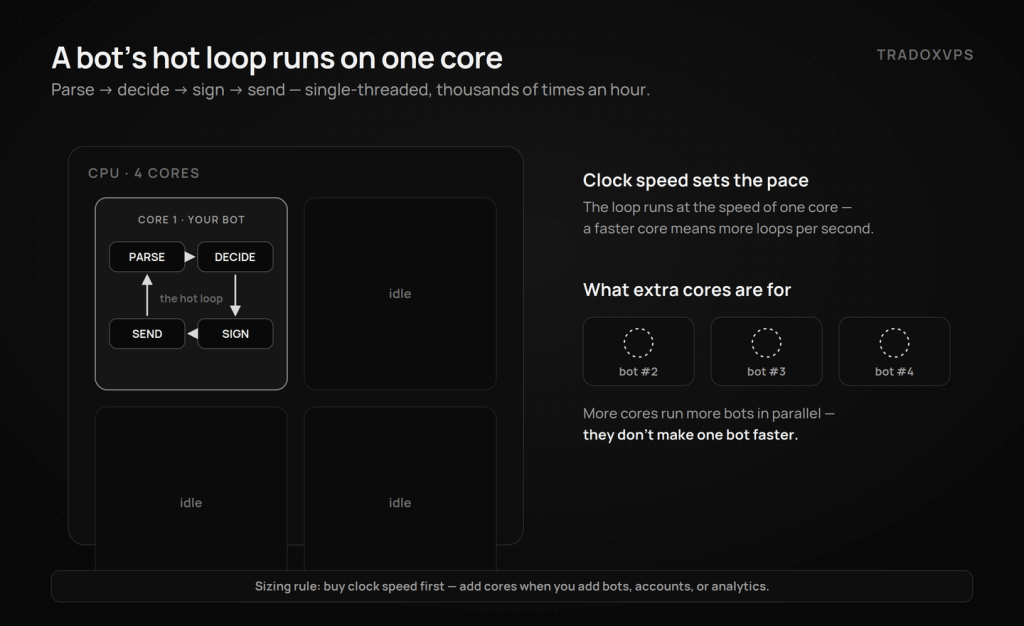
- CPU — one fast core, not many slow ones. The hot loop — parse the book update, run your logic, sign the order, write the socket — is single-threaded. It runs at the speed of one core, thousands of times an hour. Clock speed and IPC are the spec that matters; core count only matters when you run more bots in parallel.
- RAM — stability, not speed. Memory holds the OS, your runtime, local order-book copies, and event buffers. More of it doesn’t make the loop faster — but running out of it mid-spike is the single ugliest failure a bot can have (details below).
- Storage — never block the loop. Logs and tick data are a constant stream of small writes. On NVMe they’re invisible; on slow or network-backed disks, one stalled write can freeze the event loop in the middle of a moving market. Size it as a logging budget, not a number to brag about.
- Network — the path first, the port second. Day to day, what matters is the route between your box and Polymarket’s endpoints; the port size only matters during news-driven bursts when every subscriber’s feed spikes at once. Headroom under burst is the spec that matters — and it’s verified during a busy session, not read off a sales page.
Sizing by workload: find your row
Specs follow workload, not ambition. All four tiers below run the same silicon — AMD’s Ryzen 9 9950X (Zen 5, up to 5.7 GHz, DDR5) — because the hot loop’s speed shouldn’t depend on which tier you bought. You move up for capacity, not clock.
| Your workload | CPU | RAM | Storage | Matching plan |
|---|---|---|---|---|
| One bot, 1–3 markets, modest logging | 2 cores | 6 GB | 75 GB NVMe | Starter — $44.90 |
| Several strategies, 5–10 markets | 4 cores | 12 GB | 150 GB NVMe | Active |
| Multi-account, 20+ markets, local analytics | 6 cores | 18 GB | 250 GB NVMe | Advanced |
| Full-market scanning, dense tick logging, bot fleet | 8 cores | 24 GB | 500 GB NVMe | High Performance |
Three sizing rules that save money in both directions:
- Buy clock speed first, cores second. One strategy on eight slow cores loses to one strategy on two fast ones — adding cores adds lanes, not speed. Add them when you add bots, accounts, or heavy local analytics.
- RAM scales with instance count and OS choice. A single async Python bot is a lightweight process; what actually eats memory is running several of them, Docker layers, local databases — and Windows itself, which idles on far more RAM than headless Ubuntu. On Windows for the GUI tools? Treat the next RAM tier as your floor.
- Storage is a logging budget. A bot logging every book delta across dozens of markets writes gigabytes per week. Measure your own burn after 48 hours (
du -sh ~/botlogs), then size so a busy month can’t fill the disk — a full disk is a stopped bot, usually discovered after the fact.
What breaks first: the four undersizing failure modes
This is the section spec sheets skip, and it’s where the money is.
Out of memory. Market spikes → more events → buffers grow → the kernel’s OOM killer terminates the biggest process on the box — your bot — mid-position, silently. Post-mortem check: dmesg | grep -i oom. Pre-check: run free -h during a busy hour; if available memory is already thin while things are calm, the spike has nowhere to go.
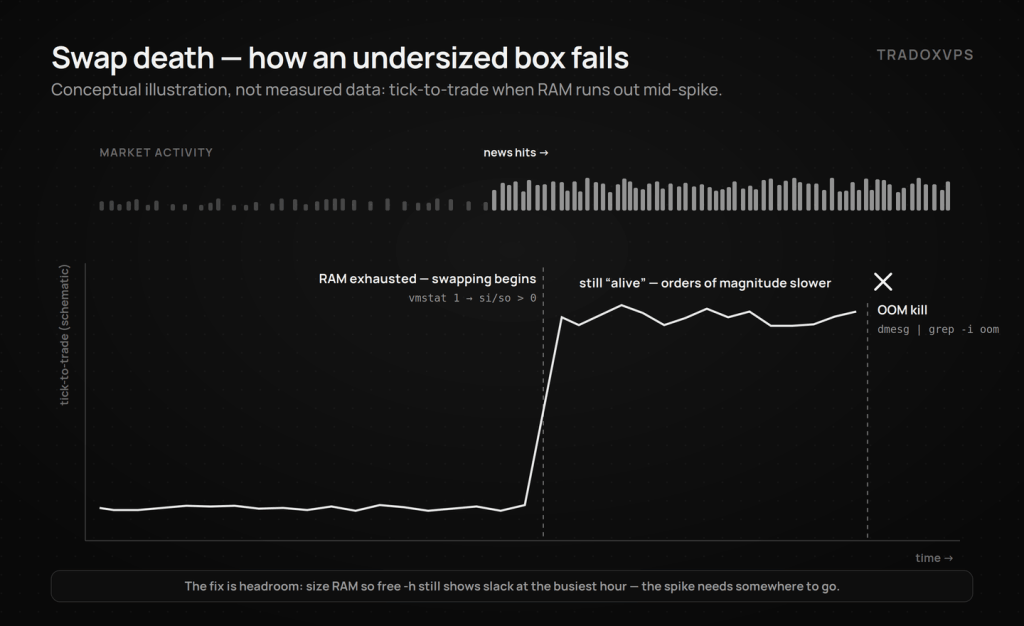
Swap death. The sneakier cousin: instead of dying, the box starts paging to disk and your event loop runs at one-hundredth speed while appearing alive. Tick-to-trade goes from milliseconds to seconds at the exact moment the market is fastest. If vmstat 1 shows nonzero si/so under load, you’re under-RAM’d — no tuning flag fixes it.
Disk-wait stutter. A synchronous log write on a saturated disk blocks the loop; you miss WebSocket frames, and your local order book silently drifts from reality until the next resync. NVMe plus asynchronous logging makes this a non-issue; iostat -x 1 tells you whether it currently is one.
CPU steal. On oversold hosts, other tenants’ workloads throttle yours — visible as %st in top. On a healthy box that column sits near zero; on an oversold one it climbs exactly when markets get busy. Check it on any box you rent — including ours — during the busiest hour you can find.
OS and software: the choices that outweigh hardware
Ubuntu 24.04 for headless bots — lower idle footprint and kernel-level tuning headroom; the bot setup guide assumes it. Windows Server when you want GUI tooling or simply work faster there — a legitimate choice; just budget the extra RAM per rule 2. Beyond the OS, three software decisions matter more than any line in the spec table:
- Async architecture. Build on Python’s asyncio with
websocketsoraiohttp, and use a fast JSON parser (orjson/ujson) — so no single slow operation ever blocks the feed handler. - Reconnect-and-resync logic. Polymarket trades around the clock; your bot must survive a WebSocket drop and rebuild order-book state before acting, or it will eventually trade on a stale book. This one feature prevents more losses than any hardware upgrade on this page.
- Correct API usage on the V2 CLOB. Order signing, auth, and rate limits are specified in Polymarket’s official CLOB documentation, and the maintained
py-clob-client-v2handles most of it for you. Still on pre-migration code? Read the V2 migration guide before touching server specs — no hardware fixes a deprecated endpoint.
Docker earns its keep at fleet scale — isolation per market listener, rolling strategy updates across nodes. One bot in one container on one box is ceremony, not engineering; add it when the fleet does.
A word on location — and only a word
This page is about the box; the wire has its own pages. Short version: We host Polymarket boxes in Dublin and Amsterdam because that’s where the measured paths are shortest and most stable. They finished about a millisecond apart on the order path, with Amsterdam ahead on the live feed, so the choice follows your strategy rather than a leaderboard. — the full numbers, four providers side by side with downloadable raw data, live in our 2026 benchmark, and the twenty-minute script lets you measure any box yourself, wherever it is. Spec the machine from this page; judge the wire from those.
Verify before you pay — anyone, including us
# What silicon is really under you (any provider):
lscpu | grep -E 'Model name|CPU family|CPU\(s\)'

# Your bot's actual resource appetite after a busy day:
free -h && iostat -x 1 3 && dmesg | grep -i oom
Our boxes’ lscpu outputs are public, and the 3-day demo exists so you can run every command in this article against us before a dollar moves. Uptime is engineered to a 99.999% target — and when a major news window hits, the headroom you sized today is what keeps the bot trading through it.
Frequently Asked Questions
Baseline for one bot on a few markets: 2 fast cores, 6 GB RAM, NVMe storage. Scale cores and RAM with the number of bots, accounts, and markets — not to make a single bot faster; its hot loop is single-threaded.
A single async Python bot runs comfortably on a 6 GB box, OS included. Add memory for each extra bot instance, Docker, local databases — and for Windows, which idles heavier than Ubuntu. The test that matters: free -h at the busiest hour should still show headroom, because the OOM killer takes your bot first.
No — the parse-decide-sign loop runs on one core, so clock speed and IPC set its pace. Extra cores let you run more bots in parallel; they don’t speed up one.
It depends entirely on how many markets you log and at what granularity — gigabytes per week is normal for dense delta logging. Measure your own burn with du -sh after 48 hours and size so a busy month can’t fill the disk.
Ubuntu 24.04 for headless bots (lighter, tunable); Windows when your tooling needs it — just budget more RAM. Same hardware either way; the difference is overhead and workflow, not magic.
Dublin or Amsterdam, on the measured evidence, and which one depends on whether your strategy reacts to the feed or the order path. That’s the wire’s question rather than this page’s; the side-by-side numbers and the script to test any box are in the benchmark.
Specs and prices checked June 2026 — confirm current plans on the pricing page. We operate TradoxVPS and provide infrastructure, not financial advice. Resource needs vary with strategy, market count, and configuration: measure yours.