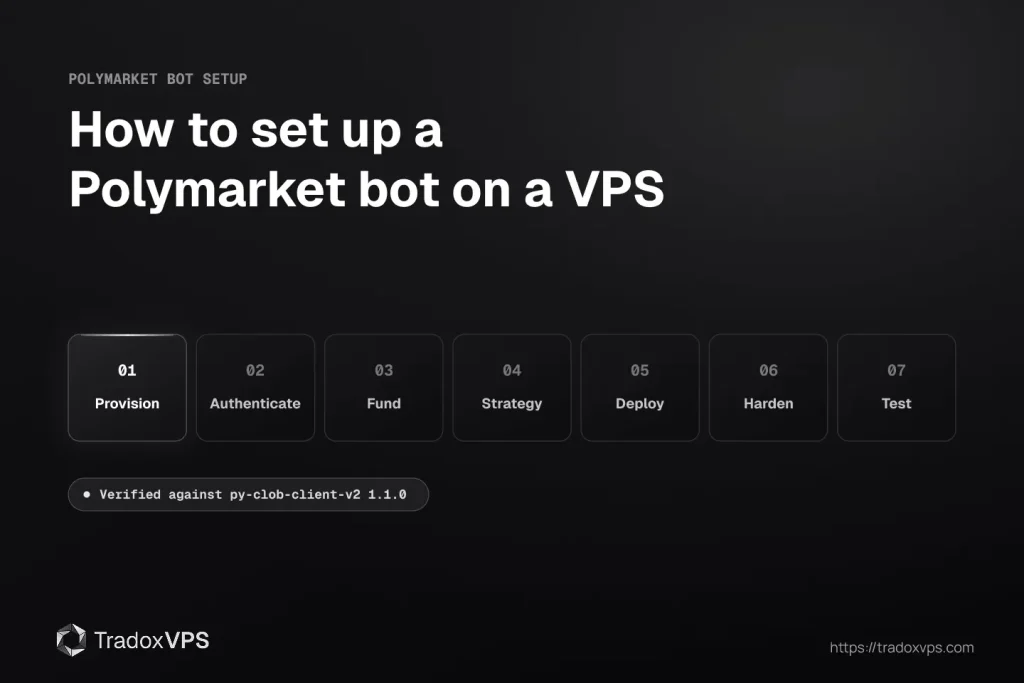
This guide walks through how to set up a Polymarket bot on a VPS, end to end: installing the SDK, authenticating a wallet, funding with the right collateral, writing order logic, and deploying it to run 24/7 without you watching. Every command and code sample was run against the current SDK before publishing.
The case for automating Polymarket isn’t a war story, it’s the on-chain record. The academic analysis of a year of Polymarket data (arXiv:2508.03474) measured roughly $40 million in realized arbitrage profit, with the top wallet earning about $2.0 million across 4,049 trades, roughly $500 per trade, thousands of times, on schedule. Edges on Polymarket are small, repeatable, and harvested by software that never sleeps.
Prerequisites: Python 3.9 or newer, a Polygon wallet, capital in pUSD, and a small amount of POL for gas. Never traded manually? Start with how to start trading on Polymarket first, because a bot amplifies a process, including a bad one.
One warning about older tutorials. Polymarket moved to CLOB V2 in April 2026, and anything published before then is dead code: a different SDK package, a different collateral token, a different order structure. If a guide tells you to install py-clob-client or fund with USDC.e, close it. Everything below is the current stack. If you have an existing bot from before the cutover, the V2 migration guide is the page you want instead of this one.
Before you build: how Polymarket’s API architecture works
Bots fail most often at the authentication and collateral layers, not the strategy layer. Knowing how the pieces fit saves hours of debugging.
The three APIs and what each one does
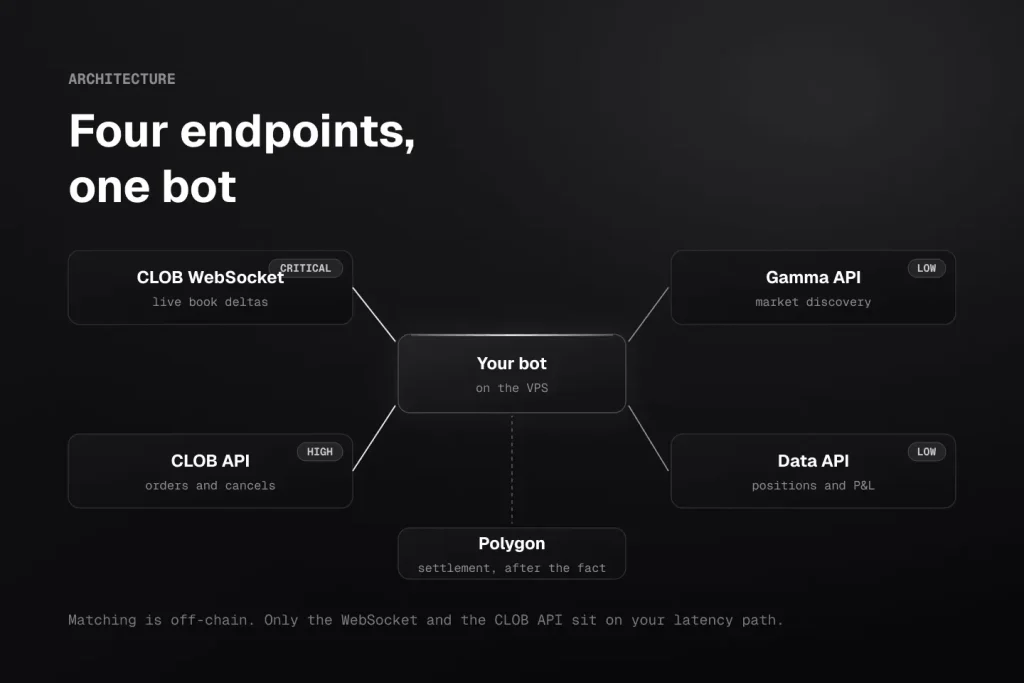
Polymarket splits functionality across three APIs plus WebSocket streams. A complete bot touches all of them.
The CLOB API (https://clob.polymarket.com) is the trading engine: order placement, cancellation, live order book data, fill confirmations. Matching happens off-chain for speed; settlement lands on-chain on Polygon. Your network path determines how fast your orders arrive after you send them, and on the venue side our benchmark observed the API root’s own p99 stretching to 250-650 ms across all providers tested, a reminder that “simultaneous” execution logic must tolerate server-side tails too.
The Gamma API (https://gamma-api.polymarket.com) is the discovery layer: available markets, event metadata, outcome descriptions, token IDs. Indexing lags roughly a second, so use it to find markets, never to price them.
The Data API (https://data-api.polymarket.com) is account-level: positions, trade history, P&L. Monitoring, not execution.
| API | Endpoint | Primary use | Latency sensitivity |
|---|---|---|---|
| CLOB API | clob.polymarket.com | Orders, cancels, order book | High, the execution path |
| Gamma API | gamma-api.polymarket.com | Market discovery, token IDs | Low, poll every 60s |
| Data API | data-api.polymarket.com | Positions, history, P&L | Low, monitoring only |
| CLOB WebSocket | ws-subscriptions-clob.polymarket.com/ws/ | Live book deltas, fills | Critical, all real-time data |
WebSocket URLs and message payloads were not changed by V2. Endpoints and schemas still evolve, so treat docs.polymarket.com as the source of truth for the current contract.
How the CLOB matches orders, and what it costs
Makers post resting limit orders; takers fill against them. Prices run $0.01 to $0.99 as implied probability, and winning contracts pay $1.00 at resolution.
The fee structure is the single most bot-relevant fact on this page: makers pay 0% on all markets and are eligible for rebates. Takers pay a category formula, rate × P × (1−P), peaking at 50¢: roughly 1.80% on crypto, 1.00% on politics, finance and tech, 0.75% on sports, with geopolitics fee-free. Fees are applied by the protocol at match time rather than embedded in your signed order, so you never compute them yourself.
The implication is mechanical: a pure market-order bot in crypto markets needs a reliable edge above 1.80% per trade before slippage just to break even, while a maker bot trades free and collects rebates. Order-type choice is fee strategy.
Rates as of July 2026. The schedule has changed once already this year, so confirm the current curve in Polymarket’s documentation before pricing a strategy on it. Per-market parameters are queryable in one call:
info = client.get_clob_market_info(condition_id)
# info.mts — min tick size · info.mos — min order size
# info.fd  — { r: rate, e: exponent, to: takerOnly }
Where latency actually comes from (measured, not guessed)
You’ll find confident claims online about which AWS region Polymarket “runs in.” Earlier versions of this site’s own pages managed to name two different regions, which tells you what those claims are worth.
Here is what we actually know, because we measured it. The CLOB API is CDN-fronted; our probes terminate at Cloudflare edges. In our June 2026 four-provider benchmark, one purchased box per provider with raw JSON downloadable, Dublin machines saw the live feed at ~13-15 ms median and round-tripped the order book warm at ~21-23 ms median. Our Amsterdam box saw the feed at ~10 ms with order round-trips within about a millisecond of Dublin’s. Nobody measured single-digit milliseconds on the order path, including us.
A US-based box pays the Atlantic crossing on top, tens of milliseconds of physics no provider removes, which matters in proportion to how contested your edge is. Between well-placed bots the race is decided in the tails: order-path p99 ranged 37-55 ms across the four boxes we tested, and the box with the smallest worst-case wins the ties.
So the honest location guidance: for Polymarket-focused bots, a European box with a short, measured path is the right call (the full location comparison has the side-by-side numbers). Our Dublin and Amsterdam locations are built for exactly this, on Ryzen 9 9950X hosts with DDR5 and NVMe and a 99.999% uptime target. Pick by strategy rather than leaderboard: Amsterdam sees the book first, Dublin edges the order path. The way to verify any of that is the same 20-minute probe we publish, run on a free 3-day demo before you pay us or anyone.
One thing to know before you test from a European box
As of July 2026, Ireland and the Netherlands both sit in Polymarket’s frontend-restricted group: the polymarket.com website is close-only from either country, while the trading API is not restricted. A bot on the CLOB runs normally from both.
This catches first-time builders out in a specific way. If you run curl https://polymarket.com/api/geoblock from your box you will get {"blocked": true, "country": "IE"} back, and that is expected. That endpoint runs on polymarket.com, not on the API servers, so it reports the website’s eligibility rather than the CLOB’s. A different IP in the same country returns exactly the same thing. The only test that answers your question is a real order attempt against the CLOB from the box you’ll trade on.
Restriction groups are set by Polymarket and by regulators, and they move. Check docs.polymarket.com/api-reference/geoblock before provisioning and at renewal.
Step 1: choosing and provisioning the VPS for your Polymarket bot
The server is part of your execution quality, but the sizing logic is simpler than vendors imply. A Polymarket bot is network-bound, not compute-bound: the hot loop (read delta, decide, sign, submit) runs on one core, so single-core speed beats core count, and more cores buy you more bots rather than a faster bot.
A single bot watching a handful of markets runs comfortably on a 2-vCPU box with a few GB of RAM; scale up as you add bots, accounts or markets. The full reasoning about what each resource does and what breaks first (OOM kills, swap death, log-blocked event loops) lives in the VPS specs guide, and current plans are on the pricing page.
NVMe matters more than it looks: continuous log writes on slow storage can block Python’s thread mid-flush, which is a real cause of missed fills.
Operating system
Both work. Linux gives you systemd, the cleanest 24/7 process management with auto-restart, and Ubuntu 22.04 or 24.04 are the standard picks. Windows Server handles Python bots fine via Task Scheduler and makes life easier if NinjaTrader or another Windows platform shares the box. Everything below shows the Linux path, with Windows equivalents noted where they differ.
First commands after connecting
SSH in (RDP on Windows), then before anything else:
sudo apt update && sudo apt upgrade -y
sudo timedatectl set-timezone UTC
UTC is not cosmetic. Polymarket’s authenticated requests expire after a short window, and meaningful clock drift fails every signed call with errors that won’t mention the clock. Install chrony as well (sudo apt install chrony) and check chronyc tracking occasionally; the offset should read in milliseconds, not seconds.
Your firewall posture is simple: the bot makes only outbound connections, so block all inbound traffic except SSH or RDP from your own IP. Full commands in the security section.
Setting up Python and the V2 SDK
# Verify Python 3.9+
python3 --version

# Virtual environment for the bot
python3 -m venv polybot-env
source polybot-env/bin/activate

# Core dependencies
pip install py-clob-client-v2==1.1.0
pip install python-dotenv
pip install websockets
Note the -v2 suffix. The package without it is the retired version and will not connect; if an earlier attempt installed it, run pip uninstall py-clob-client first.
Two things worth knowing about this package. It does not depend on web3. Older tutorials tell you to pin web3==6.14.0 because the retired SDK broke on newer releases; that advice no longer applies, and adding the pin just drags an unused dependency into your environment. The current stack is eth-account, eth-abi, eth-utils, poly_eip712_structs, py-order-utils and httpx, all resolved for you.
It also ships no WebSocket client, which is why websockets is installed separately above. The SDK is REST only; real-time data is your own connection.
Environment variables, not hardcoded keys
A committed private key is compromised the moment it touches a remote repository, even if deleted seconds later. All secrets live in a .env file:
# .env — never in version control
PRIVATE_KEY=your_polygon_wallet_private_key
POLYMARKET_API_KEY=your_api_key
POLYMARKET_API_SECRET=your_api_secret
POLYMARKET_PASSPHRASE=your_api_passphrase
WALLET_ADDRESS=your_polygon_wallet_address
CHAIN_ID=137
chmod 600 .env
import os
from dotenv import load_dotenv

load_dotenv()
PRIVATE_KEY = os.getenv("PRIVATE_KEY")
API_KEY     = os.getenv("POLYMARKET_API_KEY")
API_SECRET  = os.getenv("POLYMARKET_API_SECRET")
PASSPHRASE  = os.getenv("POLYMARKET_PASSPHRASE")
WALLET      = os.getenv("WALLET_ADDRESS")
Step 2: authenticating your wallet and deriving API credentials
Authentication is the most common point of failure for first-time builders. Two layers, both required: L1 uses your Polygon private key to prove ownership and mint API credentials; L2 uses HMAC-signed headers (key, secret, passphrase) for trading operations.
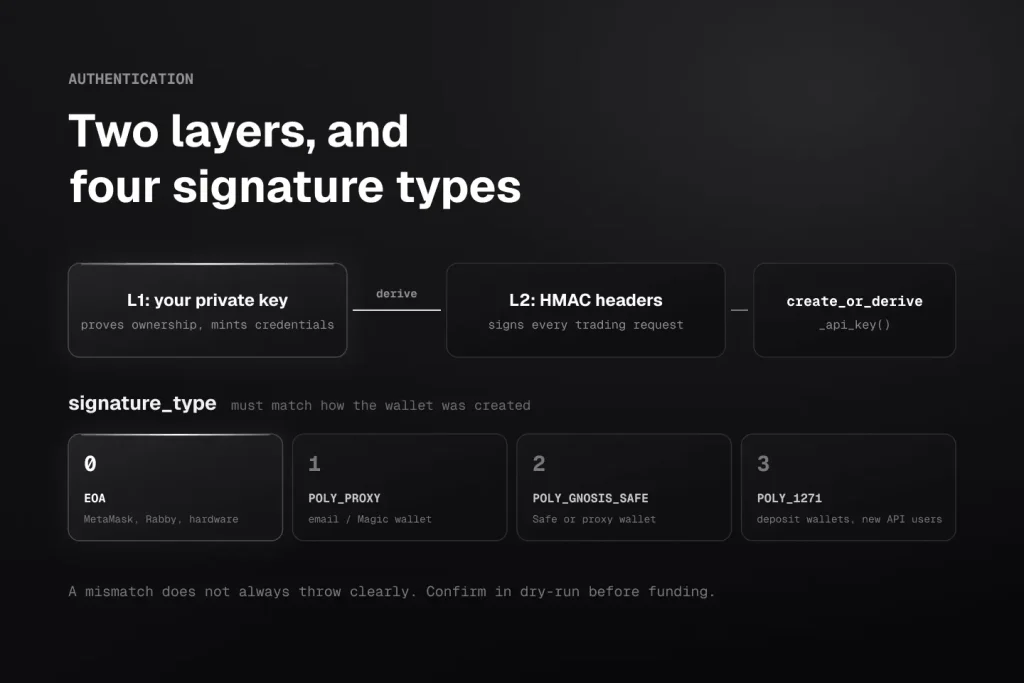
The parameter that bites people is signature_type. There are four:
- 0: standard EOA wallet (MetaMask, Rabby, hardware)
- 1: Polymarket email / Magic wallet
- 2: Gnosis Safe or browser proxy wallet
- 3:
POLY_1271, deposit wallets
Type 3 is worth understanding before you choose. Polymarket is onboarding new API users onto deposit wallets, a deterministic smart account whose order signatures the CLOB validates through ERC-1271. It has its own funding, approval and cache-sync steps that the EOA path does not, and our deposit-wallet walkthrough covers them in full.
Everything below assumes signature type 0, a standard EOA wallet, which is the simplest path for a first bot.
from py_clob_client_v2 import ClobClient, SignatureTypeV2

HOST = "https://clob.polymarket.com"
CHAIN_ID = 137   # Polygon mainnet

client = ClobClient(
    host=HOST,
    chain_id=CHAIN_ID,
    key=PRIVATE_KEY,
    signature_type=SignatureTypeV2.EOA,   # 0, match how your wallet was created
    funder=WALLET,
)

# Mints the L2 credentials, or returns the existing ones for this wallet
creds = client.create_or_derive_api_key()
client.set_api_creds(creds)

print(client.get_ok())
print(client.get_server_time())
The method is create_or_derive_api_key() and it returns an ApiCreds object; there is no create_or_derive_api_creds, which is a name from older tutorials that will raise AttributeError. Note also that the constructor takes chain_id, not chain; the rename to chain applies to the TypeScript client only.
Store the returned credentials in .env after the first run rather than deriving them on every start. They cannot be recovered if lost, only re-derived from the same key.
A signature_type mismatch doesn’t always throw clearly, so test in dry-run mode before risking an order.
Step 3: funding the bot with pUSD (not USDC)
This is the step that most often stops a first bot from trading, because the error it produces looks like an auth problem.
pUSD is the collateral for all Polymarket trading. It is a standard ERC-20 on Polygon with 6 decimals, backed by USDC with the backing enforced on-chain. USDC or USDC.e sitting in your wallet is not buying power.
If you fund through polymarket.com, the UI wraps automatically with a one-time approval and there is nothing to do. Deposits through the Bridge API also auto-wrap. If you are API-only, wrap it yourself through the CollateralOnramp:
CollateralOnramp: 0x93070a847efEf7F70739046A929D47a521F5B8ee
USDC.e (Polygon): 0x2791Bca1f2de4661ED88A30C99A7a9449Aa84174
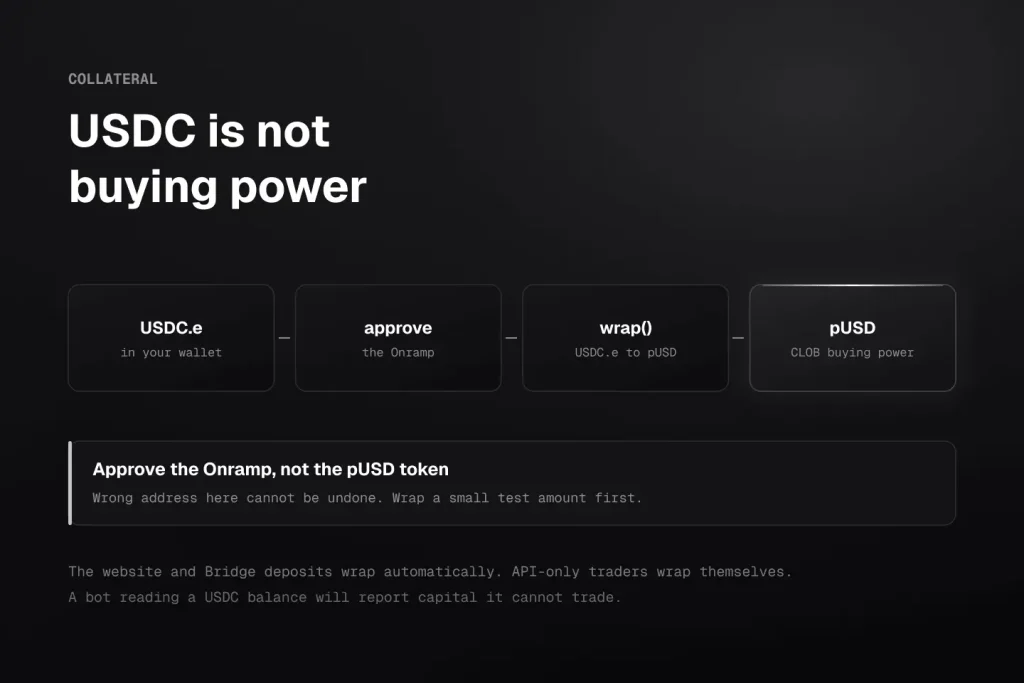
Approve the Onramp (not the pUSD token) to spend your USDC.e, then call wrap(asset, to, amount). To exit, approve the CollateralOfframp for pUSD and call unwrap(), which returns USDC.e.
Fund-critical step. Confirm the Onramp, Offramp and pUSD addresses on Polymarket’s official Contracts page before running this, and wrap a small test amount first. A wrong address here cannot be undone.
Make sure your balance logic reads pUSD. A bot that checks a USDC.e balance will report buying power it does not have.
Token allowances, once per wallet
Before your first order, Polymarket’s contracts need authorization to move your collateral and conditional tokens. Without them, every order fails at the contract level no matter how correct your API auth is.
Two separate things are involved here, and conflating them is a common source of “not enough balance” errors on a funded wallet.
The on-chain approvals are ERC-20 and ERC-1155 transactions you send yourself. The SDK does not perform them; it has no approval helper, because approving is a wallet operation rather than an API one. You approve the exchange contracts to move your pUSD and conditional tokens:
CTF Exchange V2:          0xE111180000d2663C0091e4f400237545B87B996B
Neg Risk CTF Exchange V2: 0xe2222d279d744050d28e00520010520000310F59
You’ll need a little POL for the approval gas. 1 to 2 POL covers it, and 5 to 10 POL is a sensible running buffer for an active bot.
The CLOB’s cached view of your balance and allowance is a separate thing, and it is what the SDK exposes. After funding or approving, sync it so the order book sees your buying power:
from py_clob_client_v2 import BalanceAllowanceParams, AssetType

client.update_balance_allowance(
    BalanceAllowanceParams(asset_type=AssetType.COLLATERAL)
)

# For outcome tokens, pass the token as well:
# BalanceAllowanceParams(asset_type=AssetType.CONDITIONAL, token_id=TOKEN_ID)

print(client.get_balance_allowance(
    BalanceAllowanceParams(asset_type=AssetType.COLLATERAL)
))
If orders are rejected for balance while your wallet clearly holds pUSD, this sync is the first thing to check.
Step 4: writing your Polymarket bot’s strategy logic
Real-time data: WebSocket, never REST polling
REST polling makes your bot permanently as stale as its polling interval. The WebSocket pushes book deltas as they happen, and V2 left the WebSocket layer alone.
import asyncio
import websockets
import json

async def stream_orderbook(token_id: str):
    uri = "wss://ws-subscriptions-clob.polymarket.com/ws/"
    async with websockets.connect(uri) as ws:
        # Confirm the current channel and field names against
        # docs.polymarket.com; the SDK ships no WebSocket client,
        # so this connection is yours to maintain.
        await ws.send(json.dumps({
            "type": "subscribe",
            "channel": "market",
            "assets_id": token_id
        }))
        async for message in ws:
            process_update(json.loads(message))

def process_update(data):
    # Rebuild top-of-book, run signal logic
    pass
Market discovery goes through Gamma:
import requests

def get_active_markets(category: str = "crypto", limit: int = 50):
    url = "https://gamma-api.polymarket.com/markets"
    params = {"active": True, "category": category, "limit": limit}
    return requests.get(url, params=params).json()
Position sizing: fractional Kelly with a hard cap
Sizing is risk management, not strategy. Full Kelly is aggressive; production bots typically run 0.15 to 0.25 of the Kelly output to absorb model error.
def kelly_criterion(true_prob: float, market_price: float,
                    bankroll: float, fraction: float = 0.25) -> float:
    """Fractional Kelly position size, in collateral units."""
    if market_price <= 0 or market_price >= 1:
        return 0.0

    b = (1.0 / market_price) - 1.0   # decimal odds
    p = true_prob
    q = 1.0 - p

    full_kelly = (b * p - q) / b
    if full_kelly <= 0:
        return 0.0   # no edge, no trade

    position = fraction * full_kelly * bankroll
    return min(position, bankroll * 0.10)   # hard 10% cap

size = kelly_criterion(0.72, 0.58, 1000.0)   # → 35.00
The zero-output case is the entire point. A bot that passes on 90% of markets and trades only positive-Kelly signals beats one that forces marginal trades, and the profitability data says exactly that about who wins here.
Placing orders: GTC for making, FOK for taking
Order uniqueness is handled by a millisecond timestamp the SDK sets for you, so there is no nonce to track. Fees are not part of the order you sign.
GTC limit orders rest as makers, at zero fees and rebate-eligible. FOK market orders fill now or cancel, and taker fees apply. One classic mistake: a $500 FOK in a market with $200 of depth at your price cancels entirely, so use FAK for partial fills in thin books, or slice into GTC orders.
from py_clob_client_v2 import (OrderArgs, MarketOrderArgs, OrderType, Side,
                               PartialCreateOrderOptions)

def place_limit_order(client, token_id, price, size, side=Side.BUY):
    """GTC maker order: rests on the book, zero fees, rebate-eligible."""
    return client.create_and_post_order(
        order_args=OrderArgs(token_id=token_id, price=price,
                             size=size, side=side),
        options=PartialCreateOrderOptions(tick_size="0.01", neg_risk=False),
        order_type=OrderType.GTC,
        post_only=True,      # reject rather than cross and pay taker fees
    )

def place_market_order(client, token_id, amount, side=Side.BUY,
                       usdc_balance=0):
    """FOK taker order: fills now or cancels, taker fees apply."""
    return client.create_and_post_market_order(
        order_args=MarketOrderArgs(token_id=token_id, amount=amount,
                                   side=side, order_type=OrderType.FOK,
                                   user_usdc_balance=usdc_balance),
        options=PartialCreateOrderOptions(tick_size="0.01", neg_risk=False),
    )
Four details that save debugging time.
Side is an enum, not a string: Side.BUY is 0 and Side.SELL is 1. OrderType accepts GTC, GTD, FOK and FAK.
post_only=True is the flag that protects your fee position. Without it, a limit order priced through the book crosses and pays taker fees; with it, the order is rejected instead. For a maker strategy that is almost always what you want.
If you prefer to inspect an order before sending it, create_order(order_args, options) and post_order(order, order_type) are both available separately; create_and_post_order just does the two in one call.
user_usdc_balance on a market buy enables fee-adjusted fill math, and builder_code attaches attribution if you run an app on top of Polymarket. Both are optional and default to zero.
Handling rate limits, errors and reconnections
A bot that crashes on its first API error breaks at 3 AM during the event you built it for.
Current ceilings, as of June 2026:
| Endpoint | Burst | Sustained |
|---|---|---|
POST /order | 5,000 / 10 s (500/s) | 120,000 / 10 min (200/s) |
DELETE /order | 5,000 / 10 s (500/s) | 120,000 / 10 min (200/s) |
POST /orders (batch) | 2,000 / 10 s (200/s) | 21,000 / 10 min (35/s) |
These have moved twice in recent months, so always confirm against the live Rate Limits page. The architecture answer is the same regardless of the numbers: real-time data on WebSockets, REST reserved for account data on a slow cadence.
import time
from functools import wraps

def rate_limited(max_per_second: float):
    min_interval = 1.0 / max_per_second
    last_called = [0.0]
    def decorator(func):
        @wraps(func)
        def wrapper(*args, **kwargs):
            wait = min_interval - (time.time() - last_called[0])
            if wait > 0:
                time.sleep(wait)
            result = func(*args, **kwargs)
            last_called[0] = time.time()
            return result
        return wrapper
    return decorator
Retry 5xx errors with exponential backoff (1s, doubling, cap 30s, give up after 5). Never auto-retry 400 or 401, which mean fix the request or the auth. And reconnect WebSockets unconditionally:
async def subscribe_with_reconnect(token_ids: list, handler):
    uri = "wss://ws-subscriptions-clob.polymarket.com/ws/"
    while True:
        try:
            async with websockets.connect(uri) as ws:
                for token_id in token_ids:
                    await ws.send(json.dumps({
                        "type": "subscribe",
                        "channel": "market",
                        "assets_id": token_id
                    }))
                async for message in ws:
                    await handler(json.loads(message))
        except (websockets.exceptions.ConnectionClosed,
                OSError, asyncio.TimeoutError) as e:
            print(f"WS disconnected: {e}. Reconnecting in 3s.")
            await asyncio.sleep(3)
For a market-making bot, a missed update is a stale quote on the book, which informed flow will happily fill. On reconnect, resync state before quoting again; never trade on a book you mirrored before the gap.
Three Polymarket bot strategies and what each one demands
Strategy 1, intra-market arbitrage (YES + NO under $1.00). When both sides of one market sum below $1, filling both locks the difference. The academic record shows this lane is real (~$10.6M of the study’s $40M) and industrialized; the authors only counted gaps above 5¢ because execution reality eats thinner ones. Windows close in seconds in liquid markets, making this the most latency-sensitive lane, both legs FOK, tails deciding the race. Full mechanics, fee math and the one-leg risk rule are in the arbitrage guide.
Strategy 2, cross-signal trading (the Binance lag). Polymarket’s short-horizon crypto markets reprice after the spot venue moves, and the repricing lag is the edge window. Measure it rather than trusting folklore numbers. Two measured cautions from our own benchmark: this strategy pays taker fees in the most expensive category (1.80% peak, so your per-trade edge must clear it), and routing to your signal venue is per-box. Our Dublin machine’s Binance probe hit a far CDN edge at ~313 ms while three competitor boxes saw ~208 ms, same city, different routes. Before deploying, probe both your Polymarket path and your signal-source path from the exact box that will trade. The test script covers it, and yes, it caught our own routing weakness, which we published and put on the roadmap.
Strategy 3, market making. Quote both sides, earn the spread plus rebates, pay zero fees, in exchange for the strictest uptime requirement on this page. Offline means stale quotes, and stale quotes mean adverse fills. Continuous WebSocket, fast cancels, instant reconnect-and-resync, and a process manager that restarts you in seconds are the job description.
Step 5: deploying the bot for 24/7 operation
Copy code up with rsync, excluding secrets (create .env fresh on the box):
rsync -avz --exclude '.env' ./polybot/ user@your-vps-ip:/home/user/polybot/
Then systemd:
# /etc/systemd/system/polybot.service
[Unit]
Description=Polymarket Trading Bot
After=network.target

[Service]
Type=simple
User=your-username
WorkingDirectory=/home/your-username/polybot
EnvironmentFile=/home/your-username/polybot/.env
ExecStart=/home/your-username/polybot-env/bin/python main.py
Restart=always
RestartSec=5
StandardOutput=journal
StandardError=journal

[Install]
WantedBy=multi-user.target
sudo systemctl daemon-reload
sudo systemctl enable polybot
sudo systemctl start polybot
sudo journalctl -u polybot -f
Restart=always brings the bot back five seconds after any crash and survives reboots. Log every significant event with UTC timestamps to a rotating file (50MB × 10 keeps weeks of history). On Windows, Task Scheduler with “restart on failure” plays the systemd role. Once this is running, our 24/7 operations guide covers the next layer: watchdogs for hangs, drain procedures before reboots, and restart-time state reconciliation.
The circuit breaker is not optional
Strategies break in production in ways backtests never predicted. A hard daily-loss stop that cancels all open orders and halts is the difference between a bad day and a bad month.
class CircuitBreaker:
    def __init__(self, max_daily_loss: float):
        self.max_loss = max_daily_loss
        self.daily_loss = 0.0
        self.triggered = False

    def record_loss(self, amount: float):
        self.daily_loss += amount
        if self.daily_loss >= self.max_loss:
            self.triggered = True

    def is_ok(self) -> bool:
        return not self.triggered

breaker = CircuitBreaker(max_daily_loss=100.0)

# in the main loop:
if not breaker.is_ok():
    client.cancel_all()
    break
Step 6: security hardening before you fund it
The bot holds a private key controlling real collateral. The attack surface is narrow but the failure is irreversible.
# Inbound: SSH from your IP only. The bot needs no inbound ports.
sudo ufw allow from YOUR.IP.ADDRESS to any port 22
sudo ufw default deny incoming
sudo ufw default allow outgoing
sudo ufw enable
# /etc/ssh/sshd_config → PasswordAuthentication no, PermitRootLogin no
Fund the trading wallet with this week’s risk budget only; the rest stays in cold storage, so a compromised key drains a float rather than your holdings. Cap position size in code regardless of what Kelly outputs until the strategy has 200+ live trades behind it. And keep secrets in the chmod 600 .env loaded via EnvironmentFile=, never in the unit file’s Environment= line, which is world-readable through systemctl show.
Step 7: testing before going live
Add a DRY_RUN flag and gate every submission on it:
DRY_RUN = os.getenv("DRY_RUN", "true").lower() == "true"

def submit_order(client, order_args, options, order_type):
    if DRY_RUN:
        logger.info(f"[DRY RUN] {order_args.side} {order_args.size}"
                    f" @ {order_args.price} on {order_args.token_id}")
        return {"status": "simulated"}
    return client.create_and_post_order(order_args=order_args,
                                        options=options,
                                        order_type=order_type,
                                        post_only=True)
Run dry for at least 48 hours across different market conditions and check signal frequency, sizing outputs and error patterns. Then go live with $50 to $100 for a week, enough for real fills, slippage and gas while bugs are still cheap, and only scale when live results match the dry-run logs. If they diverge, investigate before adding capital rather than after.
Frequently Asked Questions
py-clob-client-v2 for Python, or @polymarket/clob-client-v2 for TypeScript. Mind the -v2 suffix: the packages without it are retired and will not connect to production, which is the single most common reason a bot built from an older tutorial never places an order.
pUSD. It is the collateral for all Polymarket trading. The polymarket.com UI wraps automatically and Bridge deposits auto-wrap, but if you are API-only you wrap USDC.e yourself through the CollateralOnramp. USDC sitting in your wallet is not buying power, and a bot checking a USDC balance will report capital it cannot trade.
Derive them once from your Polygon wallet, then store them in .env. L1 uses your private key to prove ownership and mint the credentials; L2 uses those credentials as HMAC-signed headers on every trading request. You do not create them through a web dashboard.
0 for a standard EOA wallet like MetaMask, 1 for Polymarket email or Magic accounts, 2 for Gnosis Safe or proxy wallets, and 3 (POLY_1271) for deposit wallets. Match it to how your wallet was created. If you are creating a new API account today, note that new API users are being onboarded onto deposit wallets, which have their own funding and approval flow.
As of June 2026, POST /order and DELETE /order allow 500/s burst and 200/s sustained, with batch endpoints lower. These rose twice in two months, so verify current numbers in the official docs before architecting around them. The design answer is fixed either way: WebSockets for all real-time data, REST for slow account polling.
Europe, for Polymarket-focused bots, and the realistic numbers are tens of milliseconds rather than the single-digit claims you’ll see around the internet. In our published benchmark the live feed ran ~13-15 ms median from Dublin and ~10 ms from Amsterdam, with warm order round-trips ~21-23 ms from either and bot-versus-bot races decided in the 37-55 ms p99 tails. The API is CDN-fronted, so ignore confident region trivia and measure from your actual box with the free probe.
blocked: true from my Dublin box. Is something wrong? No. That endpoint runs on polymarket.com and reports the website’s eligibility, not the CLOB’s. Ireland and the Netherlands are close-only on the website while the trading API stays unrestricted, so your bot’s orders go through normally. A different IP in the same country returns the same response. Act only on a genuine rejection from the API itself.
A single bot watching a handful of markets runs comfortably on 2 vCPU and a few GB of RAM. The hot loop is single-threaded, so per-core speed matters more than core count, and extra cores buy more bots rather than a faster bot. NVMe keeps log writes off the critical path. The full sizing logic and failure modes are in the specs guide.
systemd with Restart=always and RestartSec=5 on Linux, or Task Scheduler’s restart-on-failure on Windows, plus rotating logs, a WebSocket reconnect loop that resyncs state before quoting, and a circuit breaker that cancels everything past a daily loss limit. The box itself should be always-on with an uptime target worthy of resting orders; a home PC is the weak link, not the code.
Yes. Python 3.9+, pip and the V2 SDK install cleanly, and Task Scheduler replaces systemd. Windows is the convenient choice when the bot shares a box with NinjaTrader or another Windows-native platform.
A Polymarket bot is only as good as its worst minute: the dropped WebSocket during a Fed print, the reboot with resting orders on the book, the log flush that blocked the loop. Build for those minutes, and verify every infrastructure claim, ours included, with measurements. Our current numbers are public in the benchmark, the probe is free, and the 3-day demo exists so the first thing your bot does on our hardware is check whether we told you the truth.
SDK versions, contract addresses, fee figures, rate limits and API details reference Polymarket’s official documentation as of July 2026 and change frequently; verify against docs.polymarket.com and the official Contracts page before deploying, and test any flow that moves funds with a tiny amount first. Restriction groups are set by Polymarket and regulators, not by any hosting provider, and can change. We operate TradoxVPS and provide infrastructure, not financial advice; automated trading involves substantial risk, including rapid total loss.