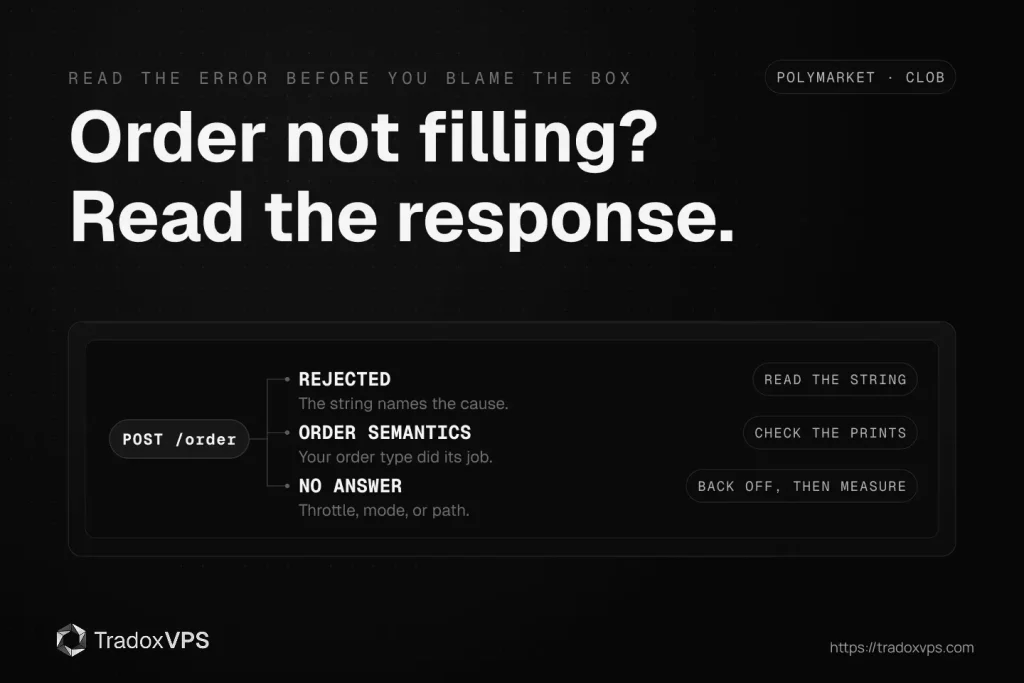
Your bot saw the price, sent the order to Polymarket, and the position never appeared. A Polymarket order not filling has exactly three families of causes, and before you blame the network, buy a faster box, or rewrite the strategy, find out which family yours belongs to, because the fixes have nothing in common. An order that was rejected has an exact error string that names its cause. An order that was accepted but never filled did what you told it to do, just not what you wanted. And a request that got no answer at all is a transport or throttling problem, the only family where infrastructure is even a suspect.
This guide maps all three families to their real causes, with the exact error strings the CLOB returns as of July 2026, the one-line test for each, and the fix. It also covers the quiet reason so many previously fine bots started failing this spring. One honest note before any of it: the most common cause of a missed fill on a fast market is that nothing was wrong. The book moved, and someone got there first. We will show you how to confirm that too, because knowing an edge is gone is worth more than a month of debugging code that was never broken.
Polymarket order not filling: find your family first
Match what you saw to a row. Everything below the table is the detail.
| What you saw | Family | Most likely causes | First test |
|---|---|---|---|
HTTP 400 with an error string | Rejected | Balance or allowance, signature setup, tick or size rule, market state, jurisdiction | Read the string, it names the cause |
| A 400 naming your order type, or a 200 with no fill | Order semantics | FOK or FAK doing its job, post-only crossing, the book moved first | Read the string, then the trade prints |
| Timeout, 429, 503, or 425 | No answer | Rate limiting, exchange mode, engine restart, network | Read the status code, then measure the path |
The April 2026 change that breaks old Polymarket bots
If a bot that traded fine for months suddenly cannot place an order, start here. On April 28, 2026, Polymarket cut production over to CLOB V2: new exchange contracts, a rewritten backend, and collateral moving to pUSD. There is no backward compatibility, so orders signed the old way are rejected by the new exchange even though every credential is valid, and the older client libraries most tutorials still install no longer work against production.
The symptoms look like credential problems: signature-style rejections from a key that works in the website, or not enough balance / allowance from a wallet that visibly holds USDC.e. The wallet does hold USDC.e. The exchange now settles in pUSD, so from the matching engine’s point of view the balance you are pointing at is not the balance it checks.
The fix is not a parameter, it is the migration. The step-by-step, client swap, collateral wrap, and re-testing included, is in our Polymarket V2 migration guide, and the authoritative reference is Polymarket’s own migration page. We deliberately do not print contract addresses in a blog post, ours or anyone’s: addresses belong in the official docs, where they are maintained. A wrong address in a stale tutorial is how funds get approved to the wrong place.
Family one: the Polymarket order was rejected
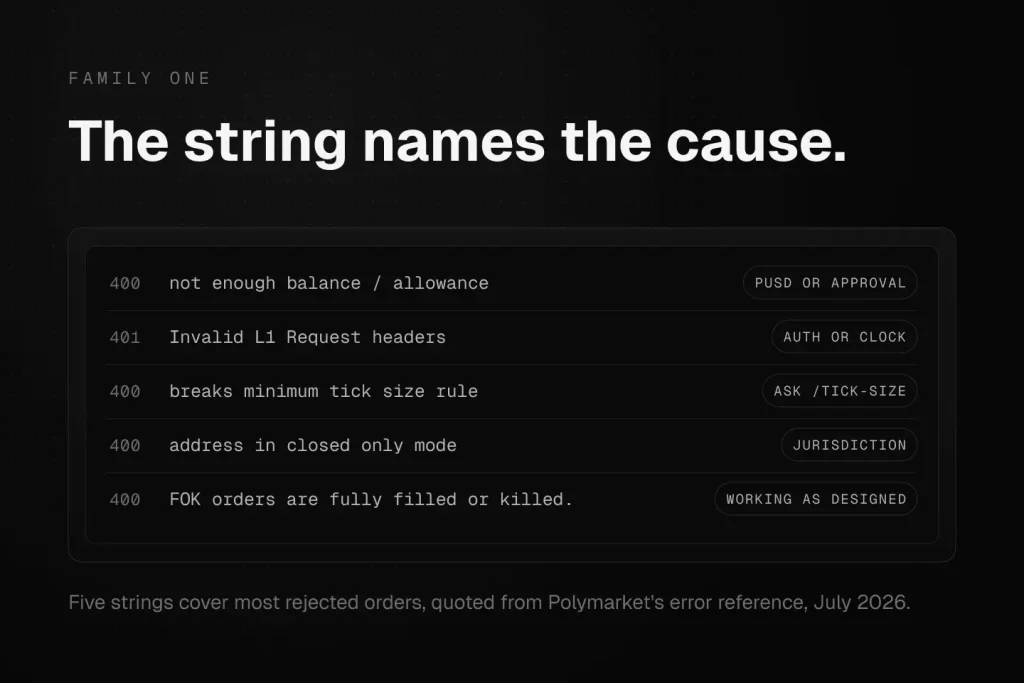
A rejection is the friendly failure. The CLOB tells you exactly what it disliked in the error field, and every string below is quoted from Polymarket’s error reference as of July 2026.
not enough balance / allowance
The most-asked-about string in every Polymarket developer forum, and it means exactly two things: your pUSD balance is short, or the exchange contract is not approved to spend it. Check both with one call:
curl "https://clob.polymarket.com/balance-allowance?asset_type=COLLATERAL&signature_type=EOA"
(with your auth headers, and your actual signature type: EOA, POLY_PROXY, or GNOSIS_SAFE). If the balance is zero but your wallet shows USDC.e, you are looking at the April change above. If the balance is right and the allowance is zero, do the approval flow from the docs. If both look right and the error persists on a sell, check that you are checking the conditional token allowance, not just collateral: sells spend the outcome token, not pUSD. And on a deposit-wallet account, the pUSD has to sit in the deposit wallet itself; a funded owner address counts for nothing.
Signature and ownership errors
Three strings live here, and they name three different mistakes:
the order owner has to be the owner of the API KEYmeans the maker address in the order and the address that created your API credentials are not the same identity. Common after switching wallets or regenerating keys.Invalid L1 Request headersis your HMAC layer: wrong secret, wrong message composition, or a stale timestamp. The documented causes of a 401 include an expired timestamp, which makes your system clock a trading dependency. A box that drifts far enough fails auth in ways that look random. Runtimedatectl(orchronyc sources) on Linux, orw32tm /query /statuson Windows, before you touch the code; we have watched drifting Windows guests produce exactly this class of mystery, and the fix was the clock, not the bot.- An invalid-signature style rejection with correct credentials usually means the signature type and funder do not match how your account actually holds funds. A raw wallet is
EOA. An account created through the Polymarket website holds funds in a proxy, and orders must say so. The combination that works in someone else’s tutorial is the combination for their account type, not yours. And since V2, new API accounts onboard through deposit wallets with their own signature type, so a fresh account following an old tutorial’s settings fails by design; the migration guide covers which setup applies to which account.
Price (...) breaks minimum tick size rule and Size (...) lower than the minimum
Both strings arrive with the numbers filled in, which makes them the easiest fixes on this page. Markets do not all share one tick size, and a market’s tick can change with its price range. Ask instead of assuming:
curl "https://clob.polymarket.com/tick-size?token_id=YOUR_TOKEN_ID"
Round your price to the returned tick before signing, and keep order size at or above the market minimum. Bots that hardcode a tick from one market fail on the next one.
Market state rejections
the market is not yet ready to process new orders is real and temporary: markets open on Polymarket’s clock, not on your bot’s first attempt. order match delayed due to market conditions is the engine telling you matching is momentarily held. And a Duplicated. rejection means your own retry logic resubmitted an order the book already has, which is a bug worth thanking the exchange for catching.
'...' address in closed only mode
This one is jurisdiction, not code. As of July 2026, Polymarket restricts access in four groups. Some countries are unrestricted. In a second group, which currently includes Ireland and the Netherlands, the website is close-only while the CLOB API remains open, which is why bots trade from both Dublin and Amsterdam all day while the polymarket.com geoblock check reports blocked: true from the same machines: that check reports the website, not the API. In a third group, including the US and UK, accounts are close-only on both the website and the API, and this error string is what that policy looks like to a bot. A fourth group is blocked entirely.
If you see this string, the account’s jurisdiction assignment is the cause, and no infrastructure changes it. We do not sell around it and neither should anyone: a VPS is a performance tool, not a legal one. The full four-group picture, which has already moved more than once this year, is in our Dublin vs Amsterdam comparison, and the authoritative current state is always Polymarket’s own geoblock reference.
Family two: accepted, but never filled
This family arrives in two costumes. Sometimes it is an explicit rejection whose string names your own order type doing exactly what it promises, and sometimes it is a clean acceptance and a position that never comes. Either way, nothing malfunctioned: the diagnosis is semantics and timing, not code.
Fill-or-Kill did its job. order couldn't be fully filled. FOK orders are fully filled or killed. A FOK order is all-or-nothing: if the book cannot fill the entire size at your limit, the whole order dies. On a thin prediction market book, a large FOK is a coin you keep flipping and losing. If partial fills are acceptable to the strategy, FAK is the honest type: it takes what exists and kills the rest, and only errors with no orders found to match with FAK order when there was nothing at all to take.
Post-only met its contradiction. invalid post-only order: order crosses book means you asked for a maker order at a taker price. The order was designed to rest and it could not, so it was rejected rather than matched. Reprice inside the spread or drop the post-only flag, depending on which side of the fee and queue logic your strategy actually wants.
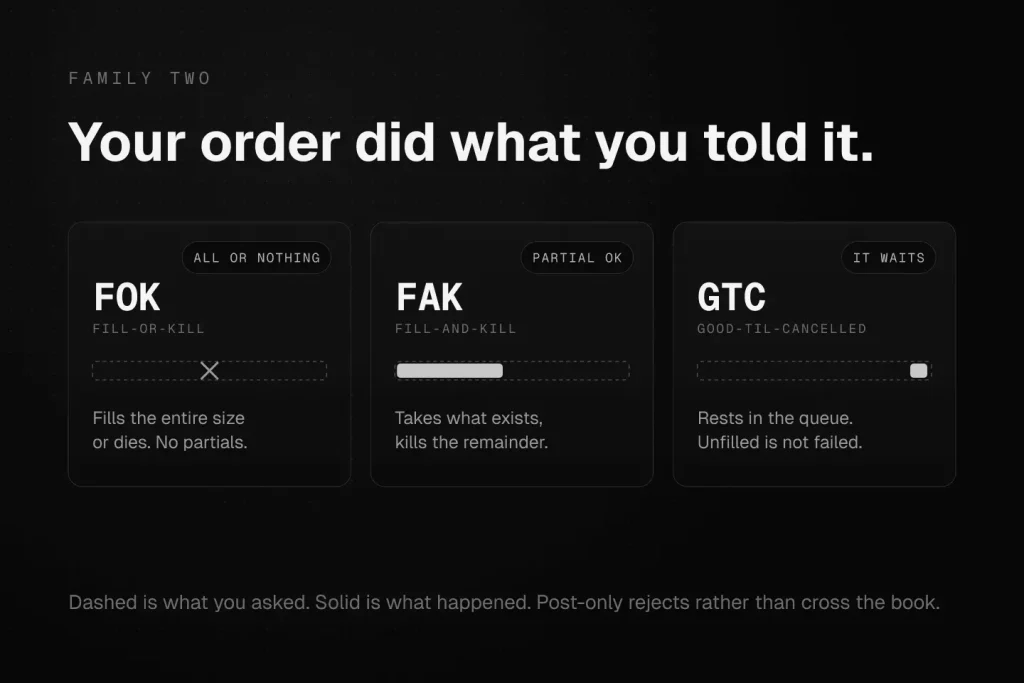
A resting GTC just has not been reached. A good-til-cancelled order away from the touch is not a failure, it is a queue position. Check it with the order status endpoint before concluding anything.
The book moved first. The uncomfortable one. Your logic was right, the order was valid, and by the time it arrived the liquidity was gone to someone closer or faster. Confirm it instead of suspecting it: pull the trade prints around your send time from the Data API and compare the timestamps to your own log. If the size you wanted printed to someone else between your signal and your arrival, you have a latency result, not a bug. Measure the path properly with the probe in our latency testing guide before spending money on the conclusion, and hold onto the honest corollary: on the fastest markets, some edges are not reachable from any box, because the taker you are racing includes the market’s own design. Knowing that early is cheaper than learning it in production.
Family three: nothing came back at all
Silence, or a status code with no order semantics in it. This is the only family where your infrastructure belongs on the suspect list, and even here it goes last.
429 Too Many Requests. You are past the documented limits. The current numbers live on Polymarket’s rate limit page; design to them rather than to a remembered value, because they are the kind of fact that changes without a changelog entry reaching your bot. The fix is architectural: exponential backoff on 429, and a WebSocket-first design that streams the book instead of polling it, which cuts request volume dramatically while making the bot faster, not slower.
503 with a mode message. Trading is currently cancel-only. New orders are not accepted, but cancels are allowed. or the post-only variant. The exchange is protecting itself or a market event, not rejecting you personally. The post-only response even tells you when to come back: it carries retry_after_seconds in the body and the same delay in the Retry-After header. A bot that reads that header and sleeps is a good citizen; a bot that hammers through it graduates to the 429 section above.
425 Too Early. The matching engine is restarting. Retry with backoff. If your logs show a recurring cluster of these at similar times, that is the engine’s schedule, not your box: the details are on the matching engine page of the docs, and the correct response is patience in code form.
A real timeout. Now, and only now, the network. Before you rebuild anything, measure: TCP and TLS to the endpoint, warm request round-trips, and the WebSocket feed, all separately, from the box the bot runs on. That is a solved problem and the full method, script included, is the latency guide. While you are on the box, spend one minute on the machine itself: a saturated single core, swap in use, or a busy neighbor stealing CPU produces timeouts that no network fix touches. uptime, free -m, and top answer that faster than any support ticket.
The diagnosis checklist for a Polymarket bot
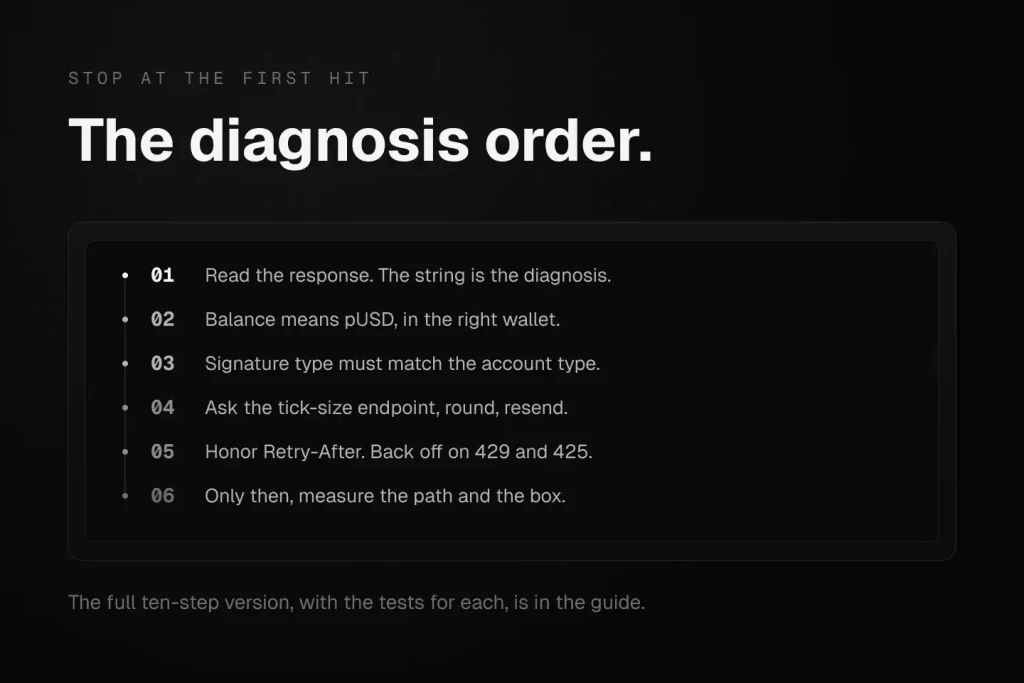
Run it in this order, stop at the first hit, and resist the urge to skip to your favorite suspect.
- Read the response. A string names its family; silence is family three.
- If it names balance or allowance: check pUSD, not USDC.e, and check the conditional token on sells.
- If it names signatures or owners: confirm signature type and funder match how the account holds funds, then check the clock.
- If a previously working bot broke in spring 2026: migrate to the current client before debugging anything else.
- If it names tick or size: ask the tick-size endpoint, round, resend.
- If it names closed-only mode: it is jurisdiction. Stop debugging.
- If the order was accepted: check its status, then check whether its type did exactly what it promises.
- If nothing came back: read the status code, honor
Retry-After, back off on 429 and 425. - Only then, measure the path with the probe, and the box with
top. - If the prints show someone beat you fairly, decide whether the edge is real before optimizing toward it.
What a VPS fixes here, and what it does not
Honesty about our own product: a well-placed VPS addresses family three and the timing tail of family two. It shortens and stabilizes the path, it removes home-connection jitter and reboots from the equation, and it gives your bot a machine that is on when the market moves at 4am. It does not fix a signature type, an allowance, a tick size, a jurisdiction assignment, or a strategy that is racing the market’s own design. If your failure is in family one, fix the code first; the fastest box in Europe will reject your order with identical speed.
If the diagnosis lands on the path, test before you commit: run the probe from your current setup, then run the same probe on ours with the free 3-day demo and compare the two printouts. If our numbers are not better from where you trade, keep your money. That is the same deal we make in every benchmark we publish.
Frequently Asked Questions
One of three reasons: it was rejected with an error string that names the cause, it was accepted but its order type’s rules were not met by the book, or the request never completed at all. Read the response first; the string or status code routes you to the fix faster than any amount of code review.
Your pUSD balance is insufficient or the exchange contract is not approved to spend it. Since the April 2026 upgrade, collateral is pUSD rather than USDC.e, so a wallet full of USDC.e still fails this check. Verify with the balance-allowance endpoint, and on sell orders check the outcome token allowance too.
Most likely the April 2026 exchange upgrade: a new order structure, a new signing domain version, and pUSD collateral. Older client libraries were archived and orders signed the old way are rejected. Migrating to the current official client and redoing collateral setup per the docs fixes it.
Fill-or-Kill fills the entire order or cancels it entirely; a partial fill is impossible by design. Fill-and-Kill takes whatever the book offers up to your size and cancels the remainder, erroring only when there was nothing to match at all. On thin books, FOK misses that FAK would have partially caught.
blocked: true from the geoblock check mean my bot cannot trade? Not by itself. That endpoint reports website availability. As of July 2026, Ireland and the Netherlands are close-only on the website while the CLOB API is open, so bots there see blocked: true and trade anyway. The API-level restriction shows up differently, as a closed-only-mode error on the order itself. Check Polymarket’s docs for your jurisdiction’s current group.
You receive HTTP 429, and during exchange protection modes a 503 whose body and Retry-After header tell you how long to wait. Honor them, add exponential backoff, and move book-watching from polling to the WebSocket feed so your request budget goes to orders.
Only if the diagnosis lands in the network family: timeouts, jitter, or losing races you confirm in the trade prints. It will not fix rejections, which are code, configuration, or jurisdiction. Diagnose first, measure second, buy third.
Error strings and behavior on this page were verified against Polymarket’s documentation in July 2026. Exchange policies, error wording, limits, and jurisdiction groups change; the linked official docs are always the current authority. Nothing here is legal or financial advice.