
There are two different skills hiding inside “running a Polymarket bot.” The first is building and deploying one — authentication, allowances, strategy code, the systemd unit — and that’s the setup guide’s job, start there if your bot doesn’t exist yet. The second skill is the one nobody writes about: keeping a live bot alive, sane, and solvent for months. That’s this page. Because a trading bot’s worst enemy isn’t a slow server — it’s the 3 AM hour when the process is technically running, the WebSocket silently died eleven minutes ago, and your resting quotes are now free money for whoever notices first.
Downtime for a trading bot isn’t “the site was unreachable.” It’s three specific bleeding modes: stale quotes (a market-making bot offline or frozen leaves orders that informed flow fills adversely — you are, by definition, the last to know the price moved), missed windows (arbitrage and news edges that close in seconds don’t wait for your restart), and unmanaged risk (open positions during the exact volatile event your strategy was built for, with nobody home). The cost scales with exactly how good your strategy is — which is the cruel part.
Start with the math: what “uptime” actually buys you
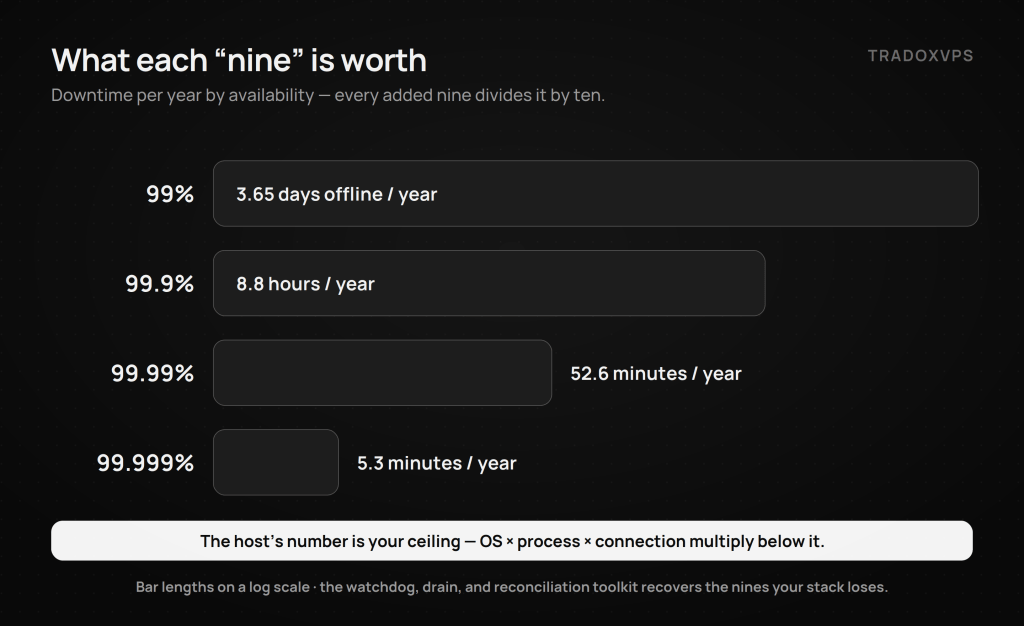
| Availability | Downtime per year | Downtime per month |
|---|---|---|
| 99% | ~3.65 days | ~7.3 hours |
| 99.9% | ~8.8 hours | ~43.8 minutes |
| 99.99% | ~52.6 minutes | ~4.4 minutes |
| 99.999% | ~5.3 minutes | ~26 seconds |
Two readings of this table matter. First, the gap between “pretty reliable” and “five nines” is three and a half days a year — and for a bot holding resting orders, those days arrive unannounced, often during the volatility that makes them expensive. Second, and more important: the host’s availability is your ceiling, not your number. Your real uptime is the host times your OS (reboots), times your process (crashes), times your connection (WebSocket flaps), times the venue itself. In practice, most bot downtime is self-inflicted — which is good news, because the self-inflicted layers are the ones this guide fixes.
The Six-layer model: where 24/7 actually breaks
- Host: the machine and network. The provider’s job; yours is to verify it (our uptime target and measured latency are public — run the probe yourself) and to size correctly so you’re not your own noisy neighbor (specs guide; a single bot is happy on our 2-core Starter).
- OS: updates, reboots, clock drift, full disks. Fixed by policy, below.
- Process: crashes and, worse, hangs. Fixed by systemd done properly, below.
- Connection: WebSocket flaps and resyncs. Your reconnect loop (built in the setup guide) handles the re-connecting; this page adds detecting the silent death.
- Venue: Polymarket’s own bad minutes. We measured the API root’s p99 stretching to 250–650 ms across every provider in our benchmark; you can’t fix the venue’s tail, only design so it doesn’t hurt (don’t chase, widen or pull quotes, size for the one-leg case).
- Strategy: the model quietly stops being true. No server fixes this; the monthly review (last section) and the circuit breaker do.
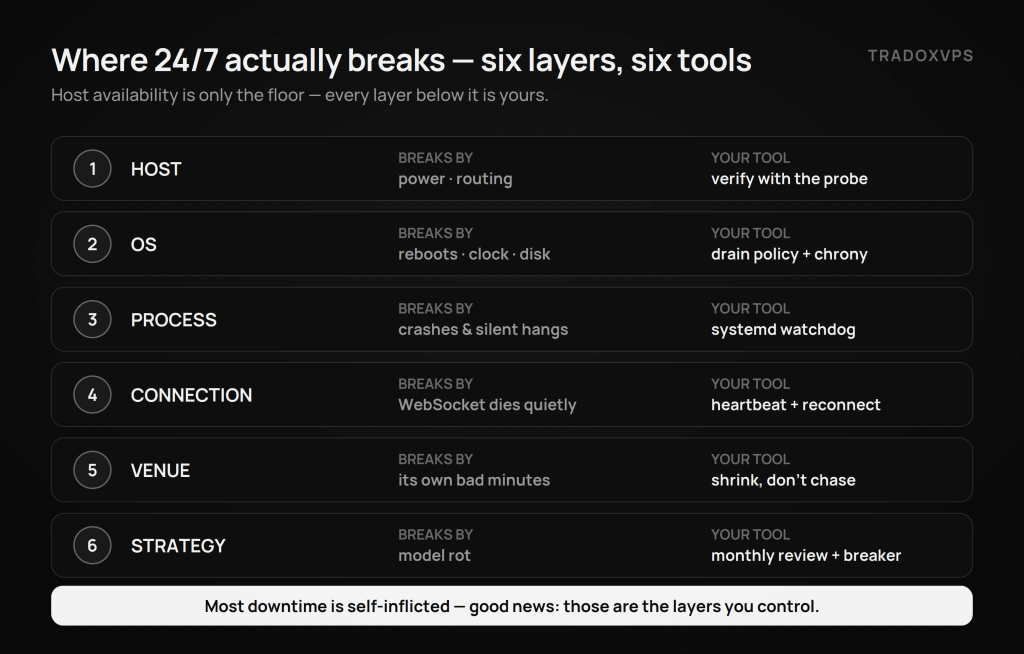
The rest of this guide is the toolkit, layer by layer, though not in numerical order. Layer 1 is the host’s job rather than yours, so it gets its own section at the end. Layers 5 and 6 have no config file to fix them; they live in the incident playbooks and the monthly review. That leaves layers 2 to 4, where almost all self-inflicted downtime actually happens, and we start with layer 3, because a hung process is the failure that costs the most and gets noticed the least.
Layer 3: systemd beyond Restart=always
The setup guide’s unit file restarts your bot after a crash. Production needs three more behaviors.
Catch the hang, not just the crash. The deadliest failure is a process that’s alive but frozen — the event loop blocked, the heartbeat gone, systemd seeing nothing wrong. The fix is systemd’s watchdog: your bot pings systemd every loop; miss the deadline and systemd kills and restarts it.
# Add to the [Service] section:
Type=notify
WatchdogSec=60
# pip install sdnotify — then in your bot:
import sdnotify
n = sdnotify.SystemdNotifier()
n.notify("READY=1")          # once, after startup completes

# inside your main loop (must run more often than WatchdogSec):
n.notify("WATCHDOG=1")
Now a hung loop dies within 60 seconds instead of bleeding until you wake up.
Decide your crash-loop policy on purpose. By default, systemd gives up after 5 restarts in 10 seconds and leaves the unit dead. For a bot that might hold positions, you probably want the opposite — keep trying, and alert me:
[Unit]
StartLimitIntervalSec=0        # never stop retrying
OnFailure=polybot-alert.service   # fire an alert unit on failure
(polybot-alert.service can be a oneshot that runs the webhook script from the monitoring section.)
Cap memory so a leak kills the bot, not the box. A slow leak that OOMs the whole VPS takes your SSH access down with it. A cgroup cap turns that into a clean, logged, auto-restarted process death:
[Service]
MemoryMax=4G
Die gracefully. When the bot is told to stop — by you, by the watchdog, by a reboot — it should cancel its resting orders before exiting, not abandon them:
import signal, sys

def shutdown(signum, frame):
    logger.info("SIGTERM received — cancelling all open orders")
    try:
        client.cancel_all()
    finally:
        sys.exit(0)

signal.signal(signal.SIGTERM, shutdown)
systemd sends SIGTERM on stop by default and waits TimeoutStopSec (default 90s) before SIGKILL — plenty of time to clean the book.
Layer 2: an OS that never surprises you
Patches yes, surprise reboots no. Enable unattended security updates, but make reboots a decision, not an event:
sudo apt install unattended-upgrades
# /etc/apt/apt.conf.d/50unattended-upgrades:
Unattended-Upgrade::Automatic-Reboot "false";
When a kernel update does want a reboot, use the drain procedure — the single most important habit on this page: systemctl stop polybot (your SIGTERM handler cancels all orders) → verify zero open orders via the Data API or UI → reboot → systemd auto-starts the bot → the bot reconciles state (next section) before trading. Never reboot over live orders; “it’ll only take a minute” is how resting quotes get picked off during the minute.
Keep the clock disciplined. Signed CLOB requests expire quickly; clock drift fails them with errors that never mention the clock. Chrony makes drift a non-event:
sudo apt install chrony
chronyc tracking     # 'System time' offset should be milliseconds, not seconds
Add chronyc tracking to the weekly checklist.
Don’t let the disk fill. A full disk is the silent bot-killer: logs stop, then writes fail, then strange crashes. Bound the journal (SystemMaxUse=1G in /etc/systemd/journald.conf), keep the rotating file handler from the setup guide, and check df -h weekly.
Layers 3–4: monitoring that actually catches trading failures
CPU graphs don’t catch the failures that cost money. These do:
- Time since last book delta, per market — the stale-feed detector. If a market you quote hasn’t ticked in N minutes during active hours, either the WS died silently or you’re mirroring a ghost.
- WS reconnects per hour — one occasionally is life; a flapping connection is a routing or code problem.
- Order acknowledgment latency vs your baseline — you measured ~21–23 ms warm medians when healthy (or whatever your probe said); alert when p95 doubles. Degradation usually announces itself here first.
- 429/reject counts — a loop gone greedy, or limits changed upstream.
- Open orders vs expected — the number systemd can’t see but your P&L can.
- Daily P&L vs circuit-breaker budget — the breaker (built in the setup guide) is the floor; watching the approach is the point.
Emit one heartbeat line per minute with all of the above — a single grep-able line turns every incident review into thirty seconds. Then make the heartbeat physical: touch a file every loop, and let a one-line cron be your local watchdog’s watchdog:
# in the bot loop:
pathlib.Path("/tmp/polybot.heartbeat").touch()
#!/bin/bash
# /usr/local/bin/polybot-alert.sh — cron: * * * * *
HB=/tmp/polybot.heartbeat
AGE=$(( $(date +%s) - $(stat -c %Y "$HB" 2>/dev/null || echo 0) ))
if [ "$AGE" -gt 180 ]; then
  curl -s -X POST "$WEBHOOK_URL" \
    -H 'Content-Type: application/json' \
    -d '{"content":"polybot heartbeat stale ('"$AGE"'s) — check the box"}'
fi
Point $WEBHOOK_URL at a Discord/Telegram/Slack webhook and your phone buzzes within three minutes of any freeze. Final piece: who watches the VPS itself? A monitor running on the box can’t report the box’s death. The pattern is a dead-man’s switch — the bot (or a cron) pings an external check-in URL every minute, and the external service alerts when the pings stop. No inbound ports needed (your firewall stays sealed), works for power, network, and host failures alike, and several free services exist for exactly this.
Restart correctness: never trust your own memory
After any restart — crash, watchdog kill, reboot — your bot’s in-memory picture of the world is fiction. The iron rule: reconcile from the venue before trading.
def reconcile_on_start(client):
    open_orders = client.get_orders()        # what the venue says
    for o in open_orders:
        if o["id"] not in strategy.expected_orders():
            client.cancel(o["id"])           # unknown = cancel
    positions = fetch_positions()            # Data API — actual inventory
    strategy.load_inventory(positions)
    # rebuild every book from a fresh snapshot before quoting:
    await resync_all_books()
For simple bots, the blunt version — client.cancel_all() on startup, then rebuild — trades a few seconds of absence for zero ambiguity, and is usually the right call. Either way, the sequence is fixed: reconcile orders → load real inventory → fresh book snapshots → only then quote. A bot that resumes quoting on pre-crash state is trading against a market that kept moving while it was dead.
Incident playbooks: decide now, execute at 3 AM
| Symptom | First response | If it persists |
|---|---|---|
| WS flapping (reconnects spiking) | Backoff is already coded; halve quote size | Pull quotes; probe the path; check provider status |
| 429s climbing | Audit loops for REST polling that belongs on WS | Reduce markets; verify current limits in the docs |
| Order acks 2–3× baseline | Venue or path degradation — widen or pull quotes, never chase fills | Run the latency probe; compare to your baseline file |
| Crash-looping | journalctl -u polybot -n 50; restart in DRY_RUN=true | Roll back to last good version (keep one, always) |
| Heartbeat stale, process “running” | That’s the hang — watchdog should have fired; if not, systemctl restart | Lower WatchdogSec; find the blocking call |
| Auth errors after weeks of calm | chronyc tracking — it’s the clock more often than the keys | Re-derive API creds per the setup guide |
| Disk >90% | Purge old logs; check journald cap | Lower rotation sizes; move history off-box |
The meta-rule across all rows: degrade by shrinking, not by hoping. Half size, wider quotes, fewer markets, or full stop — a bot that reduces exposure when confused outlives every bot that doesn’t.
The 10-minute weekly routine (and the monthly hour)
Weekly: systemctl status polybot and restart count · journalctl -p err -u polybot --since "-7 days" · df -h · chronyc tracking · scan heartbeat lines for reconnects, 429s, ack-latency drift · confirm open orders match the strategy’s expectation · confirm the trading wallet still holds only this week’s float (the security posture from day one).
Monthly: re-run the latency probe and diff against your baseline file — paths drift, and our own benchmark caught a far-edge route nobody would have noticed otherwise · compare live fill quality and win rate against your dry-run/early-live baseline — model rot shows up here months before it shows up in the P&L · check the platform’s fee schedule and API changelog (the fee structure changed once already in 2026; a strategy priced on last quarter’s fees is a different strategy) · update dependencies in a venv copy, dry-run 24h, then promote.
That’s the whole job: ninety minutes a month of boring, and the 3 AM disasters become log entries.
What the host layer owes you (and how to check us)
Everything above runs on any competent always-on box. What the host contributes is the floor: stable power and routing, NVMe that doesn’t block your log writes, and a short path you’ve measured: ~10-15 ms median to Polymarket’s feed from Dublin or Amsterdam in the public benchmark, raw data downloadable, with a 99.999% uptime target we ask you to verify rather than believe: the probe runs free on a 3-day demo. If your bot doesn’t exist yet, build it with the setup guide; if it’s deciding between your desk and a data center, the home-PC comparison settles it in one read.
Frequently Asked Questions
Process status lies — “active (running)” includes frozen event loops. The reliable signals are a heartbeat file the bot touches every loop (alert when its age exceeds ~3 minutes), systemd’s watchdog (Type=notify + WatchdogSec kills a process that stops pinging), and a stale-feed metric: a quoted market with no book delta for minutes during active hours means you’re mirroring a ghost.
For a bot that may hold positions, yes — set StartLimitIntervalSec=0 so systemd never gives up, pair it with OnFailure= alerting so you know it’s happening, and rely on the startup reconciliation (cancel unknown orders, reload real inventory, fresh book snapshots) to make each restart safe. A bot stopped in a crash-loop with live resting orders is the worst of all states.
Drain first: stop the service (a proper SIGTERM handler cancels all open orders), verify zero open orders via the API, then reboot or update; systemd auto-starts the bot, which reconciles state before quoting. Configure unattended security updates with Automatic-Reboot "false" so the OS never makes this decision for you.
Trading-shaped metrics, not CPU graphs: time since last book delta per market, WebSocket reconnects per hour, order-ack latency against your measured baseline, 429/reject counts, open orders versus expected, and daily P&L against the circuit-breaker budget — emitted as one heartbeat log line per minute, with a dead-man’s-switch ping to an external service so a dead box still raises an alarm.
Match it to the strategy: a market maker bleeds through adverse fills every offline minute and wants every nine it can get plus instant restart; a daily-cadence strategy survives an hour of downtime unharmed. Remember the multiplication — host availability is the ceiling, and your OS, process, and connection layers usually cost more nines than the host does. The fixes above recover most of them.
No, and treat any provider’s number as a target to verify, ours included. Host uptime says nothing about your process hanging, your WebSocket flapping, or a surprise reboot you configured yourself. The stack in this guide (watchdog, reconciliation, drain procedure, external dead-man’s switch) is what converts a good host into an actual 24/7 operation.
Commands and configurations target Ubuntu 22.04/24.04 with systemd; adapt paths for your environment and test in dry-run before relying on any of it. Latency figures from our published Dublin benchmark; fee and API details change — verify against official Polymarket documentation. We operate TradoxVPS and provide infrastructure, not financial advice; automated trading involves substantial risk, including rapid total loss.