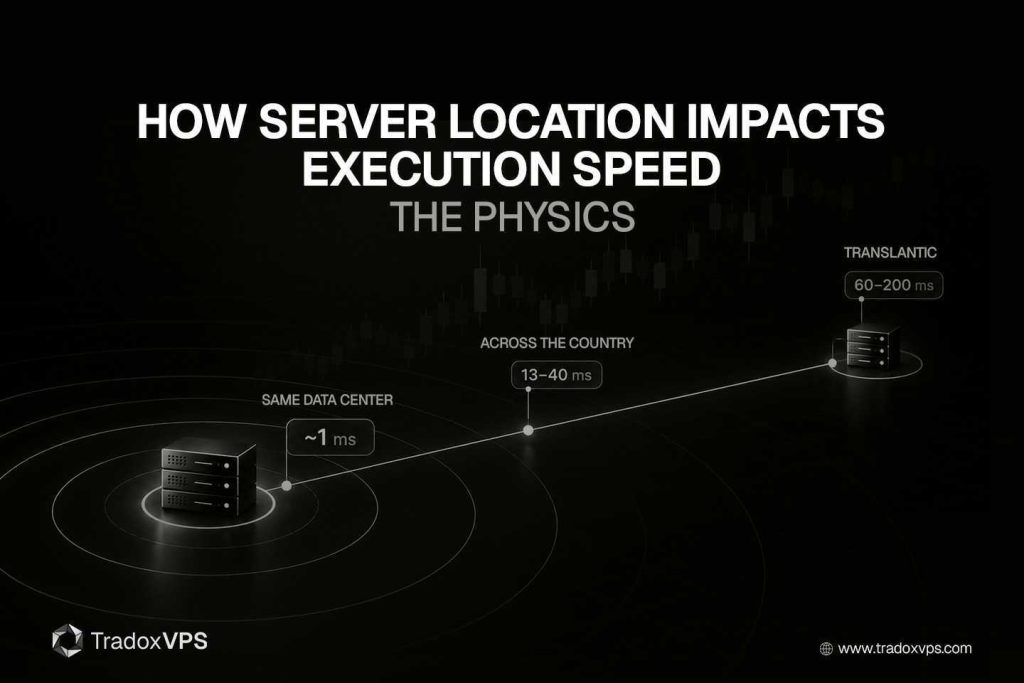
You can upgrade your CPU, tune your operating system, and optimize your routing, and none of it will make light travel faster. That’s the part of execution speed most traders miss: the single biggest factor is distance, because a signal moving through fiber covers only about 200 kilometers per millisecond, and no software removes that. Where your server physically sits relative to the exchange’s matching engine sets a hard floor on how fast your orders can possibly execute — a floor you can hit or miss by tens of milliseconds.
Here’s the physics of why location matters, how kilometers turn into milliseconds and then into ticks, and what that means for where you host.
Execution speed is a round trip, and distance sets its floor
Execution speed is how long your order takes to reach the matching engine and get an acknowledgment back — the round-trip, in the terms we use in what counts as low latency. That round-trip is the sum of a few things, but one of them is physical and unoptimizable: propagation delay, the raw time for the signal to travel the distance.
Light in fiber moves at about two-thirds of its vacuum speed, roughly 200,000 kilometers per second, because the glass slows it down. Worked out, that’s about 1 millisecond per 200 kilometers one-way, or near enough 10 milliseconds of round-trip for every 1,000 kilometers. You can shave the other components of latency. You cannot shave this one below what the distance allows — it is, quite literally, a speed limit.
The numbers: distance becomes latency
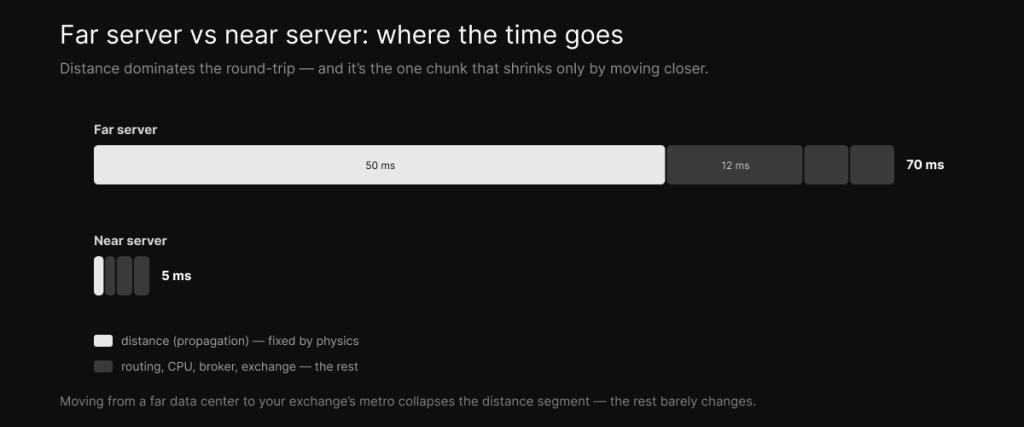
Here’s what that physics looks like in the real world, from inside the exchange out to your living room.
| Setup | Approx. distance | Typical round-trip |
|---|---|---|
| Colocated (same data center as the engine) | meters | under 1 ms |
| Proximity VPS (same metro) | a few km | ~1 ms |
| Across the country (New York ↔ Chicago) | ~1,180 km | ~13 ms fiber (~8.5 ms microwave) |
| Coast to coast (New York ↔ Los Angeles) | ~4,500 km | ~30–40 ms |
| Transatlantic (New York ↔ London) | ~5,600 km | ~60–80 ms |
| Home connection (any distance) | + 10–15 network hops | 50–200 ms |
Notice that the home row isn’t about distance alone. A consumer connection adds 10 to 15 router hops on top of the kilometers, each one adding delay and the risk of congestion, which is why it lands at 50 to 200 ms even for a nearby exchange. Distance sets the floor; hops and congestion pile on top of it — the routing side of the story we tell in network speed versus latency.
Why you can’t software your way out of distance
This is what makes location different from every other optimization you can do. A faster CPU helps your processing time. A tuned OS helps. Cleaner routing with fewer hops helps. But the propagation delay is fixed by physics, and the only way to reduce it is to physically move the server closer to the engine.
The industry proves this at the extreme, and the scale is genuinely instructive. Firms have spent hundreds of millions of dollars shaving milliseconds off the New York–Chicago route, taking it from 14.5 ms in the 1980s down to 13.1 ms of fiber by 2010, then to about 8.5 ms with microwave towers — which is within 0.6 ms of the vacuum speed-of-light floor, the theoretical limit. One transatlantic cable cost $300 million for roughly a 5 ms edge, which works out to about $60 million per millisecond. When distance is worth that kind of money to institutions racing each other, it tells you precisely how much your own hosting location matters, and it’s the frontier we describe in the HFT reality piece.
How milliseconds become money
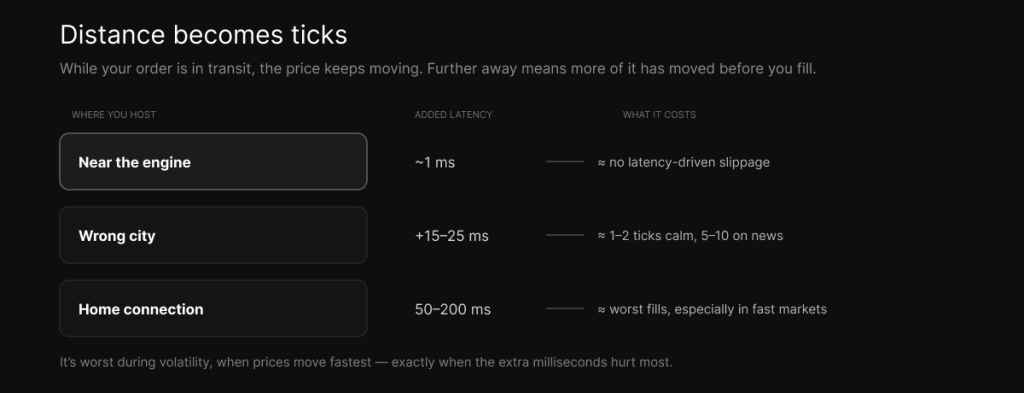
Latency from distance isn’t an abstract figure; it turns into ticks. While your order is in transit, the market keeps moving, so a longer trip means a higher chance the price has shifted before you fill — which is slippage, the controllable kind we break down in can a VPS reduce slippage. The further you sit, the more of it you eat, and it’s worst during volatility, when prices move fastest.
For a futures trader, being in the wrong city instead of near the CME’s Aurora engine adds 15 to 25 ms to every order, enough for the E-mini to move a tick or two in calm conditions and several more on a news spike. That’s a cost you’re paying on every single trade, for nothing, simply because of where the server sits. The flip side is the encouraging part: getting close removes that self-inflicted cost entirely.
But distance isn’t the only thing
Two honest caveats, so you don’t over-index on raw kilometers.
For short distances, hops and processing matter more than distance. A single congested router can add more delay than 500 km of fiber, so being in the right metro over a clean, well-peered path beats being marginally closer over a congested one. Location is necessary, not sufficient — you still need clean routing, a CPU that keeps up so it doesn’t add its own delay, and low jitter so your latency is consistent rather than just occasionally fast.
Proximity is not colocation. Being in the right city gets you to about 1 ms of network ping, which captures most of the available benefit, but it isn’t the sub-millisecond, microsecond world of a server sitting inside the exchange. Your order still round-trips through your broker’s gateway, so real execution stays in single-digit milliseconds, and the sub-millisecond numbers you see advertised are ping, the network leg, not your fill. That distinction matters, and it’s the same one we draw across the latency tiers.
So where should your server be?
The rule that falls straight out of the physics is simple: put the server in the same metro as your market’s matching engine. For CME futures that’s Chicago, near the Aurora data center, which is the Chicago VPS case; for US equities it’s northern New Jersey; for forex it’s often London — the full which-city breakdown covers the matchups.
And match the effort to your sensitivity, because this isn’t equally important for everyone. A scalper or a fast automated bot feels every millisecond and should be as close to the engine as possible. A swing trader holding for hours or days operates on a timescale where a few milliseconds are pure noise, so location matters far less. Be honest with yourself about which one you are before paying for proximity you won’t actually use.
The honest bottom line
Server location is the biggest single lever in execution speed because it controls the one part of latency that physics won’t let you optimize away. Get the city right — in the same metro as your venue’s engine — and you’ve captured most of the available speed. Chase microseconds beyond that and you’re into institutional colocation territory you almost certainly don’t need. Distance sets the floor, so put your server where the floor is lowest, then let your CPU, your routing, and your strategy do the rest. If your market is CME futures, that floor is in Chicago, and the plans and pricing are built around it.
Frequently asked questions
A great deal, because it controls propagation delay, the unoptimizable part of latency. Being in your exchange’s metro gets you around 1 ms of network ping; being across the country adds 13 to 40 ms, and a home connection 50 to 200 ms. Distance sets the floor on how fast you can possibly execute.
Because the limit is physical. Light travels through fiber at about 200,000 km/s, so distance adds a fixed delay that no amount of bandwidth or CPU upgrade removes. The only way to cut propagation delay is to physically move closer to the engine.
Roughly 10 ms of round-trip for every 1,000 km in fiber, plus router hops. New York to Chicago is about 13 ms over fiber, coast to coast is 30 to 40 ms, and transatlantic is 60 to 80 ms.
In the same metro as your market’s matching engine: Chicago for CME futures, New Jersey for US equities, and often London for forex. Match the city to where your orders are actually matched, not to where the broker is headquartered.
No. The right city gets you proximity, around 1 ms of network ping, which captures most of the benefit. Colocation puts your server inside the exchange’s data center at sub-millisecond and microsecond latency — an institutional service that costs far more.
No. Scalpers and fast bots feel every millisecond, while swing and position traders operate on timescales where a few milliseconds are noise. Match how much you invest in proximity to how latency-sensitive your strategy actually is.
No. Those are network ping figures, the time to reach the data center, not your order’s round-trip through the broker, which is single-digit milliseconds.
We operate TradoxVPS and provide trading infrastructure, not financial advice. Latency figures are typical for normal network paths and vary with your broker, route, and configuration; a proximity VPS is not exchange colocation and does not eliminate the round-trip through your broker. Trading futures and other leveraged products carries substantial risk, including the loss of more than your initial deposit.