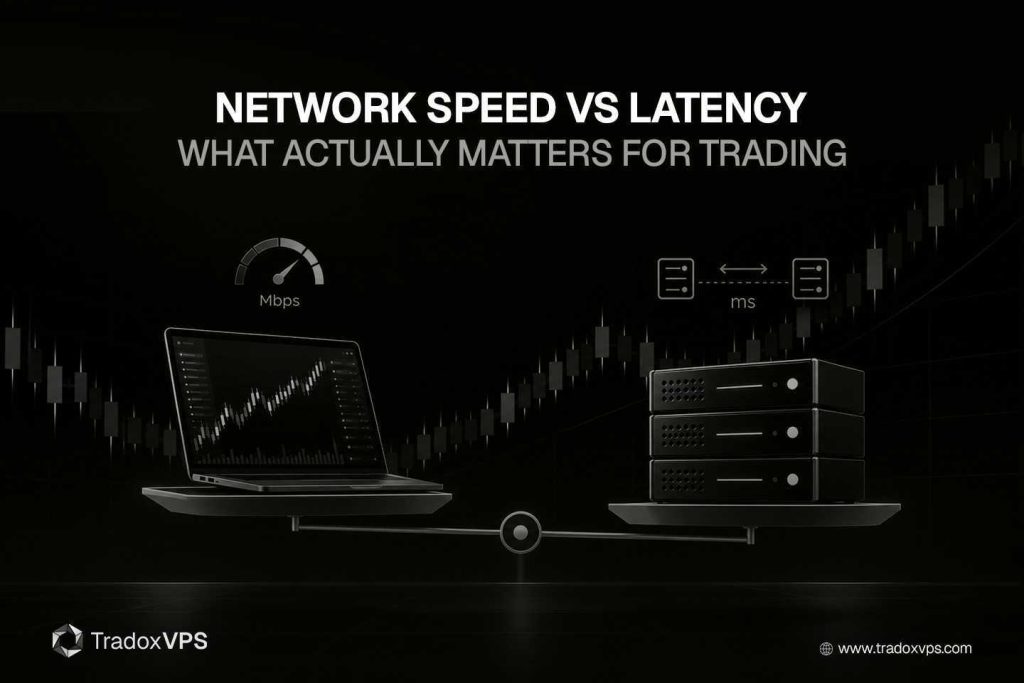
Open any trading-VPS comparison page and the number doing the shouting is bandwidth. “Up to 3 Gbps.” “10 Gbps burst.” It’s the easiest spec to print on a sales banner, and it’s the one most buyers anchor on, because a big number feels like it must mean a fast machine.
It mostly doesn’t, at least not for trading. “Network speed” and “latency” get tossed around as if they’re the same thing, when they aren’t even the same kind of measurement. One is how wide the road is. The other is how long the drive takes. And a trade order is small enough that the width of the road barely registers. This is the long version of why that’s true: the vocabulary done properly, the math that shows a tiny order doesn’t care about your gigabits, the cases where bandwidth genuinely does matter, and the four things that actually decide your network performance when you trade.
It runs longer than our usual posts because the topic deserves it. If you only remember one line, make it this one: for order speed, bandwidth is a rounding error and distance is the whole game.
The vocabulary problem: “speed” is three different things
Most of the confusion here comes from one overloaded word. When a provider says “speed,” it could mean any of three distinct things, and only one of them is the one you care about.
Bandwidth is capacity. It’s the maximum data rate a link can theoretically carry, measured in bits per second, megabits, or gigabits. A “1 Gbps” link describes the size of the pipe, the ceiling on how much data can flow per second. It does not describe how fast any individual piece of data arrives.
Throughput is what you actually get. It’s the real, achieved data rate during live traffic, and it’s almost always lower than the bandwidth ceiling, because of protocol overhead, contention with other users on a shared link, and the limits of the machines at each end. If a hundred VPS share a link, your throughput can be a fraction of the advertised bandwidth even though the headline number never changes. Bandwidth is the ceiling; throughput is the floor you stand on.
Latency is delay. It’s the time it takes for data to travel from one point to another, usually quoted as round-trip time, in milliseconds. This is the one that decides how quickly your order reaches the exchange and how quickly the acknowledgement comes back. When traders say “speed,” latency is almost always what they actually mean, and it’s the metric the bandwidth banner tells you nothing about.
Two more belong in the same conversation, because for trading they matter as much as the average latency. Jitter is the variation in latency over time: not how slow your connection is on average, but how much that number jumps around. Packet loss is the share of packets that never arrive and have to be re-sent or are simply gone. Hold onto those two; they’re where a lot of real-world trading pain actually lives, and we’ll come back to each.
So when you read “speed,” translate it. In consumer marketing it nearly always means bandwidth, which is the least useful of the five for a trader.
The pipe analogy, and exactly where it breaks
The cleanest way to feel the difference is to picture a pipe carrying water.
Bandwidth is the width of the pipe. A wider pipe carries more water per second. Latency is the length of the pipe. A longer pipe takes more time for any single drop to travel end to end. These are independent properties. You can have a very wide pipe that’s also very long, so it moves enormous volumes of water per second while any individual drop still takes a while to come out the far end.
Now here’s where the analogy does its real work. A trade order is one drop. It’s a tiny message, and you’re not trying to move a flood of them, you’re trying to get one small thing to the exchange and back as fast as possible. Widening the pipe lets you pour more water per second, but it does almost nothing for the travel time of a single drop. To make your one drop arrive sooner, you need a shorter pipe, not a wider one. A shorter pipe means less distance, which means lower latency. That’s the entire intuition, and the math underneath it is worth seeing because it’s even more lopsided than the analogy suggests.
What latency is actually made of
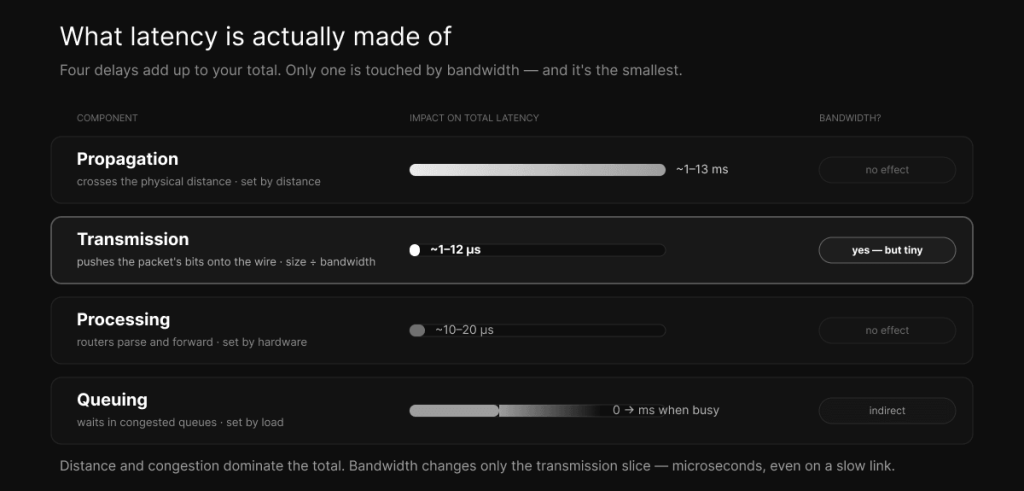
Latency isn’t one thing. The delay a packet experiences is the sum of four separate components, and seeing them broken apart is what makes the bandwidth question obvious. Three of the four have nothing to do with bandwidth at all.
The first is propagation delay: the time for the signal to physically cross the distance. Bits travel as electromagnetic signals, and in optical fiber they move at roughly two-thirds the speed of light, which works out to about five milliseconds per thousand kilometers. This component is set entirely by distance and the medium. Bandwidth does not touch it. As one networking reference puts it bluntly, moving from 100 Mbps to 1 Gbps Ethernet reduces other delays, but if the cable length stays the same, the propagation delay is identical. This is the component that makes physical location the dominant factor in trading latency, which is the whole argument in why a Chicago VPS is best for CME futures.
The second is transmission delay, also called serialization delay, and this is the only one of the four that bandwidth actually changes. It’s the time required to push all of a packet’s bits onto the wire, and it’s a simple division: the packet size in bits divided by the link rate in bits per second. A standard 1,500-byte packet on a 1 Gbps link serializes in about twelve microseconds. Drop the link to 10 Mbps and the same packet takes about 1.2 milliseconds, which is a hundred times longer. So bandwidth genuinely matters here, but notice the scale: even at gigabit speeds this component is measured in microseconds for normal packets, and it shrinks as bandwidth grows.
The third is processing delay: the time a router or switch spends parsing a packet’s header and deciding where to forward it. On modern hardware this is tiny, on the order of ten to twenty microseconds per hop, and bandwidth doesn’t change it.
The fourth is queuing delay: the time a packet spends waiting in a router’s queue when the link is busy handling other traffic. This one is variable and depends entirely on congestion. When a link is lightly loaded, queuing delay is near zero. When it’s saturated, packets pile up and wait, and the delay climbs sharply as utilization approaches capacity. This is the component that oversubscription wrecks, and it’s the primary source of jitter. Bandwidth helps here only indirectly: more headroom means the link saturates less often, but a big bandwidth number that’s shared among too many tenants still queues badly at the worst moments.
Add them up and you have your latency. Propagation, set by distance. Transmission, the small slice bandwidth touches. Processing, negligible. Queuing, set by congestion. Of the four, the only one bandwidth directly improves is the smallest, and it’s already in microseconds.
The math that ends the bandwidth argument
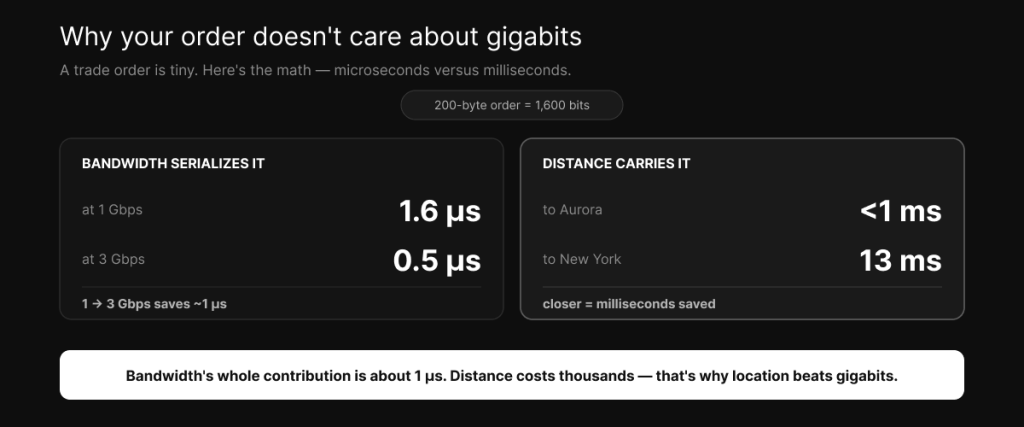
Let’s put real numbers on a real order, because the gap is bigger than most people expect.
A futures order message is small. The exact size depends on the protocol, but a couple of hundred bytes is a fair, generous estimate. Take 200 bytes, which is 1,600 bits. Now serialize it, which is the one job bandwidth does. On a 1 Gbps link, 1,600 bits divided by a billion bits per second is 1.6 microseconds. On a 3 Gbps link it’s about 0.5 microseconds. Even on a comparatively slow 100 Mbps connection, it’s 16 microseconds. So the entire contribution of bandwidth to sending your order is somewhere between a fraction of a microsecond and a few microseconds, and upgrading from 1 Gbps to 3 Gbps saves you roughly one microsecond.
Now look at the propagation side, the distance the order has to travel. From a Chicago-metro server to CME’s matching engine in Aurora, the network ping is under a millisecond. From New York to the Chicago area, the round trip is about thirteen milliseconds, which is thirteen thousand microseconds. From London, it’s roughly seventy milliseconds across the Atlantic.
Set those side by side. Tripling your bandwidth saves about one microsecond on an order. Moving your server from New York to Chicago saves about thirteen thousand microseconds. That’s not a close call or a matter of tuning. The bandwidth difference is a rounding error, literally thousandths of the distance difference. This is why a provider waving a “3 Gbps” flag at you is selling a number that has almost nothing to do with how fast your trades execute, and why the same money spent on a closer, lower-latency location buys you something thousands of times larger. We get into how to actually verify that location advantage in how to choose a VPS near the CME data center, and into how lower latency turns into better fills in how a low-latency VPS improves trade execution.
So when does bandwidth actually matter?
It would be dishonest to tell you bandwidth is useless, because it isn’t. It’s just that it matters for different things than the marketing implies, and “more is faster” is the wrong way to think about it. Here’s where it genuinely earns its place.
The big one is market data. While your orders going out are tiny, the data coming in can be substantial. CME distributes market data through its Market Data Platform as a dual-feed UDP multicast, and a full feed, especially Market By Order data that shows every individual order in the book rather than just the totals at each price, is a high-rate stream that bursts hard during volatile moments. A handful of instruments through a broker is modest, but during a fast market the message rate spikes, and if your bandwidth is too low or your link is congested, that incoming data queues up and packets get dropped. When that happens you’re not slow, you’re wrong, trading against a stale picture of the book. So you need enough bandwidth, with real headroom for bursts, to take the full data feed without choking. Tellingly, CME runs that market data as two redundant feeds specifically so clients can fill gaps when packets are lost, which tells you how seriously the people who built the exchange take packet loss.
The second case is bulk transfers. Downloading years of historical tick data for backtesting, pulling down market replay datasets, running updates, moving backups. None of that is latency-sensitive, but it’s genuinely bandwidth-bound, and more capacity makes those jobs finish faster. If you do heavy research or replay work, bandwidth saves you wall-clock time, just not during live trading.
The third is simply having enough headroom that your own traffic never saturates your own link. If your data feed, your orders, your remote-desktop session, and everything else you’re running can comfortably fit with room to spare, you never create your own queuing delay. That’s an argument for adequate, dedicated bandwidth, not for the biggest possible number.
Put those together and the honest position is this: you want enough bandwidth, not maximum bandwidth. A dedicated, uncongested 1 Gbps line will serve a trader better than a shared, oversubscribed 10 Gbps line every single time, because the dedicated link delivers consistent low latency and the shared one delivers queuing delay and jitter precisely when the market gets busy and you need it least.
Jitter: the metric that actually breaks automated strategies
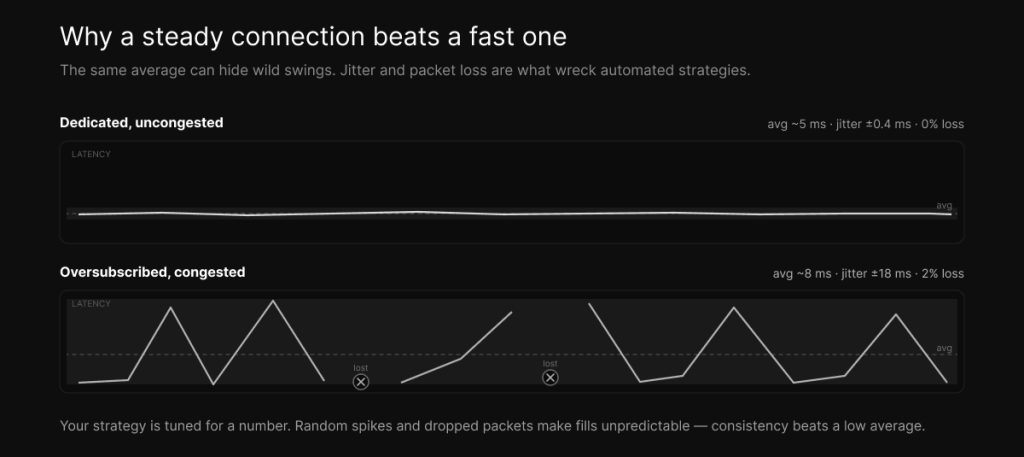
If latency is how long the drive takes on average, jitter is how unpredictable the drive time is. It’s the variation in latency from one moment to the next, and for automated trading it can do more damage than a slightly higher average ever would.
Jitter comes from two main sources. The first is congestion, the queuing delay we just discussed: when a link gets busy, packets wait, and how long they wait changes from packet to packet depending on what else is in the queue. The second is route changes, when the network path your packets take shifts and the new path has a different length. On a VPS, the usual culprit is oversubscription, too many tenants sharing the same underlying link and CPU, so that your latency is low when the neighbors are quiet and spikes when they get busy.
Here’s why that’s worse than it sounds for an automated strategy. Your system is tuned around an expected latency. Its timing, its assumptions about when an order will land, its behavior around fast-moving prices, all of it is calibrated for a number. When the actual latency is a steady five milliseconds, the strategy behaves the way you tested it. When it’s two milliseconds that randomly jumps to forty, the strategy is constantly being surprised: orders land later than expected, fills become inconsistent, and the edge you backtested quietly erodes in the gaps. A stable five milliseconds is more valuable than a brilliant two milliseconds that swings wildly, because trading systems live and die on consistency, not on best-case numbers. This is the single strongest argument for dedicated resources over shared ones, and it’s why the cheap “low-latency” box with a great headline ping can still trade badly.
You measure jitter not by a single ping but by watching the variation across many of them, ideally during market hours when the network is under real load. A connection that posts one beautiful number and then scatters is worse for you than one that posts a slightly higher number and holds it steady.
Packet loss: the silent killer
Packet loss is the quietest of these problems and one of the most destructive. A lost packet doesn’t just vanish without consequence. For order routing over TCP, a lost packet has to be detected and re-sent, and that retransmission costs at least a full round trip of extra delay for that packet, turning a clean few-millisecond path into a sudden spike. For market data over UDP, a lost packet is a missing update, a gap in your view of the book that has to be recovered from a secondary feed or a snapshot, during which your picture of the market is incomplete.
Even loss rates that sound trivial cause real harm. A connection dropping one percent of packets will feel fine on a casual speed test and then periodically stab your latency with retransmission spikes and feed you a book with holes in it. For trading, near-zero loss matters more than a large bandwidth number, full stop. It’s worth repeating that CME’s market data architecture uses two parallel feeds, A and B, precisely so that a packet missed on one can be recovered from the other; packet loss is treated as a first-class enemy by the people who run the matching engine, and it should be by you too.
On a VPS, loss almost always traces back to the same root causes as jitter: congestion from oversubscription, or a poor network path with a weak link somewhere along it. The fix is the same as well, which is dedicated, uncongested capacity on a clean route, not a bigger advertised pipe.
What to actually look for, and how to measure it
By now the hierarchy should be clear, so here it is in order of what matters for trading.
First, low latency to your venue and your data feed. This is overwhelmingly a function of physical location and network path, not bandwidth. Get your server close to where your trades match and where your feed originates. Second, low jitter, which means dedicated, uncongested resources rather than a crowded shared host. Third, near-zero packet loss, which comes from a clean path and, again, no oversubscription. Fourth, and only fourth, enough bandwidth with headroom to carry your data feed through its bursts and to finish your bulk transfers, which for most traders a dedicated gigabit line covers comfortably. Notice that the headline Gbps number sits at the bottom of the list, and that three of the four priorities are about distance and dedication rather than capacity.
Measuring them is straightforward and worth doing yourself rather than trusting any banner. A simple, sustained ping to your broker’s gateway or feed gives you both your latency, in the average, and your jitter, in the variation, and you should run it during market hours under real load rather than at a quiet hour. A traceroute or mtr shows you the path and reveals packet loss and where it’s happening along the route. A conventional speed test tells you your bandwidth, which you should run once to confirm you have enough, after which the number stops being interesting. Run your own latency check and hold any provider to what you measure, not what they advertise.
How we think about it
We publish an “up to 3 Gbps” figure too, because it’s the number people compare on and leaving it off the page just makes us look slower than boxes that are actually worse for trading. But it’s not the thing we optimize for, and we’d rather you knew that. What we actually build around is the list above: a Chicago-metro location for genuinely low latency to CME’s engine in Aurora, dedicated rather than oversubscribed resources so your jitter stays low and your packet loss stays near zero, and bandwidth with real headroom so your data feed never chokes during a volatile open. Then we hand you a latency checker so you can verify all of it yourself instead of taking our word for it. The number on the banner is the least important thing about a trading connection, and any provider who leads with it is hoping you’ll stop reading before the part that matters. Plans and pricing are here once you’ve measured for yourself.
Frequently asked questions
No, and they’re not even the same kind of measurement. “Network speed” almost always means bandwidth, which is the capacity of a link, measured in megabits or gigabits per second. Latency is the delay for data to travel, measured in milliseconds. A connection can have huge bandwidth and still be high-latency, and for trading it’s the latency that decides how fast your orders execute.
Barely. Bandwidth only affects the transmission, or serialization, component of latency, which is the time to push a packet’s bits onto the wire. For a small order that’s a microsecond or two even at gigabit speeds. The dominant component is propagation delay, which is set by physical distance and is completely unaffected by bandwidth. Moving your server closer to the exchange does far more for latency than upgrading your bandwidth ever could.
Enough to carry your market data feed comfortably through its volatility bursts, plus headroom for everything else you run, plus capacity for bulk jobs like downloading historical data. For most traders a dedicated gigabit connection is more than enough. Maximum bandwidth is a vanity metric for order speed, because the order itself is tiny.
Latency, by a wide margin, followed by jitter and packet loss, with raw bandwidth a distant last. Three of the four things that decide your trading network performance are about distance and dedicated, uncongested capacity rather than the size of the pipe.
Jitter is the variation in latency over time, caused mainly by congestion and route changes. It matters because automated strategies are tuned around an expected latency, and when that number swings unpredictably, fills become inconsistent and a backtested edge erodes. A stable connection beats a faster but erratic one, which is the strongest practical reason to choose dedicated resources over a shared, oversubscribed host.
Because a lost packet either has to be re-sent, costing a full round trip of extra delay, or leaves a gap in your market data so you’re trading against an incomplete book. Even a one-percent loss rate causes periodic latency spikes and missing data. Near-zero packet loss matters more for trading than any bandwidth figure, which is why exchange market data is built with redundant feeds specifically to survive it.
No. Your order is a small message, and serializing it takes microseconds regardless of whether your link is 1 or 3 Gbps. The bandwidth headline helps with data feeds and bulk transfers, not with how fast a single order reaches the exchange. What makes your trades faster is being physically closer to the matching engine, with low jitter and no packet loss.
We operate TradoxVPS and provide trading infrastructure, not financial advice. Trading futures and other leveraged products carries substantial risk, including the loss of more than your initial deposit. Network figures are environment-dependent — measure your own connection before relying on them.