“Near CME” is the easiest claim in the trading-hosting business to make and the hardest to check. Every provider writes it. Almost none give you a way to verify it, and a fair number are quietly counting on you not trying. The phrase is doing a lot of quiet work, too: it might mean a server genuinely cross-connected to the exchange’s network, or a box in some random data center with “Chicago” stamped on the product name, or a ping figure that has nothing to do with the price you actually get filled at.
So let’s skip the sales pitch and do the practical version. What “near the CME data center” has to mean before it’s worth anything, how to test a server’s real latency yourself before you spend a dollar, what to look for beyond the location line, and the marketing tells that mean you should keep scrolling.
One quick bit of context so the rest makes sense. The reason proximity matters at all is that CME’s matching engine doesn’t run from the Chicago skyline — it runs from a data center in Aurora, Illinois, about 35 miles west. We pull that geography apart in why a Chicago VPS is best for CME futures. This post assumes you already buy that location matters, and you want to choose one without getting played.
What “near the CME data center” has to mean
Forget the city name on the marketing page. “Near” is about the network path to Aurora, not the postal address. A server that genuinely helps your fills is one with a short, direct route to the exchange’s engine and to your broker’s gateway — whether that’s a cabinet inside the Aurora data center for institutions, or a machine in a Chicago-metro facility cross-connected to Aurora over short fiber for everyone else.
What doesn’t count: a box labeled “Chicago” that actually routes your traffic through another city before it reaches Aurora, or a cheap shared server that’s technically in the metro but so overloaded your order sits in a queue on the machine before it ever hits the wire. Both can honestly advertise a Chicago location. Neither is near CME in any way that improves your trading. The location line is necessary, but on its own it proves almost nothing.
Why you can’t take “near CME” at face value
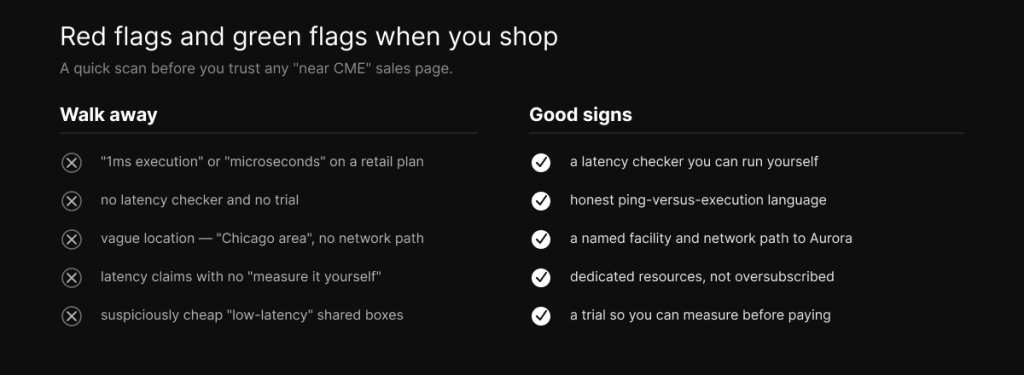
There are four common gaps between the claim and the reality, and once you can spot them you’ll never read a hosting page the same way.
The first is the ping-for-execution swap. A provider measures a bare network ping to a nearby point, gets a sub-millisecond number, and lets you assume that’s how fast your trades fill. It isn’t. Your real order round trip runs through your broker’s risk checks and the matching engine, and lands in single-digit milliseconds — we break the whole path down in how a low-latency VPS improves trade execution. A sub-millisecond ping is real and also not your fill.
The second is the “Chicago” that isn’t. Some products carry a Chicago label while the actual hardware sits elsewhere, or in a metro facility with a mediocre path to Aurora. The label is marketing; the route is physics, and only one of them shows up in your fills.
The third is the oversubscribed box. A near-CME location buys you nothing if a few hundred VPS are crammed onto the same host and your strategy stalls for cores during a volatile open. Proximity wasted on a starved machine is just an expensive way to be slow.
The fourth is the idle-only number. A gorgeous latency figure measured at three in the morning with nothing happening is the easy number. The one that matters is during a busy session under real load, which is exactly the number most pages won’t show you.
How to verify proximity yourself, before you pay
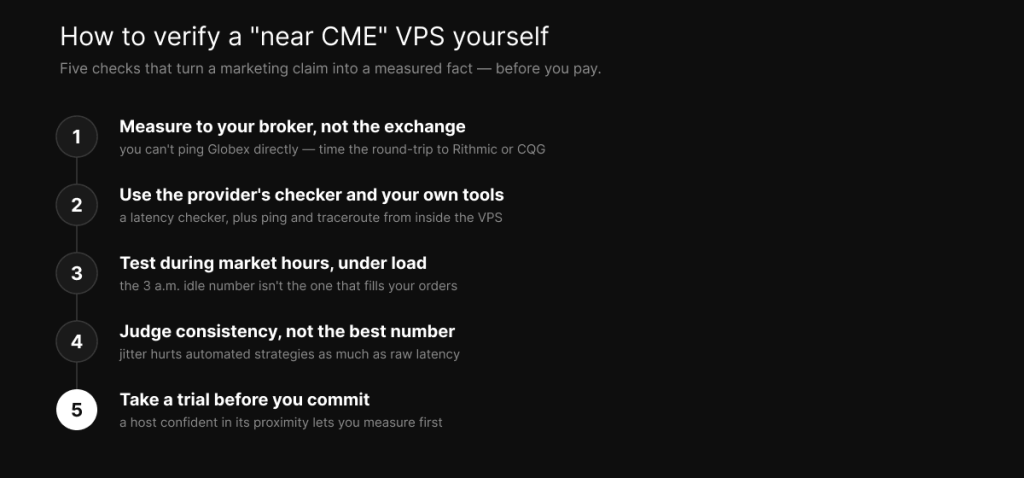
Here’s the part that turns you from someone who trusts a banner into someone who measures. It takes a few minutes and it settles the question.
Start by measuring the right thing. As a retail trader you can’t ping CME’s matching engine directly — it sits behind your broker, not on the open internet. So the meaningful test is the round trip from the VPS to your broker’s gateway or data feed, the Rithmic or CQG endpoint your orders actually travel to, plus whatever round-trip number your trading platform reports during a live session. That’s your real path. A ping to a generic “Chicago” target is not.
Then use more than one tool. Run the provider’s latency checker and also your own, ping and traceroute from inside the VPS to the broker endpoint, so you can see the actual hops and where time is spent rather than trusting a single headline figure. Do it during market hours and under realistic load, because the idle reading is the flattering one and the busy-session reading is the honest one.
Judge consistency, not just the best result. Jitter, the variation between your fastest and slowest round trips, hurts an automated strategy as much as raw latency does. A steady single-digit-millisecond connection beats one that posts a brilliant number once and then swings wildly when the book gets busy. And finally, take a trial. A provider that’s actually confident in its proximity will let you measure before you commit, and one that won’t is telling you something. Our walkthrough on how to test latency properly covers the method in full.
The buyer’s checklist, beyond location
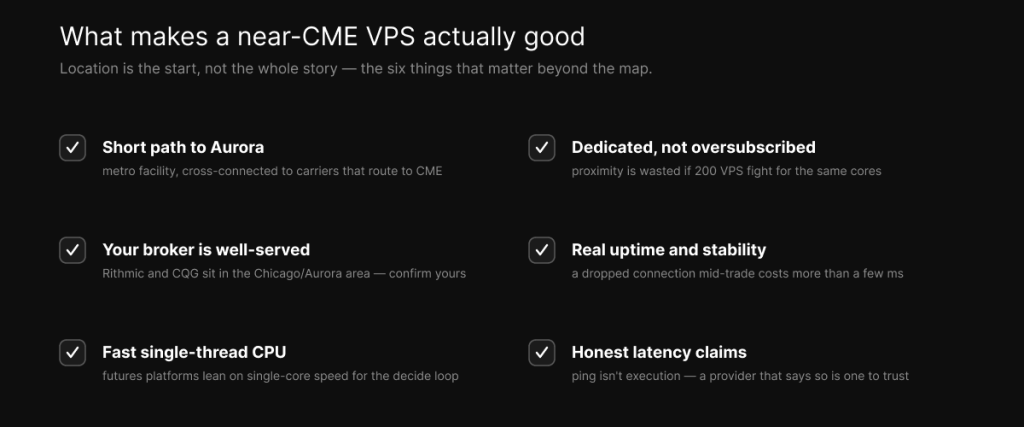
Location gets you in the door. These are the things that decide whether a near-CME VPS is actually good once you’re inside.
A short, direct path to Aurora, meaning a metro facility that cross-connects to the carriers routing to the exchange, not a server three network hops removed. A broker that’s well served from that location, since Rithmic and CQG concentrate their infrastructure in the Chicago and Aurora area and that shortens your path, so confirm your specific broker isn’t the weak link. A fast single-thread CPU for the decide-and-send loop, because futures platforms lean on single-core speed far more than on core count, which is the whole argument in our CPU comparison. Dedicated rather than oversubscribed resources, so you’re not sharing cores with a crowd at the worst possible moment. Real uptime and stability, because a connection that drops mid-trade costs you more than a couple of milliseconds ever will. And honest latency claims, since a provider that openly separates ping from execution is one you can probably trust on everything else too.
What numbers to actually expect
Set your expectations with real figures, not marketing ones. From a genuine Chicago-metro VPS you should see a sub-millisecond network ping to Aurora and a single-digit-millisecond order round trip once your broker and the matching engine are in the path. That’s a strong, honest result for retail futures trading.
What you should not expect is microseconds. Microsecond access to Globex requires a cabinet inside the Aurora data center wired straight to the engine, which is an institutional arrangement that costs institutional money. So if a retail plan is advertising “microseconds to CME” or “sub-1ms execution,” treat that as a red flag rather than a feature — it’s a ping dressed up as a fill, or a number with nothing behind it.
How we’d want you to judge us
We’re not going to ask you to take our word for any of this, because the whole point of this post is that you shouldn’t take anyone’s. We host in the Chicago metro, near the interconnect that feeds Aurora, on fast single-thread hardware built for the decide-and-send loop. So run the tests above against our Chicago VPS and against any competitor you’re weighing, use our latency checker and your own, measure during a live session, and buy whichever one actually holds up. If we’re the closest honest option for your broker and strategy, the numbers will say so. Plans and pricing are here when you’ve seen them.
Frequently asked questions
Measure the round trip from inside the VPS to your broker’s gateway or data feed, the Rithmic or CQG endpoint your orders actually reach, and watch your trading platform’s reported latency during a live session. Use the provider’s latency checker plus your own ping and traceroute, test under load during market hours, and look at consistency, not just the best reading.
No. The Globex matching engine sits behind your broker and isn’t reachable on the open internet for retail traders. Measure to your broker’s gateway or data feed instead, since that’s the path your orders actually travel.
A sub-millisecond network ping to the Aurora area, and typically single-digit milliseconds for a full order round trip through a broker. Microsecond execution is a property of in-building colocation, not a retail VPS, so be skeptical of any retail plan claiming it.
Not necessarily. The network path to Aurora and the load on the host matter far more than the city on the label. A Chicago-labeled server that routes through another city or runs on an oversubscribed machine is not near CME in any way that helps your fills.
It depends on how you trade. For scalping, automated strategies, arbitrage, or news trading on CME futures, proximity is part of your edge. For swing or position trading on higher timeframes, uptime and stability matter more than a few milliseconds, and you shouldn’t pay for latency your strategy can’t use.
We operate TradoxVPS and provide trading infrastructure, not financial advice. Trading futures carries substantial risk, including the loss of more than your initial deposit. Latency figures are environment-dependent and network-only unless stated — measure your own before relying on them.