
Buying a trading VPS is easy. Getting real value out of one is where people slip up — and the costliest mistakes aren’t even technical. They’re believing what the ads imply: HFT speed, zero slippage, an edge waiting inside a rented box.
Here are the most common trading VPS mistakes, grouped by where they happen — buying one, expecting things from it, and using it — each with the honest fix.
Mistakes when you buy
1. Choosing the location by where you live. This is the single most common one. People host the VPS near their own home, but your remote-desktop session isn’t what needs to be fast — your orders are, and they travel from the VPS to the broker on every trade. Host the box near the exchange’s matching engine, not near your desk, and if you don’t know where your broker executes, ping a couple of hubs and compare. It’s the whole point of choosing the location for your strategy.
2. Buying on sticker price. The $5 box is the expensive one. Rock-bottom plans tend to be oversold, parked in a random region, and throttled under load — so they cost you in slipped fills and downtime what they saved you on the invoice. Price matters, but it comes after location, dedicated resources, and a real uptime figure. Check the provider’s uptime and test their support with a technical question before you pay.
3. Chasing CPU cores instead of clock speed. A trading platform does its critical work on one thread, so a CPU with 32 slow cores loses to one with 8 fast ones. The number that matters is single-core clock, which is the entire argument for the Ryzen 9950X — not a big core count that does nothing for your charts.
Mistakes in what you expect
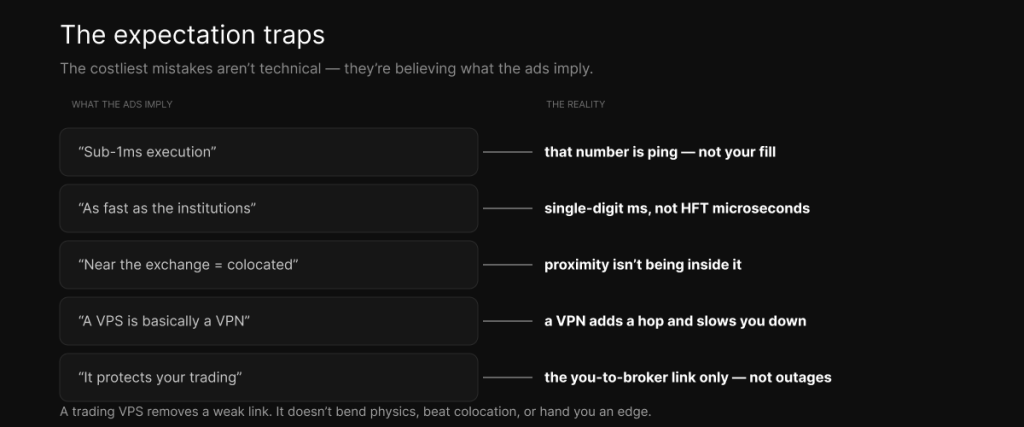
4. Expecting HFT speed. A retail VPS gets you single-digit-millisecond execution — genuinely useful, but not the microseconds of institutional high-frequency trading, which need colocation and specialized hardware. Two traps live here: the “sub-1ms execution” figure in ads is network ping, not your fill, and being near the exchange isn’t being inside it. Proximity is not colocation, as the HFT reality piece spells out.
5. Expecting zero slippage, or easy money. A VPS narrows the slice of slippage caused by latency and jitter. It cannot eliminate slippage — volatility, liquidity, and order size still move your fills — and it creates no edge. It removes a weak link; it doesn’t make a losing strategy win.
6. Confusing a VPS with a VPN. They sound similar and do opposite things. A VPN reroutes your existing connection through an extra server, which makes the path longer and usually slower; a VPS is a whole computer sitting near the market. One is a security tool for your admin connection, the other is the execution environment — the VPS-versus-VPN piece untangles it.
7. Assuming it protects you from everything. A VPS protects the link between you and your broker — your platform and stops stay alive if your home internet dies. It can’t do anything about an exchange halt, a broker outage, or a data-feed problem further down the chain. Knowing that boundary is part of understanding what a trading VPS actually is.
Mistakes when you use it
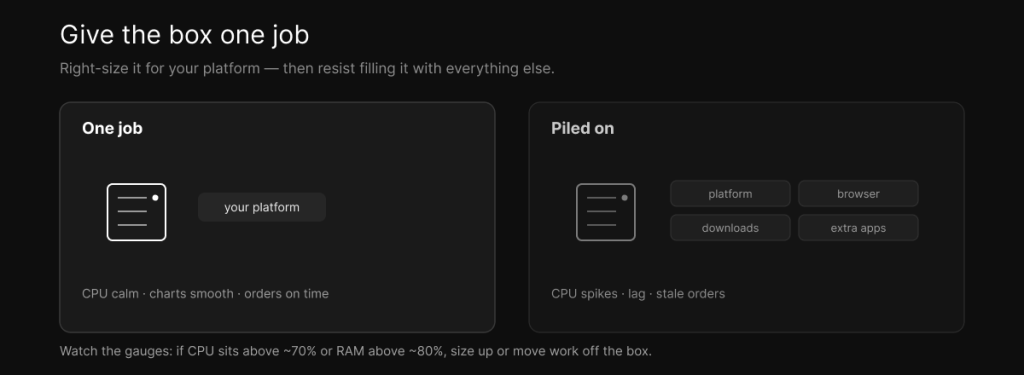
8. Wrong size, then piling everything on. Two halves of one mistake: buying a 16-core monster for a single chart, or cramming ten platforms and a web browser onto a 2-core box. Give the machine one job — your trading platform — and right-size it to that, watching the gauges. If CPU sits above roughly 70% or RAM above 80% during a busy session, size up or move work off the box.
9. Letting updates and reboots hit during market hours. A forced Windows Update reboot or an antivirus scan firing at the open is a self-inflicted outage. Schedule updates and scans for off-hours — never right before the session — and while you’re at it, keep the system patched and back up your EAs, templates, and configs so you can rebuild on a new box in minutes.
10. Neglecting security. A data center adds firewalls, DDoS protection, and isolation a home connection lacks, but the basics are still on you: a strong, unique password, two-factor authentication where it’s offered, and not leaving Remote Desktop wide open to the whole internet. A VPS is a Windows machine on the public internet — treat it like one.
Two more that quietly bite
Ignoring monitoring and jitter. Don’t fly blind. Watch CPU, RAM, and ping, and pay attention to the distribution, not just the average — a connection that averages 10 ms but spikes to 200 ms during news is worse than a steady 30 ms, because the spikes land when fills matter most.
Using a VPS where your prop firm forbids it. Rules vary, and breaking them can void a funded account. Notably, Topstep bans VPS, VPN, and all automation, while firms like Apex, MyFundedFutures, Tradeify, and TakeProfit allow them. Check your firm’s rulebook before you set anything up.
The short version
If you only remember the fixes, here they are:
| Mistake | The honest fix |
|---|---|
| Location near you | Locate near the broker’s engine; ping hubs to verify |
| Buying the cheapest box | Weigh location, dedicated resources, uptime — then price |
| Chasing cores | Prioritize single-core clock |
| Expecting HFT speed | Expect single-digit ms; sub-1ms ads are ping, not your fill |
| Expecting zero slippage | It narrows latency slippage; can’t erase it or create edge |
| Treating it like a VPN | A VPN is security; a VPS is the execution environment |
| Thinking it stops all outages | It guards the you↔broker link, not exchange/broker outages |
| Overloading the box | One job; size up past ~70% CPU / ~80% RAM |
| Updates in market hours | Schedule off-hours; back up EAs and configs |
| Skipping security | Strong password, 2FA, locked-down RDP |
Almost every one of these starts in the same place — taking a landing page at its word. A trading VPS is genuinely useful for the right trader, but for what it actually does: keep your platform online and your orders moving from a spot near the market. Buy it for that, size it sensibly, lock it down, and it quietly earns its keep. If you want one near the CME, that’s what our Chicago plans and pricing are built for — and the buyer’s guide covers the positive checklist in full.
Frequently asked questions
Choosing the location based on where you live instead of where your broker’s matching engine is. Your orders travel from the VPS to the broker on every trade, so the box should sit near the exchange, not near your desk.
Often, yes. Rock-bottom plans are usually oversold, in the wrong region, and throttled under load, which costs you in slipped fills and downtime. Weigh location, dedicated resources, and uptime first, then price.
No. A retail VPS gets you single-digit-millisecond execution, not the microseconds of institutional high-frequency trading, and the sub-millisecond figures in ads are network ping, not your actual fill. Proximity to the exchange isn’t the same as colocation inside it.
No. It narrows the portion of slippage caused by latency and jitter, but volatility, liquidity, and order size still move your fills, and no VPS creates a trading edge.
It depends on the firm. Topstep bans VPS, VPN, and automation, while firms like Apex, MyFundedFutures, Tradeify, and TakeProfit allow them. Always check the rulebook before setting up.
Enough headroom for your platform and EAs — and keep an eye on the gauges. If CPU runs above roughly 70% or RAM above 80% during busy sessions, size up or move some work off the box.
We operate TradoxVPS and provide trading infrastructure, not financial advice. A trading VPS improves uptime and execution but cannot create an edge, deliver HFT-grade latency, eliminate slippage, or protect against broker and exchange outages beyond your own infrastructure; advertised sub-millisecond figures are network ping, not order execution. Always confirm your prop firm’s rules before using a VPS. Trading futures and other leveraged products carries substantial risk, including the loss of more than your initial deposit.