The two acronyms are one letter apart, and that single letter trips up more traders than almost anything else in this corner of the market. People buy a VPN expecting their fills to get faster. They buy a VPS and then wonder why they still need to think about security. They read a forum thread where half the posters are clearly talking about one thing and half about the other, and they walk away more confused than when they started.
So here’s the clean version. A VPS is a computer. A VPN is a tunnel. A VPS runs your trading platform for you, around the clock, in a data center. A VPN takes the traffic from a platform that’s still running on your own machine and reroutes it through another server. They’re not competitors, they don’t do the same job, and for the thing most traders actually care about, getting orders to the exchange quickly and reliably, only one of them helps. This explains exactly what each is, how it works, what it does to your latency, where each is genuinely the right call, and how the people who run serious setups use both without tripping over either.
The difference in one sentence
A VPS, a Virtual Private Server, is a remote computer in a data center that runs your trading platform twenty-four hours a day, independent of your home machine. A VPN, a Virtual Private Network, is an encrypted tunnel that routes your existing internet traffic through another server, mainly for privacy and security.
The distinction that matters: your trading runs on a VPS, and your trading runs through a VPN while still living on your local PC. Different layer, different purpose. One is where the work happens. The other is just a road the traffic takes. Confuse the two and you either overpay for the wrong tool or, more commonly, add a VPN to your setup and quietly make your execution worse. Let’s take each one properly.
What a VPS actually is, and what it does for a trader
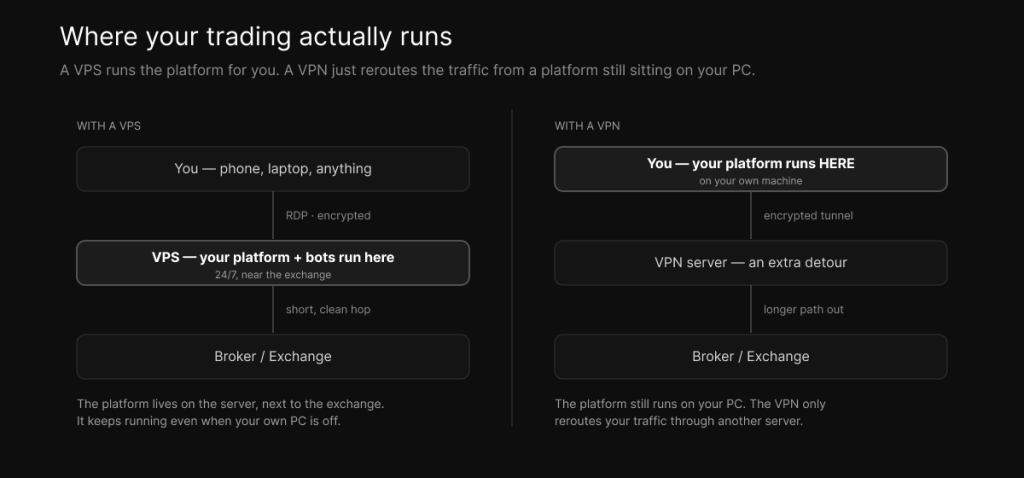
A VPS is a slice of a real, physical server in a data center, carved out with its own dedicated CPU, memory, and NVMe storage, running its own operating system, usually Windows. You connect to it with Remote Desktop and use it exactly like a desktop that happens to be sitting somewhere else. You install NinjaTrader or MetaTrader or whatever you run, you log in, and from then on the platform is living on that server rather than on the laptop in front of you.
For a trader, that arrangement buys three things.
The first is uptime, and it’s the one most people underrate until it bites them. Because the platform runs on the server, it keeps running when your own machine doesn’t. Close your laptop, lose your home internet, suffer a power cut, and your strategies, your Expert Advisors, your trade copiers, and your protective orders all keep going. If your connection drops mid-session, your bracket orders and trailing stops are still sitting on the server doing their job, and you can reconnect from a phone or a tablet to manage the position. For anyone holding leveraged positions, removing your home internet as a single point of failure is the whole game. We go deeper into that risk-management side in how a low-latency VPS improves trade execution.
The second is proximity, which is where latency comes in, and where it’s worth being honest because most of this industry isn’t. A VPS placed near your broker or the exchange sits on a short, clean network path, rather than the long, congested retail route from your house. On the local hop that can mean sub-millisecond ping times. But ping is not execution. A real order round-trip, your platform to the broker’s gateway and back with a confirmation, runs in single-digit milliseconds even from a well-placed VPS, because it passes through your broker’s infrastructure on the way. True microsecond execution, the kind HFT firms chase, requires colocation inside the exchange’s own data center, which is a different and far more expensive tier than any retail VPS. What a good VPS gives you is a dramatically shorter and steadier path than home, not a magic wire into the matching engine. The mechanics of why distance, not bandwidth, sets that floor are in network speed vs latency, and the geography of the CME case specifically is in why a Chicago VPS is best for CME futures.
The third is stability. A trading VPS isn’t fighting the things a home PC fights: no forced Windows updates rebooting you mid-trade, no browser tabs and background apps stealing cycles, no consumer connection that wobbles whenever someone else in the house streams a movie. Pair that with a fast single-thread CPU, which is what platforms like NinjaTrader actually lean on, and you have an environment built to keep a strategy running cleanly for hours. This is where your trading lives and executes.
What a VPN actually is, and what it does
A VPN is software, not a computer. It builds an encrypted tunnel between your device and a server run by the VPN provider, and sends your internet traffic through that tunnel. To the outside world, your traffic appears to come from the VPN server’s location and IP address rather than your own, and the link between you and that server is encrypted so the network you’re sitting on can’t read it.
That’s genuinely useful for a few things. It gives you privacy, your internet provider and the local network can’t see what you’re doing. It gives you security on networks you don’t trust, which is the real reason to care about it as a trader, more on that shortly. And it lets you appear to be in a different location, which people use to reach region-locked websites.
What it does not do is just as important. It does not run your trading platform. It does not keep anything alive when your computer is off. And it does not shorten the path between you and your broker. Your platform is still running on your local machine, with all the fragility that implies; the VPN has only changed the route your packets take on the way out. If you switch your computer off, a VPN does nothing, because there’s nothing left running to tunnel. That single fact is why a VPN can never be a substitute for a VPS in a trading context.
The latency truth: why a VPN usually makes trading slower
This is the part the “VPN for traders” marketing skips, so it’s worth being blunt.
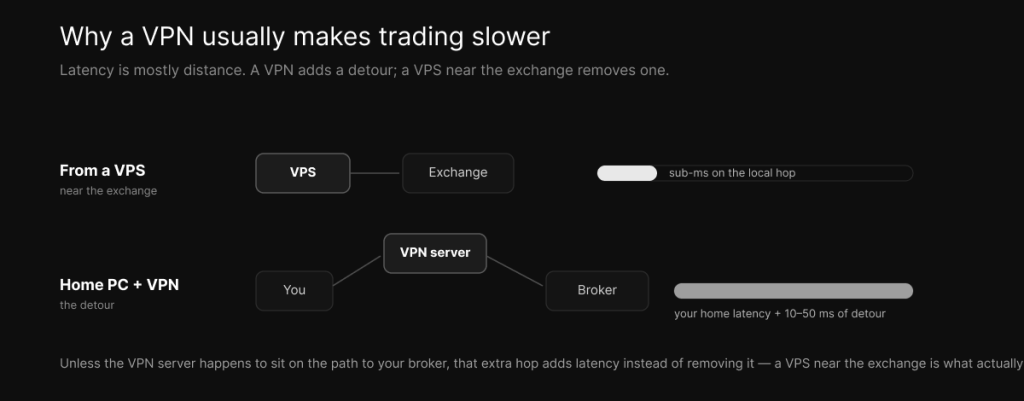
Latency to the exchange is mostly a function of physical distance. Data moves through fiber at roughly two-thirds the speed of light, and every extra mile and every extra hop adds time. A VPN, by design, inserts an extra hop: instead of your traffic going from you to your broker, it now goes from you to the VPN server and then on to your broker. Unless that VPN server happens to sit right on the path between you and the broker, which it almost never does, you’ve added distance to the journey, not removed it. On top of the detour there’s the cost of encrypting and decrypting every packet, and the chance that the VPN server itself is busy and introducing congestion or packet loss.
In practice a VPN adds somewhere from a handful to a few tens of milliseconds, depending on how far away the VPN server is, how loaded it is, and which protocol it uses, lighter modern protocols like WireGuard add less than older ones like OpenVPN. That overhead lands on top of whatever latency your home connection already has. So a trader sitting on a typical home link who switches on a VPN to “improve” their trading usually ends up slower than before, and for a scalper or an automated strategy that extra delay shows up directly as worse fills.
There’s one honest exception. If your internet provider routes traffic to your broker badly, and the VPN provider happens to have better-peered connectivity to that destination, the path through the VPN can occasionally be shorter than your default route. But that’s luck, not a plan, and it’s not something to build a strategy on. The proper fix for a bad path to your broker isn’t to gamble on a VPN’s routing, it’s to put a VPS near the broker so the path is short by design. If your goal is faster, more consistent execution, a VPN is simply the wrong instrument.
The compliance angle nobody mentions
Here’s a consideration most VPS-vs-VPN comparisons leave out entirely, and it can cost you an account.
Brokers, and prop firms especially, watch the IP addresses their clients log in from. They use that to detect fraud, account sharing, and people trading from regions they’re not permitted to. When you route your trading through a VPN, your apparent location and IP change, and if they change often, or land somewhere that doesn’t match your account, you can trip those automated flags. The result can be a restricted or frozen account even though you’ve done nothing dishonest, just because the pattern looked wrong. Some prop firms go further and explicitly prohibit VPN use in their rules. Before you put a VPN anywhere near a funded account, read the broker’s and the firm’s terms, and know that a stable, static IP, which is what a good VPS gives you, is the safer profile.
There’s a practical trap here too. If you install a VPN inside your VPS, you change the VPS’s own public IP address, which can instantly break the Remote Desktop session you use to reach it and lock you out of your own server. It’s a surprisingly common way to end a trading day early. As a rule, don’t run a VPN inside your VPS.
The same caution applies to using a VPN to reach a geo-restricted broker or market. It’s technically possible, but doing it to access a venue you’re not permitted to use can violate the broker’s terms and, depending on where you are, local regulations. This isn’t legal advice, just a flag: that’s a real risk, not a clever workaround.
“Can I use both?” The setup serious traders actually run
Yes, and the two fit together cleanly once you see them as living at different layers.
The VPS is your always-on, low-latency execution environment. It runs the platform and the strategies, sits near the exchange, and stays up regardless of what your home setup is doing. That’s the engine.
The VPN, if you use one, is for securely connecting to that VPS when you’re on a network you don’t trust, a coffee shop, an airport, a hotel. In that scenario the VPN encrypts your connection so nobody on the local network can sniff your credentials as you log in. That’s the legitimate trading use of a VPN, and it’s a good one. Worth knowing, though: Remote Desktop is already encrypted by default, so a VPN on top is extra protection rather than a strict requirement. Plenty of traders connect to their VPS from untrusted WiFi using RDP alone and are fine; a VPN is belt-and-suspenders for the security-conscious.
The mental model that keeps it straight: the VPS is where your trading happens, and the VPN is how you safely reach it from the outside. They don’t conflict, as long as you keep the VPN on the device you’re connecting from and not running inside the server itself.
Side by side: which one for what
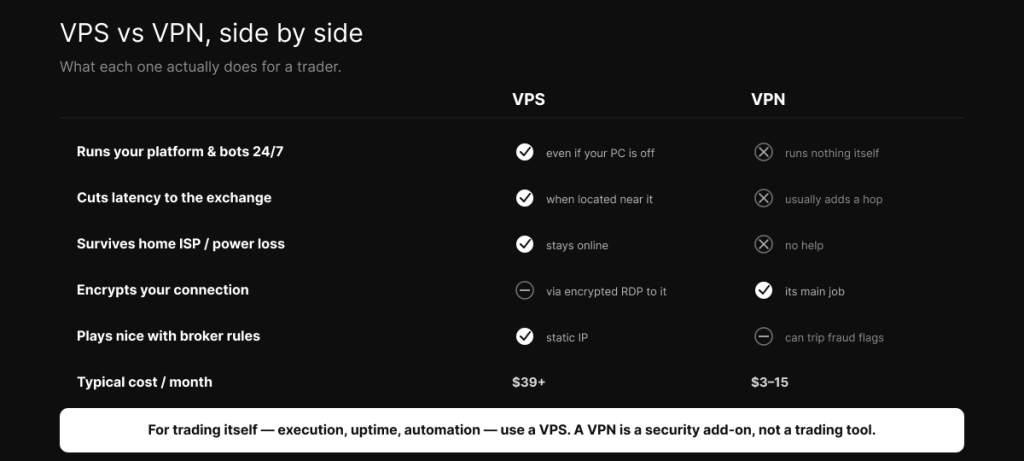
Lined up against the things traders actually care about, the split is clear. A VPS runs your platform and bots around the clock; a VPN runs nothing on its own. A VPS cuts latency to the exchange when it’s located near it; a VPN usually adds a hop. A VPS keeps you trading through a home internet or power failure; a VPN does nothing for that. A VPN’s job is encryption and privacy, which it does well; a VPS gets you the same protection on the connection to it through encrypted Remote Desktop. A VPS with a static IP sits comfortably within broker rules; a VPN’s shifting IPs can trip fraud flags. A VPS costs more, typically from around $39 a month; a VPN is cheap, a few dollars to fifteen.
Put plainly: for trading itself, the execution, the uptime, the automation, you want a VPS. A VPN is a security add-on, useful in its place, and actively counterproductive if you mistake it for a performance tool.
So what should you actually get?
If you run any automated strategy, if you scalp or trade anything execution-sensitive, or if your home internet is the single point of failure standing between you and an open leveraged position, you want a VPS near your venue. For CME futures that means the Chicago metro near the exchange; the right location depends on what you trade, and matching the server to the venue is most of the benefit. Get on it, then measure your real latency from it rather than trusting anyone’s headline number.
Add a VPN only if you regularly connect to that VPS from networks you don’t trust and want the extra encryption on the session, and even then, keep it on your local device and never inside the server. Whatever you do, don’t buy a VPN expecting it to speed up your trading. That isn’t what it’s for, and in most setups it does the opposite. When you’re ready to match a server to how you actually trade, the plans and pricing are here.
Frequently asked questions
A VPS, for trading itself. It runs your platform and strategies around the clock and, when located near your broker, shortens the path to the exchange. A VPN is a privacy and security tool, not a performance tool, and it usually adds latency rather than reducing it.
No, in almost all cases it does the opposite. A VPN routes your traffic through an extra server before it reaches your broker, which adds a hop, extra distance, and encryption overhead. Only a VPS located near your broker meaningfully reduces latency, because it makes the path physically shorter.
Yes, and they complement each other. Run your trading on the VPS, and use a VPN, if you want one, only to securely connect to that VPS from an untrusted network like public WiFi. Don’t install the VPN inside the VPS, because changing the server’s IP can break your Remote Desktop connection.
It can. Brokers and prop firms monitor login IPs for fraud and account sharing, and a VPN, especially one that changes your apparent location frequently, can trip those flags and lead to a restricted or frozen account. Some prop firms prohibit VPNs outright. Check the rules, and prefer a static IP.
No. Remote Desktop is encrypted by default, so you can connect securely without one. A VPN is optional extra protection if you’re connecting from a network you don’t trust, such as public WiFi.
Proximity and stability, not “faster internet.” A well-placed VPS sits near the exchange on a short, clean network path and runs continuously without home ISP wobble, power cuts, or background processes interfering. That combination produces more consistent execution than a home connection, which routes through a long retail path and competes with everything else on your network.
No. A VPN doesn’t run anything, it only reroutes traffic from software that’s still running on your own machine. The moment you turn your computer off, the VPN does nothing. Only a VPS keeps your Expert Advisors, bots, and protective orders running when your computer is off.
We operate TradoxVPS and provide trading infrastructure, not financial or legal advice. References to broker rules and geo-restrictions are general; check your own broker’s and prop firm’s terms. Trading futures and other leveraged products carries substantial risk, including the loss of more than your initial deposit.