
NinjaTrader announced its UK launch on 27 October 2026. According to the announcement, UK traders get NinjaTrader’s desktop, web and mobile platforms, can fund their accounts in pounds or dollars, and can trade CME and Eurex futures.
That raises three questions for anyone trading from the UK. Who holds the account, and what protection comes with it? When do the markets open on a UK clock? And where should the platform run, when the exchanges are in Illinois and Frankfurt rather than London?
This guide answers each one from NinjaTrader’s announcement and UK web pages, the exchanges’ own documents and NinjaTrader’s help guide. Most of it applies to traders in the rest of Europe too, and a short section covers the EU.
Disclosure: TradoxVPS has no relationship with NinjaTrader, CME Group or Eurex. We run trading servers in Chicago, London and Frankfurt, among other locations, which is why the second half of this guide looks at where the platform runs.
NinjaTrader UK: the short answer
- What launched: on 27 October 2026, NinjaTrader announced UK access to “U.S. equity index, energy, metals, and FX futures on CME, and EUREX”, on its desktop, web and mobile platforms, with accounts funded in GBP or USD.
- Regulation: NinjaTrader describes itself as “an overseas firm” that is “not authorised by the FCA”. An FCA-authorised firm, Gateway 21 Limited, approves its UK communications, and investors are not protected by the Financial Services Compensation Scheme.
- Fees: NinjaTrader’s UK pricing page lists the same plans and commissions as its US site, in dollars. Commissions run from $0.09 to $1.29 per contract, per side, depending on the plan and the contract size.
- Hours: CME’s equity index, energy and metals futures open at 23:00 UK time on Sunday and close at 22:00 on Friday, with a break from 22:00 to 23:00 each weekday. For a few weeks around the March and October clock changes, those times are one hour earlier. Eurex stays one hour ahead of UK time all year.
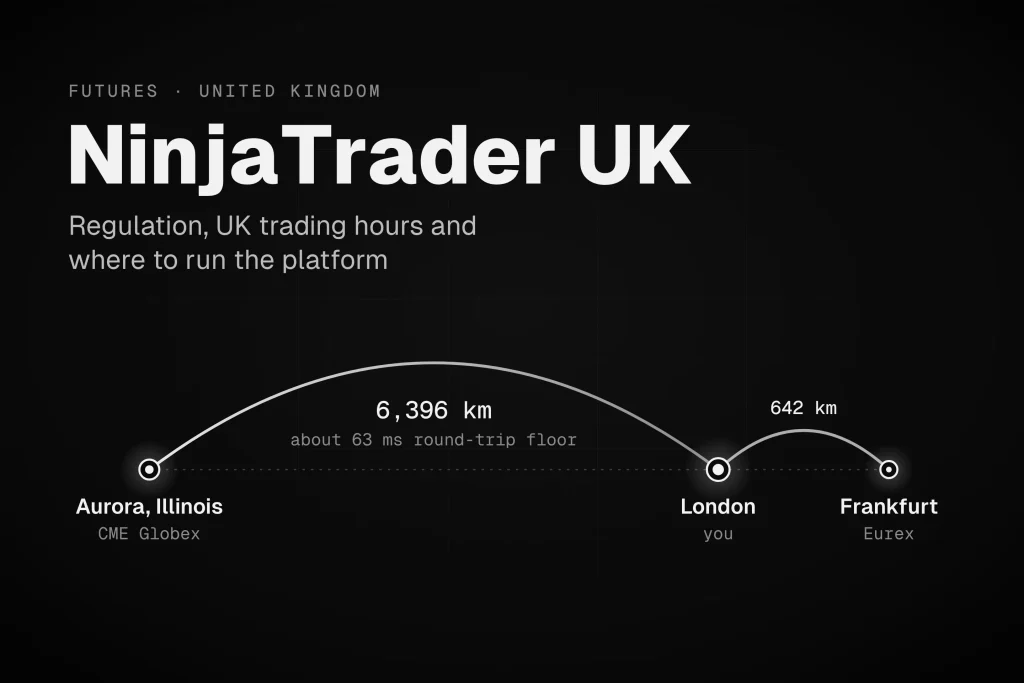
- Distance: CME matches orders in Aurora, Illinois, about 6,400 km (4,000 miles) from London. Eurex matches orders in Frankfurt, about 640 km away. Light in optical fibre needs about 63 ms for a round trip between London and Aurora, however good the connection.
- Where to run it: a server in Chicago does not speed up manual clicking from the UK, because your screen and your clicks still cross the Atlantic. It does remove that distance for automated strategies and for the order handling NinjaTrader Desktop does on its own computer, and it keeps both running if your home PC or broadband fails.
- Platform: NinjaTrader Desktop needs Windows 11 or Windows Server 2016 or later. Mac users can trade on the web and mobile platforms, or run Desktop on a Windows machine they connect to remotely.
Current status
Checked 2 November 2026. This section and the pricing table below are the only parts of the guide that depend on announcements and price lists.
- United Kingdom: NinjaTrader announced its UK launch on 27 October 2026. The announcement does not name the company UK clients contract with, and it does not publish a UK fee schedule. NinjaTrader’s UK pricing page does list prices, covered below.
- Regulatory notices: the UK announcement and the UK pricing page both carry approval from Gateway 21 Limited, which they describe as “authorised and regulated by the Financial Conduct Authority (FRN: 999557)”.
- European Union: NinjaTrader announced its EU launch on 30 January 2026, starting with the Netherlands and Germany, through Payward Europe Digital Solutions (CY) Limited, an investment firm authorised by the Cyprus Securities and Exchange Commission (licence 342/17). Eurex futures went live on 15 June 2026, when NinjaTrader was available in 30 EU and EEA countries.
- CME’s location: CME matches orders in Aurora, Illinois. It is moving its futures and options markets onto a private Google Cloud region in Aurora, and its client systems wiki schedules the main migration for late 2027 to 2028.
- Next clock-change gap: from 14 to 27 March 2027, CME opens at 22:00 UK time on Sunday instead of 23:00.
What NinjaTrader launched in the UK
NinjaTrader’s announcement of 27 October 2026 calls the UK launch “the next phase of its global expansion following its earlier 2026 expansion into Germany, Italy, France, Netherlands, Spain, and broader EU markets”. The details that matter to a trader:
- Markets: the announcement says the platform “gives UK traders direct access to global futures markets including U.S. equity index, energy, metals, and FX futures on CME, and EUREX”. When Eurex went live for NinjaTrader’s EU clients, that included EURO STOXX 50, DAX and Euro-Bund futures, with MSCI index futures planned.
- Platforms: “UK traders will have access to NinjaTrader’s desktop, web, and mobile platforms”. The desktop platform is the Windows program most NinjaTrader users know, with the SuperDOM order ladder and NinjaScript automation the announcement mentions. The web and mobile platforms run in a browser and in NinjaTrader’s app.
- Funding: UK traders “will be able to fund their accounts using GBP or USD”.
- Practice: NinjaTrader offers a free simulator with virtual funds. It is the natural place to learn the platform, and to check the hours below on a UK clock, before trading live.
The announcement does not mention crypto futures or options. NinjaTrader’s UK pricing page lists more venues than the announcement does, so check the product list in your own account application rather than assuming either list is complete.
The announcement carries its own risk warning, which is worth repeating: “Futures trading involves substantial risk and is not suitable for everyone. Losses may exceed the initial investment.”
NinjaTrader UK pricing
Prices as listed on NinjaTrader’s UK pricing page on 2 November 2026. The page shows them in US dollars.
| Free plan | Monthly plan | Lifetime plan | |
|---|---|---|---|
| Platform fee | $0 | $99 a month | $1,499, paid once |
| Commission per side, micro contracts | $0.39 | $0.29 | $0.09 |
| Commission per side, standard contracts | $1.29 | $0.99 | $0.59 |
Commissions are charged per side, so a round trip (into a position and out again) costs twice the listed rate. The same page lists these charges as well:
- CME market data: non-professional Level I data costs $12 a month for all four CME exchanges (CME, CBOT, NYMEX and COMEX), or $4 a month per exchange. Level II costs $48 a month for all four, or $16 per exchange. Professional users pay $156 a month per exchange.
- Clearing and exchange fees: clearing costs $0.19 per contract, and the page adds that “Exchange, clearing, and NFA fees apply”.
- Rithmic order routing: $0.25 per contract, for accounts that route orders through Rithmic.
- Currency conversion: 1%. This matters if you fund the account in pounds and trade dollar-priced CME contracts.
- Inactivity: a $35 minimum account activity fee in any month when a free-plan account logs in to its trading platform but makes no live trades.
The UK page shows the same plan fees and commissions as NinjaTrader’s US pricing page. It also lists venues the UK announcement does not mention, including ICE Futures US, Coinbase Derivatives and Bitnomial, and a fee line that refers to plans from before 20 June 2025, long before the UK launch. Treat your account application and client agreement as the final word on what a UK account can trade and what it costs.
NinjaTrader UK regulation: who holds your account
The UK announcement and NinjaTrader’s UK pages end with the same notices. The pricing page puts it this way: “NinjaTrader is an overseas firm which is not authorised by the Financial Conduct Authority.” It continues: “Investors are not protected by the UK Financial Services Compensation Scheme.”
Here is what those notices mean in practice:
- The marketing is approved, but the firm is not authorised. Section 21 of the Financial Services and Markets Act 2000 stops a person from communicating, in the course of business, an invitation or inducement to engage in investment activity, unless that person is authorised, an authorised firm has approved the communication, or an exemption applies, as Kroll’s guide to the rules explains. NinjaTrader’s UK communications carry the approval of Gateway 21 Limited, “authorised and regulated by the Financial Conduct Authority (FRN: 999557)”. Since 7 February 2024, firms that approve promotions for unauthorised firms need a specific FCA permission to do so. The approval covers the communication. It does not make NinjaTrader an FCA-regulated firm.
- There is no FSCS cover. The Financial Services Compensation Scheme can compensate customers when an investment firm fails, but its investments page is clear that “the PRA or the FCA must have authorised the provider or adviser”. NinjaTrader’s notices say its investors are not protected by the scheme.
- The US side is regulated in the US. The announcement says “NinjaTrader Clearing, LLC provides direct access to the futures markets”, and its own disclosures describe that company as a futures commission merchant registered with the CFTC, the US derivatives regulator. The UK announcement does not say which company holds a UK client’s account or money.
So before you fund an account, read the client agreement for three things: which company you contract with, which regulator supervises that company, and how your money is held while it sits there. This guide is not legal or financial advice. For your own circumstances, ask a qualified adviser.
CME and Eurex trading hours in UK time
CME publishes its hours in US time, and Eurex in Central European Time (CET). Both convert to UK time with a fixed rule, apart from a few weeks each year.
| Market | Exchange’s own time | UK time, most of the year | UK time, clock-change gap weeks |
|---|---|---|---|
| CME equity index, energy and metals futures | Sunday 6:00 p.m. to Friday 5:00 p.m. ET, daily break 5:00 to 6:00 p.m. ET | Sunday 23:00 to Friday 22:00, daily break 22:00 to 23:00 | Sunday 22:00 to Friday 21:00, daily break 21:00 to 22:00 |
| US stock market core session (NYSE) | 9:30 a.m. to 4:00 p.m. ET | 14:30 to 21:00 | 13:30 to 20:00 |
| Eurex regular trading day | 08:00 to 22:00 CET | 07:00 to 21:00 | 07:00 to 21:00 |
| Eurex early hours, selected liquid futures | 01:00 to 08:00 CET | 00:00 to 07:00 | 00:00 to 07:00 |
| Eurex DAX futures, start of continuous trading | 01:10 CET, after pre-trading from 01:00 | 00:10 | 00:10 |
Sources: CME’s Micro E-mini FAQ and Micro WTI FAQ, NinjaTrader’s guide to futures hours, NYSE, Eurex’s trading hours page and its DAX futures page. UK times are TradoxVPS arithmetic from the IANA time zone database.
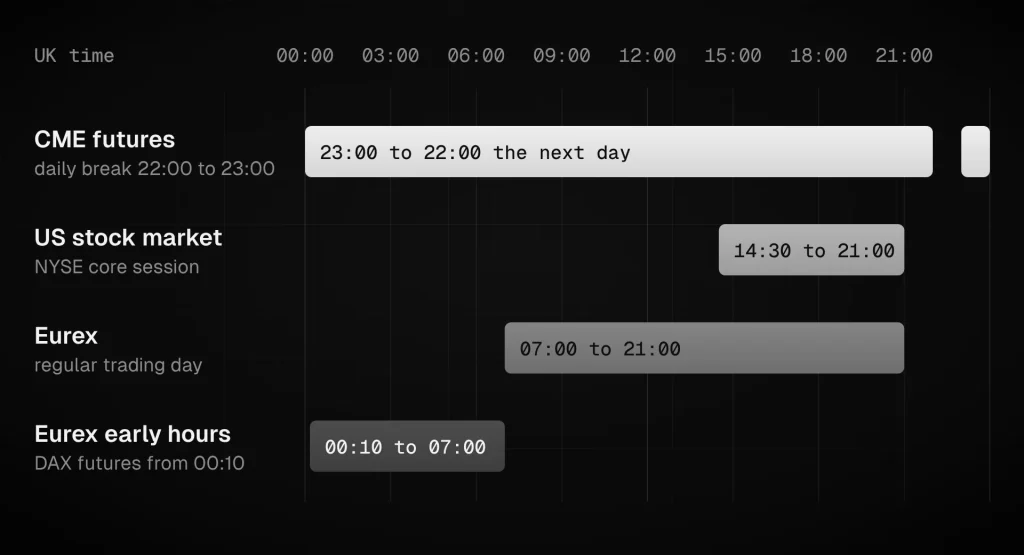
“Most of the year” means whenever the UK and the US are both on summer time or both on winter time. The two countries change their clocks on different Sundays, so for one week in autumn and two or three weeks in spring, US market times arrive an hour earlier in the UK. The next gap weeks are 14 to 27 March 2027 and 31 October to 6 November 2027. Our daylight saving time trading hours guide lists the dates through 2031 and what each change does to platforms and strategies.
Eurex never moves against UK time, because the EU and the UK change their clocks at the same moment.
A few more points matter for UK traders:
- The daily break is the natural maintenance slot. CME’s equity index, energy and metals futures stop for an hour each weekday at 22:00 UK time (21:00 in the gap weeks), and Eurex’s day has ended by then. If NinjaTrader runs on an always-on machine, that hour and the weekend are the times to restart it or install updates.
- Exact hours vary by contract. NinjaTrader’s own guide says to “confirm the schedule for the specific market you trade”. Eurex publishes the trading phases for every product in Annex C of its contract specifications.
- Holidays follow the exchanges, not the UK. CME’s holiday calendar is built around US holidays such as Thanksgiving, and Eurex publishes its own trading calendar. Neither follows the UK bank holiday calendar, so check both rather than assuming a UK bank holiday shuts a market.
- A few CME contracts never close for the weekend. They follow their own maintenance windows instead, listed in our CME 24/7 trading guide.
- Set the platform’s time zone on purpose. NinjaTrader displays charts and market data in the time zone chosen in its general settings, regardless of the time zone the computer itself is set to, as NinjaTrader support explains on its forum. In the Control Center, open Tools, then Settings (Options in older versions), then General. London time is fine for watching the market. For strategies that use fixed clock times, Central Time or the instrument’s trading hours template avoids the gap-week drift our daylight saving guide describes.
Where NinjaTrader orders go from the UK
Every NinjaTrader order makes two trips. The first runs from the platform to the servers of your broker or connection provider. The second runs from those servers to the exchange’s matching engine, the system that pairs buyers with sellers.
- CME matches orders in its data centre in Aurora, Illinois, which its co-location page places about 35 miles (56 km) from CME’s headquarters in Chicago. In 2024, CME and Google Cloud announced a private Google Cloud region in Aurora, and CME’s client systems wiki schedules the main migration of its markets there for late 2027 to 2028. Either way, CME’s matching stays in the Chicago area. Our CME Google Cloud migration guide follows the move.
- Eurex matches orders in Frankfurt. Deutsche Börse announced in 2010 that it would place the matching engines for its key exchanges in Equinix’s FR2 data centre in the city. Eurex completed its move in October 2011, and Deutsche Börse’s co-location service is still hosted by Equinix.
Where the first trip ends depends on the connection your account uses. For NinjaTrader’s own connection, its help guide says orders in the “Accepted” or “Working” or “Suspended” state “are at the brokerage or exchange”, but NinjaTrader’s UK and EU announcements do not say where its order servers sit for European clients.
You can see where your own platform connects, using tools built into Windows:
- With NinjaTrader connected, open Resource Monitor. Typing resmon into the Start menu finds it.
- On the Network tab, tick NinjaTrader.exe in the list of processes with network activity.
- In the TCP Connections panel, the Remote Address column shows the servers NinjaTrader is talking to, and the Latency (ms) column shows how long data takes on each connection, as Windows measures it.
- For the route, open Command Prompt and type tracert followed by one of those addresses. Some networks do not answer tracert, so a route that stops early is not necessarily a fault.
A latency of a few milliseconds from the UK means the servers are in Europe. A latency of 60 ms or more means they are in North America, as the floors in the next section show.
How far the UK is from CME and Eurex
Distance sets a floor under every round trip. Light in optical fibre travels at about 204,000 km per second, roughly two thirds of its speed in a vacuum, so every 100 km of distance adds about 1 ms to a round trip. The table below uses straight-line distances, which no real cable follows, so real round trips always take longer than these floors.
| From | Distance to CME, Aurora | Round-trip floor | Distance to Eurex, Frankfurt | Round-trip floor |
|---|---|---|---|---|
| London | 6,396 km | 63 ms | 642 km | 6.3 ms |
| Manchester | 6,170 km | 60 ms | 841 km | 8.2 ms |
| Edinburgh | 6,001 km | 59 ms | 1,026 km | 10.0 ms |
| Dublin | 5,933 km | 58 ms | 1,091 km | 10.7 ms |
| Amsterdam | 6,650 km | 65 ms | 366 km | 3.6 ms |
| Paris | 6,695 km | 66 ms | 483 km | 4.7 ms |
| Madrid | 6,773 km | 66 ms | 1,450 km | 14.2 ms |
| Milan | 7,334 km | 72 ms | 519 km | 5.1 ms |
| Frankfurt | 7,007 km | 69 ms | Same city | Under 0.1 ms |
Great-circle distances from each city centre to Aurora and to Equinix’s FR2 site in Frankfurt, with light in fibre at 204,000 km per second. TradoxVPS arithmetic.
Three things follow from the table:
- From anywhere in the UK, CME is about 60 ms away before any equipment is counted. Transatlantic cables land on the US east coast, so a real route from London to Aurora runs by way of the coast. Through New York, for example, the path is about 6,770 km, with a floor of about 66 ms. Routers, switches and longer cable paths add more on top.
- Inside the Chicago area, the distance almost disappears. From one of our Chicago servers, a Rithmic API endpoint in Chicago measured 1.2 ms for the round trip on 14 September 2026, over 30 samples.
- Eurex is close to most of Europe. From London, Frankfurt is about a tenth of the distance to Aurora.
If you want a feel for the transatlantic delay before deciding anything, our latency checker measures the round trip from your own browser to each of our server locations, Chicago included.
Does a VPS make NinjaTrader faster from the UK?
It depends on who makes the decision: you or the platform.
Every trading decision is a loop. The market moves at the exchange, the new price reaches whoever is deciding, and an order travels back. What matters is how many times that loop crosses the Atlantic.
- Home PC in the UK, trading by hand. The price travels from Aurora to your PC, and your order travels back. The loop crosses the Atlantic twice.
- Server in Chicago, trading by hand over remote desktop. The price reaches the server almost at once. But the picture of your screen still has to travel to the UK, and your click has to travel back before the server sends the order. The loop still crosses the Atlantic twice, and remote desktop adds its own small delay for sending the picture.
- Server in Chicago, running an automated strategy. The price reaches the strategy, the strategy decides, and the order goes to the exchange without leaving the Chicago area. The loop never crosses the Atlantic.
[IMAGE 2, place here]
ninjatrader-uk-decision-loop.webp
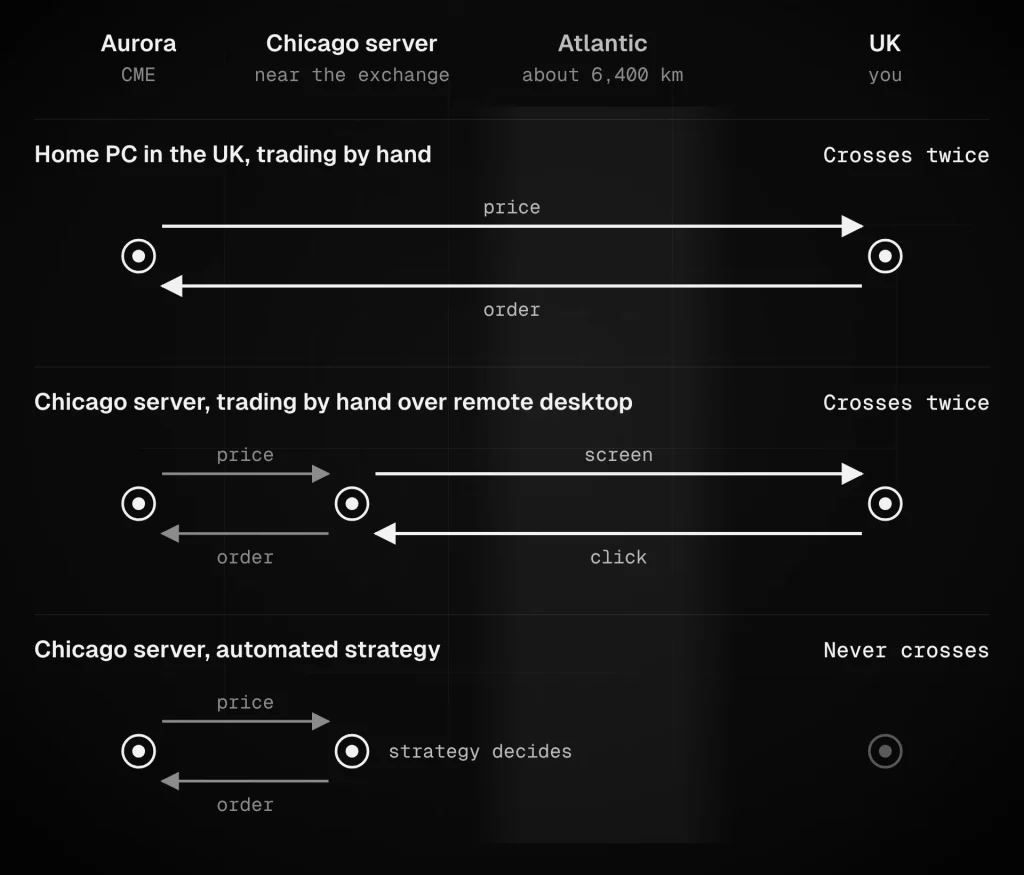
So a server near the exchange does not make manual clicking faster from the UK. What it gives a manual trader is resilience: the platform keeps running when home power or broadband fails. For automated strategies, and for the order handling NinjaTrader Desktop does on the computer it runs on, it takes the transatlantic distance out of every decision.
What NinjaTrader Desktop does on your own computer
Not everything in NinjaTrader lives at the broker. NinjaTrader’s help guide spells out which parts depend on the computer running the platform:
- Accepted and working orders do not. On NinjaTrader’s own connection, orders in the “Accepted” or “Working” or “Suspended” state “are at the brokerage or exchange”, according to NinjaTrader’s order residency page. A plain limit or stop order stays in the market if your computer switches off.
- OCO links often do. OCO (one cancels other) is the link that cancels your stop when your target fills, and the other way round. For the NinjaTrader connection, the same page says “Most OCO (One Cancels Other) functionality is simulated on your local PC”, and it says OCO is simulated on your local PC for Rithmic too. For Interactive Brokers, it says OCO is supported natively on the provider’s servers. For CQG, it says most OCO functionality is, and points to a disclaimer.
- ATM strategies do. NinjaTrader’s FAQ answers yes to the question “Does NinjaTrader need to be connected for ATMs to work?”: the platform must be connected for an ATM strategy to activate and for its functions to operate.
- Some simulated orders can be lost. The order residency page warns that MIT orders and simulated orders in a TriggerPending state cannot be recovered when the provider does not support them natively, and that their state becomes Unknown after reconnecting.
- NinjaScript strategies do. A strategy is code running inside the platform. When the computer stops, the strategy stops making decisions, whatever orders it has left at the broker.
This is why the machine NinjaTrader runs on matters even to traders who do not care about speed. Our guide to NinjaTrader connection problems covers what happens to working orders during a disconnect, and what to check when you reconnect.
The rules above come from NinjaTrader Desktop’s help guide. The web and mobile platforms run in a browser and in NinjaTrader’s app, so check with NinjaTrader how brackets are held there before you pay for a server to keep them running.
Where to run NinjaTrader from the UK
| How you trade | A sensible place to run NinjaTrader | Why |
|---|---|---|
| By hand, on the web or mobile platform | Your own device | The platform runs in your browser or NinjaTrader’s app, not as a Windows program you need to keep running |
| By hand on NinjaTrader Desktop, watching every trade, with reliable power and broadband | Your own computer | Working orders sit at the broker or exchange, and a remote server would not shorten the transatlantic loop |
| Desktop with ATM strategies or OCO brackets that must keep working if your PC or broadband fails | An always-on Windows machine, ideally near the exchange | NinjaTrader must be connected for ATM strategies, and on NinjaTrader and Rithmic connections OCO is largely simulated on the local PC |
| NinjaScript strategies on CME contracts | A server in the Chicago area | The strategy reads prices and sends orders without crossing the Atlantic |
| NinjaScript strategies on Eurex contracts | A server in Frankfurt, once you have checked where your orders go | Eurex is in Frankfurt, but NinjaTrader does not say where it routes Eurex orders |
| Strategies on both CME and Eurex | Near the market your strategy depends on most, or one machine near each | Aurora and Frankfurt are about 7,000 km apart, so one machine cannot be close to both |
| Remote desktop that feels as quick as possible | A server in London, or a machine at home | Close to you, but no closer to either exchange than your home connection |
Where hosting fits: our Chicago VPS servers sit in the Chicago area for CME, our Frankfurt VPS covers Eurex, and our NinjaTrader VPS page explains the setup for NinjaTrader specifically. If you trade by hand on the web platform, or sit in front of NinjaTrader Desktop for every trade on a reliable connection, you do not need any of them.
Running NinjaTrader on a remote server from the UK
If you decide a remote Windows server makes sense, these points come up for UK traders in particular:
- Check the Windows version. NinjaTrader’s minimum system requirements are “Windows 11, Windows Server 2016 or later 64-bit”, with Microsoft .NET Framework 4.8.
- Connect from a Mac with Windows App. Microsoft’s Windows App runs on macOS and connects to remote Windows PCs, so Mac users can run NinjaTrader Desktop on a Windows server.
- Expect a remote desktop delay. Every click and screen update makes the transatlantic round trip, which cannot take less than about 60 ms from the UK to Chicago. You will notice it when clicking quickly. It matters far less when you are supervising a strategy.
- Run one session at a time. Rithmic’s connection guides say a second application can disconnect the first when both use the same feed, and NinjaTrader says NinjaTrader Desktop cannot maintain two simultaneous Rithmic connections. If NinjaTrader runs on the server, close it at home.
- Schedule maintenance for the break. Restart and update Windows at the weekend or during CME’s daily break, 22:00 to 23:00 UK time (21:00 to 22:00 in the gap weeks). Never do it with a strategy running and a position open.
- Choose the platform’s time zone deliberately. London time suits watching the market. Central Time, or trading hours templates, suit strategies with fixed clock times.
- Secure the server. A machine that can reach your brokerage account deserves the same care as your own computer. Our guide to securing a trading VPS covers the basics.
- Rehearse on the simulator. Run the whole setup on NinjaTrader’s free simulator, including a restart and a reconnect, before you trade live.
NinjaTrader in the EU
NinjaTrader announced its EU launch on 30 January 2026, starting with the Netherlands and Germany, with the service provided “via Payward Europe Digital Solutions (CY) Limited (PEDSL-CY), a MiFID investment firm”. Its disclaimer describes that firm as authorised and regulated by the Cyprus Securities and Exchange Commission under licence 342/17. Eurex’s EURO STOXX 50, DAX and Euro-Bund futures went live on 15 June 2026, when NinjaTrader said it was available in 30 EU and EEA countries.
Everything above about distance and where to run the platform applies in the EU too. Two things differ:
- Eurex needs no conversion. CET is your local time in most of the EU.
- CME’s week opens at midnight. Sunday 6:00 p.m. ET is 00:00 CET on Monday for most of the year, and 23:00 CET on Sunday during the gap weeks. The daily break runs from 23:00 to 00:00 CET, or from 22:00 to 23:00 in the gap weeks.
How we checked this
On 2 November 2026 we read NinjaTrader’s UK announcement of 27 October 2026, its UK and US pricing pages, its EU announcements of 30 January and 15 June 2026, and the NinjaTrader Desktop help guide pages on order residency, ATM strategies and system requirements. Trading hours come from CME’s product FAQs and holiday calendar, NinjaTrader’s guide to futures hours, NYSE, and Eurex’s trading hours and DAX futures pages. Exchange locations come from CME’s co-location page, its 2024 Google Cloud announcement and its client systems wiki, and from Deutsche Börse’s 2010 announcement, Eurex’s 2011 migration notice and Deutsche Börse’s current co-location page. The UK and CET conversions and the clock-change dates were computed from the IANA time zone database.
Distances are great-circle distances from each city centre, and the floors assume light in fibre at 204,000 km per second. The Rithmic figure is our own measurement, taken from a customer-facing Chicago server on 14 September 2026, over 30 samples.
We did not open a NinjaTrader UK account, so we have not seen the UK client agreement. We also did not measure NinjaTrader’s own order servers for UK clients, because their location is not published and depends on the connection an account uses. The Resource Monitor steps above let you check yours.
Frequently asked questions
Not by the FCA. NinjaTrader’s UK announcement and pricing page describe it as an overseas firm that is not authorised by the Financial Conduct Authority, and they say investors are not protected by the Financial Services Compensation Scheme. Its UK communications are approved by Gateway 21 Limited, an FCA-authorised firm (FRN 999557), which is one of the routes UK law allows for an unauthorised firm to market investments here. That approval covers the communication, not the account. NinjaTrader Clearing, LLC, which the announcement says provides access to the futures markets, is registered with the US regulator, the CFTC, as a futures commission merchant.
NinjaTrader’s announcement lists US equity index, energy, metals and FX futures on CME, plus Eurex futures. For EU clients, Eurex access includes EURO STOXX 50, DAX and Euro-Bund futures. NinjaTrader’s UK pricing page lists more venues than the announcement, including crypto futures exchanges, so confirm the product list in your account application before planning around a particular market.
Yes. The announcement says UK accounts can be funded in GBP or USD. NinjaTrader’s UK pricing page shows its fees in dollars and lists a 1% currency conversion charge, and CME contracts are priced in dollars, so expect conversion costs if you fund in pounds and trade dollar-priced contracts. The account terms set out exactly when conversions happen.
CME’s equity index, energy and metals futures open at 23:00 UK time on Sunday and close at 22:00 on Friday, with a one-hour break from 22:00 to 23:00 on weekdays. During the clock-change gap weeks, one week around the end of October and two or three weeks in March, everything happens an hour earlier: the week opens at 22:00 on Sunday, and the break runs from 21:00 to 22:00. The US stock market’s core session runs from 14:30 to 21:00 UK time, or from 13:30 to 20:00 in the gap weeks.
NinjaTrader Desktop is a Windows program: its minimum requirements are Windows 11 or Windows Server 2016 or later, 64-bit. Mac users can trade on NinjaTrader’s web and mobile platforms, or run Desktop on a Windows machine and connect to it with Microsoft’s Windows App, which runs on macOS. A Windows server in a data centre works for this just as a Windows PC at home does.
No. If you trade by hand on the web or mobile platform, or you sit in front of NinjaTrader Desktop for every trade on a reliable connection, your own device is enough. A remote server earns its place when something must keep running without you: NinjaScript strategies, ATM strategies, and the OCO handling NinjaTrader largely simulates on the local computer for its own and Rithmic connections. For CME strategies, a server in the Chicago area also takes the transatlantic distance out of every decision.
Not from the UK. With NinjaTrader on a Chicago server, prices reach the platform quickly, but the picture of your screen still travels to the UK and your click travels back, so the Atlantic is crossed twice per decision, just as it is with a home PC. What a manual trader gains is a platform that keeps running if home power or broadband fails. The speed gain belongs to automated strategies, which decide and send orders without leaving the Chicago area.
For CME, Chicago. CME matches orders in Aurora, Illinois, about 6,400 km from London, so a strategy on a Chicago server avoids a transatlantic round trip that cannot take less than about 63 ms. A London server is close to you, which makes remote desktop feel quicker, but it is no closer to CME than your home connection. For Eurex, the exchange is in Frankfurt, so a Frankfurt server is the closer choice once you have checked that your orders actually route there.
The announcement is about opening a futures account with NinjaTrader itself. A prop firm account connects through the provider the firm chooses, such as Rithmic or Tradovate, under the firm’s own rules, so nothing in the announcement changes how it works. Check your firm’s rules on platform fees and on remote servers, and see our guide to VPS hosting for prop firm futures trading for what to look out for.