
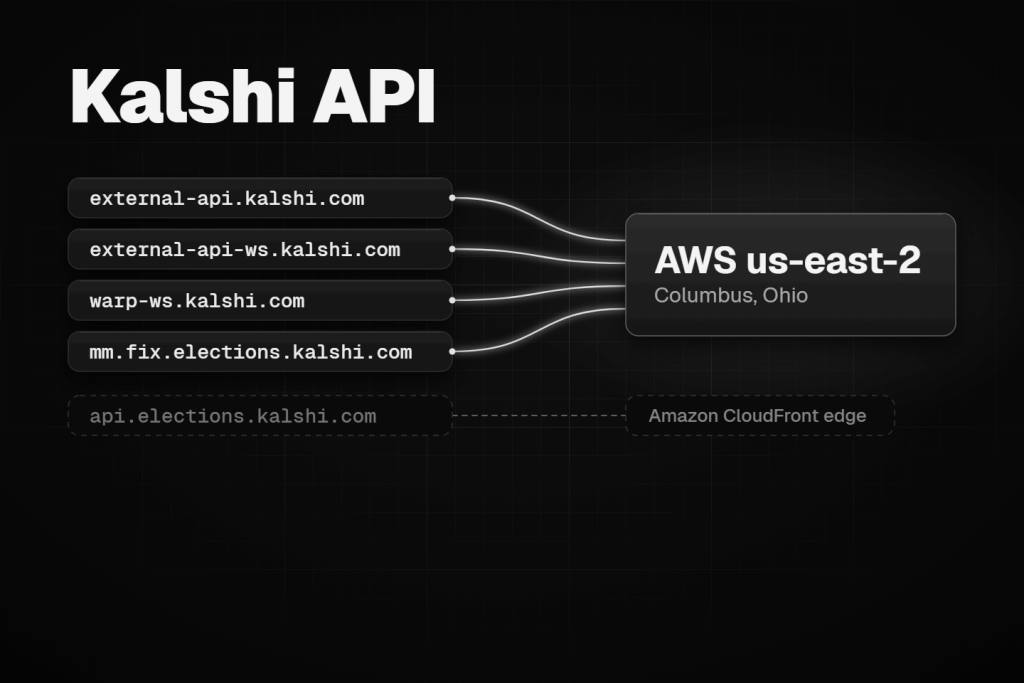
The Kalshi API gives a trading bot three ways in: REST for orders and account data, a WebSocket for live market and account updates, and FIX for institutional order entry. Market data is free and needs no key; anything that touches your account needs a signed request. This guide covers what it takes to run a bot on Kalshi in production, checked against Kalshi’s own documentation on 9 November 2026.
The short version, as of November 2026:
- Hosts. Use
external-api.kalshi.comfor REST andexternal-api-ws.kalshi.comfor the WebSocket. Both resolve to AWS’s us-east-2 region in Columbus, Ohio. - Keys. Ed25519 is Kalshi’s recommended key type. RSA still works, signed with RSA-PSS.
- Rate limits. Requests cost tokens from a per-tier budget. A new account can place 10 orders a second; one free upgrade raises that to 30.
- Orders. New bots should use the V2 order endpoint, which quotes every order from the yes side.
- Maintenance. Every Thursday from 3:00 to 5:00 a.m. ET, Kalshi pauses trading: no new orders, cancels only.
It is written for two readers: someone wiring up a first Kalshi bot, and a developer arriving from Polymarket who needs to know what works differently. For the venue comparison itself, see Polymarket vs Kalshi. If you also trade Polymarket, our Polymarket API guide covers the same ground there.
The Kalshi API at a glance: REST, WebSocket, FIX and DoubleZero Edge
Most bots need REST and the WebSocket together. FIX and DoubleZero Edge solve narrower problems, mainly for market makers.
| Interface | Use it for | Production endpoint | What you need | Who it suits |
|---|---|---|---|---|
| REST | Placing and managing orders, account data, market lookups | https://external-api.kalshi.com/trade-api/v2 | No key for market data; a signed request for everything else | Every bot |
| WebSocket | Live order books, prices, trades, your fills and order updates | wss://external-api-ws.kalshi.com/trade-api/ws/v2, plus warp-ws for fills and orders | A signed handshake on every connection | Any bot that reacts to the market |
| FIX | Order entry with cancel on disconnect, execution reports, FIX market data | mm.fix.elections.kalshi.com and marketdata.fix.elections.kalshi.com | An API key, a FIX engine and TLS; some sessions only on request | Market makers and firms with existing FIX systems |
| DoubleZero Edge | Full-depth data for every sports, crypto perps and politics market | A subscription with DoubleZero | A paid feed; data only, no orders | Market makers who want whole categories without building a book |
REST and FIX draw on the same token budgets, so FIX adds features, not capacity. DoubleZero Edge sits outside Kalshi’s API budgets altogether. Perps use the same three Kalshi interfaces, with REST under a /margin path and their own WebSocket and FIX hosts, covered in the perps section.
How Kalshi markets map to the API
Before a bot can trade, it has to find the right market, read its prices in the right units and send money to the right matching engine. Each of those steps has a Kalshi-specific rule that catches people coming from crypto exchanges or from Polymarket.
Series, events and markets
Kalshi organises its listings in three levels:
- Series: a template for events that repeat with the same rules and settlement source, such as a monthly jobs report or the daily high temperature in New York.
- Event: one real-world occurrence inside a series, such as a single release date or a single game. An event holds one or more markets.
- Market: one yes/no contract inside an event, identified by its ticker. In Kalshi’s own example
KXHIGHNY-24JAN01-T60, the market ticker extends its event’s ticker, which extends the series ticker.
You trade markets, not events. GET /markets filters by status (unopened, open, closed, settled), and the list endpoints page with a cursor: each response includes one, and you pass it back to fetch the next page. Combo markets are the exception to the usual lookup. A market inside a multivariate (combo) collection has to be created through its own endpoint before you can look it up or trade it. Kalshi caps that at 5,000 creations per user per week.
Prices and quantities are strings
As of Kalshi’s November 2026 fixed-point notes, prices travel as dollar strings with up to four decimal places, in fields ending in _dollars ("0.1200"). Contract counts travel as strings with up to two decimals, in fields ending in _fp ("10.00").
This matters for three reasons:
- Ticks are not always one cent. Each market publishes
price_ranges, a list of bands with their own tick size. On a tapered market the tick is $0.001 below $0.10 and above $0.90, and $0.01 in between. Combo markets tick in hundredths of a cent near the edges. Snap every price to its band’s step, or Kalshi rejects the order. Do not key logic off the human-readableprice_level_structurename, because new structures appear over time. - Integer-cent fields cannot hold sub-cent prices. On markets with sub-cent ticks, read the
_dollarsfields. - Contracts can be fractional. On markets that allow it, quantities go down to 0.01 of a contract, and a fill can be fractional even when you ordered whole contracts. Keep quantities in hundredths, or in
Decimal, rather than floats.
The order book only shows bids
GET /markets/{ticker}/orderbook needs no key and returns two arrays of bids: yes_dollars and no_dollars. Each entry is [price, count], sorted from low to high, so the best bid is the last element. There are no asks in the response, because on a yes/no contract a bid for no at $0.56 is the same order as an offer to sell yes at $0.44.
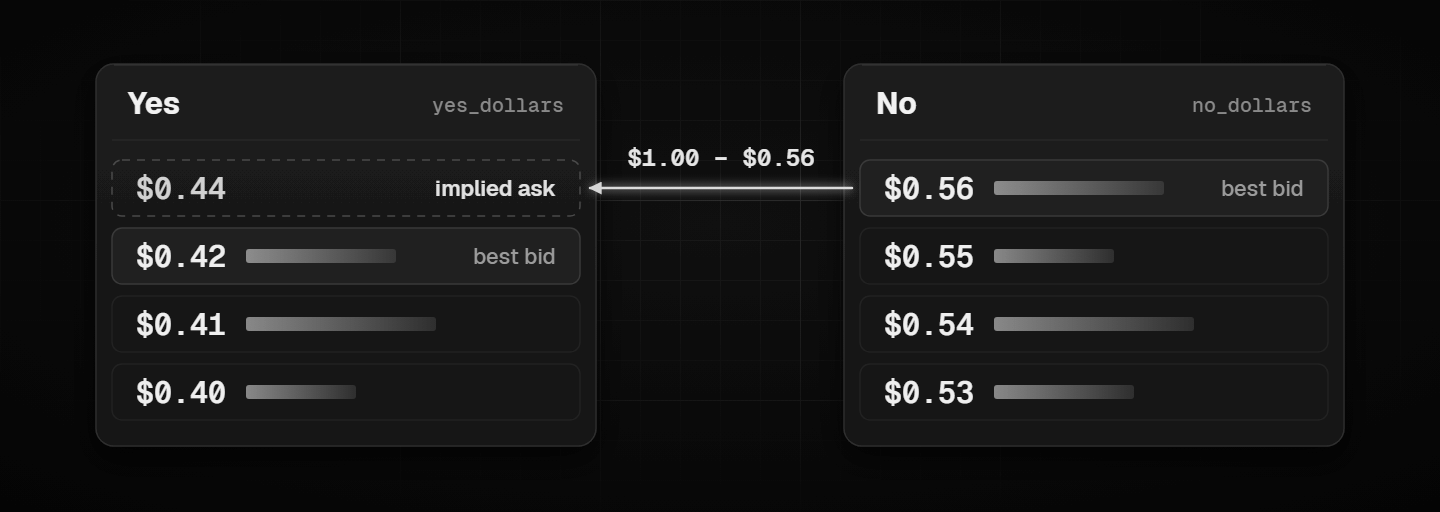
The best yes ask is therefore $1.00 minus the best no bid:
from decimal import Decimal
import requests

url = "https://external-api.kalshi.com/trade-api/v2/markets/KXHIGHNY-24JAN01-T60/orderbook"
book = requests.get(url, timeout=10).json()["orderbook_fp"]

best_yes_bid = Decimal(book["yes_dollars"][-1][0]) if book["yes_dollars"] else None
best_no_bid = Decimal(book["no_dollars"][-1][0]) if book["no_dollars"] else None
best_yes_ask = Decimal("1") - best_no_bid if best_no_bid is not None else None
The WebSocket order book adds one more twist, covered in the WebSocket section: by default it prices the no side in no-leg terms unless you ask it not to.
Order direction: outcome_side and book_side
Orders, fills and trades describe direction with two fields that carry the same information. outcome_side is yes or no, the outcome you end up long. book_side is bid or ask, and bid always means yes while ask always means no. Buying yes and selling no are the same exposure, so both come back as outcome_side=yes. Public trades use taker_outcome_side and taker_book_side. The older action and side fields are deprecated, so new code should read only the new pair.
Exchange shards split your balance
Kalshi runs several matching engines, which it calls exchange shards, and assigns each new event to one by category. As of November 2026, Kalshi’s sharding page lists:
| Shard | What runs there |
|---|---|
| 0 | Every category not listed below |
| 1 | Exotics (combos) |
| 2 | Crypto and commodities |
| 3 | Sports: tennis, baseball and basketball |
Three consequences matter for a bot:
- Collateral is checked inside each matching engine. The Kalshi app moves money between shards for you, but an API trader normally has to fund the right shard before ordering, through the intra-account transfer endpoint or the website. You can also opt into automatic rebalancing, which every 10 seconds moves funds back towards a target split you set.
- The shard is in the market data.
GET /markets,GET /eventsand the lifecycle WebSocket channels carryexchange_index, and that field, not the ticker format, is the source of truth. Every market of an event lives on the same shard. - Some features stop at the shard boundary. Subaccount balances are local to one shard, and order groups do not work across shards.
Kalshi API hosts: production, demo and the fill feed
Kalshi runs separate production and demo environments, and API keys do not cross between them: a demo key only works on demo hosts and a production key only on production hosts. As of November 2026, Kalshi’s environment page recommends the external-api hosts for API traders and keeps the older shared hosts working for existing clients.
| What it is for | Production | Demo |
|---|---|---|
| REST, recommended | https://external-api.kalshi.com/trade-api/v2 | https://external-api.demo.kalshi.co/trade-api/v2 |
| REST, older but supported | https://api.elections.kalshi.com/trade-api/v2 | https://demo-api.kalshi.co/trade-api/v2 |
| WebSocket, recommended | wss://external-api-ws.kalshi.com/trade-api/ws/v2 | wss://external-api-ws.demo.kalshi.co/trade-api/ws/v2 |
| WebSocket, your fills and orders only | wss://warp-ws.kalshi.com/trade-api/ws/v2 | wss://warp-ws.demo.kalshi.co/trade-api/ws/v2 |
The word elections in the older hostname is historical. That host serves every Kalshi market, not only election markets.
The warp-ws hosts carry only two channels, fill and user_orders, and Kalshi says updates arrive there with lower latency. Subscribe to anything else on them and you get error code 8, Unknown channel name. A bot that wants both therefore keeps two connections: market data on external-api-ws, and its own fills and order updates on warp-ws. Perps have a separate pair of fill hosts, margin-warp-ws.
Where the hostnames lead
We looked up the production and demo hostnames on 9 November 2026. They do not all lead to the same place:
external-api.kalshi.com,external-api-ws.kalshi.comandwarp-ws.kalshi.comall point to one Amazon load balancer, and every address it returned belongs to AWS’s us-east-2 region in Columbus, Ohio.api.elections.kalshi.comreturns Amazon CloudFront addresses. Our lookup got an edge server in Chicago, and a CDN hands out a different edge depending on where you ask from.external-api.demo.kalshi.copoints to a load balancer in AWS us-west-2, in Oregon.
Two practical points follow. A ping to the older hostname measures the trip to a nearby CDN edge rather than to the exchange, which is why it can show a misleadingly small number. And latency measured against demo says nothing about production, because the two environments sit on opposite sides of the country.
Private connectivity for bots already on AWS
Bots that already run inside AWS can keep their traffic off the public internet. Kalshi offers AWS PrivateLink for external-api.kalshi.com and external-api-ws.kalshi.com to members on the Premier tier or above, and members on Prime or above can also discuss VPC peering for the production WebSocket. The tiers are explained in the rate limits section below.
The signed path stays the same on every host
Whichever host you use, you sign the path from the API root without the query string. A request to https://external-api.kalshi.com/trade-api/v2/portfolio/orders?limit=5 is signed as /trade-api/v2/portfolio/orders. Moving an existing bot from the older host to external-api therefore needs a new base URL and nothing else.
Kalshi API keys and request signing
Public market data needs no key: market lists, single markets and order books all answer unsigned requests. Anything that touches your account needs a signed request, and so does every WebSocket connection, even one that only subscribes to public channels.
Ed25519 or RSA
A Kalshi API key is an asymmetric key pair. You keep the private key and sign with it, and Kalshi checks each signature against the public key it holds. As of November 2026, Kalshi’s API key page lists two types:
| Key type | How requests are signed | When to use it |
|---|---|---|
| Ed25519, Kalshi’s recommended choice | Ed25519 over the pre-sign text, 64-byte signatures | Any client that supports Ed25519; signing costs less CPU than RSA-PSS |
| RSA, 2048-bit | RSA-PSS with SHA-256 | Clients limited to RSA-PSS, including Kalshi’s own SDKs before version 3.31.0 |
Many older tutorials describe RSA only, because Ed25519 support arrived later. The headers, permissions and error responses are identical for both types. One trap: the PEM header does not tell you the type, since a PKCS#8 RSA key also begins with -----BEGIN PRIVATE KEY-----. Detect the type from the parsed key object, as the code below does.
Creating a key
- On the website. The API Keys section of your account settings creates a key pair, with Ed25519 selected by default. You get a Key ID and the private key as a downloaded file.
- Kalshi shows the private key once. It does not store it and cannot show it again. If you lose it, delete that key and make a new one.
- Bring your own key pair. Generate the pair yourself and paste only the public key into the same form, so the private key never leaves your machine:
openssl genpkey -algorithm ed25519 -out kalshi.key
openssl pkey -in kalshi.key -pubout -out kalshi.pub- Through the API.
POST /api_keys/generatereturns a new pair, but it defaults to RSA unless you send"key_type": "ed25519", the opposite of the website’s default. Registering your own public key throughPOST /api_keysis limited to Premier and market-maker usage levels.
Demo and production are separate accounts, so you create keys in each. A demo key gets a 401 on production and the other way round.
Give each key only the access it needs
Keys created through the API can carry scopes. Without scopes a key gets full read and write access. The child scopes include write::trade, write::transfer and read::portfolio_balance, and they can be granted without their broad parent. A key for a trading bot can therefore hold read plus write::trade and still be unable to transfer funds between subaccounts or shards. A key for a monitoring dashboard needs only read.
A key can also be restricted to one subaccount, numbered 0 to 63. A restricted key can only read and trade on that subaccount; it cannot touch the others, transfer between them or create new ones. Subaccounts themselves need the Advanced tier or higher.
Signing a request
Each signed request carries three headers:
| Header | Value |
|---|---|
KALSHI-ACCESS-KEY | Your Key ID |
KALSHI-ACCESS-TIMESTAMP | The current time in milliseconds |
KALSHI-ACCESS-SIGNATURE | Base64 of the signature over timestamp + HTTP method + path |
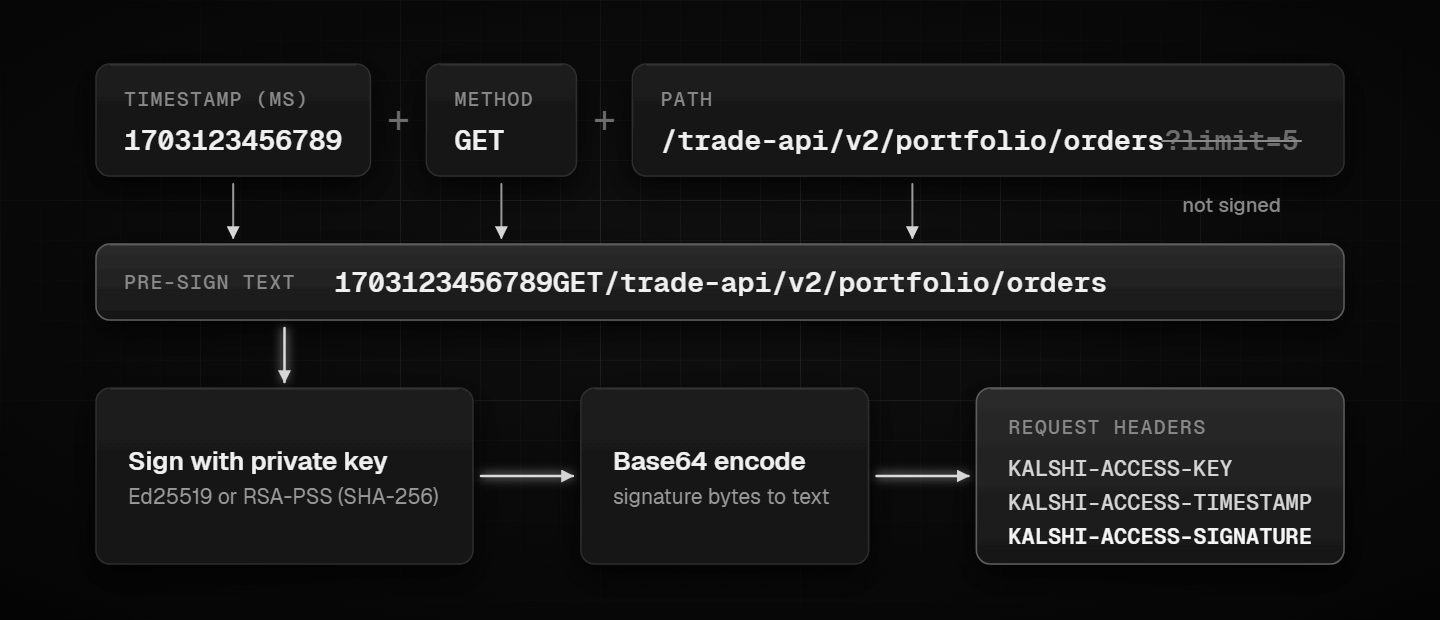
The text you sign is the timestamp, the method and the full path from the API root run together, with no query string: 1703123456789GET/trade-api/v2/portfolio/balance. This Python helper handles both key types:
import base64, os, time
import requests
from cryptography.hazmat.primitives import hashes, serialization
from cryptography.hazmat.primitives.asymmetric import padding
from cryptography.hazmat.primitives.asymmetric.ed25519 import Ed25519PrivateKey

BASE = "https://external-api.kalshi.com"  # demo: https://external-api.demo.kalshi.co
KEY_ID = os.environ["KALSHI_KEY_ID"]
with open(os.environ["KALSHI_KEY_PATH"], "rb") as f:
    PRIVATE_KEY = serialization.load_pem_private_key(f.read(), password=None)

def sign(text: str) -> str:
    msg = text.encode()
    if isinstance(PRIVATE_KEY, Ed25519PrivateKey):
        sig = PRIVATE_KEY.sign(msg)
    else:  # RSA keys sign with RSA-PSS over SHA-256
        sig = PRIVATE_KEY.sign(
            msg,
            padding.PSS(mgf=padding.MGF1(hashes.SHA256()),
                        salt_length=padding.PSS.DIGEST_LENGTH),
            hashes.SHA256(),
        )
    return base64.b64encode(sig).decode()

def kalshi_headers(method: str, path: str) -> dict:
    ts = str(int(time.time() * 1000))           # milliseconds, not seconds
    to_sign = ts + method + path.split("?")[0]   # never sign the query string
    return {
        "KALSHI-ACCESS-KEY": KEY_ID,
        "KALSHI-ACCESS-TIMESTAMP": ts,
        "KALSHI-ACCESS-SIGNATURE": sign(to_sign),
    }

path = "/trade-api/v2/portfolio/balance"
r = requests.get(BASE + path, headers=kalshi_headers("GET", path), timeout=10)
print(r.status_code, r.json())
Why signed requests come back 401
- The query string was signed. Sign
/trade-api/v2/portfolio/orders, not/trade-api/v2/portfolio/orders?limit=5. - The path was signed without its prefix. If your base URL already ends in
/trade-api/v2, you still sign the full path from the root. - The timestamp is in seconds. Kalshi expects milliseconds.
- The wrong algorithm was used. An RSA key signed with PKCS#1 v1.5 padding instead of PSS fails, and so does a client that assumes RSA when the key is Ed25519.
- The method in the signature does not match the request. A POST signed as GET fails.
- The key belongs to the other environment. Demo keys only work on demo hosts.
Keeping the private key safe on a server
- Keep the key file outside your code repository, readable only by the user that runs the bot (
chmod 600), and pass its path in through an environment variable. - Give each bot or server its own key, so you can delete one without stopping the rest.
- Use scopes and subaccount restriction so a leaked key cannot transfer funds or touch other strategies.
- Delete keys you no longer use. The wider server hardening checklist is in how to secure a trading VPS.
Kalshi API rate limits: tokens, buckets and tiers
Kalshi meters the API in tokens, not in requests. Every authenticated request costs tokens, most of them the default of 10. Your tier sets how many tokens per second flow back into your balance, so your sustained rate for an endpoint is your budget divided by its cost. The figures below are from Kalshi’s rate limits page as of November 2026. Older guides that quote a flat number of requests per second describe the earlier scheme.
Read and Write budgets
You hold two separate budgets. Write covers placing, amending and cancelling orders, order groups, the RFQ quote flow and block trade accepts. Read covers GET requests and everything else. REST and FIX draw from the same two budgets, so moving to FIX does not buy extra capacity.
The balance endpoint, GET /portfolio/balance, has its own small allowance: once per second on Basic and Advanced, five times per second above that, with no burst. Your balance only changes on fills, settlements and transfers, so it is better to react to the fill channel on the WebSocket than to poll it.
Tiers and what they allow
| Tier | Read budget (tokens/s) | Write budget (tokens/s) | Orders per second at 10 tokens | WebSocket connections | How you get it |
|---|---|---|---|---|---|
| Basic | 200 | 100 | 10 | 200 | Open an account |
| Advanced | 300 | 300 | 30 | 200 | Call the upgrade endpoint after placing an API order |
| Expert | 600 | 600 | 60 | 200 | Volume share of 0.075% |
| Premier | 1,200 | 1,200 | 120 | 500 | Volume share of 0.125% |
| Paragon | 2,400 | 2,400 | 240 | 750 | Volume share of 0.25% |
| Prime | 4,800 | 4,800 | 480 | 1,000 | Volume share of 0.50% |
| Prestige | 12,000 | 9,600 | 960 | 1,000 | Volume share of 1.00% |
Advanced is a one-step upgrade: Kalshi grants it permanently through POST /account/api_usage_level/upgrade once at least 1 of your last 100 prediction-market orders was placed through the API. The higher tiers are reviewed once a day from your volume share, which is your trailing 30-day volume, counting both sides of every trade you are part of, divided by twice the previous calendar month’s total exchange volume. A qualifying review grants the tier for 30 days, and each tier has a lower threshold to keep it than to earn it, so a short dip does not cost you the tier. GET /account/limits returns your current tier, both budgets and their capacities.
Bursts
Each budget is a token bucket that refills continuously, with no fixed windows or per-second resets. How much it can store decides how hard you can burst:
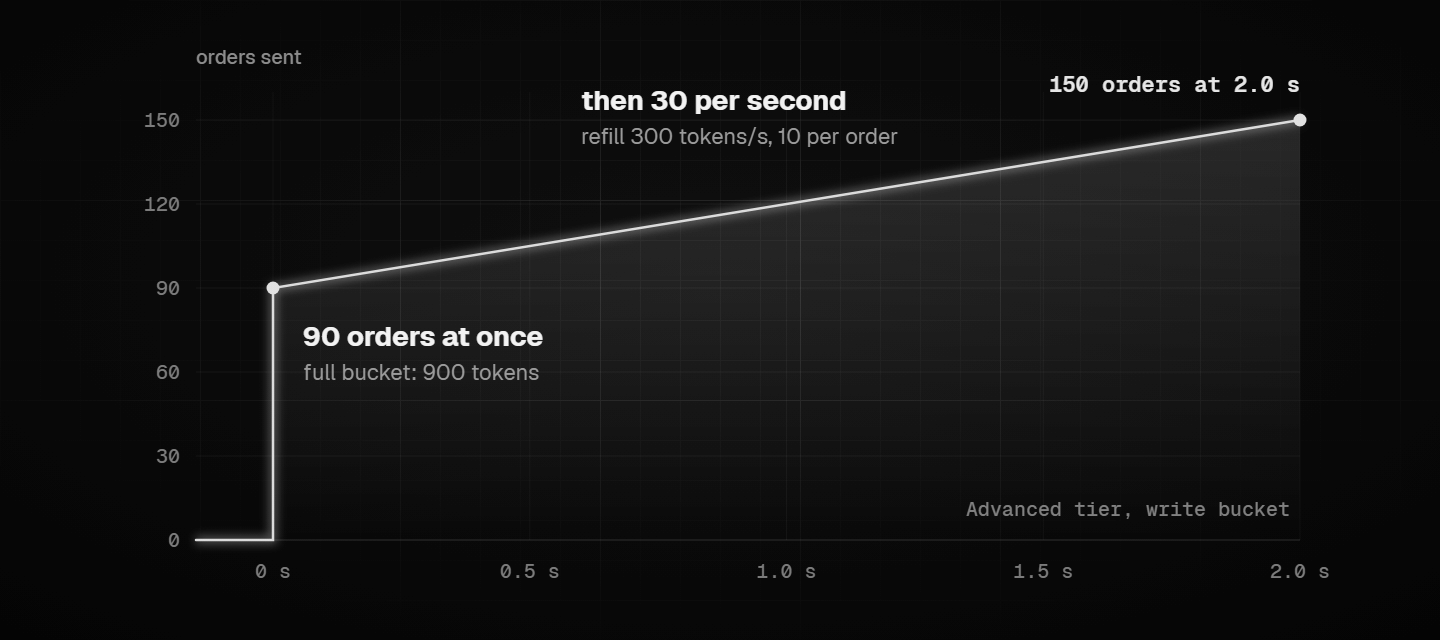
- Read buckets on Basic and Advanced, and Write buckets on every tier above Basic, hold three seconds of budget. After three quiet seconds an Advanced account can fire 90 orders at once, then continues at 30 per second.
- Read buckets above Advanced, and the Basic Write bucket, hold one second of budget. A Basic account can never send more than 10 orders in one burst.
Shards change how writes are billed
Kalshi runs several matching engines, called exchange shards, and each shard has its own Write bucket carrying your full tier budget (shards are explained in the section on how markets map to the API). A single order that names its shard with exchange_index of 1 or higher is billed to that shard’s bucket only. An order sent with no shard, which Kalshi routes for you from the market ticker, is billed to every shard’s bucket and, by Kalshi’s own note, adds latency. Reading exchange_index from the market data and sending it with each order saves both budget and time. Batch requests are always billed to your unscoped Write bucket.
Batches do not save tokens
A batch costs the same as sending each order on its own: 25 orders cost 250 tokens. In Kalshi’s own example a cancel costs 2 tokens, so 25 cancels cost 50. The whole batch has to fit in the bucket when it arrives, or Kalshi rejects all of it. GET /account/endpoint_costs lists every endpoint whose cost differs from 10.
When you hit the limit
A throttled request returns 429 Too Many Requests with the body {"error": "too many requests"}. As of November 2026 the response carries no Retry-After or rate limit headers, and there is no penalty or cooldown: the next request succeeds as soon as the bucket holds enough tokens. Back off exponentially rather than retrying at once. Opening more WebSocket connections than your tier allows also returns 429, on the handshake.
The cleanest fix is to never send the throttled request at all. A small client-side copy of your bucket, configured from GET /account/limits at start-up, does that:
import time, threading

class TokenBucket:
    """Client-side mirror of one Kalshi bucket."""
    def __init__(self, refill_rate: float, capacity: float):
        self.rate, self.capacity = refill_rate, capacity
        self.tokens, self.last = capacity, time.monotonic()
        self.lock = threading.Lock()

    def take(self, cost: float = 10) -> None:
        while True:
            with self.lock:
                now = time.monotonic()
                self.tokens = min(self.capacity, self.tokens + (now - self.last) * self.rate)
                self.last = now
                if self.tokens >= cost:
                    self.tokens -= cost
                    return
                wait = (cost - self.tokens) / self.rate
            time.sleep(wait)

# Advanced write bucket: refills 300 tokens/s and holds 900
write_bucket = TokenBucket(refill_rate=300, capacity=900)
write_bucket.take(10)  # call before every order
Run against those Advanced figures, 150 back-to-back orders clear in two seconds: 90 at once from the full bucket, then 60 at 30 per second. That is the shape Kalshi’s own bucket enforces. Perps have separate budgets, covered in the perps section.
Placing orders through the Kalshi API
Kalshi now takes event-market orders on a V2 endpoint, POST /portfolio/events/orders, which quotes every order from the yes side and uses fixed-point dollar prices. Kalshi has asked clients to move off the legacy /portfolio/orders path, so new bots should start on V2. The fields below are from Kalshi’s Create Order (V2) reference as of November 2026.
The order fields that matter
| Field | Required | What it does |
|---|---|---|
ticker | Yes | The market ticker |
side | Yes | bid buys yes, ask sells yes |
count | Yes | Contracts, as a string ("10" or "10.00") |
price | Yes | Dollars as a string, on the market’s price grid ("0.5600") |
time_in_force | Yes | good_till_canceled, immediate_or_cancel or fill_or_kill |
self_trade_prevention_type | Yes | taker_at_cross cancels your incoming order if it would hit your own resting order; maker cancels your resting order and keeps matching |
client_order_id | No | Your own ID for the order, echoed back on fills and order updates |
expiration_time | No | Unix seconds; turns a good_till_canceled order into one that expires |
post_only | No | The order must rest on the book rather than take |
reduce_only | No | Caps the order at your current position; only accepted with immediate_or_cancel |
cancel_order_on_pause | No | Cancels the order if trading pauses |
order_group_id | No | Ties the order to an order group (below) |
exchange_index | No | The shard; omit it or send -1 and Kalshi routes by ticker |
subaccount | No | 0 is the primary account |
The side field is where most first orders go wrong. V2 describes everything from the yes leg, so buying no at $0.44 is sent as "side": "ask" at "price": "0.5600", because selling yes at $0.56 is the same position.
A first order
This reuses kalshi_headers() from the signing section. Run it against demo first by changing BASE:
import uuid

path = "/trade-api/v2/portfolio/events/orders"
order = {
    "ticker": "KXHIGHNY-24JAN01-T60",      # example ticker from Kalshi's docs
    "client_order_id": str(uuid.uuid4()),
    "side": "bid",                         # bid = buy yes, ask = sell yes
    "count": "10",
    "price": "0.4200",                     # must sit on the market's grid
    "time_in_force": "good_till_canceled",
    "self_trade_prevention_type": "taker_at_cross",
    "post_only": True,
    "cancel_order_on_pause": True,
    "exchange_index": 0,                   # read it from GET /markets
}
r = requests.post(BASE + path, headers=kalshi_headers("POST", path), json=order, timeout=10)
print(r.status_code, r.json())
A successful order returns 201 with order_id, fill_count and remaining_count. When something filled at once, it also carries average_fill_price and average_fee_paid. The response also includes ts_ms, the matching engine’s own timestamp for the order, which is useful when you measure how long your orders take to arrive.
Managing orders after they rest
- Amend changes price, size or expiry in one call. The
countyou send is the new total: already filled plus what should keep resting. - Decrease shrinks a resting order with either
reduce_byorreduce_to. - Cancel returns the order ID and how much it removed, not the whole order.
- Batch create and batch cancel send many orders in one request. The largest batch you may send grows with your tier’s Write budget, and as the rate limits section showed, a batch costs the same tokens as single requests.
- Cancel all removes every resting event-market order you have, across all shards, optionally for one subaccount only.
- Queue position endpoints tell you how many contracts sit ahead of your resting order at its price.
Order groups are your kill switch
An order group caps how many contracts its orders may fill within a rolling 15-second window, anywhere from 1 to 1,000,000. If fills pass the cap, Kalshi cancels every resting order in the group and rejects new ones until you reset it. You can also trigger a group on purpose, which cancels all its orders at once.
For a bot that quotes many markets, this is protection that runs on Kalshi’s side and does not depend on your code reacting in time. Two limits apply: a group cannot span shards, so a bot trading several shards needs one group per shard, and the cap counts filled contracts, not dollars.
Fees
Kalshi’s fee schedule, last updated and effective on 7 July 2026, charges trading fees on orders that match immediately:
fee = round up(M × 0.07 × C × P × (1 − P))Here C is the number of contracts, P the price in dollars and M the series’ fee multiplier. Series that also charge makers use round up(M × 0.0175 × C × P × (1 − P)), charged only when a resting order actually fills. Each series publishes its fee_type and fee_multiplier, events can override them, and an endpoint lists scheduled fee changes.
The formula peaks at 50 cents. With a multiplier of 1, 100 contracts at $0.50 cost $1.75 in taker fees, while 100 contracts at $0.10 cost $0.63. A strategy that trades near the middle of the range pays the most per contract.
Reading fills and positions
Fills, positions and settlements each have their own endpoint under /portfolio. Kalshi notes a short delay before exchange events show up in those REST endpoints, and suggests combining the responses to your own requests with WebSocket data for the most accurate picture. Fills and orders older than Kalshi’s historical cutoff move to separate /historical endpoints, so a reconciliation job that reads far back has to query both.
Kalshi WebSocket API: channels, sequence numbers and reconnects
Polling REST for prices spends Read budget and still arrives late. A bot that reacts to the market should hold one authenticated WebSocket connection and subscribe to what it needs, and use REST for actions and occasional checks.
Connecting and staying connected
Connect to wss://external-api-ws.kalshi.com/trade-api/ws/v2 (demo: wss://external-api-ws.demo.kalshi.co/trade-api/ws/v2) and send the same three headers as a REST request. The text you sign is the timestamp, GET and /trade-api/ws/v2. Every connection must be authenticated, even one that only subscribes to public data.
Kalshi sends a ping every 10 seconds with the body heartbeat and expects a pong back. Python’s websockets library answers pings for you; with other libraries, check that it does. Plan for disconnections: the weekly maintenance window, covered later, can drop sessions.
Channels
The channel list below is from Kalshi’s WebSocket reference as of November 2026:
| Channel | What it carries | Notes |
|---|---|---|
orderbook_delta | A snapshot, then every change, for the markets you name | Needs market_ticker or market_tickers |
ticker | Price, volume and open interest updates | Public market data |
trade | Public trades | Reports the taker’s side |
market_lifecycle_v2 | Market state changes and newly created events | New markets arrive with their exchange_index |
fill | Your fills | Also on warp-ws, with lower latency |
user_orders | Your orders as they are created and updated | Also on warp-ws |
market_positions | Your positions | |
order_group_updates | Order group triggers, resets and limit changes | |
communications | RFQs and quotes | |
cfbenchmarks_value | CF Benchmarks index values, about once a second | A sibling channel runs at up to 5 updates a second |
The CF Benchmarks channel deserves a note for crypto bots. Kalshi’s crypto markets help page says most crypto price markets settle on the average of a CF Benchmarks index, such as the Bitcoin Real-Time Index (BRTI), over the 60 seconds before the time in the market’s rules. Streaming that index is closer to the settlement source than any single exchange’s price. Kalshi also offers a Pyth feed for prices and Treasury yields.
A subscription is a JSON command on the open connection:
{"id": 1, "cmd": "subscribe",
 "params": {"channels": ["orderbook_delta"],
            "market_tickers": ["KXHIGHNY-24JAN01-T60"],
            "use_yes_price": true}}
Keeping a local order book correct
Kalshi’s order book channel reference sets out the rules. These are the ones that decide whether your book matches the exchange:
- Start from the snapshot. Each market’s first message is an
orderbook_snapshot. Replace your local book with it, then apply eachorderbook_delta, which carries a price, a signed size change (delta_fp) and a side. - Check
seqon every message. It counts messages within one subscription and has no gaps. If it skips, your book is wrong. Ask for fresh snapshots withupdate_subscriptionand theget_snapshotaction, or unsubscribe and subscribe again. A repeatedsubscribeon its own does not resynchronise markets you already follow. - Use
clockacross connections, notseq.clockis the exchange’s own counter, identical on every connection, so a bot running two connections for redundancy can match the same change on both. It can go backwards across a maintenance window. - Set
use_yes_price. By default the no side of the WebSocket book is priced in no terms, so the same level reads differently on each side. Withuse_yes_price: trueboth sides share one scale, and the no side reads directly as yes asks. Kalshi plans to make this the default later. - Know what conflation does. Setting
update_interval_msto 100 or 1000 batches changes per price level. That suits dashboards; execution logic usually wants the real-time default. Updates to your own orders skip the batching either way.
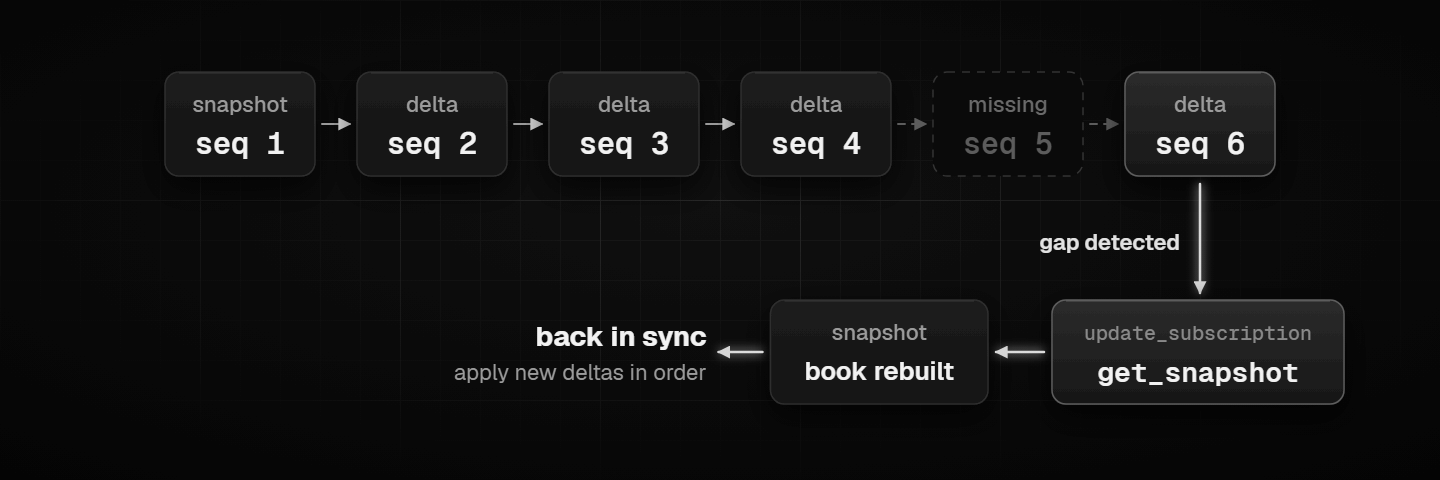
Each message also carries sending_ts_ms, the time Kalshi queued it for the network. Logged next to your own receive time on a clock kept in sync, it shows how long updates take to reach your server.
A reconnecting order book client
This client reuses kalshi_headers() from the signing section, signs a fresh handshake on every reconnect, and rebuilds from new snapshots whenever seq skips:
import asyncio, json, random
from decimal import Decimal
import websockets

WS_URL = "wss://external-api-ws.kalshi.com/trade-api/ws/v2"
WS_PATH = "/trade-api/ws/v2"
MARKETS = ["KXHIGHNY-24JAN01-T60"]
books = {}  # ticker -> {"yes": {price: size}, "no": {price: size}}

def apply_snapshot(msg):
    book = {"yes": {}, "no": {}}
    for side, key in (("yes", "yes_dollars_fp"), ("no", "no_dollars_fp")):
        for price, size in msg.get(key, []):
            book[side][Decimal(price)] = Decimal(size)
    books[msg["market_ticker"]] = book

def apply_delta(msg):
    levels = books[msg["market_ticker"]][msg["side"]]
    price = Decimal(msg["price_dollars"])
    size = levels.get(price, Decimal(0)) + Decimal(msg["delta_fp"])
    if size > 0:
        levels[price] = size
    else:
        levels.pop(price, None)

async def run():
    backoff = 1
    while True:
        try:
            headers = kalshi_headers("GET", WS_PATH)  # fresh signature per connection
            async with websockets.connect(WS_URL, additional_headers=headers) as ws:
                await ws.send(json.dumps({"id": 1, "cmd": "subscribe", "params": {
                    "channels": ["orderbook_delta"], "market_tickers": MARKETS,
                    "use_yes_price": True}}))
                last_seq, backoff = None, 1
                async for raw in ws:
                    data = json.loads(raw)
                    kind = data.get("type")
                    if kind in ("orderbook_snapshot", "orderbook_delta"):
                        if last_seq is not None and data["seq"] != last_seq + 1:
                            raise RuntimeError(f"seq gap {last_seq} -> {data['seq']}")
                        last_seq = data["seq"]
                        if kind == "orderbook_snapshot":
                            apply_snapshot(data["msg"])
                        else:
                            apply_delta(data["msg"])
                    elif kind == "error":
                        print("error from Kalshi:", data["msg"])
        except Exception as exc:
            print("reconnecting after:", exc)
            await asyncio.sleep(backoff + random.random())
            backoff = min(backoff * 2, 30)

asyncio.run(run())
Reconnecting on a gap is the bluntest recovery, but it is always correct, because a new subscription starts from fresh snapshots. A busier bot can send get_snapshot instead and keep the connection.
Error codes worth handling
Kalshi answers a bad command with an error message and a numeric code. Four come up most in bot code:
- 8, Unknown channel name: usually a channel sent to the
warp-wshost, which only serves fills and orders. - 9, Authentication required: the channel or action needs access the connection was not granted.
- 14, Market Ticker required:
orderbook_deltawas subscribed without naming markets. - 25, Subscription buffer overflow: your client read too slowly during a burst. Subscribe to fewer markets per connection, or move parsing off the thread that reads the socket.
Kalshi FIX API: when it is worth the extra work
Kalshi also accepts orders and serves market data over FIX, the session protocol most institutional trading systems already speak. FIX does not buy more capacity: as of November 2026, its messages draw from the same Read and Write token buckets as the equivalent REST calls. What it adds is session behaviour that REST and WebSocket do not have.
Sessions and hosts
From Kalshi’s FIX connectivity page, production order entry runs on mm.fix.elections.kalshi.com and market data on marketdata.fix.elections.kalshi.com. Our 9 November lookup placed the order entry host in AWS us-east-2, the same Ohio region as the REST and WebSocket load balancer.
| Session | Port | What it is for | Access |
|---|---|---|---|
KalshiNR | 8228 | Order entry without retransmission | API key |
KalshiRT | 8230 | Order entry with retransmission, RFQ creation, settlement reports | On request from Kalshi’s institutional team |
KalshiDC | 8229 | Drop copy: queries for past execution reports | Gated |
KalshiPT | 8231 | Post trade: settlement reports and position resolution | On request |
KalshiRFQ | 8232 | Market maker session for RFQs and quotes | Market makers |
KalshiMD | 8233 | Order book snapshots and updates, on the market data host | API key |
The connection is FIXT.1.1 with FIX50SP2, over TLS 1.2 or higher. A FIX engine without native TLS can sit behind a local proxy such as stunnel. Your API Key ID is the SenderCompID, and the same Ed25519 or RSA key pairs work. Only one FIX connection is allowed per key, so a second session needs a second key.
What FIX gives you that REST does not
- Cancel on disconnect. Set
CancelOrdersOnDisconnect(tag 8013) at logon and Kalshi cancels all your open orders if the session drops, including on a clean logout. On REST, the nearest equivalent is an order group, which reacts to fills, not to your bot going silent. - Recovery of missed messages. On
KalshiRT, aResendRequestreplays messages you missed, by default from the last 24 hours and up to 72 if you set a longer retention at logon. - Execution reports as a stream. Listener sessions give a read-only copy of your session’s execution reports, useful for a separate risk or logging process.
- Dollar pricing switch. Event-contract FIX prices default to integer cents; the
UseDollarslogon flag (tag 21005) turns on dollar prices with sub-cent precision.
What it costs you
- Clock discipline. The logon signature covers
SendingTime, which must be within 30 seconds of Kalshi’s clock or the logon is rejected. Run time sync on the server. - Sequence numbers. A sequence number lower than expected ends the session. On
KalshiNRthere is no retransmission, so every logon must reset sequence numbers. - Maintenance. Sessions may drop in the weekly maintenance window. Kalshi does not reset sequence numbers for you there; clients reset on reconnect.
- An engine to run. You need a FIX library, session configuration and someone who can read FIX logs at 3 a.m.
For a market maker quoting many markets, cancel on disconnect alone can justify the work. For a single-strategy bot, REST for orders and WebSocket for data covers the same ground with less to maintain.
Kalshi market data on DoubleZero Edge
Since August 2026, Kalshi’s order book has also been sold as a paid feed through DoubleZero Edge, a market data service that delivers data by multicast over DoubleZero’s own fiber network. It carries data only. Orders still go through Kalshi’s REST, WebSocket or FIX interfaces.
What the feed covers
DoubleZero’s Kalshi page listed six feeds as of November 2026, three categories in two depths:
| Category | Full depth (L2) | Top of book and trades (L1) |
|---|---|---|
| Sports | Yes | Yes |
| Crypto perps | Yes | Yes |
| Elections and politics | Yes | Yes |
Kalshi’s other categories, such as economics, weather or financial event markets, are not in the feed. Markets stay in it until they settle, and new markets in a covered category appear without a new subscription.
How it differs from the WebSocket
- One copy, sent to everyone. With multicast the publisher sends each update once and the network copies it to every subscriber, instead of a server writing to each client in turn.
- One book per market. The feed folds Kalshi’s yes and no sides into a single book, so there is no conversion like the one in the order book section above.
- Snapshots in the stream. Full book state cycles through the feed continuously, so a client that joins late or drops a packet rebuilds from the feed itself.
- No Read tokens. Because the data does not come through Kalshi’s API, it leaves your Read budget free.
Who it is for
At the August launch, Decrypt reported that Kalshi would waive its share of subscription fees for the feed’s first year. Subscribers pay DoubleZero for delivery, and access starts with a request to DoubleZero.
The feed suits market makers and systematic desks that want full depth across every sports, crypto perps or politics market without writing their own book builder. A bot that trades a handful of markets gets the same information from the WebSocket at no extra cost.
Trading Kalshi perps through the API
Kalshi started listing perpetual futures in June 2026, crypto first, and they trade through their own branch of the API. Kalshi’s docs call the product perps, margin and perpetual futures interchangeably. In code it is always margin: endpoints live under /margin and fields carry margin prefixes. The details below are from Kalshi’s Perps API overview as of November 2026.
Where perps traffic goes
| Interface | Production |
|---|---|
| REST | https://external-api.kalshi.com/trade-api/v2/margin/ |
| WebSocket | wss://external-api-margin-ws.kalshi.com/trade-api/ws/v2/margin |
| WebSocket, fills and orders only | wss://margin-warp-ws.kalshi.com/trade-api/ws/v2/margin |
| FIX order entry and drop copy | margin-mm.fix.elections.kalshi.com |
| FIX market data | margin-marketdata.fix.elections.kalshi.com |
As of November 2026, Kalshi lists production perps API access as rolling out member by member. GET /margin/enabled tells you whether it is switched on for your account in a given environment.
What carries over and what does not
Authentication, pagination, error format and the order lifecycle (create, amend, decrease, cancel) work the same way as on event contracts, so the signing code above needs no change. Perps also add endpoints for margin balance and risk, funding (estimated and past rates, and payment history), fee tiers, subaccounts and transfers between your event-contract and perps balances.
Several event-contract features are missing on the perps side:
- Batch order create and cancel
- Queue positions
- RFQs and quotes
- Historical data endpoints and the exchange schedule
- The
market_positions,communicationsand multivariate WebSocket channels
Timestamps differ too. Every timestamp in a perps WebSocket message is Unix milliseconds in a field ending _ms, where several event-contract channels still use seconds or RFC 3339 strings. Code shared between the two needs to parse both.
Separate limits, separate keys
Perps have their own Read and Write buckets with a separate tier table, so perps orders never eat into your event-contract budget, and the other way round. A single perps cancel or decrease costs 1 token. At the Basic tier the perps budgets are 400 Read and 200 Write tokens per second; GET /account/limits/perps shows yours. On FIX, Kalshi says not to share an API key between the event-contract and perps gateways.
Contract details that change bot logic
For bitcoin, Kalshi’s contract specifications set a contract size of 0.0001 BTC and use the CF Benchmarks BRTI as the reference price for funding and settlement. Funding is capped at plus or minus 2% per 8-hour interval. Margin is isolated in Kalshi’s apps and works at portfolio level through the API.
Fractional sizes are also on the way: Kalshi’s fixed-point notes schedule fractional perps trading for single-stock perps from 27 November 2026 and for the remaining perps from 17 December 2026. After those dates a fill can come back fractional even for a whole-contract order, so size fields need to handle two decimals.
Building a Kalshi trading bot: a production checklist
Getting a first order through the Kalshi API takes an afternoon. Most of what goes wrong in production comes later, in the parts around the API: stale state, weekly maintenance, a shard with no money in it, a key left in a repository.
Start in demo, but know its limits
Kalshi’s demo environment at demo.kalshi.co runs on mock funds, with its own accounts and keys. Use it to prove the mechanics: signing, order fields, cancels, reconnects. Do not use it to judge a strategy or a server. Kalshi warns that demo prices and market behaviour may not reflect real markets, and its servers sit in AWS’s Oregon region, not in Ohio with production.
Official SDK or your own client
Kalshi publishes official SDKs: kalshi_python_sync, kalshi_python_async and kalshi-typescript. The older kalshi-python package is deprecated. Ed25519 keys need SDK version 3.31.0 or later. The version we inspected, kalshi_python_sync 3.35.0, already defaults to the external-api host.
Kalshi itself cautions that the SDKs can lag the API. It recommends treating its OpenAPI and AsyncAPI specifications as the source of truth, and generating your own client or integrating directly for production. The SDKs suit getting started and tools; a bot you depend on is better on code you control. Either way, follow the API changelog, because fields get renamed and endpoints move.
Habits that keep a bot out of trouble
- Take state from the WebSocket and act through REST or FIX. Polling for prices or your balance burns Read tokens and arrives late.
- Give every order a
client_order_id. If a request times out, look for that ID among your open orders or on theuser_orderschannel before sending again, so a retry does not double your position. - Fund the shard before you trade it. Read
exchange_indexfrom the market, keep money on that shard, and send the index with each order. - Mirror your rate limits locally. Configure a client-side token bucket from
GET /account/limits, so throttling happens in your code rather than as a 429. - Put a limit on Kalshi’s side. An order group caps fills over 15 seconds no matter what your code is doing. Market makers on FIX can add cancel on disconnect.
- Plan for Thursday maintenance. Every Thursday from 3:00 to 5:00 a.m. ET, Kalshi runs a trading pause. New orders and amendments are refused, cancels still work, and resting orders stay unless they were placed with
cancel_order_on_pause. Sessions can drop, so reconnect after 5:00 a.m. ET. Kalshi’s maintenance page also describes rarer full exchange pauses. - Allow for reporting lag. Kalshi notes a short delay before exchange events reach its REST portfolio endpoints, and offers an endpoint that reports how current that data is. Trust your fills channel first.
- Keep the clock in sync. Signatures carry a timestamp, FIX logons are refused more than 30 seconds off, and latency measurements are meaningless on a drifting clock. Run
chronyor another time sync service. - Log Kalshi’s timestamps, not just yours. Store
ts_msfrom order responses andsending_ts_msfrom WebSocket messages next to your own receive times. They are how you find out where time goes. - Run the bot as a service. It should restart on a crash or a reboot without you logging in.
On Ubuntu, a minimal systemd unit covers the last point:
[Unit]
Description=Kalshi trading bot
After=network-online.target
Wants=network-online.target

[Service]
User=kalshi
WorkingDirectory=/opt/kalshi-bot
EnvironmentFile=/opt/kalshi-bot/.env
ExecStart=/opt/kalshi-bot/venv/bin/python bot.py
Restart=always
RestartSec=5

[Install]
WantedBy=multi-user.target
The .env file holds KALSHI_KEY_ID and KALSHI_KEY_PATH, readable only by the kalshi user. Enable it with sudo systemctl enable --now kalshi-bot, and read its logs with journalctl -u kalshi-bot -f.
Stay inside Kalshi’s rules
API use is governed by the Kalshi Developer Agreement, which limits the API to a member’s own trading on the exchange and warns that other uses can lead to account suspension. You must be a Kalshi member and follow its rulebook, and you are responsible for everything done under your keys. A bot that trades your own account sits inside those terms. Reselling Kalshi data, or trading for other people through your account, does not.
Where to run a Kalshi API bot
Every production Kalshi trading host we looked up on 9 November 2026 resolved to AWS’s us-east-2 region in Columbus, Ohio: the REST and WebSocket load balancer, the fill feed and the FIX order entry host. That one fact decides most of the hosting question.
| Where the bot runs | Relation to Kalshi’s servers | What you trade off |
|---|---|---|
| AWS us-east-2 (Ohio) | Same cloud region | The shortest path; Premier tier and above can add PrivateLink. You run and secure the cloud instance yourself, and pay AWS’s usage and data transfer charges. |
| A VPS in Chicago | About 440 km (275 miles) from Columbus in a straight line | A fixed monthly price, Windows or Linux, remote desktop. Further than AWS Ohio. |
| A VPS in New York | About 930 km (580 miles) from Columbus, roughly twice Chicago’s distance | Sensible if the same server also serves other venues in New York. Further from Kalshi than Chicago. |
| A home computer | Depends on your connection | No hosting bill, but sleep, updates, power and home internet outages stop the bot. |
TradoxVPS has no location in Ohio. Chicago is the closest we offer: in the measurement behind our Kalshi VPS guide, last updated in July 2026, the round trip from our Chicago location to Kalshi’s FIX engine came to about 10 ms. If your strategy needs to sit inside AWS us-east-2, a TradoxVPS server is not the closest option, and it is better to know that before buying one.
When those milliseconds matter on Kalshi
- Market making. When news moves a market, quotes left resting get filled at stale prices until the cancels land. Distance adds to how long that takes.
- Live sports. Prices move on every play. Your sports data feed is usually the larger delay, but the trip to Kalshi adds to it.
- Short crypto markets. Markets that settle on a 60-second CF Benchmarks average reward reacting quickly to the index, especially near the close.
They matter much less for a bot that holds positions for hours, trades daily markets or places a few orders an hour. There, staying connected through maintenance, reconnecting cleanly and never missing a fill count for more than a few milliseconds.
Measure from your own server
TCP connect time is a fair first estimate of the network round trip, and it costs no tokens. Run this on the machine you plan to trade from:
import socket, time, statistics

def tcp_connect_ms(host: str, port: int = 443, samples: int = 20) -> float:
    times = []
    for _ in range(samples):
        t0 = time.perf_counter()
        with socket.create_connection((host, port), timeout=5):
            times.append((time.perf_counter() - t0) * 1000)
        time.sleep(0.2)
    return statistics.median(times)

for host in ("external-api.kalshi.com", "api.elections.kalshi.com"):
    print(f"{host}: {tcp_connect_ms(host):.1f} ms median TCP connect")
Expect the two numbers to differ. The first host goes to the load balancer in Ohio; the second stops at a nearby CloudFront edge, so its figure describes the edge, not the exchange. For a fuller test, time each phase of a request (DNS, TCP, TLS, first byte) and compare percentiles over hundreds of samples rather than one figure. Our latency testing guide walks through that method for Polymarket, and it carries over to any API. Kalshi adds one more measuring stick: log the ts_ms on each order response, the matching engine’s own timestamp, next to the time your bot sent the order.
A server does not change who can trade
A VPS changes where your code runs, nothing else. Kalshi opens accounts through identity checks, its Developer Agreement limits the API to your own trading, and moving a bot to another city does not change what your account is allowed to do.
If Chicago fits your strategy, our Kalshi VPS plans run on AMD Ryzen 9 9950X with 2, 4, 6 or 8 of its cores per plan, DDR5 memory, NVMe Gen4 storage and an unlimited 3 Gbps network, with Windows Server 2022 or Ubuntu.
How we checked this
Everything in this guide was checked on 9 November 2026, against Kalshi’s own material wherever it exists:
- Kalshi’s API documentation. We read the pages on environments, API keys, rate limits and tiers, exchange sharding, fixed-point prices, order books, order direction, the V2 create-order reference, order groups, maintenance, fee rounding, the WebSocket channels, FIX connectivity and sessions, the Perps API, the SDKs and the demo environment.
- Kalshi’s legal and contract documents. The fee schedule effective 7 July 2026, the Developer Agreement (version 1.1), the crypto markets help page and the BTC perpetual contract specifications.
- Where the hosts lead. We resolved Kalshi’s production and demo hostnames through Google Public DNS and looked up which AWS region each returned address belongs to.
- The official SDK. We downloaded
kalshi_python_sync3.35.0 from PyPI and checked its default host. - The code in this guide. We ran the signing helper against freshly generated Ed25519 and RSA keys and verified each signature with the matching public key. We ran the token bucket against the Advanced tier’s figures and the order book functions against Kalshi’s documented snapshot and delta example.
- DoubleZero Edge. We read DoubleZero’s Kalshi page and the launch coverage.
Where our first-hand experience stops: we did not place live orders on Kalshi for this guide, and we did not open a FIX session or subscribe to the DoubleZero feed. The 10 ms Chicago figure comes from the earlier measurement published in our Kalshi VPS guide. Kalshi changes this API often, with SDK releases most weeks, so treat any figure here as dated November 2026 and check the changelog before you build on it.
Frequently asked questions
Yes. Kalshi does not charge for API access, and its market data endpoints answer without a key. To trade you need a verified, funded Kalshi account, and every trade pays the fees in Kalshi’s fee schedule, exactly as it would on the website.
Not over REST. Market lists, single markets and order books all answer unsigned requests. The WebSocket is different: every connection must be authenticated with your key, even one that only subscribes to public channels such as tickers and trades.
As of November 2026, Kalshi recommends https://external-api.kalshi.com/trade-api/v2 for REST and wss://external-api-ws.kalshi.com/trade-api/ws/v2 for the WebSocket. The older api.elections.kalshi.com host still works and serves every market despite its name. The demo equivalents use external-api.demo.kalshi.co and external-api-ws.demo.kalshi.co.
Use Ed25519 unless something in your stack only supports RSA. Kalshi recommends Ed25519, signing costs less CPU, and the headers and permissions are identical. RSA keys still work and are signed with RSA-PSS over SHA-256; Kalshi’s official SDKs need version 3.31.0 or later for Ed25519.
The usual causes are signing the query string along with the path, signing without the /trade-api/v2 prefix, sending a timestamp in seconds instead of milliseconds, or signing with the wrong algorithm for your key type. A demo key used against production, or the reverse, also returns 401, because the two environments have separate accounts and keys.
Kalshi meters requests in tokens, most costing 10. A new Basic account refills 200 Read and 100 Write tokens per second, which works out to about 20 reads and 10 orders per second. The Advanced tier raises both budgets to 300, and higher tiers are earned from trading volume. A throttled request returns 429 with no Retry-After header, so back off and retry.
Place at least one order through the API, so that it is among your last 100 prediction-market orders, then call POST /account/api_usage_level/upgrade. Kalshi grants Advanced permanently. GET /account/limits confirms your tier and budgets afterwards.
Yes. One authenticated connection carries channels for order books, tickers, public trades, market lifecycle events, your fills, your orders, your positions and order group updates. Kalshi pings every 10 seconds, and fills and order updates are also served from dedicated warp-ws hosts with lower latency.
Yes. Perps live under the /margin part of the API, with the same signing and order lifecycle as event contracts but separate hosts, separate rate limit budgets and some missing features, such as batch orders. As of November 2026, production access is rolling out member by member, and GET /margin/enabled tells you whether yours is on.
In our lookups on 9 November 2026, Kalshi’s recommended REST and WebSocket hosts, its fill feed and its FIX order entry host all resolved to AWS’s us-east-2 region in Columbus, Ohio. The older api.elections.kalshi.com host resolves to Amazon CloudFront edges, and the demo environment runs in AWS’s Oregon region.
We have not measured FIX against REST on Kalshi, so we will not claim a speed difference. What FIX clearly adds is session behaviour: cancel on disconnect, replay of missed messages on the retransmission session, and streamed execution reports. It draws on the same token budgets as REST, so it does not raise your order rate.
Yes. Kalshi’s demo environment at demo.kalshi.co uses mock funds, with its own account and API keys. It is the right place to test signing, orders and reconnects, but not strategy results or latency, because demo prices may not match real markets and its servers are in a different AWS region from production.
Yes. Kalshi publishes an API for programmatic trading, and its Developer Agreement allows API use for a member’s own trading on the exchange. The same agreement disallows other uses, such as redistributing Kalshi data, and warns that they can lead to account suspension.
Every Thursday from 3:00 to 5:00 a.m. ET, Kalshi runs a trading pause. You cannot place or amend orders, you can still cancel, and resting orders stay on the book unless you placed them with cancel_order_on_pause set. Connections can drop during the window, so your bot should reconnect after 5:00 a.m. ET.
No. A VPS changes where your code runs, not who you are. Kalshi opens accounts through identity checks and its Developer Agreement limits the API to your own trading, so a server in another city does not change what your account is allowed to do.