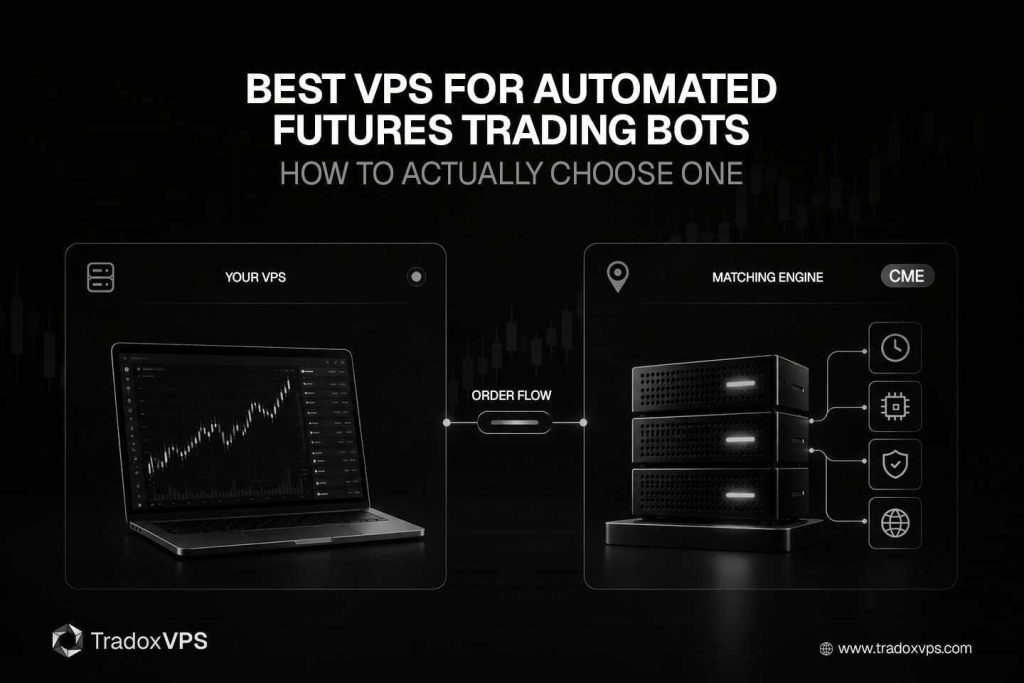
Search “best VPS for automated futures trading bots” and you get a wall of providers all claiming the same three things — lowest latency, highest uptime, best hardware — usually parked next to a sub-millisecond number that’s meant to end the conversation before it starts. None of that tells you what to actually buy. The right VPS depends entirely on what your bot is, where it trades, and the thing nobody selling you a server wants to bring up: whether your prop firm even allows one.
So this is the practical version. The specs that genuinely move the needle for an automated bot, the ones that are mostly marketing, how to size the machine for what you actually run rather than for a sales-page checklist, and the rules that can make a VPS pointless before you’ve installed anything. We sell these, which means we’ll point out our own category’s marketing traps as we go, because telling you to chase a number you can’t use isn’t doing you a favor.
First, what a VPS does for a bot, and what it doesn’t
A VPS is an always-on trading workstation sitting in a data center near your broker, which you reach by remote desktop and leave running. For an automated bot it buys three concrete things. Uptime, so the bot keeps running through a home internet drop, a power cut, or a Windows reboot, because a bot that silently stops mid-session leaves positions sitting unmanaged with no exit going through. Proximity, a short and clean network path to the exchange instead of the 50-to-200-millisecond scenic route from your house. And dedicated, stable resources, so nothing on your home machine is stealing CPU from your strategy at the worst moment. We go deeper on the uptime case in how a low-latency VPS improves trade execution.
Here’s what a VPS does not do, stated plainly because the marketing implies otherwise. It will not turn a losing bot into a winning one. And it will not deliver microsecond high-frequency trading, that requires colocation inside the exchange’s own data center, which is a different and far more expensive tier than any retail VPS. What you’re buying is reliability and the removal of execution friction. That’s genuinely valuable. It’s just not magic.
The spec that matters most, and the one that barely matters
Start with the CPU, because this is where the conventional wisdom is backwards. For live trading, single-thread clock speed matters far more than core count. The reason is that the platforms running your bots, NinjaTrader, Sierra Chart, the MetaTrader engines, lean on single-thread responsiveness for their core calculations. One genuinely fast core running your decide-and-send loop without stutter beats sixteen mediocre ones, which is why a high-clock chip like the Ryzen 9 9950X boosting to 5.7GHz removes the bottleneck that actually causes order delays, while a higher core count often does nothing for a live strategy at all. We break the chip comparison down in detail in the best CPU for a trading VPS piece, including why some providers quietly run older silicon and sell you on cores instead.
Cores do matter for exactly one thing, and it’s worth knowing which: backtesting and optimization, which are genuinely multi-threaded, plus running many platform instances or bots in parallel. So the honest rule is high clock for live execution, more cores for research and for many-instance farms. If you’re doing both, those are arguably two different machines.
RAM and storage, the quiet stability levers
RAM is the spec that fails silently. Under-provision it and Windows starts paging memory to disk, which makes the platform feel sluggish and can freeze or crash it outright even when your latency is perfect, and a frozen bot is a stopped bot. Sizing RAM with headroom is one of the simplest ways to buy long-term stability. As a baseline, a couple of light EAs need only a few gigabytes, while serious NinjaTrader automation with tick replay wants 16GB as a comfortable floor, and you scale up from there with every additional instance or terminal you run.
Storage is similar, quietly important rather than headline-grabbing. NVMe isn’t about “execution speed,” it’s about responsiveness and reliability, and it earns its place when you’re handling tick data, running backtests, writing logs, and keeping a setup alive for weeks at a time, all of which drag on slow disks. SSD is the baseline; NVMe is the right default if you store historical data or run anything heavy, with 200GB-plus making sense once you’re keeping market history locally.
Location is the factor people get wrong most
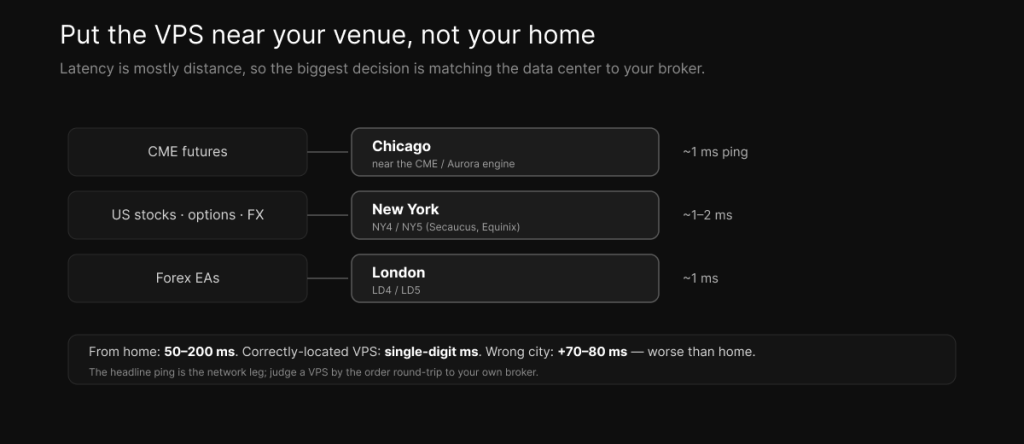
Because latency is mostly a function of physical distance, the single biggest latency decision you make is where the VPS lives, and the most common expensive mistake is putting it near your home, or in whichever city has the fastest-sounding marketing, rather than near your broker’s server hub. Match the venue. CME futures belong on a Chicago VPS near the exchange. US stocks, options, and equity-side FX belong in New York, in the NY4 and NY5 ecosystem. Forex EAs belong in London, near LD4 and LD5, and that matters concretely, FTMO, for instance, runs its servers in London exclusively. Get this wrong and a VPS in the wrong city can add seventy or eighty milliseconds, which is worse than some home connections, while a correctly located one drops you from home’s 50-to-200ms down to single digits. The geography of the CME case specifically is in why a Chicago VPS is best for CME futures.
A word on the headline numbers while we’re here, kept consistent with everything else we publish. A well-placed Chicago VPS reaches roughly one millisecond of network ping to the CME data center, and that figure is real, but it’s the network leg, not your order’s execution round-trip. Your bot’s order travels through your broker’s gateway on the way to the matching engine, so the actual round-trip is single-digit milliseconds, and true microseconds require colocation inside the exchange. The practical takeaway: judge a VPS by the round-trip to your own broker, not by an advertised ping number.
The specs that are mostly marketing
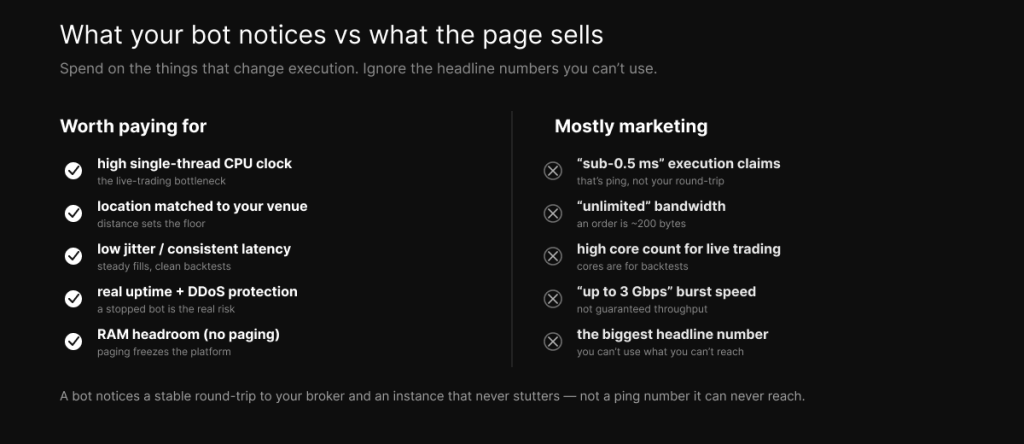
Three things get sold hard and matter little for an automated bot.
The first is the sub-millisecond race. Numbers like “0.52ms” or “sub-millisecond routing” are network ping figures, not your order’s execution round-trip, and unless you’re running colocated microsecond HFT, which a retail VPS can’t do anyway, the gap between half a millisecond and a full millisecond of ping is invisible next to the single-digit-millisecond round-trip through your broker. Don’t pay a premium chasing a number you have no way to use.
The second is bandwidth, sold as “unlimited,” “unmetered,” or “up to 3 Gbps.” A trade order is tiny, a couple hundred bytes, so bandwidth barely affects how fast an order goes out; it matters for market-data feeds and bulk transfers, not for firing trades. And “up to” burst figures aren’t guaranteed sustained throughput anyway. Routing quality and consistency beat raw port speed every time, which is the core point of network speed versus latency.
The third is peak speed sold over consistency. What actually wrecks an automated strategy isn’t a slightly higher average latency, it’s jitter, the random spikes that make fills unpredictable and break the match between your backtest and your live results. Deterministic, low-jitter latency, where every packet takes the same path at the same speed, matters more for a bot than any headline peak number.
Size it by what you actually run
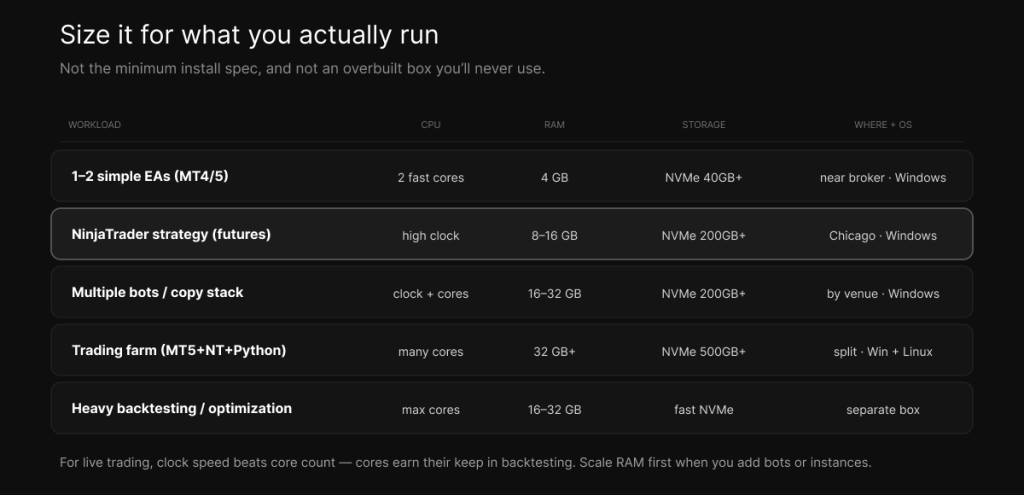
This is where most buying guides wave their hands, so here’s the specific version, mapped in the table above. The principle underneath all of it: size for your real workload, not the minimum install spec and not an overbuilt box you’ll never touch.
One or two simple MetaTrader EAs on a pair or two is a modest job, a couple of fast cores, around 4GB of RAM, NVMe, and Windows, located near your broker. A useful sanity check here: MT5 should sit under roughly 25% CPU in normal operation, so if it’s pegged, you have runaway calculation loops or too many indicators, not too small a VPS.
A single NinjaTrader automated strategy on futures wants a high-clock CPU, 8 to 16GB of RAM, NVMe with 200GB-plus for data and backtests, Chicago placement, and Windows, with 16GB the comfortable floor once you’re running heavy strategies or tick replay.
Multiple bots, multiple platform instances, or a copy-trading stack changes the math, and the first thing to scale is RAM, because every instance or terminal adds memory pressure and under-provisioned RAM is what causes the paging freezes described above; budget 16 to 32GB plus enough cores to run everything in parallel. If that stack is a copy-trader across prop accounts, the setup and the firm rules in the futures copy trading guide apply directly.
A full trading farm, say MT5 plus NinjaTrader plus a Python bot across several brokers, wants Windows for the GUI platforms and optionally Linux for the Python and API pieces, 32GB-plus of RAM, plenty of cores, and generous NVMe, and it’s worth splitting the latency-sensitive live components, which should be co-located, from research and backtesting, which can live elsewhere.
And heavy backtesting and optimization is finally where cores earn their keep, since that work is genuinely multi-threaded. It’s often smartest to run research on a separate, core-heavy box so it isn’t competing with your live execution for resources.
Windows or Linux
Match the operating system to how your bots are built. Windows Server, 2019 or 2022, is the practical choice for the GUI platforms, MetaTrader 4 and 5, NinjaTrader, cTrader, TradeStation, Rithmic terminals, because EAs and those platforms are built for Windows. Linux, typically Ubuntu 22.04 or 24.04, is the right home for custom Python, API, and algorithmic bots that don’t need a graphical platform. One firm rule from hard experience: don’t run MetaTrader through Wine on Linux for production trading, it measurably raises the EA-freeze rate. And use a 64-bit OS always, for the stability and the RAM ceiling. Pre-optimized Windows images save you the setup work; a DIY build needs hardening and some service tuning before it’s trading-ready.
Uptime, resilience, and the setup that survives a bad day
A bot is only as good as its uptime, so treat uptime as a strategy variable rather than a background detail. Look for a real 99.9 to 99.99% SLA, redundant power and network paths, 24/7 monitoring, and DDoS protection, because the volume spikes around FOMC and CPI releases are exactly when generic hosts lag, and exactly when network attacks tend to land. Two practical must-dos sit on top of the provider’s reliability. First, configure auto-restart and recovery, because platforms leak memory and crash over weeks of continuous operation, and a watchdog that restarts your bot keeps it alive through the night. Second, keep your protective orders server-side wherever possible, so a stop you’ve set survives even a brief outage, which is the single most important safeguard against the worst-case scenario of an unmanaged position running against you.
The prop-firm landmine nobody selling you a VPS will mention
Here’s the question to settle before you spend a dollar on a VPS, because a large share of futures bots run on prop accounts and the answer is frequently no: does your firm allow a VPS, and does it allow automated trading at all? Both, separately, and it’s firm-specific.
Topstep is the clearest case, and the most important to know up front. Topstep bans VPS use, bans VPN use, a VPN connection returns a flat 403 error, and bans all automation, no bots, no EAs, no copiers. You cannot run an automated bot on a Topstep account, period, which means a VPS bought for a Topstep bot is money wasted. We’d rather tell you that than sell you a server you can’t legally point at your account.
Apex, MyFundedFutures, Tradeify, TakeProfitTrader, and Lucid are where a bot-on-a-VPS actually makes sense, because they permit automation and a VPS, though each has its own terms, Apex, for instance, allows automation but prohibits HFT and exploitative strategies. The FTMO and FundedNext lineage allows EAs but restricts certain HFT and latency-exploiting strategies and emphasizes independent decisions, so read their automation rules closely. The gating move is simple: confirm both boxes, VPS allowed and automation allowed, for your specific firm and account tier, before you buy. The per-firm detail lives in the futures copy trading guide, which covers the same rules from the copy-trading angle.
How to actually test a VPS before you commit
Don’t trust the advertised ping, test the thing with your own broker. Use a trial or a refund window for this, we run a seven-day refund and 25% off the first month specifically so you can validate before committing. Three checks settle it. Ping your broker’s or data feed’s server and confirm the round-trip is low single-digit milliseconds with zero packet loss and, just as importantly, that it stays stable, low jitter, during the sessions you actually trade. Run your real bot for a few sessions and watch CPU and RAM in Task Manager, MetaTrader should sit under roughly 25% CPU, with no memory paging and no micro-stutter. And put it through a high-impact release like FOMC or CPI to see how the host behaves under load, since that’s when generic providers degrade. The numbers on a sales page are a starting point. Your real round-trip and your real stability are the answer.
So what should you actually get?
For a CME futures bot, a high-clock CPU with 16GB of RAM and NVMe, in Chicago, on Windows, at a firm that allows automation. For forex EAs, London placement on Windows, sized to your EA count. For a Python or multi-bot farm, a bigger box with a Windows-plus-Linux split, scaling RAM and cores to the load. In every case the same discipline applies: match the location to your venue, size for your real workload, prioritize consistency and uptime over a headline ping, confirm your prop firm allows both a VPS and automation, and test with your own broker before you commit. When you’re ready to match a server to your bot, our Chicago plans and pricing are the place to start.
Frequently asked questions
A high single-thread CPU, 8 to 16GB of RAM (more for multiple bots), NVMe storage, a location near your venue (Chicago for CME futures), and Windows for NinjaTrader or MetaTrader. The honest version is to size by what you actually run rather than to a generic minimum.
No. A good VPS removes execution friction and gives you uptime and consistency, but it cannot fix a losing strategy, and it cannot deliver microsecond HFT, which requires colocation inside the exchange. It improves reliability, not your edge.
Live trading depends on single-thread speed far more than core count, while RAM scales with how many instances and terminals you run, roughly 4GB for a couple of EAs and 16GB-plus for NinjaTrader automation or multiple bots. Cores matter mainly for backtesting and optimization.
Near your broker’s server hub: Chicago for CME futures, New York for US stocks and options, London for forex EAs. Putting it in the wrong city can add seventy or eighty milliseconds, which can be worse than trading from home.
It depends on the firm. Apex, MyFundedFutures, Tradeify, TakeProfitTrader, and Lucid permit automation and a VPS; Topstep bans VPS, VPN, and automation entirely. Always confirm both that a VPS is allowed and that automation is allowed for your firm and account tier before buying.
Windows Server for MetaTrader 4 and 5, NinjaTrader, and cTrader, since EAs and those platforms are built for it. Linux for custom Python and API bots. Avoid running MetaTrader through Wine on Linux in production, it raises the EA-freeze rate.
Not unless you’re doing colocated microsecond HFT, which a retail VPS can’t do regardless. For a normal automated bot, a stable single-digit-millisecond round-trip to your broker matters far more than a headline sub-millisecond ping you can’t actually reach.
We operate TradoxVPS and provide trading infrastructure, not financial or legal advice. Specifications, provider details, and prop-firm policies mentioned here are accurate to the best of our knowledge as of 2026 and change frequently; verify current details and your own firm’s rules directly. A VPS improves reliability and execution consistency but does not guarantee profitability. Trading futures and other leveraged products carries substantial risk, including the loss of more than your initial deposit.