
A NinjaTrader VPS gets sold like a commodity. Pick a plan, it’s a Windows box near the exchange, done. But NinjaTrader isn’t a generic app you can park anywhere and forget. It’s a .NET desktop platform with a few specific, slightly unusual demands: it renders your charts on the CPU when there’s no graphics card, it processes each instrument on its own thread, it’s particular about which data feed it talks to, and it runs your automated strategies on the machine itself rather than in some cloud. Get those quirks wrong and you’ll spend months blaming the platform for problems that were really your server.
Here are the five mistakes that quietly wreck a NinjaTrader setup, and how to avoid each one.
Mistake 1: Sizing for the install screen, not your real workload
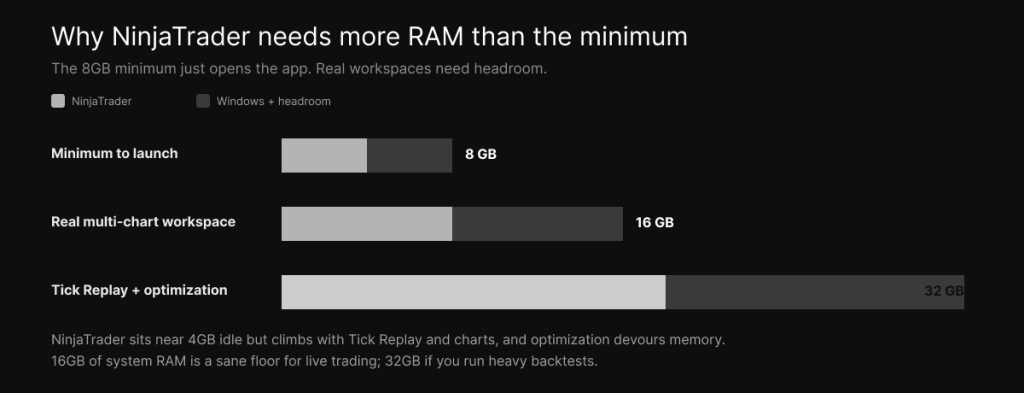
NinjaTrader’s published minimum is modest — roughly 8 GB of RAM and a quad-core CPU — and that number is the trap. Minimum specs mean “the application will open,” not “your eight charts and three strategies will run smoothly through a volatile open.” Those are very different promises.
In practice, NinjaTrader itself sits around 4 GB of RAM idle, but turn on Tick Replay and it climbs to 6-8 GB, and a serious multi-instrument workspace plus Windows wants 16 GB of system RAM as a floor. If you run Strategy Analyzer optimizations, which devour memory and cores while they churn through iterations, 32 GB starts to make sense. The mistake is buying the two-core, four-gigabyte special because it’s cheap, then watching the platform stutter the first time the market actually moves. Size for your real chart count, instrument count, and strategies, with headroom left over for Windows to breathe.
Mistake 2: Misunderstanding how NinjaTrader uses your CPU
This is the one almost everyone gets backwards, and it’s worth slowing down for because it’s where most of the wasted money goes.
People see “8 cores” on a VPS plan and assume more cores means a faster NinjaTrader. The reality is more specific. NinjaTrader 8 assigns each instrument you trade to its own CPU thread, and a single instrument’s ticks have to be processed on one thread to keep them in the correct order — so one instrument cannot be spread across multiple cores. That means your live, tick-heavy responsiveness, the kind that matters for order flow, volumetric bars, or Tick Replay, is bound by single-core clock speed, not by how many cores you have.
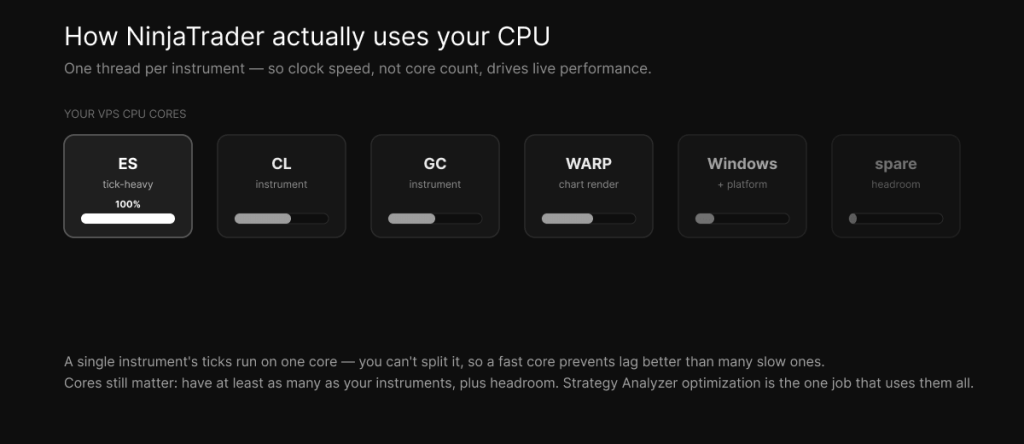
There’s a second twist that’s unique to running on a VPS. Most VPS instances have no dedicated graphics card, so NinjaTrader renders your charts on the CPU through Microsoft’s WARP software renderer. That’s more load landing on the processor, on top of the strategy and data work. So the priority order is clear: get the highest single-core clock speed you can, which is exactly why we run the Ryzen 9 9950X, and then make sure you have at least as many cores as you have instruments, plus a few spare for Windows. The one real exception is optimization, which genuinely parallelizes across many cores. Put simply, buy clock speed for live trading and cores for backtesting. The budget “more cores, slower clock” boxes get this exactly wrong for the way you’ll actually use the platform.
Mistake 3: Ignoring NinjaTrader’s data-feed path
NinjaTrader doesn’t route your retail orders straight to CME. It connects through a feed and brokerage provider — Rithmic, CQG, NinjaTrader’s own Continuum, Kinetick for data, Tradovate, or Interactive Brokers — and your market data and order routing travel through that provider first. Your real first hop is the feed, not the exchange.
That detail breaks a lot of “near CME” reasoning. A VPS that sits physically close to the exchange but has a poor network path to your specific feed will still lag NinjaTrader, because the platform talks to the feed before anything reaches Aurora. The good news for futures traders is that Rithmic, CQG, and Continuum concentrate their infrastructure in the Chicago and Aurora area, which is part of why a Chicago-metro VPS works well for NinjaTrader. But the only way to actually know is to measure the round trip from the server to your feed — which is exactly the kind of test we walk through in how to choose and verify a VPS near the CME data center. Match the location to your feed, not just to the exchange, then prove it.
Mistake 4: Running it on a box that can’t host NinjaTrader properly
This one comes in two flavors, and both are easy to overlook until you’ve already paid.
First, the operating system. NinjaTrader is a Windows application built on the .NET Framework — it needs .NET 4.8 and a proper Windows environment, so a cheap Linux VPS simply will not run it. You need a Windows Server instance, full stop. Second, the disk. Market Replay and Tick Replay download enormous tick datasets, and NinjaTrader’s databases grow steadily as you use it, so a tiny disk or a slow SATA SSD becomes a bottleneck the moment you load years of historical data or kick off an optimization. NinjaTrader’s install plus its data wants genuine NVMe space, comfortably past the bare install minimum. Treating storage and OS as afterthoughts is how you end up with a “trading VPS” that chokes on its own data. Specify a Windows Server box on NVMe with real headroom, and the problem never appears.
Mistake 5: “Set and forget” without real uptime and reconnection
This is the expensive one, because it fails at the worst possible moment.
Your automated NinjaScript strategies run on the VPS itself, not in some always-on cloud. So if the machine reboots for an update, drops its connection, or NinjaTrader crashes mid-session, your strategy stops running and any open position can be left unmanaged while you’re not watching. Plenty of traders assume “it’s a VPS, it’s always on” and never configure for the reality that machines and connections occasionally fail. What you actually want is real, monitored uptime, a plan for the platform restarting and re-establishing its connection after an interruption, and NinjaTrader’s own connection-loss handling set up deliberately rather than left on defaults. A stable connection through a volatile session is worth far more than shaving a millisecond off a quiet one — and if you want the full version of that argument, it’s in how latency actually affects execution.
The five, side by side
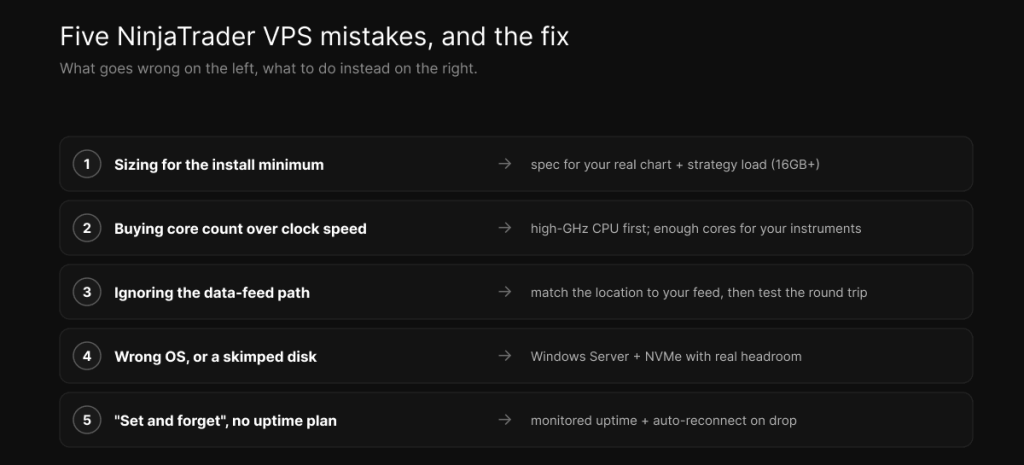
A good NinjaTrader VPS isn’t the cheapest box with “Chicago” in the product name. It’s a Windows Server instance with a high-clock CPU, enough cores and RAM for your actual workspace, fast NVMe with room to grow, a clean network path to your specific feed, and uptime you can trust through a busy session. That’s how we spec our NinjaTrader VPS — on Ryzen 9 9950X hardware in Chicago near CME, with a latency checker so you can measure your own feed path before you commit rather than taking our word for it. Plans and pricing are here when you’ve made up your own mind.
Frequently asked questions
What specs does a NinjaTrader VPS actually need? A Windows Server instance, a high single-core-clock CPU, and 16 GB of system RAM as a realistic floor for live trading, with fast NVMe storage and room to grow. Step up to 32 GB and more cores if you run Strategy Analyzer optimizations, which are memory- and core-hungry.
Is NinjaTrader single-threaded? Not exactly, and the nuance matters. NinjaTrader 8 runs each instrument on its own thread, but a single instrument’s ticks have to be processed on one thread to stay in order, so one instrument can’t be split across cores. That means single-core clock speed drives live, tick-heavy performance, while optimization is the one task that uses many cores at once.
Does NinjaTrader need a GPU on a VPS? No. When there’s no dedicated graphics card, NinjaTrader falls back to Microsoft’s WARP software renderer, which draws your charts on the CPU. That’s another reason a fast CPU matters on a GPU-less VPS — it’s doing the rendering as well as the trading.
Can I run NinjaTrader on a Linux VPS? No. NinjaTrader is a Windows .NET application and needs a Windows environment with .NET 4.8. You’ll want a Windows Server VPS rather than a Linux one.
Does a “near CME” VPS guarantee good NinjaTrader latency? No, because NinjaTrader routes through your data-feed provider first — Rithmic, CQG, Continuum, and the rest — before anything reaches the exchange. Test the round trip from the server to your actual feed rather than assuming exchange proximity is enough.
We operate TradoxVPS and provide trading infrastructure, not financial advice. Trading futures carries substantial risk, including the loss of more than your initial deposit. Latency and performance figures are environment-dependent — measure your own setup before relying on them.