The Polymarket US API lets software trade on Polymarket US, the CFTC-regulated version of Polymarket for US residents. It is not the API most Polymarket bot guides describe. The international Polymarket API belongs to a crypto-based platform whose rules list the United States as close-only. Polymarket US is a separate exchange with US dollar accounts, its own API keys, its own order format and its own servers.
This guide covers what a developer needs to build a trading bot on the Polymarket US API:
- how to get access and sign requests;
- the rate limits;
- the two WebSockets;
- the order rules that catch automated traders out;
- the weekly maintenance, and what it does to open orders;
- where the exchange’s servers run, and what that means for hosting.
Disclosure: TradoxVPS has no relationship with Polymarket. We host trading platforms and bots, including servers in New York and Chicago. Every fact about the API below comes from Polymarket US’s own documentation unless another source is named.
The short answer
- Which API: the Retail API. It handles trading at
https://api.polymarket.usand public market data athttps://gateway.polymarket.us. A separate exchange API exists for firms. - Documentation: the Polymarket US API reference, with a trader guide and a changelog alongside it.
- Who can use it: anyone with a Polymarket US account that has passed identity verification. You create keys at polymarket.us/developer, and the secret key is shown once.
- How requests are signed: three headers, with a signature over the timestamp, the HTTP method and the path. The timestamp must be within 30 seconds of the server’s time.
- Rate limit: 25 requests per second on the rate limits page (October 2026), counted per source IP address and Cloudflare location. The orders overview gives 20 per second per API key, so a bot that stays under 20 is inside both.
- Streaming: two WebSockets, one for your orders, positions and balances, and one for market data. Both need an API key, and each subscription covers up to 100 markets.
- Maintenance: every Thursday, 6:00 to 8:00 a.m. Eastern Time. All open orders are cancelled before it starts, and the order books reopen empty.
- Testing: Polymarket US documents no sandbox for the Retail API. Public market data needs no key, so the data side of a bot can be built before you trade.
- Where the exchange runs: in Amazon Web Services’ us-east-1 region in Northern Virginia, on the evidence below. The Retail API sits behind Cloudflare.
- Where to host a bot: on a server in the eastern US. Of TradoxVPS’s locations, New York is the closest to Northern Virginia.
- The international API from the US: as of October 2026, not an option for opening positions. Polymarket lists the United States as close-only on both its website and its API.
Polymarket US and Polymarket are separate platforms
The two products share a name and little else. Polymarket’s international platform is crypto-based. You connect a crypto wallet, your trades settle on a blockchain, and Polymarket’s geographic restrictions page lists the United States as close-only on the website and on the API alike. Existing positions can be closed, but new ones cannot be opened. Our Polymarket geoblock explainer covers how those restrictions work.
Polymarket US, in its own words, is “a CFTC-regulated exchange for trading event contracts on real-world outcomes”. It operates as a designated contract market and a derivatives clearing organization under the Commodity Futures Trading Commission. All trading is in US dollars, prices come from a central limit order book, and the platform describes itself as “Built for US residents”. See what Polymarket US is.
For a developer, that means four practical differences:
- Different credentials. Keys from one platform do not work on the other.
- Different order format. Polymarket US orders use market slugs, intents and US dollar prices, not the wallet-signed orders that the international platform settles on-chain.
- Different SDKs. Polymarket US publishes its own
polymarket-uspackages. Clients built for the international platform, such aspy-clob-client, do not work with it. - Different servers. The international platform’s geographic restrictions page names its primary servers as AWS eu-west-2, the London region. Polymarket US runs in Northern Virginia, as the location section below shows.
Code written for the international API does not port across. Our guide to the international Polymarket API only applies there, and our guide to the best VPS location for a Polymarket trading bot covers that platform’s servers.
One point needs to be plain. A server in another country does not change where you are. If you are in the US, Polymarket US is the platform built for US residents, subject to its own eligibility checks, and this guide is written for it. TradoxVPS does not help anyone get round a platform’s location rules.
The two Polymarket US APIs
Polymarket US documents two separate APIs. Most bot builders need the first.
| Retail API | Exchange API | |
|---|---|---|
| Built for | Individual traders with a verified account | Firms that sign an Entity Participant and Clearing Member Agreement |
| Trading address | https://api.polymarket.us | https://api.prod.polymarketexchange.com |
| Public market data | https://gateway.polymarket.us, no key needed | Public endpoints, 20 requests per second per IP |
| Authentication | Signed headers from an API key | Access tokens that expire every 3 minutes, plus a participant ID header on account calls |
| Streaming | Two WebSockets | gRPC streams, up to 20 at once per firm |
| FIX | Not in the Retail API docs | Yes, over AWS PrivateLink |
| Test environment | None documented | Pre-production, with dummy funds |
| Rate limits | 25 requests per second per IP and Cloudflare location (the orders overview says 20 per API key) | Per-firm limits for each method, with REST and unary gRPC tiers set by the firm’s share of contract volume |
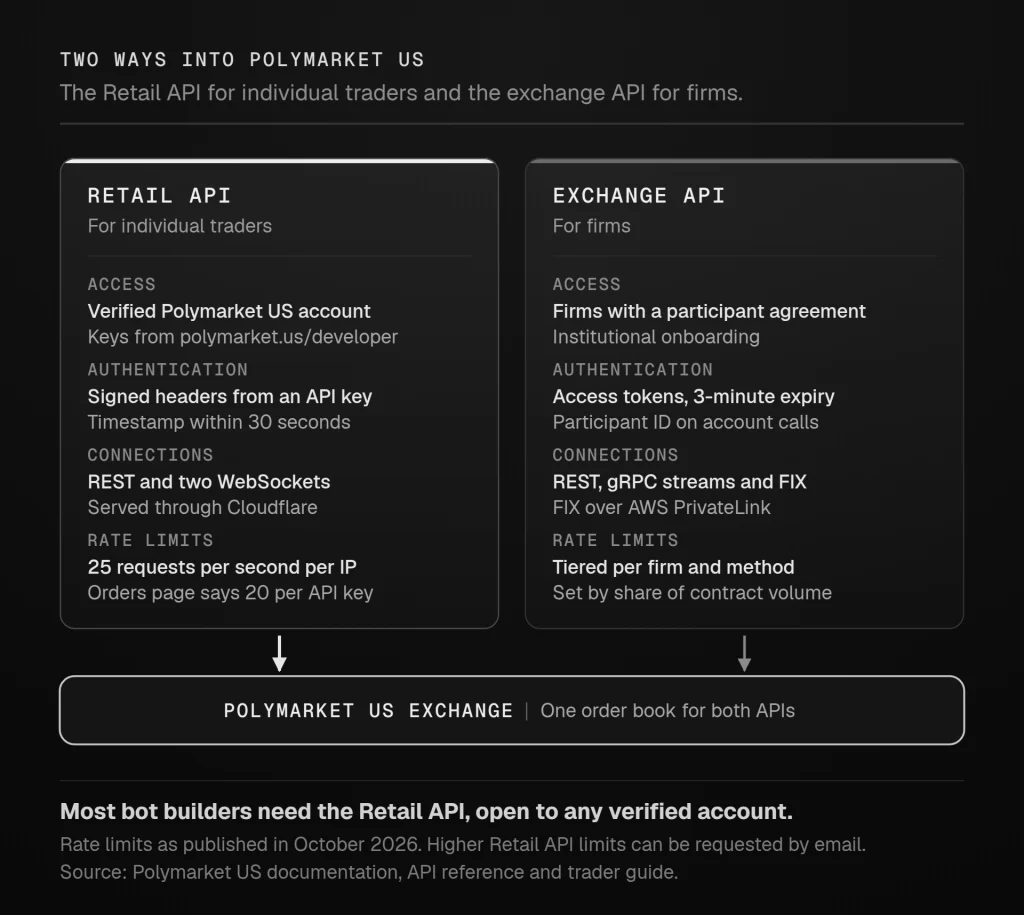
The exchange API’s onboarding page says it directly: “Individual traders: You do not need to complete this onboarding process.” Firms register through an institutional portal, sign the participant agreement, receive separate pre-production and production credentials, and fund by wire. The FIX comparison page describes REST and gRPC as “Designed for stateless, elastic, internet-style clients”, and FIX as “Designed for long-lived, stateful connections with known counterparties”.
The rest of this guide covers the Retail API, apart from the hosting section, which covers both.
Polymarket US API docs and endpoints
The official documentation lives at docs.polymarket.us. Three parts of it matter most to a bot developer:
- the API reference, for the Retail API’s endpoints, WebSockets and SDKs;
- the trader guide, for the exchange API, with the institutional pages covering FIX;
- the changelog, which announces breaking changes and extra maintenance windows.
The Retail API splits into public endpoints on gateway.polymarket.us, which need no key, and authenticated endpoints on api.polymarket.us. These are the ones a trading bot uses most:
| Job | Method and path | Host |
|---|---|---|
| List markets, with their slugs | GET /v1/markets | gateway, no key |
| One market by slug | GET /v1/market/slug/{slug} | gateway, no key |
| Order book | GET /v1/markets/{slug}/book | gateway, no key |
| Best bid and offer | GET /v1/markets/{slug}/bbo | gateway, no key |
| Price history | GET /v1/price-history | gateway, no key |
| Events | GET /v1/events | gateway, no key |
| Place an order | POST /v1/orders | api, signed |
| Open orders | GET /v1/orders/open | api, signed |
| Cancel one order | POST /v1/order/{orderId}/cancel | api, signed |
| Modify one order | POST /v1/order/{orderId}/modify | api, signed |
| Cancel all open orders | POST /v1/orders/open/cancel | api, signed |
| Place up to 20 orders | POST /v1/orders/batched | api, signed |
| Positions | GET /v1/portfolio/positions | api, signed |
| Account activity | GET /v1/portfolio/activities | api, signed |
| Balances | GET /v1/account/balances | api, signed |
Every order names its market by slug. Read the slug from the slug field in the markets list, which also accepts a slug filter. Price history takes the market slug as its symbol parameter. Trade prints come from the trade subscription on the markets WebSocket.
Polymarket US documents no sandbox for the Retail API: its reference lists production servers only. The exchange API has a pre-production environment with dummy funds, but only for firms that complete institutional onboarding. For the Retail API, the practical route is to build and test the data side against the public endpoints first, then start live trading at each market’s minimum order size.
Getting a Polymarket US API key
The authentication page sets out the steps:
- Create an account in the Polymarket US app. If you need an invite code to access the app, Polymarket US says to email support@polymarket.us.
- Verify your identity. The sign-up page asks for your date of birth, phone number, legal name, address and Social Security number. It adds that “Most users are verified automatically”, and that others may be asked for a government ID and a selfie check. Verification comes before you can deposit or trade, and the authentication page adds that it also comes before API access.
- Open the developer portal at polymarket.us/developer. Sign in with the same method you used in the app: Apple, Google or email. The docs warn that “Switching between sign-in methods may break your API key access.”
- Create a key. You receive a Key ID and a Secret Key. Copy the secret straight away, because “Your secret key is shown only once.”
Treat the secret like a password with a trading account attached:
- keep it in an environment variable on the server, never in your code;
- never commit it to version control;
- revoke it at the developer portal if you think it has leaked.
Polymarket US’s SDK examples read the two values from environment variables named POLYMARKET_KEY_ID and POLYMARKET_SECRET_KEY.
Public market data needs no key at all. You can list markets, read order books and best prices, and pull price history from gateway.polymarket.us before you have an account. The WebSockets are different: both need an API key, so until you have one, a bot can only poll for data.
How Polymarket US API authentication works
Every authenticated request carries three headers:
| Header | Value |
|---|---|
X-PM-Access-Key | Your Key ID |
X-PM-Timestamp | The current time in milliseconds |
X-PM-Signature | A signature over the timestamp, the HTTP method and the path, encoded in base64 |
The string you sign is the timestamp, the method and the path joined with no separators. For example, a GET request to /v1/portfolio/positions sent at timestamp 1700000000000 signs the string 1700000000000GET/v1/portfolio/positions. The documentation’s Python example signs that string with an Ed25519 key built from the first 32 bytes of the base64-decoded secret. The official SDKs sign the path without its query string and send any query parameters separately, so a hand-written client should do the same.
The timestamp rule matters more on a server than on a laptop: “Timestamps must be within 30 seconds of server time.” A server whose clock drifts will start getting its requests rejected. Keep the clock synchronised with NTP (on Linux, chrony or systemd-timesyncd does this). It is the first thing to check when authentication fails on a machine where it used to work.
Signing a request yourself
If you want to see exactly what goes over the wire, this is the signing step in Python. It needs pip install requests cryptography:
import base64
import os
import time

import requests
from cryptography.hazmat.primitives.asymmetric.ed25519 import Ed25519PrivateKey

KEY_ID = os.environ["POLYMARKET_KEY_ID"]
SECRET = os.environ["POLYMARKET_SECRET_KEY"]
PRIVATE_KEY = Ed25519PrivateKey.from_private_bytes(base64.b64decode(SECRET)[:32])


def signed_headers(method, path):
    timestamp = str(int(time.time() * 1000))
    message = f"{timestamp}{method}{path}".encode()
    signature = base64.b64encode(PRIVATE_KEY.sign(message)).decode()
    return {
        "X-PM-Access-Key": KEY_ID,
        "X-PM-Timestamp": timestamp,
        "X-PM-Signature": signature,
        "Content-Type": "application/json",
    }


path = "/v1/portfolio/positions"
response = requests.get("https://api.polymarket.us" + path,
                        headers=signed_headers("GET", path), timeout=10)
print(response.status_code, response.text)
Using the official SDKs
Polymarket US publishes official SDKs, which handle signing for you:
- Python:
pip install polymarket-us, for Python 3.10 and later, with synchronous and asynchronous clients. Its WebSocket connections are async-only. - TypeScript:
npm install polymarket-us, for Node.js 18 and later, with full TypeScript types.
Both cover WebSockets and raise typed errors. See the SDK introduction. The Python SDK retries failed idempotent requests on its own, but “Non-idempotent requests such as order placement are never retried automatically”, so the decision to resend an order stays with your bot. The SDKs are developed in public on GitHub, in polymarket-us-python and polymarket-us-typescript. The package registries can lag the repositories, so if an example from the docs fails, compare your installed version with the repository first.
This is the shape of a limit order with the Python SDK, adapted from Polymarket US’s quickstart:
import os
from polymarket_us import PolymarketUS

client = PolymarketUS(
    key_id=os.environ["POLYMARKET_KEY_ID"],
    secret_key=os.environ["POLYMARKET_SECRET_KEY"],
)

open_orders = client.orders.list()
order = client.orders.create({
    "marketSlug": "your-market-slug",
    "intent": "ORDER_INTENT_BUY_LONG",
    "type": "ORDER_TYPE_LIMIT",
    "price": {"value": "0.55", "currency": "USD"},
    "quantity": 10,
    "tif": "TIME_IN_FORCE_GOOD_TILL_CANCEL",
    "manualOrderIndicator": "MANUAL_ORDER_INDICATOR_AUTOMATIC",
})

client.close()
Check the market’s minimum quantity and price increment before you copy those numbers. The order rules section below explains why, and why the example marks the order as automatic.
Polymarket US API rate limits
The rate limits page gives one general number and a few exceptions:
- General limit: “The Retail API has a general limit of 25 requests/s, shared across endpoints except quote creation and deletion.”
- Combos and RFQs: creating combos and creating RFQs share a limit of one request per second, and the combos overview adds an edge limit of 10 requests per 10 seconds, per API key and per IP. Creating quotes and deleting quotes are limited to 100 per second each, and the RFQ read endpoints (listing RFQs, listing quotes, listing RFQ trades and fetching your RFQ user ID) to one per second each.
- What happens when you exceed it: you get HTTP 429 with the body
{"status": 429, "message": "Too Many Requests"}. The docs advise stopping, waiting at least a second, and retrying with exponential backoff. - Higher limits: email support@polymarket.us with your use case, your expected request volume and the endpoints involved.
One page gives a different number. The orders overview says: “The API enforces a global rate limit of 20 requests per second per API key across all endpoints.” Until the two pages agree, a bot that keeps its total under 20 requests per second per IP address stays inside both.
The detail that matters most for hosting is how the limit is counted: “Limits are enforced per source IP and Cloudflare location, so requests using different API keys from the same IP share counters at that location.” The count follows the IP address, not the account. A bot on an address that other people also send traffic from, such as a shared office connection, a VPN exit or a shared proxy, competes with them for the same allowance. A server with its own public IP address keeps the whole allowance for your bot.
“Global Rate Limit Exceeded” is not a rate limit
One error message is easy to misread. During periods of increased latency, new orders and cancel-replace requests that are not processed within 5 seconds are rejected with the message “Global Rate Limit Exceeded”. The documentation is explicit: “they are not an actual rate limit”, and “You do not need to throttle your traffic in response to them.” Treat it as a transient reject, log it, and decide in your strategy whether to resubmit. Pure cancels are not affected.
A bot that treats every “rate limit” message as a reason to back off will slow itself down for no reason during busy periods. Handle the two cases separately: a real 429, and this latency reject.
Use streams, not polling
The docs recommend replacing polling with WebSockets. Use the private stream for your orders, positions and balances, and the markets stream for prices, rather than calling endpoints like GET /v1/orders/open in a loop. They also suggest caching market and event metadata, which changes rarely. A bot that polls the order book for ten markets twice a second already makes 20 requests per second, the whole allowance on the stricter reading, before it places a single order.
Polymarket US API WebSockets
The Retail API has two WebSockets, both on api.polymarket.us, and both need an API key. The connection handshake carries the same signed headers as REST, signed over GET and the WebSocket path, for example /v1/ws/private. See the WebSocket overview.
| WebSocket | Address | Subscription types |
|---|---|---|
| Private | wss://api.polymarket.us/v1/ws/private | Orders, an order snapshot, positions, account balance, RFQ events |
| Markets | wss://api.polymarket.us/v1/ws/markets | Full order book and market stats, a lighter price feed, trades |
The rules worth building around:
- Subscriptions: each one covers up to 100 markets. For more, open more subscriptions. On the private stream, leaving
marketSlugsempty subscribes to all markets. Give each subscription a unique request ID, because unsubscribing uses that ID. - Snapshots: to rebuild your open orders, request a one-off snapshot with
SUBSCRIPTION_TYPE_ORDER_SNAPSHOTunder its own request ID, alongside theSUBSCRIPTION_TYPE_ORDERsubscription for updates. The official Python SDK documents it this way, and the snapshot ends with aneof: trueframe. A balance subscription starts with a balance snapshot. No position snapshot is documented, so read positions over REST. Rebuild state this way after every reconnect, not only at start-up. - Message format: the overview describes snake_case field names with numbered subscription types, while the private and markets pages show camelCase fields with named types such as
SUBSCRIPTION_TYPE_ORDER. The official Python SDK sends the camelCase form, which makes it the safer one to copy in a client of your own. - Heartbeats: the server sends periodic heartbeat messages, and the docs say to respond or run your own keep-alive. If heartbeats stop, reconnect. The interval is not published, so do not hard-code an assumption about it.
- Reconnects: reconnect automatically with exponential backoff, and process messages in the order they arrive.
- RFQ events: these are “live and best effort, with no replay or durable cursor”. On start-up and after every reconnect, subscribe to RFQ events first, then fetch the overlapping RFQ trade history over REST and remove duplicates by trade ID.
Batch order calls lean on the private stream too. Batch responses do not confirm each order, so the order stream is where you learn which ones were accepted, filled or rejected. In practice the private WebSocket is the bot’s record of what happened, and REST is how it asks for things.
Polymarket US order rules that catch bots out
Many order failures on Polymarket US come from a handful of rules in the orders overview and the create order reference:
- Only YES is directly tradable. The orders overview says “Only the long side (YES) is directly tradable”, and that
price.value“always represents the long side’s price, regardless of which order intent you use”. To buy NO at 0.83, you sendORDER_INTENT_BUY_SHORTwith a price of 0.17, which is 1.00 minus 0.83. A bot that sends the NO price as it appears on screen is quoting the wrong price. - The slug tells you which side is YES. In a market slug, “the first team is always the long/YES side and the second team is the short/NO side”.
- Do not trade against yourself. Buying YES at 0.60 and NO at 0.40 in the same market “causes a self-match error”, in the docs’ own words.
- Prices must sit between 0.01 and 0.99. An out-of-range order still receives an order ID, but it is rejected during validation and never fills. The docs say: “Always validate price bounds client-side before submission to avoid unnecessary orderIDs for rejected orders.”
- Quantities and increments vary by market. Every market publishes a
minimumTradeQtyand anorderPriceMinTickSize. Quantities can be decimals in partial-contract markets, where aminimumTradeQtyof 0.01 means 1% of a contract. AnorderPriceMinTickSizeof 0.005 means half-cent prices. Read both values from the market before you size an order, because extra precision may be normalised. - Market orders default to unlimited slippage. Set
slippageTolerance(in ticks or basis points) on market and close-position orders. A market order into a thin book without one fills at whatever the book offers. - Maker-only orders exist. Set
participateDontInitiate, and an order that would match immediately is rejected instead of crossing the spread. - Batches take up to 20 orders. Batch create, cancel and modify each accept up to 20 entries. Shape validation is atomic: one bad entry fails the whole batch with a 400. An unknown order ID in a batch cancel or modify is silently ignored. Confirm results on the private WebSocket.
- Order types and time in force are strings. Orders are
ORDER_TYPE_LIMITorORDER_TYPE_MARKET. The time in force is DAY, GTC (good till cancelled), GTD (good till date), IOC (immediate or cancel) or FOK (fill or kill), sent in full, such asTIME_IN_FORCE_GOOD_TILL_CANCEL. The docs say all enums are passed as strings, not numbers. - Do not rely on DAY orders to cancel at the end of the day. Since 13 September 2026, DAY orders have not cancelled automatically at the 5:00 p.m. ET trade-day roll. Polymarket US describes this as temporary while it improves DAY orders, and asks traders to use GTD orders with the desired timestamp in the meantime. The order schema still describes DAY as expiring at the end of the trading day, so check the changelog before you rely on DAY again. For an order that must be gone at a set time, a GTD order with a
goodTillTimeworks either way. - Mark bot orders as automatic. The orders overview lists
manualOrderIndicatoras “Required for regulatory compliance”, with the valuesMANUAL_ORDER_INDICATOR_MANUALandMANUAL_ORDER_INDICATOR_AUTOMATIC, although the order schema lists onlymarketSlugas required. An order placed by a bot isMANUAL_ORDER_INDICATOR_AUTOMATIC, so set it on every order. - Synchronous execution suits immediate fills only. With
synchronousExecutionset, the call blocks until the order is filled, rejected, cancelled or expired, up to amaxBlockTimeyou choose. The orders overview suggests it only for orders that can fill immediately, because it can wait up to 10 seconds for a final state. For resting limit orders and market making, submit asynchronously, which is the default, and follow the private stream.
Trading hours, maintenance and API status
Polymarket US trades “nearly 24/7”, according to its trading hours page, with exceptions a bot has to plan for:
- Weekly maintenance every Thursday, 6:00 to 8:00 a.m. Eastern Time. Polymarket US’s general FAQs give that window as effective from 24 September 2026, and the trading hours page shows the same slot.
- Extra announced windows: the changelog regularly lists additional maintenance windows, often in the early hours Eastern Time.
- Emergency pauses, which can happen without notice “to protect market participants or ensure system stability”.
- The trading day ends at 5:00 p.m. ET, weekends included. This matters for reporting, and for the DAY-order behaviour above.
Maintenance does more than pause trading. According to the general FAQs:
- “All open orders are canceled before maintenance begins.”
- “All API requests return 503 Service Unavailable during maintenance.”
- When maintenance ends, connections are re-enabled first, then markets move from SUSPENDED to OPEN, and “Order books reopen empty since all orders were cancelled before maintenance.”
For a bot that runs unattended, that sets the routine. Expect every resting order to be gone after the window, and treat a run of 503 errors as maintenance rather than a fault. Wait for markets to return to OPEN, rebuild state from the WebSocket snapshots and REST, then re-place the orders you still want. Avoid retry loops that hammer the API while it is down.
For live status, incidents and scheduled maintenance, the general FAQs point to Polymarket US’s status page, at status.polymarketexchange.com. It is worth checking there before you assume a bug in your own code.
Combos and RFQs through the Polymarket US API
Since 1 October 2026, according to the changelog, “RFQs and combos are now available to all Retail API users with existing API keys”. A combo bundles 2 to 10 legs into one instrument, and prices are usually set by a request for quote:
- A trader asks for a price on a combo.
- Market makers reply with two-sided quotes.
- The trader accepts one.
- The selected maker gets 3 seconds of last look to confirm.
- Paired orders go to the exchange 1 second after confirmation, the maker’s first and then the trader’s.
The timings come from the combos page in the trader guide, which calls them “configuration, not client-side timers”. A bot should read the deadlines from the quote itself, confirmationDeadline for the last look and executionDeadline for submission, instead of hard-coding them. For RFQ Engine requests, the same page gives market makers 200 ms to quote after an RFQ is created. The best price wins each side, an equal price goes to the earlier quote, and an exact tie goes to the lexicographically smaller quote ID. There is also a participant-wide quota of 1,000 new combo instruments a week, shared across both APIs and reset on Mondays at 00:00 UTC.
Two more details matter to a quoting bot. Since 1 October 2026, every successful quote submission returns a new quote ID, including replacements, so track the latest ID for each quote. And a quote marked as executed means the paired orders were submitted; in the docs’ words, “They do not mean the orders filled.”
Quoting RFQs is one of the most demanding jobs to automate on the platform:
- the bot has to listen to the RFQ events on the private WebSocket;
- price each request as it arrives;
- confirm within the last-look window.
That is a job for a machine that never sleeps, which is where hosting starts to matter.
Polymarket US fees for API traders
The fee schedule applies exchange-wide and lists no separate fee for API orders. Under the fee schedule that took effect on 1 October 2026, the fee on a fill is Θ × C × p × (1 − p), where C is the number of contracts and p the price:
- Taker: the standard Θ is 0.0695 (table tennis markets have used 0.10 since 7 October 2026). Buying 100 contracts at $0.50 costs $1.74 in fees.
- Maker: Θ is −0.0125, a rebate, on straight single-market trades. The same 100 contracts at $0.50 earn $0.31 back.
- Shape of the curve: fees are largest at $0.50 and shrink towards $0.01 and $0.99.
- Rounding: to the nearest cent, using banker’s rounding.
- No fill, no fee: cancelled, expired and rejected orders pay nothing.
- Taker rebates by taker volume in the previous calendar month: 10% from $250,000, 25% from $1 million and 50% from $10 million, paid weekly. Taker volume is “the amount you put at risk” on each taker fill, not the contracts’ face value.
- Combos use a separate taker fee curve, and combo trades have paid no maker rebate since 7 October 2026.
Two programmes pay for liquidity:
- The Liquidity Incentive Program takes a random snapshot of the order book every second. It scores resting orders by size, discounted by their distance from the best price. Rewards under $1.00 are not paid, and the current pools and parameters are listed at polymarket.us/rewards.
- The Market Maker Program is for approved market makers, through institutional@qcex.com.
Both reward liquidity that stays on the book, which means a server that stays online and puts its orders back after the Thursday maintenance.
Where Polymarket US servers are located
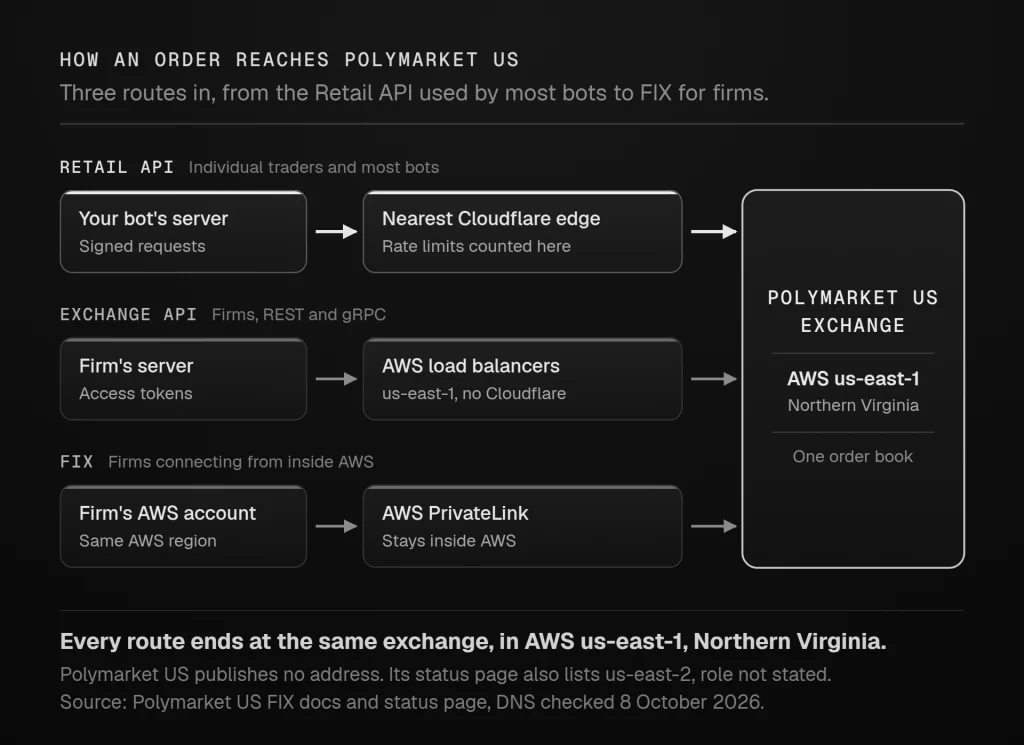
Polymarket US does not publish a data centre address, but three pieces of evidence point to the same place. You can check each one yourself.
The first is Polymarket US’s own FIX documentation. FIX connections are provisioned through AWS PrivateLink, the only connection method the documentation describes. The FIX connection setup page lists the Availability Zone IDs for production as use1-az1, use1-az2 and use1-az6, and for pre-production as use1-az1, use1-az2 and use1-az4. AWS’s Availability Zone documentation explains that an AZ ID is “the same physical location in every AWS account”. Its table places use1-az1 to use1-az6 in us-east-1, the US East (N. Virginia) region, and lists all six in Virginia. A firm that wants FIX has to bring an AWS account and connect inside that region.
The second is DNS. When we checked on 8 October 2026, the exchange API’s gRPC address, grpc-api.prod.polymarketexchange.com, resolved to six IP addresses, all within AWS’s published EC2 address ranges for us-east-1. AWS publishes those ranges in its ip-ranges.json file. The pre-production addresses resolved to us-east-1 as well. The REST address, api.prod.polymarketexchange.com, usually returned the same six addresses, but some lookups returned Amazon CloudFront addresses instead. CloudFront is a content delivery network with locations around the world, so those answers say nothing about where the exchange is.
The third is Polymarket US’s status page. The status page names the exchange’s infrastructure components, including “AWS Load Balancers (us-east-1)” and “AWS Virtual Networking Infrastructure (us-east-1)”. It lists the same two components for us-east-2, AWS’s Ohio region, and Polymarket US does not say what runs there.
The Retail API is different. api.polymarket.us and gateway.polymarket.us resolve to addresses in Cloudflare’s published ranges. Cloudflare answers at the edge location nearest to you, so DNS cannot show where the servers behind it sit. This fits the way the rate limit is counted, “per source IP and Cloudflare location”. Your requests enter at the Cloudflare location nearest your server, then travel on to Polymarket US. Every order ends up at the same exchange.
The conclusion: the evidence places Polymarket US’s exchange in AWS us-east-1, in Northern Virginia. Every exchange address we checked that points at AWS servers, rather than at CloudFront, is in us-east-1, and FIX connects there too. AWS does not publish which buildings a region uses, so Northern Virginia is as precise as the public evidence allows. The us-east-2 entries on the status page are a reason to re-check now and then rather than treat the answer as permanent, and the script further down makes that quick.
Where to host a Polymarket US trading bot
The logical place for a Polymarket US bot is the eastern US, close to Northern Virginia.
- The shortest route is a server inside AWS us-east-1 itself, which is also where FIX users must connect from.
- Among TradoxVPS’s locations, New York is the closest to Northern Virginia, and Chicago is more than twice as far.
For a market maker quoting combos or competing for a spot at the best price, that distance is worth having. If you run a bot on our infrastructure, our New York VPS is the location we would point you to for Polymarket US.
For most bots, though, distance is not what goes wrong. The failures we see on unattended trading servers are more ordinary. Each one maps to something in Polymarket US’s own rules:
- It has to stay on. The markets trade nearly around the clock, liquidity rewards are scored every second, and RFQs arrive whenever they arrive. A bot on a home computer stops when the computer sleeps, updates or loses its connection.
- It needs an address of its own. The rate limit follows the source IP. A server with its own public IP address does not share that allowance with anyone else.
- It needs an accurate clock. Signatures more than 30 seconds out are rejected, and a server synchronised with NTP stays inside that window without anyone thinking about it.
- It has to survive maintenance. Every Thursday the exchange cancels all open orders and answers API requests with 503 errors during a two-hour window. A bot that recognises the window, waits for markets to reopen and re-places its orders needs nobody to restart it.
FIX is the one case where a VPS is the wrong tool. FIX on Polymarket US requires institutional onboarding, your AWS account ID so that Polymarket can allowlist it, and a PrivateLink endpoint in your own AWS account, in Availability Zone IDs that are all in us-east-1. Polymarket’s comparison page also lists static IP allowlisting. If you are building that, you are building inside AWS.
How to measure your route to Polymarket US
The reliable way to choose between two servers is to measure from both. The script below uses only Python’s standard library and runs 20 rounds against each Polymarket US address. For the Retail API, each round times the DNS lookup, TCP connection, TLS handshake and time to first byte, for a market lookup that Cloudflare cannot answer from its cache. For the exchange API, it stops after the TLS handshake. It then prints the median and the fastest round. Save it as route_check.py on each server you are comparing and run python3 route_check.py.
#!/usr/bin/env python3
"""Time the network path from this machine to Polymarket US.

For each host it runs 20 rounds of: DNS lookup, TCP connect, TLS handshake
and, where a path is set, time to first byte. It then prints the median and
the fastest round in ms. Standard library only. Run it on every server you
are comparing.
"""
import secrets
import socket
import ssl
import statistics
import time
from collections import Counter

TARGETS = [
    # (label, host, path); path None means connect and TLS handshake only.
    # {nonce} becomes a new random value each round: a market slug that does not
    # exist, so Cloudflare cannot answer from its cache and the request goes on
    # to Polymarket US, which returns an empty list.
    ("Retail API, public data (Cloudflare)", "gateway.polymarket.us",
     "/v1/markets?limit=1&slug=route-check-{nonce}"),
    ("Exchange API, gRPC address (AWS us-east-1)", "grpc-api.prod.polymarketexchange.com", None),
]
ROUNDS = 20
PAUSE = 0.25          # seconds between rounds, to stay far below any rate limit
PORT = 443


def one_round(host, path, port=PORT, context=None):
    if context is None:
        context = ssl.create_default_context()
        if path is None:
            context.set_alpn_protocols(["h2", "http/1.1"])
    t0 = time.perf_counter()
    # IPv4 only, so a server with broken IPv6 still gets a fair test
    addr = socket.getaddrinfo(host, port, family=socket.AF_INET, type=socket.SOCK_STREAM)[0][4]
    t1 = time.perf_counter()
    sock = socket.socket(socket.AF_INET, socket.SOCK_STREAM)
    # Send each write at once, as HTTP libraries do. Without this, the kernel can
    # hold the request back for about 40 ms after the TLS handshake.
    sock.setsockopt(socket.IPPROTO_TCP, socket.TCP_NODELAY, 1)
    sock.settimeout(10)
    head, t4 = b"", None
    try:
        sock.connect(addr)
        t2 = time.perf_counter()
        tls = context.wrap_socket(sock, server_hostname=host)
        t3 = time.perf_counter()
        if path is not None:
            target = path.format(nonce=secrets.token_hex(6))
            request = (f"GET {target} HTTP/1.1\r\nHost: {host}\r\n"
                       "User-Agent: route-check/1.0\r\nConnection: close\r\n\r\n")
            tls.sendall(request.encode())
            while b"\r\n\r\n" not in head:
                chunk = tls.recv(4096)
                if not chunk:
                    break
                if t4 is None:
                    t4 = time.perf_counter()
                head += chunk
        tls.close()
    finally:
        sock.close()
    lines = head.split(b"\r\n\r\n")[0].decode("latin-1").split("\r\n")
    headers = {k.strip().lower(): v.strip() for k, _, v in (l.partition(":") for l in lines[1:])}
    ms = lambda a, b: (b - a) * 1000
    return {
        "dns": ms(t0, t1), "connect": ms(t1, t2), "tls": ms(t2, t3),
        "first_byte": ms(t3, t4 or time.perf_counter()) if path is not None else None,
        "status": (lines[0] or "-") if path is not None else "not requested", "ip": addr[0],
        "edge": headers.get("cf-ray", "").rpartition("-")[2] or "-",
        "cache": headers.get("cf-cache-status", "-"),
    }


def main():
    for label, host, path in TARGETS:
        rounds = []
        for _ in range(ROUNDS):
            try:
                rounds.append(one_round(host, path))
            except OSError as exc:
                print(f"  {host}: {exc}")
            time.sleep(PAUSE)
        if not rounds:
            continue
        last = rounds[-1]
        counts = Counter(r["cache"] for r in rounds)
        cache = "-" if set(counts) == {"-"} else ", ".join(f"{k} x{v}" for k, v in counts.items())
        print(f"\n{label}\n  host {host}  ip {last['ip']}  response {last['status']}\n"
              f"  cloudflare edge {last['edge']}  cache {cache}")
        for key in ("dns", "connect", "tls", "first_byte"):
            vals = [r[key] for r in rounds if r[key] is not None]
            if vals:
                print(f"  {key:<11} median {statistics.median(vals):7.1f} ms   fastest {min(vals):7.1f} ms")


if __name__ == "__main__":
    main()
How to read the output:
- Exchange API, connect time. The TCP connect time to
grpc-api.prod.polymarketexchange.comis roughly one network round trip between your server and AWS us-east-1. It is the cleanest comparison between locations. The script uses the exchange’s gRPC address because its REST address sometimes resolves to Amazon CloudFront, whose nearest edge would answer instead. It stops after the TLS handshake, so no request reaches the exchange, and the response column reads “not requested”. - Retail API, connect time. The connect time to
gateway.polymarket.usonly reaches the nearest Cloudflare edge, which is usually close. Do not compare locations on this line. - Retail API, first byte. The time to first byte on
gateway.polymarket.uscovers the trip from Cloudflare onward to Polymarket US and back, plus the time Polymarket’s servers take to answer, so it is the script’s closest view of the full path a Retail API request takes. Each round asks for a market slug that does not exist, so Cloudflare cannot answer from its cache, and the cache column should count MISS or DYNAMIC rounds. Any HIT rounds were answered by Cloudflare alone and cover only the edge. - Cloudflare edge. The “cloudflare edge” code shows which Cloudflare location served you, as an airport-style code. It shows “-” for the exchange API, which does not sit behind Cloudflare.
- Spread. Compare medians, and look at the gap between the median and the fastest round. A server whose median sits far above its fastest round has a noisy path, and noise hurts a bot more than a slightly longer route that is steady.
If you want a quick read on your current connection without running anything, our latency checker gives a browser-based baseline.
How this guide was checked
Every statement about the API comes from Polymarket US’s documentation as published in October 2026, including:
- the API reference, authentication, rate limits, orders and WebSocket pages;
- the trader guide pages on onboarding, environments, rate limits and combos;
- the FIX setup and comparison pages;
- the fee schedule;
- the Liquidity Incentive Program;
- the trading hours page and the general FAQs;
- the changelog;
- the official SDK packages and their source code on GitHub.
Where two Polymarket US pages disagree, we say so or use the more cautious reading. The rate limit is one example: the rate limits page gives 25 requests per second per IP, while the orders overview gives 20 per second per API key.
The location section rests on four things you can repeat:
- Polymarket US’s FIX setup page, and AWS’s own definition of Availability Zone IDs;
- DNS lookups of the exchange API’s addresses on 8 October 2026, matched against AWS’s published IP ranges;
- the component list on Polymarket US’s status page;
- a DNS lookup of the Retail API on the same day, matched against Cloudflare’s published ranges.
The international Polymarket restrictions come from Polymarket’s own geographic restrictions page.
What we bring from our own work is the hosting side. We run trading servers in the US and Europe, and the operational points in the hosting section are the ones that decide whether an unattended bot is still trading in the morning. We are not affiliated with Polymarket, and this guide is not trading advice.
Frequently asked questions
Yes. Polymarket US provides a Retail API for individual traders, covering market data, orders, portfolio and account endpoints, with official Python and TypeScript SDKs and two WebSockets. Trading goes through api.polymarket.us and public market data through gateway.polymarket.us, and the documentation is at docs.polymarket.us. A separate exchange API, with gRPC streaming and FIX, serves firms that sign a participant agreement.
You need a Polymarket US account that has passed identity verification. Polymarket US describes itself as built for US residents, and it collects a Social Security number during sign-up. Create the account in the Polymarket US app and complete verification, then sign in at polymarket.us/developer with the same sign-in method as the app and create a key. You receive a Key ID and a Secret Key. The secret is shown only once, so store it securely, for example in an environment variable on your server. Public market data on gateway.polymarket.us needs no account or key.
The rate limits page gives a general limit of 25 requests per second, counted per source IP address and Cloudflare location, so different keys on the same IP share it. The orders overview gives 20 requests per second per API key, so a bot that stays under 20 per IP is inside both. Exceeding a limit returns HTTP 429, and higher limits can be requested from Polymarket US support. A “Global Rate Limit Exceeded” reject is something else: a latency stopgap for orders not processed within 5 seconds, which Polymarket US says is not an actual rate limit and needs no throttling in response.
No sandbox or test environment is documented for the Retail API, whose reference lists production servers only. The exchange API for firms has a pre-production environment with dummy funds, available through institutional onboarding. For the Retail API, build and test the data side of a bot against the free public endpoints on gateway.polymarket.us, then start live trading at each market’s minimum order size.
Not to open positions. Polymarket’s geographic restrictions page lists the United States as close-only on both the website and the API, so existing positions can be closed but new ones cannot be opened. Polymarket US is the platform built for US residents, and the international clients, such as py-clob-client, do not work with it, because it has its own API keys, request signing and order format. Use the official polymarket-us SDK for Python or TypeScript, or a client of your own built on the Retail API.
Yes. Polymarket US runs weekly maintenance every Thursday from 6:00 to 8:00 a.m. Eastern Time, in effect since 24 September 2026. All open orders are cancelled before it starts, API requests return 503 Service Unavailable while it runs, and the order books reopen empty. Extra windows are announced in the changelog, live status and scheduled maintenance appear at status.polymarketexchange.com, and trading can be paused without notice in an emergency. A bot should detect maintenance, wait for markets to reopen and re-place its orders rather than retrying in a loop.
The same schedule as any Polymarket US order. Under the schedule effective 1 October 2026, the fee is a coefficient times the number of contracts times p times (1 − p), with a standard taker coefficient of 0.0695 and a maker rebate of 0.0125 on straight trades. Combo trades have paid no maker rebate since 7 October 2026. Buying 100 contracts at $0.50 costs $1.74 as a taker, and cancelled, expired or rejected orders pay nothing.
The evidence points to Amazon Web Services’ us-east-1 region in Northern Virginia. Polymarket US’s FIX documentation lists production Availability Zone IDs that AWS defines as us-east-1, the exchange API’s gRPC address resolved to AWS us-east-1 IP addresses when we checked in October 2026, and Polymarket US’s status page lists us-east-1 load balancers. The status page also lists us-east-2 components without saying what runs there. The Retail API sits behind Cloudflare, but orders still reach the same exchange.
A server in the eastern United States, as close as possible to Northern Virginia. The shortest route is a server inside AWS us-east-1 itself, and among TradoxVPS’s locations, New York is the closest. Staying online through maintenance windows, keeping an IP address of your own and keeping the clock accurate matter as much as distance for most bots.
Facts about the Polymarket US API come from Polymarket US’s published documentation as of October 2026. The location findings come from Polymarket US’s FIX documentation, its status page and DNS lookups on 8 October 2026, matched against AWS’s and Cloudflare’s published IP ranges. Fees, limits and maintenance windows change, so check the linked pages, and Polymarket US’s changelog and general FAQs in particular, before you rely on a figure. This is educational content, not trading or financial advice.