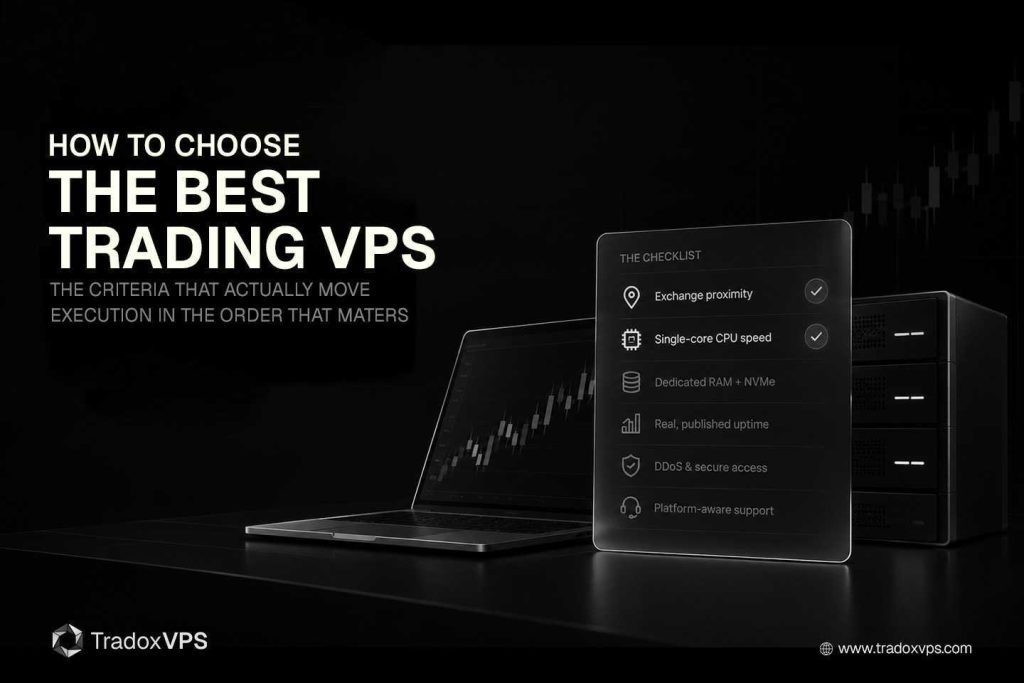
Your VPS isn’t where you host your platform — it’s part of your trading equipment. When it chokes during a market open or a news release, even a good strategy gets filled at a worse price than the one on your screen. So choosing the right one isn’t a box-ticking exercise; it’s a decision that shows up in your fills.
The trouble with most “how to choose a VPS” guides is that they hand you a flat checklist where every item looks equally important. It isn’t. Two factors actually move your execution, a few protect it, and the rest are constraints. This guide walks the criteria in priority order, explains the honest reasoning behind each, and tells you exactly what to ask a provider — whether you trade futures, forex, crypto, or prediction markets.
What a trading VPS actually is (and why it isn’t web hosting)
A trading VPS is a remote Windows server tuned for the low-latency, always-on demands of a trading platform. A generic VPS is built to keep a website available; a trading VPS is built to keep your orders fast and uninterrupted. In a real setup it does three jobs:
- It removes your home as a point of failure. Your strategy keeps running through an ISP drop, a power cut, or a reboot — the trade never sits unmanaged because your laptop went to sleep.
- It’s an automation hub. Bots, Expert Advisors, and copiers run 24/7 in a stable environment, independent of your local machine.
- It normalizes latency. It puts your execution physically closer to the exchange, so your orders reach the matching engine ahead of someone trading from a home connection two time zones away.
That last point is the one generic cloud can’t match, and it’s why the order of the criteria below matters so much.
Get the priority order right
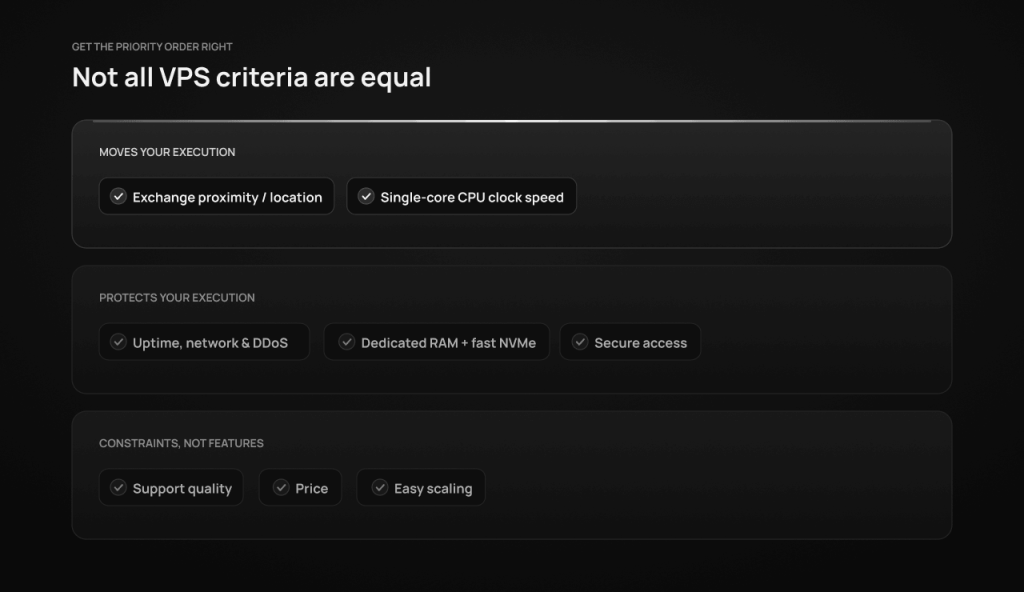
Before the checklist, the meta-point: location and single-core CPU speed are the only two factors that actively make your execution faster. Uptime, security, and good hardware protect that execution from interruption. Support, price, and scalability are real considerations, but they’re constraints — not performance features. Spend your decision-making budget accordingly. A cheaper plan in the right city beats a pricier plan in the wrong one, every time.
1. Exchange proximity — the biggest single lever
You cannot outrun the speed of light. If your server is in New York but the exchange’s matching engine is near Chicago, your orders travel hundreds of miles round-trip, and no CPU on earth claws that time back. Distance to the matching engine is the largest, most permanent factor in your latency — so the first question is always where, not how fast.
Match the data center to your market:
- Futures (CME / CBOT) — the matching engine lives in Aurora, Illinois, just outside Chicago. A well-placed Chicago VPS sits closest to it; this is the home base for futures trading on NinjaTrader, Tradovate, and Rithmic.
- Forex — choose the hub nearest your broker’s price feed; for European and many global brokers that’s London or Amsterdam. See the London VPS for FX desks.
- Crypto and prediction markets — proximity to the venue’s API endpoints matters; our Dublin VPS is geared to the Polymarket and Kalshi ecosystems and EU crypto.
Be honest with yourself about the numbers. When a provider quotes a sub-millisecond figure, that’s almost always network ping — the time for a packet to reach the exchange and back. Your actual order round-trip, the thing that determines your fill, also passes through your broker’s gateway and is realistically single-digit milliseconds, no matter how close the box is. Proximity genuinely shrinks and stabilizes that number; it does not turn a retail VPS into exchange colocation, and “zero slippage” is marketing, not physics. The right test is simple: ask the provider which data center the plan runs in, then measure ping to your broker yourself with a latency checker before you commit.
2. CPU: single-core clock beats core count
This is the spec most people get backwards. Generic providers advertise 16 or 32 cores, but those are usually server-grade Intel Xeon or AMD EPYC chips running at 2–3 GHz — fantastic for databases, wrong for trading.
Here’s why: a platform’s critical path — take in a tick, run your strategy logic, fire the order — executes on a single core, in sequence. NinjaTrader, Rithmic order handling, and MetaTrader are all built this way. If that one core is slow, the whole platform lags, and the other 31 cores sitting idle don’t help. So the number that maps to your execution speed isn’t core count — it’s single-core clock and instructions-per-clock (IPC).
That’s the case for a current-generation, high-clock desktop chip. The AMD Ryzen 9 9950X (Zen 5) boosts to 5.7 GHz on a single core — among the highest clocks available for live execution — and its higher IPC means it clears each tick faster than a previous-generation Ryzen even at the same frequency. A faster single core shows up as charts that render without stutter, indicators that update in real time, and less jitter when price moves fast. We standardized on the 9950X for exactly this reason and publish the real PassMark scores and full hardware spec so the claim is checkable rather than asserted.
| High-clock desktop chip (e.g. Ryzen 9 9950X) | Many-core server chip (Xeon / EPYC) | |
|---|---|---|
| Single-core boost | ~5.7 GHz | ~2.0–3.0 GHz |
| Best at | Live, single-threaded execution | Parallel server workloads |
| Right for trading? | Yes — matches the critical path | Only for heavy batch backtesting |
3. RAM and storage: DDR5 and NVMe
Once location and CPU are right, the job is to keep data moving without bottlenecks. A busy multi-chart setup with order-flow tools generates a constant stream of reads and writes.
- RAM — DDR5 carries meaningfully more bandwidth than DDR4, which matters when complex indicators need rapid access to thousands of price points across several instruments. Just as important, check that the RAM is dedicated to your VPS rather than shared and ballooned across tenants — dedicated memory is what stops a noisy neighbour from paging out your platform. (Our plans use dedicated DDR5.)
- Storage — insist on enterprise NVMe, not SATA SSD or — worse — HDD. Fast NVMe handles the burst of writes when your platform logs a trade or recovers a session, avoiding the “disk hang” that freezes cheaper setups at the worst moment.
| Workload | Minimum | Comfortable |
|---|---|---|
| One platform, few charts | 6 GB RAM | 12 GB RAM |
| Multi-chart + order flow (Bookmap) | 12 GB RAM | 18–24 GB RAM |
| Many bots / multi-account copiers | 24 GB RAM | 36–48 GB RAM |
| Storage (any of the above) | NVMe SSD | Enterprise Gen4 NVMe |
4. Uptime, network, and reliability
A trading VPS has to be online whenever the market is. But treat round-number uptime promises with healthy skepticism — anyone can print “five nines” on a page. What actually tells you something:
- A provider that publishes a real, live status page and uptime history you can read, like our uptime and reliability page, rather than a slogan.
- A low-jitter, well-peered network with DDoS protection — stable routing matters as much as raw speed, because variable “noise” between you and the exchange is what quietly widens slippage.
Downtime means missed trades. Consistency of the connection, not a marketing percentage, is what you’re buying.
5. Trading-specific configuration, not generic cloud
Many traders start on AWS, Azure, or GCP. Those platforms are superb at high-availability web hosting — which is a different job. They’re built so your resources can be shared with other tenants and routed for general web traffic, neither of which suits live trading.
A trading-tuned provider does the unglamorous engineering for you: a pre-configured Windows Server 2022 image, sensible network settings, and support that actually knows what NinjaTrader or Rithmic is. You shouldn’t have to spend an evening disabling Windows background services or hunting routing settings.
| Generic cloud (AWS / Azure / GCP) | Trading-tuned VPS | |
|---|---|---|
| Designed for | Web-service availability | Low-latency execution |
| CPU | Shared server cores, ~2–3 GHz | Current-gen high-clock chip |
| Location | Routed for web traffic | Proximal to the exchange |
| Support | General infrastructure | Platform-aware (trading) |
6. Security
Your VPS holds the keys to live trading accounts, so the basics aren’t optional: a firewall, DDoS mitigation, encrypted RDP or VPN access, regular backups, and a data center with proper physical security. None of this is exotic — but a provider that’s vague about it is telling you something.
7. Support that understands trading
Markets run around the clock, so support needs to as well — and it needs to be fast and platform-aware, not a ticket queue that replies in two business days. The difference between a host that can help you diagnose a latency spike or a platform install and one that treats your server like a generic web box is the difference between a five-minute fix and a lost session.
8. Price — and the real cost of “cheap”
The cheapest VPS is rarely the cheapest outcome. The way budget providers hit a low headline price is by running old, recycled server CPUs, sitting far from the exchange, packing many tenants onto each box with no dedicated RAM, and publishing no benchmarks you can verify. The slippage that setup causes during a single volatile session can dwarf the few dollars you saved that month.
A useful honesty check, since every shared VPS oversubscribes its CPU to some degree: don’t ask “is it shared?” — ask how heavily, and on what hardware. A good provider will talk openly about resource allocation, run current-generation chips, give you dedicated RAM, and let you verify performance. You can even test it yourself — run your platform during a busy session and watch for latency that appears when your own load is low (on Linux, the st “steal time” figure in top shows when the host is busy with other tenants). Judge a plan on hardware generation, proximity, dedicated RAM, transparency, and support — not on the number at the top of the pricing table.
9. Make sure it scales
Your needs grow — more charts, more accounts, a shift to heavier automation. The right provider lets you move up tiers without rebuilding from scratch: easy RAM and CPU upgrades, snapshots, and a clean path from one plan to the next. Ask before you buy whether an upgrade is a click or a migration.
Match the VPS to how you trade
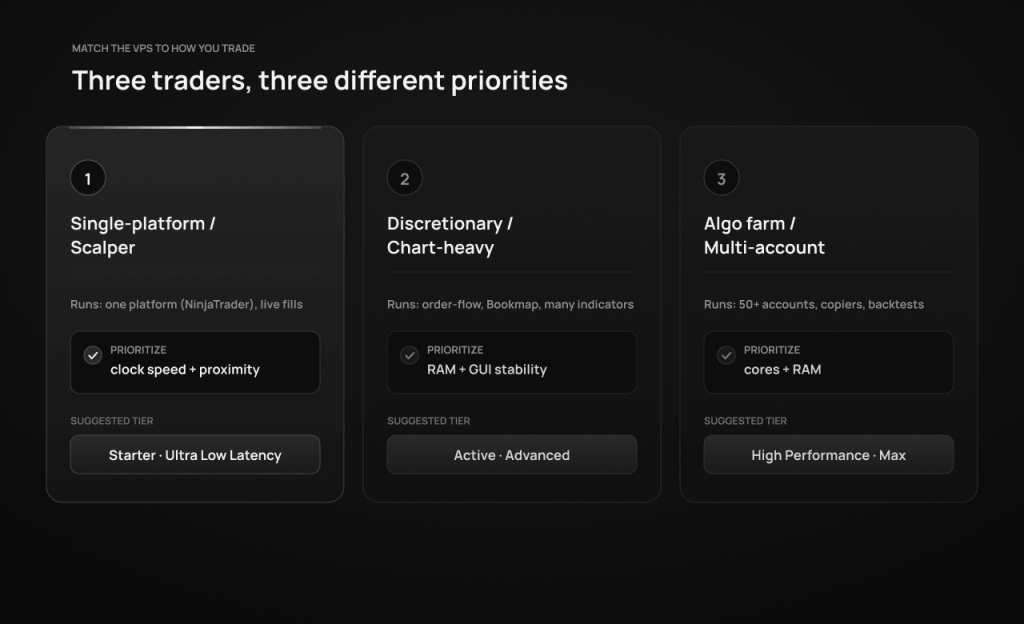
The “best” VPS depends on your strategy. Three common profiles:
| Trader profile | What you run | Prioritize | Sensible tier |
|---|---|---|---|
| Single-platform / scalper | One platform, live fills | Single-core clock + proximity | Starter → Ultra Low Latency |
| Discretionary / chart-heavy | Order flow, Bookmap, many indicators | RAM + GUI stability | Active → Advanced |
| Algo farm / multi-account | 50+ accounts, copiers, backtests | Cores + RAM | High Performance → Max |
The pattern: if you trade live on one platform, clock speed and location are everything and you don’t need many cores. If you run heavy charts, lean toward RAM. If you run many accounts or backtest at scale, that’s where core count and memory finally earn their place.
TradoxVPS plan breakdown
| Plan | Best for | Key specs | Monthly |
|---|---|---|---|
| Starter Trader | Single platform (NinjaTrader) | 2 cores · 6 GB DDR5 · 75 GB NVMe | $39 |
| Active Trader | Multi-platform / light automation | 4 cores · 12 GB DDR5 · 150 GB NVMe | $69 |
| Advanced Trader | Intensive strategies | 6 cores · 18 GB DDR5 · 250 GB NVMe | $99 |
| High Performance | Professional algo farms | 8 cores · 24 GB DDR5 · 300 GB NVMe | $129 |
| Ultra Low Latency | HFT-style / scalping | 12 cores · 36 GB DDR5 · 500 GB NVMe | $179 |
| Max Performance | Institutional workloads | 16 cores · 48 GB DDR5 · 750 GB NVMe | $249 |
Every tier runs the same Ryzen 9 9950X with dedicated DDR5 RAM, so the single-core speed that drives live execution is identical from the $39 plan to the $249 plan. You step up for cores, RAM, and storage — to run more charts, more accounts, or heavier backtests — not for faster fills on a single strategy. Deploy in a few minutes and see full pricing.
The final checklist
- ✅ Located near your exchange / broker (futures → Chicago)
- ✅ Current-generation, high-clock CPU (single-core speed, not core count)
- ✅ Dedicated DDR5 RAM, sized to your strategy
- ✅ Enterprise NVMe storage
- ✅ A published, real uptime / status page — not a slogan
- ✅ DDoS protection and a low-jitter network
- ✅ Secure access (encrypted RDP/VPN, firewall, backups)
- ✅ Pre-configured, trading-tuned Windows environment
- ✅ Fast, platform-aware support
- ✅ Verifiable benchmarks and honest resource allocation
- ✅ Room to scale without a rebuild
Frequently asked questions
Location and single-core CPU speed. Distance to the exchange sets the floor on your latency, and the single core running your platform’s critical path sets how fast each tick is processed. Get those two right first; everything else protects or supports them.
If you want 24/7 uptime and uninterrupted Expert Advisor performance, yes. A MetaTrader VPS keeps your EAs running when your own PC is off, on a connection closer to your broker.
A couple of terminals are comfortable on 6–12 GB. Many EAs, heavy indicators, or order-flow tools push you toward 18–24 GB, and multi-account copier setups toward 36–48 GB.
They do different jobs. CPU single-core speed determines how fast orders are processed; RAM determines how many charts, indicators, and instances you can run at once. For a live single strategy, CPU clock matters most; for chart-heavy or multi-account work, RAM.
Yes. You connect over Remote Desktop (RDP), which works from Mac, Windows, or mobile. The VPS runs Windows Server 2022, so Windows-only platforms like NinjaTrader run normally.
As close to the CME matching engine in Aurora, Illinois as possible — which in practice means a Chicago data center. That proximity is the single biggest lever on futures execution latency.
Buying on headline price or core count. A cheap plan on old, heavily-shared server CPUs far from the exchange will lag during volatility, and that slippage usually costs more than the hosting ever saved. Judge on hardware generation, proximity, dedicated RAM, and verifiable performance.
For a single light strategy it can work — but check the fundamentals (current-gen chip, dedicated RAM, NVMe, proximity, published uptime). The savings vanish the first time the box stalls on a news spike.
TradoxVPS provides trading-platform hosting, not financial advice, and we don’t guarantee trading results. Quoted latency figures refer to network conditions and vary with your broker, route, and configuration; actual order round-trip depends on your broker and the exchange. Trading futures, forex, and other leveraged products carries substantial risk, including loss beyond your initial deposit.