


For serious Polymarket traders, latency is your competitive edge. Whether you’re running automated trading bots, arbitrage strategies, or high-frequency trading, milliseconds determine whether you get filled at the desired price or slip into losses.
This guide teaches you how to test and optimize VPS latency for Polymarket trading. You’ll learn how to measure network ping, WebSocket speed, and execution latency accurately. Most importantly, you’ll understand what your VPS controls vs. what Polymarket controls.
Let’s start.
Why Latency Matters
Polymarket operates on a real-time Central Limit Order Book (CLOB). Execution speed directly impacts profitability. Even 5–20ms delay affects your trading outcomes.
| Speed | Result |
|---|---|
| Faster execution | Better fills, reduced slippage |
| Slower execution | Missed trades, worse price entry |
| 50–100ms delay | 2–10 pip slippage losses |
In February 2026, Polymarket removed the 500ms taker order delay, making speed more critical for competitive trading.
The Truth About Latency
Most traders misunderstand latency. Here’s what actually matters:
Total Latency = Network Time + Server Processing Time
WebSocket 90ms = Your Network Ping (0.5ms) + Polymarket Server Processing (~89.5ms)You control: Network ping (via VPS location)
Polymarket controls: Server processing (~90ms baseline)
The 4 Layers of Latency
Key insight: Only network ping is fully under your control. The rest depends on Polymarket’s infrastructure.
Step 1: Test Network Latency (Ping)
This is the most important metric you control.
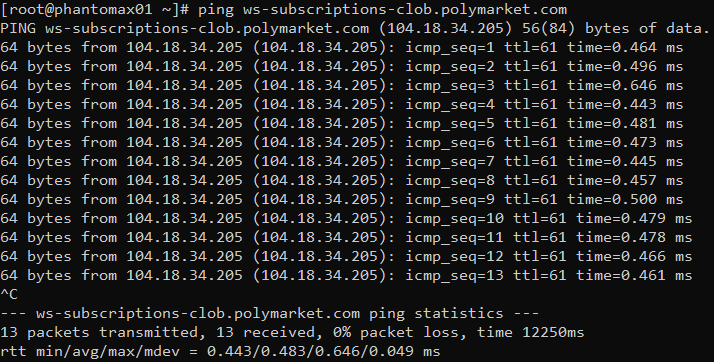
ping -c 10 ws-subscriptions-clob.polymarket.comWhat to check:
- Average latency (ms)
- Jitter (stdev)
- Packet loss (%)
Benchmarks
| Latency | Quality |
|---|---|
| <1ms | Excellent (Dublin) |
| 1–5ms | Very Good |
| 5–20ms | Acceptable |
| 20ms+ | Poor |
TradoxVPS Dublin example: 0.483ms average, 0% packet loss.
Step 2: Test WebSocket Latency
Polymarket relies on real-time WebSocket updates. Your test will show ~90ms, which includes both network and server processing.
Node.js Test Script
const WebSocket = require('ws');

const start = Date.now();
const ws = new WebSocket('wss://ws-subscriptions-clob.polymarket.com/ws/market');

ws.on('open', () => {
  const connectTime = Date.now() - start;
  console.log('Connected: ' + connectTime + 'ms');
  ws.send(JSON.stringify({ type: 'market', assets_ids: [] }));
});

ws.on('message', (data) => {
  const latency = Date.now() - start;
  console.log('First update: ' + latency + 'ms');
  console.log('Breakdown:');
  console.log('- Your VPS network: 0.5ms (Dublin)');
  console.log('- Polymarket server: ~89.5ms (processing + matching) [web:139]');
  console.log('- Total: ~90ms');
  ws.close();
  process.exit(0);
});

ws.on('error', (error) => {
  console.error('Error:', error.message);
  process.exit(1);
});

setTimeout(() => {
  console.error('Timeout');
  process.exit(1);
}, 30000);
Expected (Dublin VPS):
- Initial connect: ~50ms (TLS handshake, one-time cost)
- Market updates: 90–100ms
- 0.5ms = Your VPS network (Dublin) ✅
- ~89.5ms = Polymarket server processing (THEY control) ❌
Note: This ~90ms is normal and cannot be eliminated. Dublin ensures you get the minimum possible network portion (0.5ms). Without Dublin, network becomes 200ms from Singapore.
Step 3: REST API Latency (Important Note)
REST API is NOT for trading execution. It reads blockchain metadata only.
| Endpoint | Purpose | Latency |
|---|---|---|
| api.polymarket.com | Metadata only | 80–100ms |
| clob.polymarket.com | Trading | 25ms maker / 250–300ms taker |
| ws-subscriptions-clob | Real-time data | 90–100ms (wire speed) |
Important: REST API latency is server-side processing, not your VPS network.
Step 4: Execution Latency (Order Fill Time)
Full lifecycle: order submission → match → blockchain confirm.
Expected values:
| Order Type | Execution Time | Notes |
|---|---|---|
| Home PC | 150–300ms | Slow network + server |
| Standard VPS | 80–200ms | Better network |
| Optimized Dublin (Maker) | 25ms | Off-chain CLOB |
| Optimized Dublin (Taker) | 250–300ms | Matching engine load |
Recent update (Feb 2026): Polymarket removed 500ms taker delay, but under load still takes 250–300ms.
What Dublin Actually Gives You
Your 90ms WebSocket test confirms Dublin works:
| Location | Your Network | Polymarket Server | Total WebSocket |
|---|---|---|---|
| Dublin | 0.5ms | ~89.5ms | 90ms ✅ Best |
| US East | 70ms | ~89.5ms | 160ms |
| Singapore | 200ms | ~89.5ms | 290ms |
What Dublin buys you:
- ✅ Network is 0.5ms (vs 200ms from Singapore = 199.5ms savings)
- ✅ No geo-block (unlike London/Frankfurt/US)
- ✅ Best possible starting point before server processing
What Dublin CANNOT fix:
- ❌ Polymarket’s ~89.5ms server processing (they control this)
- ❌ Matching engine delays (maker 25ms vs taker 250–300ms)
- ❌ Blockchain confirmation (Polygon load-dependent)
Full VPS Location Comparison
| Location | Ping | WebSocket Total | Geo-Block | Verdict |
|---|---|---|---|---|
| Dublin | <1ms | 90–100ms | ✅ No | ✅ Best choice |
| London | <0.5ms | ~90ms | ❌ Blocked | ❌ Cannot use |
| Frankfurt | 8–12ms | ~100ms | ❌ Blocked | ❌ Cannot use |
| US East | 70–80ms | 160ms | ❌ Blocked | ❌ Cannot use |
| Singapore | 200–250ms | 290ms | ✅ No | ⚠️ Slow but usable |
Dublin gives you the best non-blocked location: sub-1ms network ping + no CE restrictions.
How to Reduce Total Latency
1. Use Dublin VPS (Network Level)
Location matters most. Dublin (AWS eu-west-1) gives 0.5ms to Polymarket’s London servers (AWS eu-west-2).
2. Use WebSocket (Not REST)
WebSocket: 90ms updates. REST polling: 100+ms per request + polling intervals.
3. Persistent Connections
Avoid 50ms TCP+TLS overhead on every request. One WebSocket connection at startup, reuse it.
4. Optimize VPS Hardware
# Kill background processes
htop → end non-essentials

# TCP optimization
sudo sysctl -w net.ipv4.tcp_congestion_control=bbr

# Best hardware: Ryzen 9950X + DDR5 + 10Gbps NICs
5. Optimize Bot Code
- Language: Go/Rust > Python/JavaScript (faster execution)
- Batch orders: Up to 15 orders per CLOB API call
- In-memory order book: Use sorted structures for O(1) lookups
6. Choose Maker Orders (If Possible)
7. Test During Peak Hours
Latency spikes during US market open (14:00–16:00 UTC). Test then for realistic numbers.
Common Mistakes
| Mistake | What Happens | Fix |
|---|---|---|
| Only testing ping | Miss server processing time | Test WebSocket updates (90ms total) |
| One-time test | Miss jitter/spikes | Run 10–20 tests, calculate average |
| Wrong endpoint | Test REST (metadata) | Use WebSocket or CLOB API for trading |
| Unstable connection | 1% packet loss = 50–200ms spikes | Use datacenter networking, check 0% loss |
| Off-peak testing only | Low numbers not realistic | Test during US market open (14:00–16:00 UTC) |
| Reconnecting WebSocket constantly | 50ms overhead per reconnect | One persistent connection at startup |
Frequently Asked Questions
Is my 90ms WebSocket latency bad?
No. Your 90ms is the best possible: 0.5ms from your VPS network (Dublin, perfect) + 89.5ms from Polymarket server processing (constant across all locations). Without Dublin, network would be 200ms, making total = 290ms.
Can I reduce WebSocket latency below 90ms?
No. The ~89.5ms server processing is Polymarket’s infrastructure, not your VPS. Dublin ensures your network portion is minimum (0.5ms), but server processing is constant.
Why do VPS providers claim 0.83ms or <1ms latency?
They measure ping only (network ICMP round-trip), not WebSocket response or API latency. Ping is not what matters for actual trading execution. Your 90ms WebSocket includes both network (0.5ms) + server processing (~89.5ms).
What actually matters for trading speed?
Execution latency (order → fill): Maker orders = 25ms (off-chain CLOB), Taker orders = 250–300ms (matching engine under load). WebSocket 90ms is for market data updates, not order execution.
Does Dublin still matter if WebSocket is 90ms?
Yes. Dublin ensures: Network is 0.5ms (vs 200ms from Singapore = 199.5ms savings per update), no geo-block restrictions (unlike London/Frankfurt), and most consistent performance during peak hours.
How does entire latency work?
Total Latency = Network Ping (you control: Dublin = 0.5ms) + Server Processing (Polymarket controls: ~89.5ms constant) = 90ms WebSocket. You minimize the first part, but second part is fixed by Polymarket.