

On April 28, 2026 (~11:00 UTC), Polymarket cut production over to CLOB V2 — new Exchange contracts, a rewritten CLOB backend, and a new collateral token (pUSD) — with roughly one hour of downtime. There is no backward compatibility: legacy V1 SDKs and V1-signed orders stopped working on production that day, and every open order was wiped at the cutover.
If your bot went quiet at the end of April, that’s why. And if it’s still running the old py-clob-client or @polymarket/clob-client, it isn’t trading right now.
Separately — and this is where a lot of confusion comes from — Polymarket is rolling out deposit wallets with Signature Type 3 (POLY_1271) as the new onboarding path for new API users. Existing proxy/Safe accounts are unaffected by that change in this phase.
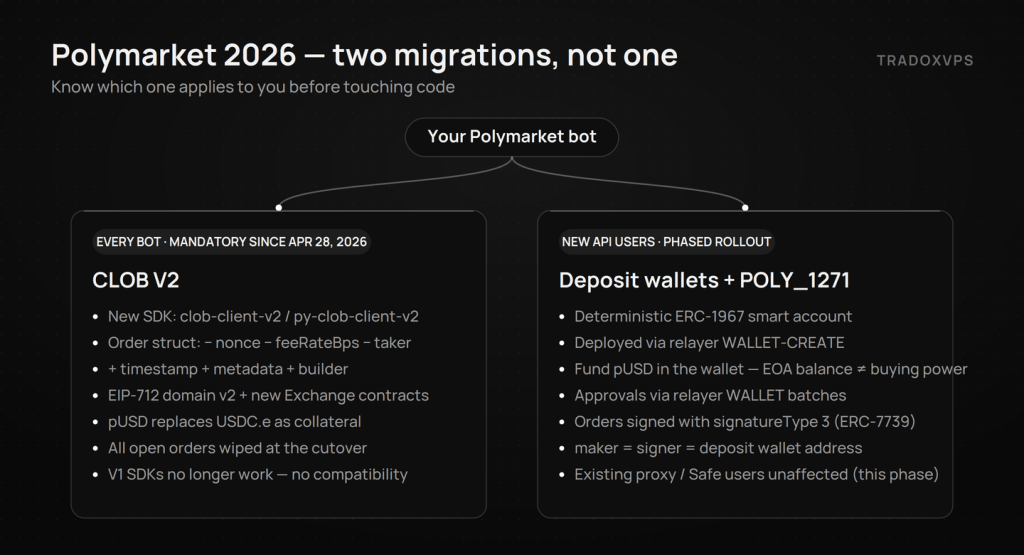
So there are two migrations, not one:
| Migration | Who it affects | Status |
|---|---|---|
| CLOB V2 (SDK, order struct, contracts, pUSD) | Every bot and integration | Mandatory since April 28, 2026 — V1 is dead |
Deposit wallets + POLY_1271 | New API users only (new accounts/deployments) | Live now; existing proxy/Safe users unaffected in this phase |
This guide covers both, in that order, with verified endpoints, addresses, and working code.
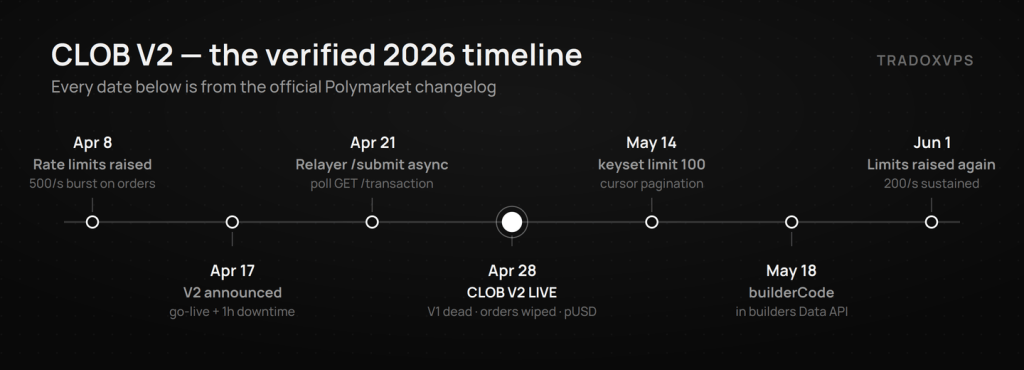
Verified timeline (from the official changelog)
- Apr 8 — CLOB rate limits raised (order endpoints get 500/s burst).
- Apr 17 — V2 announced: go-live April 28 at ~11:00 UTC, ~1 hour downtime, no backward compatibility.
- Apr 21 — Relayer
POST /submitnow returns immediately with{ transactionID, state: "STATE_NEW" }; pollGET /transactionfor the on-chain hash. - Apr 28 — CLOB V2 live on production at
https://clob.polymarket.com. V1 SDKs/orders no longer supported; open orders wiped; pUSD replaces USDC.e. - May 14 —
GET /markets/keysetmaxlimitreduced to 100 (use cursor pagination). - May 18 —
builderCodeadded to the builders Data API endpoints. - Jun 1 — Rate limits raised again:
POST /orderandDELETE /ordernow 200/s sustained (120,000 per 10 minutes).
Part 1 — CLOB V2: what every bot must change
1.1 The diff at a glance
| What | Before (V1) | After (V2) |
|---|---|---|
| SDK package | @polymarket/clob-client / py-clob-client | @polymarket/clob-client-v2 / py-clob-client-v2 |
| Constructor | Positional args | Options object; chainId → chain |
| Order fields | nonce, feeRateBps, taker | timestamp (ms), metadata, builder |
| Fees | Embedded in the signed order | Set by the protocol at match time |
| Collateral | USDC.e | pUSD (ERC-20, backed by USDC) |
| Builder attribution | POLY_BUILDER_* HMAC headers + builder-signing-sdk | One builderCode field on the order |
| EIP-712 Exchange domain | version "1" | version "2" (API auth unchanged) |
| Base URL | https://clob.polymarket.com | unchanged — V2 took over the same host |
Your API keys do not change — L1/L2 authentication is identical in V2. WebSocket URLs are unchanged and message payloads are mostly unchanged.
1.2 Swap the SDK
# TypeScript
npm uninstall @polymarket/clob-client
npm install @polymarket/clob-client-v2@1.0.0

# Python
pip uninstall py-clob-client
pip install py-clob-client-v2
The legacy packages only speak V1 and no longer function against production. The V2 SDKs include a hot-swap mechanism that polls a version endpoint — clients already on the V2 SDK rode through the April 28 cutover with no manual intervention.
1.3 Constructor: positional args → options object
TypeScript — before (V1):
const client = new ClobClient(
  host, chainId, signer, creds,
  signatureType, funderAddress,
);
TypeScript — after (V2):
import { ClobClient } from "@polymarket/clob-client-v2";

const client = new ClobClient({
  host,
  chain: chainId,        // renamed: chainId → chain
  signer,
  creds,
  signatureType,
  funderAddress,
});
tickSizeTtlMs and geoBlockToken are no longer configurable — remove them.
Python (V2) keeps keyword args:
from py_clob_client_v2 import ClobClient, ApiCreds

client = ClobClient(
    host="https://clob.polymarket.com",
    chain_id=137,
    key=PRIVATE_KEY,
    creds=ApiCreds(api_key=KEY, api_secret=SECRET, api_passphrase=PASSPHRASE),
    signature_type=SIG_TYPE,
    funder=FUNDER_ADDRESS,
)
1.4 Order creation: three fields gone, one added
Remove feeRateBps, nonce, and taker from your order-building code — they are no longer user-settable. Order uniqueness now comes from a millisecond timestamp instead of a nonce, so delete your nonce-tracking logic.
// V2 limit order args
const order: UserOrder = {
  tokenID: "0x123...",
  price: 0.55,
  size: 100,
  side: Side.BUY,
  // feeRateBps, nonce, taker — removed
};

// V2 market order args
const marketOrder: UserMarketOrderV2 = {
  tokenID: "0x123...",
  amount: 500,
  side: Side.BUY,
  orderType: OrderType.FOK,
  userUSDCBalance: 1000,  // optional — enables fee-adjusted fill math
  builderCode: "0x...",   // optional — builder attribution
};
1.5 Raw API signers: new domain, new contracts, new struct
If you sign orders without the SDK, three things change. (SDK users can skip — the client handles all of this.)
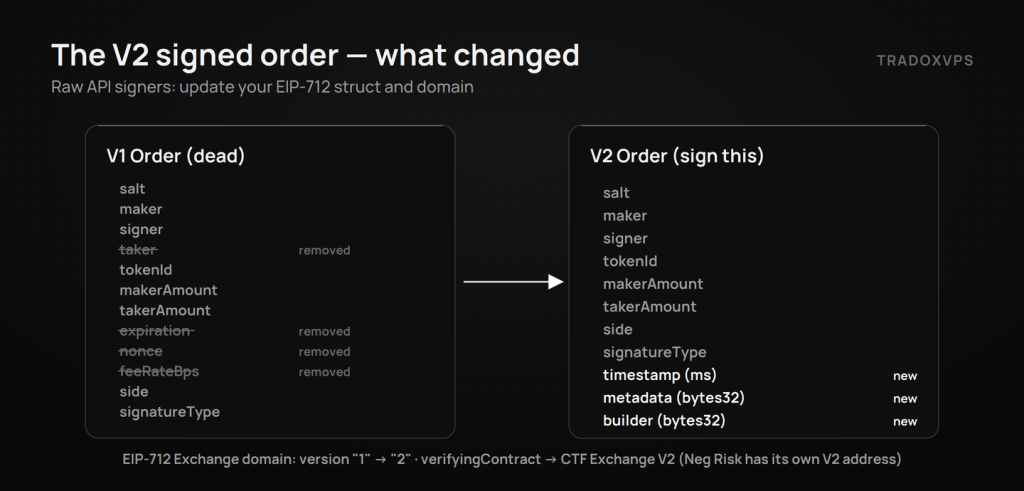
EIP-712 Exchange domain bumps to version "2" and the verifyingContract moves to the V2 exchanges:
{
  name: "Polymarket CTF Exchange",
  version: "2",                                            // was "1"
  chainId: 137,
  verifyingContract: "0xE111180000d2663C0091e4f400237545B87B996B",  // CTF Exchange V2
}
// Neg Risk markets:
// verifyingContract: "0xe2222d279d744050d28e00520010520000310F59"  // Neg Risk CTF Exchange V2
(Old V1 addresses for reference: 0x4bFb...982E and 0xC5d5...f80a.) Only the Exchange domain changes — the ClobAuthDomain used for L1 API auth stays at version "1".
The signed Order struct drops taker, expiration, nonce, feeRateBps and adds timestamp, metadata, builder:
Order(
  uint256 salt, address maker, address signer,
  uint256 tokenId, uint256 makerAmount, uint256 takerAmount,
  uint8 side, uint8 signatureType,
  uint256 timestamp, bytes32 metadata, bytes32 builder
)
timestamp— order creation time in milliseconds (uniqueness, not expiry)metadata,builder—bytes32, zero unless usedsideisuint8in the signing payload (0BUY /1SELL) but the string"BUY"/"SELL"on the wire — same as V1
POST /order body (V2):
{
  "order": {
    "salt": "12345",
    "maker": "0x...",
    "signer": "0x...",
    "tokenId": "102936...",
    "makerAmount": "1000000",
    "takerAmount": "2000000",
    "side": "BUY",
    "signatureType": 1,
    "timestamp": "1713398400000",
    "metadata": "0x0000...0000",
    "builder": "0x0000...0000",
    "signature": "0x..."
  },
  "owner": "<api-key>",
  "orderType": "GTC"
}
Headers: L1/L2 auth headers unchanged; the four POLY_BUILDER_* headers are gone (attribution moved into the signed builder field).
1.6 Fees: set at match time
Fees are no longer embedded in your signed order. The protocol applies them at match: fee = C × feeRate × p × (1 − p), takers only — makers are never charged. Per-market parameters are queryable in one call:
const info = await client.getClobMarketInfo(conditionID);
// info.mts — min tick size · info.mos — min order size
// info.fd  — { r: rate, e: exponent, to: takerOnly }
// info.t   — tokens [{ t: tokenID, o: outcome }] · info.rfqe — RFQ enabled
If you were computing fees manually, delete that code and pass userUSDCBalance on market buys instead.
1.7 Builder codes (if you run an app on top of Polymarket)
- Gone:
@polymarket/builder-signing-sdk, thePOLY_BUILDER_*env vars and headers, remote-vs-local signing. - New: a public
builderCode(bytes32) from your Builder Profile (polymarket.com → Settings → Builder). Attach per-order or once at construction (BuilderConfigis now just{ builderCode }). - Keep: your HMAC builder API key — it still authenticates you to the Relayer for gasless transactions. Only order attribution moved.
1.8 pUSD: the new collateral
pUSD (Polymarket USD) replaced USDC.e as the collateral for all trading at the cutover. Key facts: standard ERC-20 on Polygon, 6 decimals, transferable, backed by USDC with backing enforced onchain — no algorithmic peg. It’s not planned for external exchange listings; it’s the settlement layer.
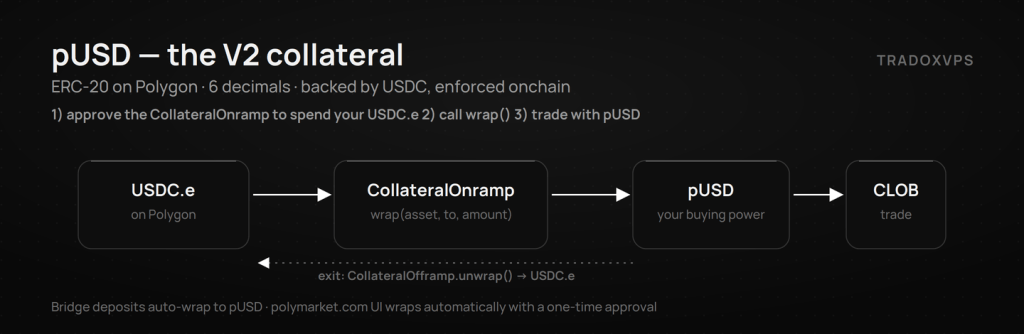
- Trading via polymarket.com? The UI wraps automatically with a one-time approval — nothing to do.
- API-only? Wrap USDC.e yourself through the CollateralOnramp (
0x93070a847efEf7F70739046A929D47a521F5B8ee):
const ONRAMP = "0x93070a847efEf7F70739046A929D47a521F5B8ee";
const USDCE  = "0x2791Bca1f2de4661ED88A30C99A7a9449Aa84174"; // USDC.e on Polygon
const amount = parseUnits("100", 6);

// 1) approve the Onramp (not the pUSD token) to spend USDC.e
await walletClient.writeContract({ address: USDCE, abi: erc20Abi,
  functionName: "approve", args: [ONRAMP, amount] });

// 2) wrap USDC.e → pUSD
await walletClient.writeContract({ address: ONRAMP,
  abi: parseAbi(["function wrap(address _asset, address _to, uint256 _amount)"]),
  functionName: "wrap", args: [USDCE, account.address, amount] });
To exit, approve the CollateralOfframp for pUSD and call unwrap() — you get USDC.e back. Deposits through the Bridge API auto-wrap to pUSD. Update any hardcoded USDC.e references in your balance logic.
1.9 Rate limits (as of June 2026)
| Endpoint | Burst | Sustained |
|---|---|---|
POST /order | 5,000 / 10 s (500/s) | 120,000 / 10 min (200/s) |
DELETE /order | 5,000 / 10 s (500/s) | 120,000 / 10 min (200/s) |
POST /orders (batch) | 2,000 / 10 s (200/s) | 21,000 / 10 min (35/s) |
DELETE /orders | 2,000 / 10 s (200/s) | — see docs |
Always confirm against the live Rate Limits page — these moved twice in two months (Apr 8, Jun 1).
1.10 If your bot has been down since April 28 — recovery checklist
- Swap to the V2 SDK and fix the constructor (§1.2–1.3).
- Delete
feeRateBps/nonce/takerand any nonce tracking (§1.4). - Raw signers: new domain version + verifyingContracts + struct (§1.5).
- Check collateral: your buying power is pUSD now; wrap if needed (§1.8).
- Re-place orders — everything resting before the cutover was wiped and did not migrate.
- Re-test the full lifecycle small-size on production; API keys are unchanged.
Part 2 — Deposit wallets & Signature Type 3 (new API users)
Who this applies to: new API accounts and fresh bot deployments. Deposit wallets replace the proxy/Safe onboarding path for new API users only — existing proxy and Safe setups keep working with their current signature types in this phase. (Polymarket’s wording — “in this phase” — is a strong hint existing accounts will migrate eventually. Watch the changelog.)
Why it exists: the rise of “ghost fills” — orders the relayer accepted that the on-chain contracts later rejected. A deposit wallet is a deterministic smart account whose order signatures the CLOB validates via ERC-1271, so balances and allowances check out before matching.
2.1 Mental model
A deposit wallet is a per-user ERC-1967 proxy deployed by a factory. It holds your pUSD and conditional tokens. Your owner EOA signs two different payload types — they are not interchangeable:
- Deposit-wallet
Batch(approvals, transfers, splits, merges) → a normal 65-byte EIP-712 signature, submitted to the relayer as aWALLETtransaction. - CLOB order with
signatureType = 3(POLY_1271) → an ERC-7739-wrapped signature, longer than 65 bytes, validated through ERC-1271 on the wallet.
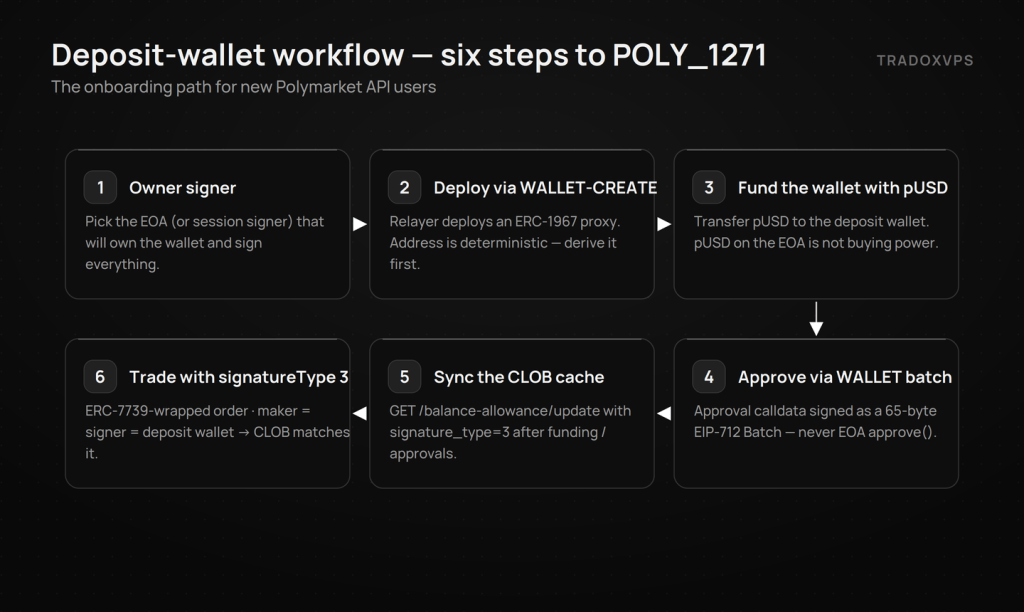
2.2 The six steps
- Pick the owner signer (EOA or session signer).
- Deploy via relayer
WALLET-CREATE— no user signature in the payload. The address is deterministic: derive it before deploying (deriveDepositWalletAddress()in TS,get_expected_deposit_wallet()in Python). - Fund the deposit wallet with pUSD. pUSD sitting on your owner EOA does not count as CLOB buying power.
- Approve from the wallet — build ERC-20/1155 approval calldata and submit it through a relayer
WALLETbatch. An EOAapprove()does nothing here. - Sync the CLOB cache:
GET /balance-allowance/update?asset_type=COLLATERAL&signature_type=3(addasset_type=CONDITIONAL&token_id=...for outcome tokens). Normal CLOB L2 auth — relayer auth and CLOB auth are separate systems. - Trade with
POLY_1271: initialize the CLOB client with the wallet asfunderand signature type 3. Bothmakerandsignermust be the deposit wallet address.
2.3 SDK versions (per the official guide)
| Stack | CLOB client | Relayer client |
|---|---|---|
| TypeScript | @polymarket/clob-client-v2@1.0.3-canary.0 | @polymarket/builder-relayer-client@0.0.9 (+ @polymarket/builder-signing-sdk for relayer auth) |
| Python | py-clob-client-v2==1.0.1rc1 | py-builder-relayer-client==0.0.2rc1 |
| Rust | polymarket_client_sdk_v2 = "=0.6.0-canary.1" | none — use TS/Python or the raw relayer API for WALLET-CREATE/WALLET |
2.4 Python walkthrough
# pip install py-builder-relayer-client==0.0.2rc1 py-clob-client-v2==1.0.1rc1
import os, time
from py_builder_relayer_client.client import RelayClient
from py_builder_relayer_client.models import DepositWalletCall, TransactionType
from py_builder_signing_sdk.config import BuilderApiKeyCreds, BuilderConfig

relayer = RelayClient(
    os.environ["RELAYER_URL"], 137, os.environ["PRIVATE_KEY"],
    BuilderConfig(local_builder_creds=BuilderApiKeyCreds(
        key=os.environ["BUILDER_API_KEY"],
        secret=os.environ["BUILDER_SECRET"],
        passphrase=os.environ["BUILDER_PASS_PHRASE"])),
)

# 1) derive + deploy
deposit_wallet = relayer.get_expected_deposit_wallet()
relayer.deploy_deposit_wallet().wait()

# 2) fund: transfer pUSD to deposit_wallet (on-chain transfer — not shown)

# 3) approve the exchange FROM the wallet, via a WALLET batch
nonce = str(relayer.get_nonce(relayer.signer.address(),
                              TransactionType.WALLET.value)["nonce"])
relayer.execute_deposit_wallet_batch(
    calls=[DepositWalletCall(target=os.environ["PUSD_ADDRESS"],
                             value="0", data=approve_calldata)],
    wallet_address=deposit_wallet,
    nonce=nonce,
    deadline=str(int(time.time()) + 240),
).wait()
# 4) sync + trade with POLY_1271
from py_clob_client_v2 import (ApiCreds, AssetType, BalanceAllowanceParams,
    ClobClient, OrderArgs, OrderType, PartialCreateOrderOptions, Side,
    SignatureTypeV2)

clob = ClobClient(
    host=os.environ["CLOB_API_URL"], chain_id=137,
    key=os.environ["PRIVATE_KEY"],
    creds=ApiCreds(api_key=os.environ["CLOB_API_KEY"],
                   api_secret=os.environ["CLOB_SECRET"],
                   api_passphrase=os.environ["CLOB_PASS_PHRASE"]),
    signature_type=SignatureTypeV2.POLY_1271,
    funder=deposit_wallet,
)

clob.update_balance_allowance(BalanceAllowanceParams(
    asset_type=AssetType.COLLATERAL,
    signature_type=SignatureTypeV2.POLY_1271))

clob.create_and_post_order(
    order_args=OrderArgs(token_id=TOKEN_ID, price=0.50, size=10, side=Side.BUY),
    options=PartialCreateOrderOptions(tick_size="0.01", neg_risk=False),
    order_type=OrderType.GTC)
2.5 TypeScript walkthrough
import { RelayClient } from "@polymarket/builder-relayer-client";
import { BuilderConfig } from "@polymarket/builder-signing-sdk";
import { AssetType, ClobClient, OrderType, Side, SignatureTypeV2 }
  from "@polymarket/clob-client-v2";

const relayer = new RelayClient(relayerUrl, 137, walletClient,
  new BuilderConfig({ localBuilderCreds: builderCreds }));

const depositWalletAddress = await relayer.deriveDepositWalletAddress();
await (await relayer.deployDepositWallet()).wait();           // WALLET-CREATE

// fund with pUSD, then approve via WALLET batch:
const deadline = Math.floor(Date.now() / 1000 + 240).toString();
await (await relayer.executeDepositWalletBatch(
  [{ target: PUSD_ADDRESS, value: "0", data: approveCalldata }],
  depositWalletAddress, deadline)).wait();

const clob = new ClobClient({
  host: CLOB_API_URL, chain: 137, signer: walletClient, creds,
  signatureType: SignatureTypeV2.POLY_1271,
  funderAddress: depositWalletAddress,
});
await clob.updateBalanceAllowance({ asset_type: AssetType.COLLATERAL });
await clob.createAndPostOrder(
  { tokenID: TOKEN_ID, price: 0.5, size: 10, side: Side.BUY },
  { tickSize: "0.01", negRisk: false }, OrderType.GTC);
The TS relayer client fetches the current WALLET nonce automatically before signing; the SDKs also build the ERC-7739 wrapper and set maker/signer for you.
2.6 Raw API integration
Deploy — POST /submit to the relayer:
{
  "type": "WALLET-CREATE",
  "from": "0xOwnerAddress",
  "to": "0x00000000000Fb5C9ADea0298D729A0CB3823Cc07"
}
| Polygon mainnet (137) | Address |
|---|---|
| Deposit wallet factory | 0x00000000000Fb5C9ADea0298D729A0CB3823Cc07 |
| Deposit wallet implementation | 0x58CA52ebe0DadfdF531Cde7062e76746de4Db1eB |
Since April 21, /submit returns { transactionID, state: "STATE_NEW" } immediately — poll GET /transaction until STATE_MINED/STATE_CONFIRMED. The address is deterministic:
walletId     = bytes32(owner)                  // left-padded
salt         = keccak256(abi.encode(factory, walletId))
bytecodeHash = SoladyLibClone.initCodeHashERC1967(implementation, args)
depositWallet = CREATE2(factory, salt, bytecodeHash)
Batch — fetch a fresh nonce (GET /nonce?address=0xOwner&type=WALLET), sign EIP-712 over types Call{target,value,data} / Batch{wallet,nonce,deadline,calls} with domain { name:"DepositWallet", version:"1", chainId, verifyingContract: depositWallet }, then submit:
{
  "type": "WALLET",
  "from": "0xOwnerAddress",
  "to": "0x00000000000Fb5C9ADea0298D729A0CB3823Cc07",
  "nonce": "0",
  "signature": "0x65ByteBatchSignature",
  "depositWalletParams": {
    "depositWallet": "0xDepositWallet",
    "deadline": "1760000000",
    "calls": [{ "target": "0xToken", "value": "0", "data": "0xCalldata" }]
  }
}
Order — same POST /order shape as §1.5, but signatureType: 3, maker and signer set to the deposit wallet, and the signature is the ERC-7739-wrapped POLY_1271 signature (a nested TypedDataSign under the CTF Exchange V2 domain, with wallet fields name:"DepositWallet", version:"1", zero salt). POLY_1271 is supported on V2 orders only.
2.7 Troubleshooting (straight from the field)
- “Invalid signature” → check all four:
signatureTypeis3;maker= deposit wallet;signer= deposit wallet; signature is the wrapped ERC-7739 one — and that you signed against the correct (Neg-Risk vs standard) V2 exchange contract. - “Not enough balance” with a funded wallet → pUSD is on the EOA instead of the wallet, or you skipped the sync call with
signature_type=3. - “Allowance missing” → you called
approve()from the EOA. Approvals must go through aWALLETbatch so the wallet grants the allowance. - Batch rejected → stale nonce or expired deadline. Fetch the
WALLETnonce fresh before every batch. - Auth confusion → relayer auth and CLOB L1/L2 auth are independent. Never reuse relayer headers on CLOB endpoints.
Part 3 — Infrastructure for the V2 era
A few operational realities changed with V2: the cutover wiped every resting order, the rate ceilings now allow 200 orders/second sustained, and restarts/maintenance windows mean the bots that re-quote first after an event capture the spread. That’s an infrastructure problem as much as a code problem.
Here’s what we actually measure from our Dublin VPS — real probes, not estimates:
- ~1.5 ms TCP hop to Polymarket’s Dublin edge
- ~14 ms median live order-book feed (p99 ~63 ms), low jitter
- ~23 ms order round-trip, signed to acknowledged
- Stall-free DNS and a clean network path, 24/7
Dublin is the closest non-restricted location to Polymarket’s infrastructure (Amsterdam is geo-blocked), and the Polymarket-tuned plans run dedicated AMD Ryzen 9 9950X cores with DDR5 and NVMe — your strategy loop, signing, and WebSocket handling never queue behind a noisy neighbour:
| Plan | Price | Cores | RAM | NVMe |
|---|---|---|---|---|
| Starter | $44.90/mo | 2× Ryzen 9950X | 6 GB DDR5 | 75 GB |
| Active | $79.90/mo | 4× Ryzen 9950X | 12 GB DDR5 | 150 GB |
| Advanced | $129.90/mo | 6× Ryzen 9950X | 18 GB DDR5 | 250 GB |
| High Performance | $159.90/mo | 8× Ryzen 9950X | 24 GB DDR5 | 500 GB |
All plans: 3 Gbps (10 Gbps burst), unlimited bandwidth, dedicated IPv4, a 99.999% uptime target with 24/7 monitoring, and Windows or Ubuntu. If you’re setting up from scratch, follow How to set up a Polymarket bot on a VPS — and use code WELCOME for a reduced first month.
Frequently Asked Questions
Yes — that’s the CLOB V2 cutover (April 28). Swap to the V2 SDK, fix the constructor and order fields, and re-place your orders. This applies to every bot, not just new accounts.
Not in this phase. Deposit wallets are mandatory for new API users; existing proxy/Safe setups keep their current signature types for now. Watch the official changelog — “in this phase” implies that will change.
Collateral is now pUSD, backed 1:1 by USDC with backing enforced onchain. The polymarket.com UI wraps automatically; API-only traders wrap USDC.e via the CollateralOnramp’s wrap() and exit via the Offramp’s unwrap(). Bridge deposits auto-wrap.
No. L1/L2 auth is identical in V2 — same key, secret, passphrase.
Wiped at the cutover. Nothing migrated; re-place with V2 signing.
The deposit-wallet order signature: the CLOB validates it through ERC-1271 on your smart-account wallet, using an ERC-7739-wrapped signature (longer than 65 bytes). Orders must set signatureType: 3 with maker and signer both equal to the deposit wallet.
(1) Still running the V1 SDK against production — nothing works. (2) For deposit wallets: funding the EOA instead of the wallet, skipping the signature_type=3 balance sync, or calling approve() from the EOA instead of through a WALLET batch.
Yes, but be realistic about the numbers: from our Dublin servers we measure a ~14 ms median live feed and ~23 ms order round-trips. The wins come from a stable, low-jitter path and being first to re-quote after wipes and restarts — not from mythical sub-millisecond claims.