Your trading VPS is not a website. Nobody defaces it for fun. It is a machine that is logged into your broker, holds the keys to your exchange accounts, and in some setups can sign transactions from a funded wallet. To an attacker, that is not “a server.” That is a box with money behind it, reachable over the internet, very often protected by a single password.
This guide is the full version of how to secure one. Not the generic checklist (install antivirus, use strong passwords, here is a link to OWASP), but the specific threat model of a trading machine in 2026, the exact controls that counter it, the trading-platform details most security articles never mention, and what to do in the first fifteen minutes if you think you have been compromised. It is long on purpose. Skim the checklist near the end if you want the short version, but the reasoning is here when you need it.
One honest note before we start: security is risk reduction, not risk elimination. Nothing below makes you unhackable, and none of it improves a losing strategy. What it does is take you out of the pool of easy targets, which is where almost all of the real-world damage happens.
What an attacker actually wants from a trading VPS
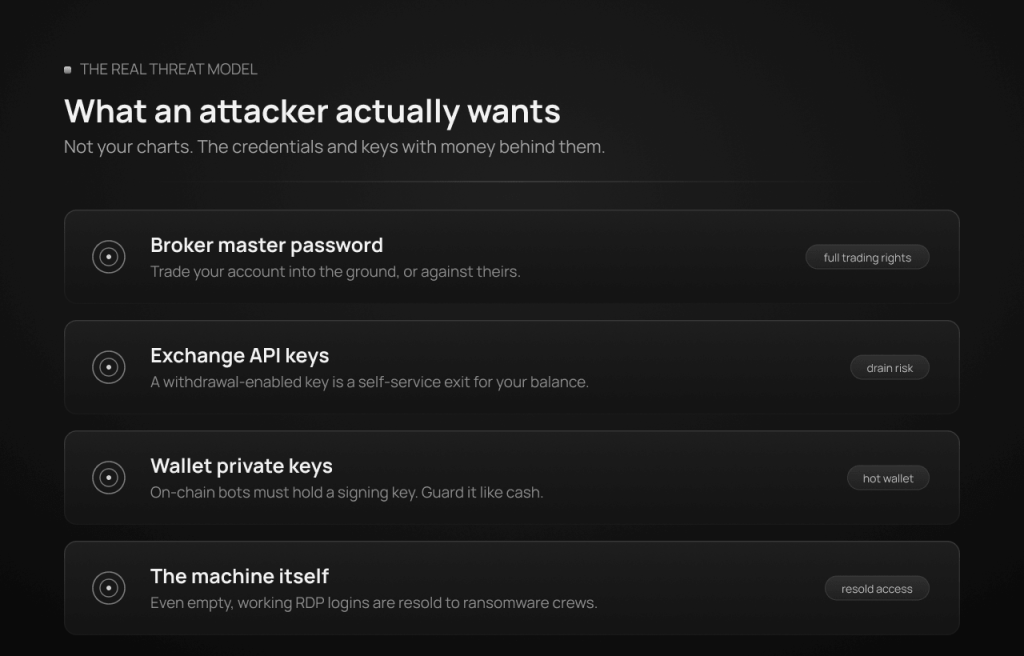
Generic guides talk about “data theft.” On a trading box, the targets are specific, and knowing them tells you exactly what to protect:
- Your broker’s master password. With it, an attacker can trade your account into the ground, or trade it deliberately against an account they control. MT4 and MT5 distinguish between the master password (full trading rights) and the investor password (read-only). Only one of them belongs anywhere near a shared tool.
- Exchange API keys. For crypto bots, the API key and secret are the account. A key with trade permission can churn or manipulate; a key with withdrawal permission can simply drain. Attackers know this, which is why real-world malware now targets keys directly.
- Wallet private keys and seed phrases. On-chain bots (Solana, Polymarket) must hold a signing key to work. If that key controls your main wallet, your main wallet is sitting on a rented computer.
- The machine itself. Even with nothing to steal, a compromised VPS gets resold. There is a mature underground market where initial access brokers sell working RDP logins to ransomware crews and fraud operations. Kaspersky’s 2026 ransomware review reports that RDP, VPN and RDWeb access remain the top vectors offered for sale in that market.
- Your strategy files and set files, occasionally. Less common than people fear, but a reason not to leave your entire research folder on an execution box.
Notice what is not on the list: your charts. Attackers do not care about your indicators. They care about credentials, keys, and a foothold. Every control below maps to one of those.
The 2026 threat model, with real numbers
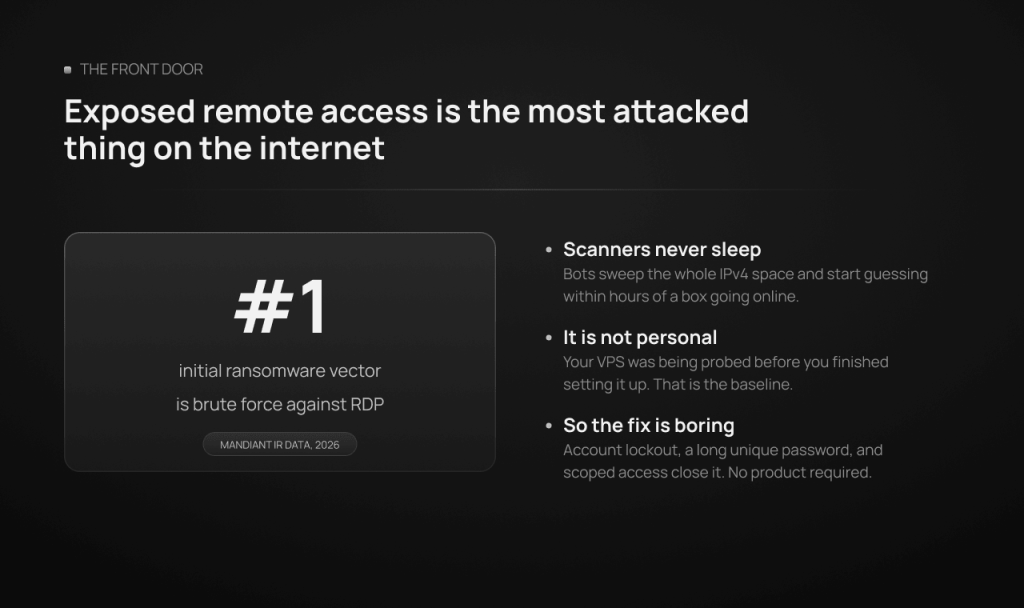
Exposed remote access is the front door, and it is the most attacked thing on the internet. Mandiant’s incident-response data ranks brute force against remote services, overwhelmingly RDP, as the single most common initial infection vector in ransomware cases, at roughly a quarter of incidents where the vector could be identified. The UK’s National Cyber Security Centre has called RDP the most common attack vector used by cyber criminals. This is not targeted at you personally: automated scanners sweep the entire IPv4 space continuously, find every machine listening on an RDP port, and start guessing credentials within hours of the machine going online. Your VPS was being probed before you finished setting it up. That is normal, and it is why the front-door controls below are non-negotiable.
Trader-targeted malware is real, current, and aimed at exactly this audience. Two documented cases from the past year make the point better than any hypothetical. In early 2026, researchers at StepSecurity documented attackers who hijacked a verified GitHub organization and published more than twenty fake “Polymarket trading bot” repositories with inflated stars; running npm install on them executed a hidden stealer that harvested wallet keys and .env files and installed an SSH backdoor for direct attacker access. And in late 2025, Socket’s threat team found a Chrome extension marketed as an MEXC trading automation tool that quietly created exchange API keys, enabled the withdrawal permission on the server while displaying it as disabled in the interface, and exfiltrated the keys to the attacker. Read those two again: one poisoned the bot itself, the other poisoned the key-creation step and lied about permissions. Both were aimed at traders, not at random users.
The cracked-EA economy is a standing malware channel. Entire websites exist to distribute “cracked” and “free premium” Expert Advisors, and industry write-ups on MetaTrader scams consistently flag fake or harmful EAs and phishing as the standard ways trading accounts get compromised. An .ex4 or .ex5 file from a forum is a program you are choosing to run on the machine that is logged into your broker. Treat it with exactly that seriousness.
Phishing and infostealers feed everything else. Much of today’s “hacking” is simply logging in with credentials stolen elsewhere: a fake broker email, a fake VPS-support message, an infostealer on your home PC that grabs saved passwords. This matters because it means your trading VPS is only as safe as the devices and email account that control it.
DDoS exists but is the one threat you mostly rent away. Network-level attacks that knock a server offline during a volatile session are real, and they are mitigated at the provider’s network edge, not inside your Windows install. That is part of the shared-responsibility picture, which is worth stating plainly.
Who secures what: the shared-responsibility line
A VPS provider secures the layer you cannot reach: the physical data center, the host machines, the network, DDoS mitigation at the edge (TradoxVPS uses Path.net upstream), and the isolation between customers, including dedicated RAM per VPS. What the provider cannot do is protect a weak RDP password, vet the EA you install, or stop you from pasting your seed phrase into a text file on the desktop. Inside the operating system, the machine is yours, and so is the responsibility. Every section from here down is your side of the line.
Layer 1: How do I secure RDP on a trading VPS? (RDP on Windows, SSH on Linux)
Most trading VPS run Windows Server for MT4, MT5, cTrader or NinjaTrader, accessed over RDP. That makes RDP hardening the highest-value twenty minutes you will spend.
Keep Network Level Authentication on. NLA forces authentication before a full session is created, which blunts a class of pre-auth attacks. It is on by default on Windows Server 2022; verify it stayed on (System Properties, Remote tab, “Allow connections only from computers running Remote Desktop with Network Level Authentication”).
Set an account lockout policy. This is the single control that turns brute force from a matter of time into a dead end. In Local Security Policy (secpol.msc) under Account Lockout Policy, set a threshold of 5 to 10 failed attempts, a lockout duration of 15 to 30 minutes, and the same reset window. A scanner that can try thousands of passwords an hour can now try roughly twenty, against a password it will never guess anyway.
Scope RDP to your own IPs in Windows Firewall. If you connect from places with stable addresses (home, office), edit the inbound Remote Desktop rule’s Scope tab to allow only those IPs. This removes you from the internet-wide scan entirely. The honest trade-off: if your home IP changes or you travel, you will lock yourself out and need the provider’s console or support to adjust it. If your IP is dynamic, an alternative is allowing your ISP’s range, which is imperfect but still cuts the noise massively.
Change the RDP port only for what it is. Moving RDP off 3389 does not stop a determined attacker (port scanners find services on any port), but it does eliminate the bulk of automated drive-by noise and cleans up your logs. Treat it as noise reduction, never as your actual defense, and never as a substitute for the lockout policy.
Disable what you do not use in the RDP session. In the RDP client settings, turn off clipboard, drive and printer redirection unless you actively need them for a transfer. A hijacked or malicious session has fewer bridges into your other machines, and clipboard-based attacks (including crypto address swapping) lose a channel.
Do not expose extra management surfaces. No RDWeb, no WinRM, no FTP, no VNC “just in case.” Kaspersky’s 2026 data specifically notes attackers shifting to poorly secured RDWeb portals as RDP exposure gets locked down. Every listening service is a second front door; a trading box needs exactly one.
If you run Linux (Ubuntu bots for Solana, Polymarket, exchange APIs): disable SSH password authentication entirely and use key-based login only, do not allow root login over SSH, run the bot under a non-root user, and let a tool like fail2ban ban repeat offenders. The logic is identical to the Windows list; only the tooling changes.
For the highly motivated: putting RDP behind a VPN (WireGuard) or a gateway so nothing is exposed publicly is the strongest posture. It adds real setup and failure-mode complexity, so we would rather you have lockout, scoping and strong credentials done perfectly than a half-configured VPN. It is the right next step for larger accounts, not the mandatory first one.
Layer 2: Identity, the actual perimeter
In 2026 the perimeter is not the firewall, it is your credentials. Four rules cover almost everything.
One long, unique password per system, from a password manager. The VPS login, the broker portal, each exchange, the email account: all different, all long (16 or more characters), none reused from anything else, all stored in a manager (Bitwarden, 1Password). Reuse is how an unrelated breach becomes your breach: credential-stuffing tools exist precisely to replay leaked passwords against RDP and broker portals. And skip forced 90-day rotation rituals; modern guidance (including NIST’s) favors long, unique passwords changed when there is a reason, over frequent rotation that breeds weak patterns.
MFA everywhere it exists, in the right order of strength. Hardware keys beat authenticator apps, which beat SMS (SIM-swap attacks are a solved art for criminals, and traders are exactly the profile worth swapping). Priority order for enabling it: your email account first (it is the recovery path for everything else, which makes it the root of trust), then the exchange accounts, then the broker portal, then your VPS provider’s control panel. Windows RDP has no clean built-in MFA; that is precisely why the lockout policy, IP scoping and a long unique password carry the front door.
Your email account is part of your trading infrastructure. Anyone who owns it can reset your broker portal, your exchange, and your VPS panel. Secure it like the master key it is.
Least privilege for other humans. If a VA, a copier technician, or an EA vendor’s support ever needs on the box, they get their own Windows account with only what they need, and it is disabled the same day the work ends. Nobody, ever, gets your main login, and no legitimate provider or broker will ever ask for your password. TradoxVPS support included: if someone claiming to be us asks for your password, it is not us.
Layer 3: How do I protect my broker login and API keys? (the part generic guides skip)
This is where a trading VPS diverges from every other server, and where the highest-value, least-known controls live.
Broker platforms: master versus investor password
MetaTrader accounts have two passwords, and the distinction is a security feature most traders never use deliberately. The master password trades; the investor password only watches. Any time someone wants “access to see the account”, a myfxbook-style tracker, a prospective copier follower, a vendor “verifying results”, they get the investor password and nothing else. The master password lives in your password manager and in the terminal on your hardened VPS, and nowhere else. If it has ever been shared, typed into a third-party site, or is the same as any other password you use, change it at the broker today. Add the broker’s own protections while you are in the portal: 2FA on the client area, and withdrawal confirmations to your (secured) email.
EAs, indicators and bots: a supply-chain problem
Every EA is code you execute on the machine that holds your broker session. So source it like it matters:
- Never run cracked or “free premium” EAs. The cracked-EA ecosystem is a standing malware channel, and the price of a legitimate license is trivial next to a compromised account. If the vendor did not give it to you, it is not yours to trust.
- Prefer accountable sources: the MQL5 Market, vendors with a real business and reputation, or code you or someone you pay has actually read.
- Leave “Allow DLL imports” off unless a specific, trusted EA documents why it needs it. A DLL runs with far more freedom than sandboxed MQL code; it is the difference between a script in a cage and a program on your machine.
- Keep the WebRequest allowlist minimal. MT4/MT5 only let EAs call URLs you explicitly whitelist. List exactly the endpoints a tool needs, and nothing else. An EA that demands broad web access without explaining why has told you something.
- Quarantine first. New EA, new indicator, new copier: demo account first, ideally on a separate terminal, watched for a few weeks. This is standard practice for strategy quality anyway; it doubles as your malware sandbox.
How should I store exchange API keys for a trading bot?
If you run bots against Binance, Bybit, Kraken, Coinbase or any other exchange, the API key configuration is worth more than every other setting on the box combined. Four rules:
- Withdrawal permission: off. Always. A trade-only key limits a thief to making bad trades; a withdrawal-enabled key is a self-service exit for your balance. No copy of a strategy bot legitimately needs withdrawal rights.
- Verify permissions on the exchange’s own website, not in the tool. The MEXC-extension case above is the reason this sentence exists: real malware enabled withdrawals server-side while showing them disabled in its interface. After creating or connecting any key, open the exchange’s API management page yourself and read what the key can actually do.
- IP-whitelist every key to your VPS. Most major exchanges let you restrict a key so it only works from listed IP addresses. Do it, and the stolen key becomes nearly useless anywhere else on earth. This is one of the quiet advantages of a VPS with a dedicated IPv4: your bot has one stable, exclusive address to whitelist, which a shared-IP or rotating-cloud setup cannot cleanly offer. Every TradoxVPS plan includes one, and this is the single best use of it.
- Contain and rotate. Use exchange sub-accounts to cap how much any one bot can touch. Rotate a key the moment anything feels off, and delete keys for bots you retired. While you are there, enable the exchange’s withdrawal-address allowlist so even a full account takeover cannot send funds to a new address without a time-locked confirmation.
Is it safe to run a bot that holds my wallet’s private key?
Solana and Polymarket bots differ from exchange bots in one brutal way: to sign transactions, the private key must be present on the VPS. There is no permission system to hide behind, so the discipline is wallet architecture:
- A dedicated bot wallet, never your main one. Generate a fresh key for the bot. Your main wallet’s seed phrase has no business existing on any server, in any file, ever.
- Minimal float. Fund the bot wallet with what the strategy needs plus margin, and sweep profits out to a wallet whose keys live offline. Size the float like the honest question it is: “how much am I willing to lose if this box is fully compromised tonight?”
- Treat the bot’s code as an attack surface. The fake-Polymarket-bot campaign worked by poisoning the software supply chain: hijacked org, credible-looking repos, fake stars, and a stealer inside npm install. Clone only from sources you have verified (the exact org, not a lookalike), read what a repo’s dependencies pull in when you can, run the bot as a limited user, lock down permissions on your .env file, and be instantly suspicious of any bot that “needs” your seed phrase rather than a key you generated for it.
Copiers and third-party services
Trade copiers, signal bridges, and management tools sit directly in the order flow, so scope them consciously: follower accounts on a copier need trading rights on themselves and nothing about your master beyond its trades; any service that asks for your master password or a withdrawal-enabled key to “verify” or “sync” has failed the interview.
Layer 4: The operating system as a production server
The mental shift that prevents most infections: the VPS is a production trading server, not a second personal computer. Concretely:
- Do not browse, read email, or chat on it. Those happen on your home machine; the VPS runs terminals and bots. Almost every malware path (phishing pages, poisoned downloads, malicious extensions like the MEXC case) requires exactly the casual usage you are choosing not to do there.
- Install nothing that is not for trading. Every extra program is attack surface. No torrents, no media, no random utilities.
- Keep Microsoft Defender on and alone. It is adequate for a well-behaved server and costs little. Do not stack a second antivirus (they fight), and only add folder exclusions if a specific platform demonstrably needs one.
- Updates: never off, always scheduled. Unpatched systems are one of the standing initial-access vectors in every year’s incident data, so disabling updates is trading a small inconvenience for a large risk. But an automatic 3 a.m. reboot mid-position is its own disaster, so manage the timing: set Active Hours to cover your trading day, and take updates in a deliberate window. For FX and futures, the weekend after Friday close is a natural slot. For 24/7 crypto and prediction markets, there is no closed session, so pick a low-activity window, stop the bots gracefully, update, reboot, verify everything reconnected, and confirm your platform’s auto-start actually works. That last verification, made routine, is also your disaster-recovery drill.
- Lock the session when you disconnect (sign out or lock, not just closing the RDP window), and set a lock-screen timeout, so an idle session is never a free seat.
Layer 5: Network posture
The provider’s edge handles volumetric DDoS (Path.net, in our case). Your job inside the box is smaller and simpler: default-deny inbound except your scoped RDP (Windows Firewall is fine; you do not need extra products), no secondary public services on the trading machine, and outbound awareness: your box should be talking to your broker, your exchanges, your data feeds, Windows Update, and very little else. The dedicated IPv4 helps here too, beyond API whitelisting: your traffic never shares a reputation with a stranger’s, so you do not inherit anyone else’s blacklisting or rate-limit penalties at brokers and exchanges.
Layer 6: What do I do if my trading VPS is hacked?
Hardening reduces the odds; detection caps the damage. Two habits and one runbook.
Watch the door log. Windows records every failed logon as Event ID 4625 and lockouts as 4740 (Event Viewer, Windows Logs, Security). Glance at it weekly. A steady drizzle of random failures is the normal background radiation of the internet; what you are looking for is your own account locking out when it should not, or a successful logon (4624, logon type 10) at a time and from a place that was not you.
Watch the money log. Your broker statement and exchange history are also security telemetry. An order you did not place, an API call pattern you do not recognize, a login notification from a new country: each is worth two minutes of attention the day it appears, not at month-end.
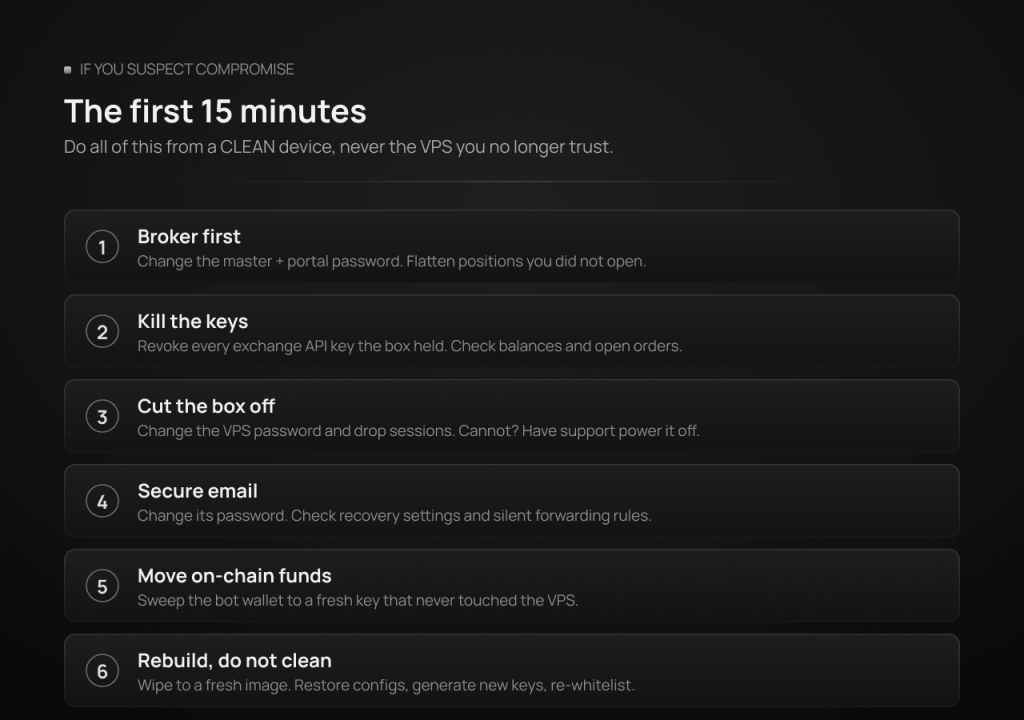
The first fifteen minutes if you suspect compromise. Order matters, and the first rule is the one people get wrong: do your recovery from a clean device (your phone or home PC), not from the VPS you no longer trust.
- From the clean device: change the broker master password and portal password, and freeze or flatten positions if anything is open that you did not open.
- Revoke every exchange API key the box held, then check balances and open orders.
- Change the VPS password from the provider’s control panel and force-disconnect sessions; if you cannot, have support power the machine off. Off is safe.
- Change your email password and check its recovery settings and forwarding rules (attackers add silent forwards).
- For on-chain bots: move remaining funds out of the bot wallet to a fresh one whose key never touched the VPS.
- Do not “clean” the machine and carry on. A compromised box gets rebuilt from a fresh image; that is what fast redeploy is for. Restore your configs, generate new keys, re-whitelist the new setup.
- Afterward, work out the entry point (the 4625/4624 trail usually tells the story) so the rebuild does not repeat it.
Layer 7: Backup and recovery
On a trading VPS, the strategy is not “back up everything,” it is “be able to rebuild fast.”
Back up the small, precious things: MT4/MT5 profiles and templates, set files, EA configuration, bot config files, and a one-page inventory of what runs on the box, which accounts and keys it uses, and in what order to restore it. Keep copies off the VPS.
Do not back up secrets in plaintext. Passwords, API secrets and private keys belong in your password manager or an encrypted store, never in a notes.txt inside a cloud-synced backup folder. A backup that leaks is a breach with extra steps.
Treat redeploy speed as your real disaster recovery. Whether the cause is ransomware, a botched update, or your own mistake, the recovery story is the same: fresh VPS image, restore configs, new keys, verify, resume. If you have never actually rehearsed it, your scheduled update windows are the free opportunity.
The prioritized checklist
The first 20 minutes (do these today):
- Long, unique VPS password from a password manager.
- Account lockout policy: 5 to 10 attempts, 15 to 30 minute lockout.
- Confirm NLA is on.
- Exchange API keys: withdrawal permission off, verified on the exchange’s own site.
- IP-whitelist those keys to your VPS’s dedicated IPv4.
- 2FA on your email, exchanges, broker portal, and VPS control panel (app or hardware key, not SMS where avoidable).
- Decide, right now, that the VPS is not for browsing.
The full posture (this month): scope RDP in Windows Firewall to your IPs (or move it behind a VPN), disable clipboard and drive redirection, set your update window and rehearse the restart, replace any shared master password and start handing out investor passwords instead, audit every EA and bot against the supply-chain rules, split crypto capital into sub-accounts and enable withdrawal-address allowlists, move on-chain bots to dedicated minimal-float wallets, back up configs off-box, and put a weekly two-minute date with Event Viewer on the calendar.
What security cannot do, honestly
It cannot make a losing strategy win; it protects the account, not the P&L. It cannot make you unhackable; it makes you expensive, which turns away the automated majority of attackers and buys you detection time against the rest. And every control above trades some convenience for risk, which is a trade each trader sets at their own account size: the lockout policy and API rules are free and universal; the VPN tier is for when the stakes justify it. What we would push back on is the inverted version we sometimes see: a five-figure account behind a reused eight-character password, on a box that doubles as a Telegram machine. Match the effort to what is actually behind the login.
Where TradoxVPS fits, and where it cannot
Our side of the shared-responsibility line: DDoS mitigation at the network edge via Path.net, a hardened network, isolation between customers with dedicated RAM per VPS, current Windows Server 2022 and Ubuntu 24.04 images, a dedicated IPv4 per server (which is what makes the API whitelisting above possible), fast redeploy when you need to rebuild, and a support team that will never ask for your password. Your side: everything inside the operating system, every credential, and every piece of software you choose to run. A VPS from any provider, ours included, is only as secure as the weakest password and the sketchiest EA on it. That is not a disclaimer; it is the design. The half of the system you control is the half this guide just handed you.
Final takeaway
A trading VPS earns attention from attackers for a simple reason: it is a reachable machine with money behind it. The defense is not exotic. Lock the one door you actually use (lockout policy, unique password, scoped access). Guard the identities behind the money (password manager, MFA in the right order, email first). Apply the trading-specific rules that generic guides skip: investor passwords for watchers, no cracked EAs, DLLs off, withdrawal-disabled and IP-whitelisted API keys verified at the source, dedicated minimal-float wallets for on-chain bots. Run the box as a production server, patch it in windows you chose, watch the two logs that matter, and know your first fifteen minutes before you ever need them. None of it requires a security team. All of it, together, moves you out of the population where nearly all of the losses actually happen.
Frequently asked questions
For running automation, generally yes, for reasons that are mostly about discipline: a well-run VPS is a single-purpose machine behind a professional network edge, while a home PC browses, downloads, and shares a household. But the advantage only holds if you treat it as single-purpose. A VPS used for casual browsing with a weak password is worse than a careful home setup.
It is fine and it quiets your logs, but understand what it is: noise reduction against low-effort scanners, not protection against anyone who matters. The account lockout policy, a long unique password, and IP scoping are the real controls; the port change is cosmetic on top.
No. Microsoft Defender, kept on and updated, is appropriate for a server that only runs trading software. The security you actually buy on a trading box comes from the habits above, not a second AV subscription. Do not run two antivirus products at once.
Passwords in a password manager, always. API secrets in the bot’s protected config or environment file with tight permissions, never in plaintext notes, chat logs, or cloud-synced folders, and never with withdrawal permission enabled. Verify each key’s real permissions on the exchange’s own website, and whitelist it to your VPS’s dedicated IP.
If you do only three: a long unique password with an account lockout policy on RDP, withdrawal-disabled and IP-whitelisted API keys, and 2FA on your email account. Those three close the paths behind the large majority of real-world trading-account losses.
It is a managed risk, not a safe one. Use a dedicated wallet generated for the bot, fund it with only what the strategy needs, sweep profits to keys that never touch the server, and source the bot’s code like the supply-chain attack target it demonstrably is. Never place your main wallet’s seed phrase on any server.
Disclaimer: TradoxVPS provides infrastructure only and does not provide investment, trading, or professional security advice. Threats evolve; the incidents and statistics cited (Mandiant, Kaspersky, NCSC, Socket, StepSecurity) reflect published research as of mid-2026. Verify critical settings against your broker’s, exchange’s, and platform’s current documentation.