
RAM is the most misunderstood spec on a trading VPS. It doesn’t make you faster — that’s the CPU’s job — it keeps you from stalling. And too little RAM rarely announces itself with a crash; it degrades quietly, and the lag gets misdiagnosed as “broker problems” when the real cause is the server running out of memory.
So here’s the honest, practical answer to how much RAM a futures trading VPS actually needs — mapped to the tiers we actually offer, with a clear note on what eats RAM (Tick Replay is the usual culprit) and how to size it to how you trade.
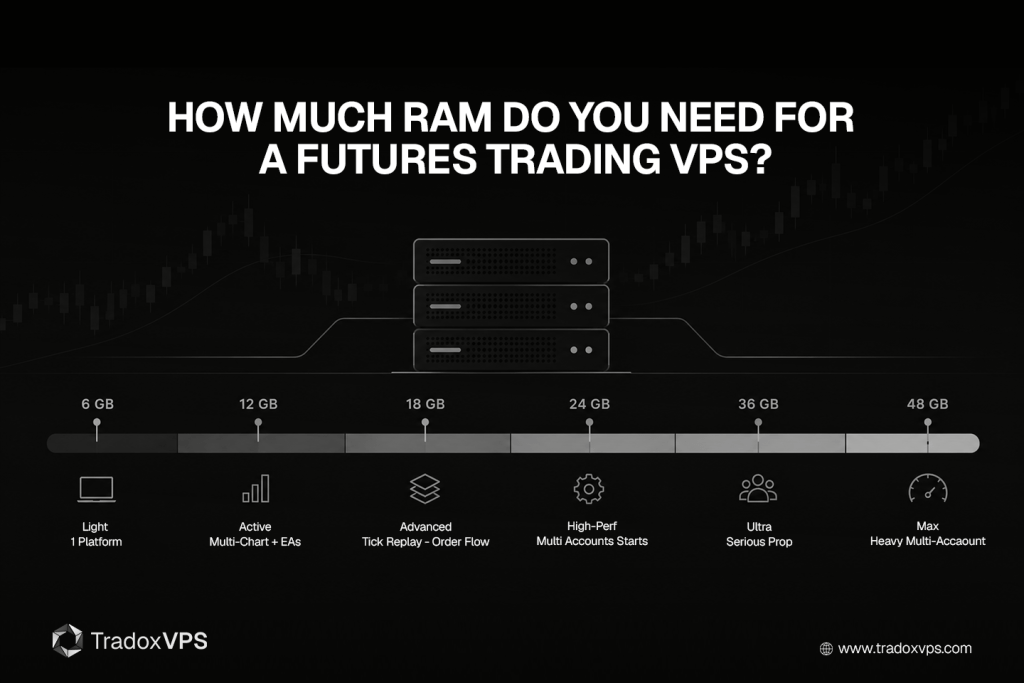
The short answer: our plans run from 6GB to 48GB, and most futures traders land in the middle. A light, single-platform setup is fine on 6GB (Starter); a serious multi-chart NinjaTrader layout is comfortable at 12–18GB (Active or Advanced); and multi-account or prop trading wants 36–48GB (Ultra or Max). And crucially, more RAM doesn’t add speed — past your working set, it just sits there as headroom.
What actually eats your RAM
The right tier depends entirely on your working set — everything the platform holds in memory at once. That’s the platform itself, the number of charts, the instruments, the indicators, the strategies, the data feeds, and the number of accounts. The single biggest swing factor most traders overlook is Tick Replay.
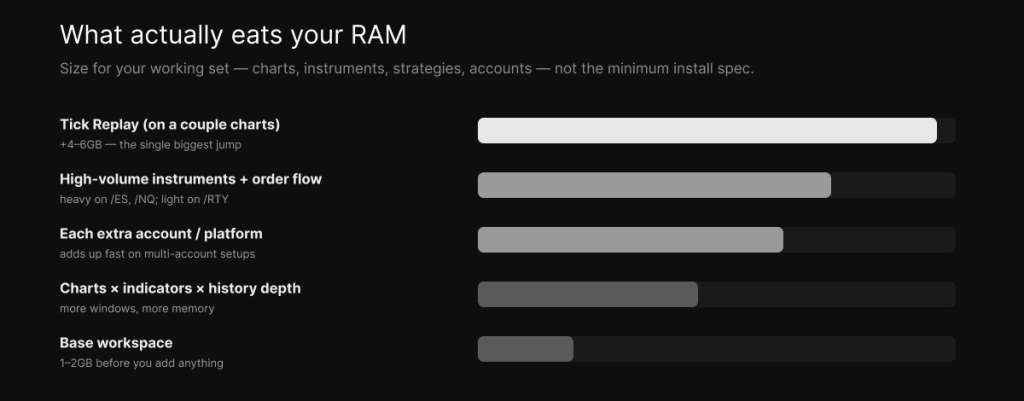
An average NinjaTrader workspace uses 1–2GB of RAM. Turn on Tick Replay on just one or two charts and the same workspace can jump to 6–8GB — it’s the heaviest single thing you can enable, which is exactly why the optimization guide says to leave it off unless an indicator genuinely needs it. High-volume instruments like /ES and /NQ are far heavier on memory than a quiet one like /RTY, order-flow and volume-profile indicators add more, and every additional account or platform stacks on top. Charts, indicators, and history depth all add too — just less dramatically.
How much RAM by workload — and which plan that is
Match the tier to what you actually run:
| Plan | RAM | Fits |
|---|---|---|
| Starter | 6GB | One platform, a few charts, 1–2 strategies — light NinjaTrader, or MT4/MT5 |
| Active | 12GB | Multiple charts + indicators + several strategies (the comfortable NinjaTrader floor) |
| Advanced | 18GB | Tick Replay on multiple charts, heavy order-flow, many instruments |
| High-Performance | 24GB | Multi-account begins — a few accounts with copiers |
| Ultra | 36GB | Serious multi-account / prop trading |
| Max | 48GB | Heavy multi-account / prop, or several platforms at once |
One honest note on the entry tier: NinjaTrader officially recommends 8GB, so for a dedicated NinjaTrader setup the 12GB Active tier is the comfortable real-world starting point — the 6GB Starter is better suited to a lighter single-platform load or MetaTrader, which is lighter than NinjaTrader to begin with. And that’s the other half of the picture: NinjaTrader is significantly more memory-hungry than MetaTrader, and MT5 uses more than MT4, so a multi-chart NinjaTrader setup wants more headroom than the same number of MT5 charts — the kind of workload sizing the automated-bots guide gets into for EAs.
The honest part: RAM is headroom, not speed
This trips up a lot of buyers, so it’s worth being blunt. RAM does not make your trading faster. Execution speed comes from single-core CPU clock — the work of crunching each chart’s incoming data on time — which is the whole argument for a chip like the Ryzen 9950X that runs across all our plans. What RAM does is give the platform room to hold its working set without spilling over, which keeps everything responsive.
So the two failure directions are different. Buy more RAM than you need and you’ve simply spent a little extra — the spare gigabytes sit idle and do nothing for speed. Buy too little and you hit the genuinely costly failure: when your working set exceeds physical memory, Windows starts paging to disk, and that swap causes latency spikes and stutters — right when the market is moving fastest.
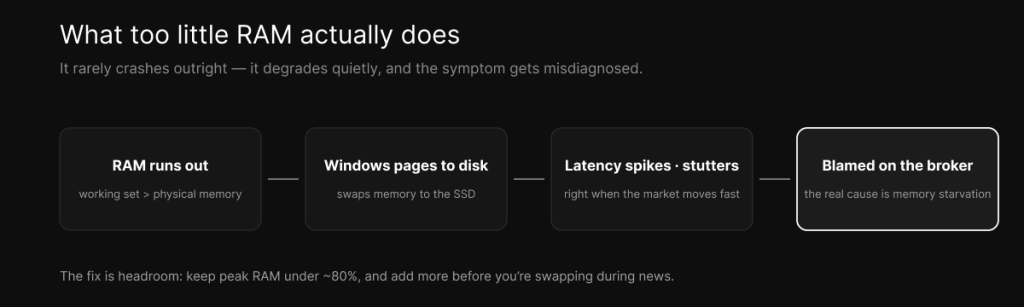
That last one is sneaky, because it doesn’t look like a memory problem. The platform doesn’t crash; it just gets slow and jerky during volatility, and traders blame the broker, the data feed, or the internet when the real fix is a tier up.
How to size it for your setup
You don’t have to guess. Run your real setup and watch the gauge. Open Task Manager, load everything you actually trade with — your charts, indicators, strategies, accounts, and Tick Replay if you use it — and watch memory usage during a busy period like the open or a news release. Keep peak usage under roughly 80%. If it’s sitting above 85% during a normal session, move up a tier before it bites.
Two rules of thumb make the rest easy. Size for your workload, not the minimum install spec — and not for the biggest box you’ll never load. And don’t run backtests or optimizations on your live trading box: the Strategy Analyzer is hungry for both RAM and CPU, so run heavy research off-hours or on a separate instance so it never competes with live execution.
The bottom line
For a futures trading VPS, our tiers run 6GB to 48GB: 6GB for a light single-platform setup, 12–18GB for a serious multi-chart NinjaTrader layout, and 36–48GB for multi-account and prop trading — with Tick Replay being the thing most likely to push you up a tier. Remember that RAM buys you stability, not speed, so size it to your real working set, leave headroom for the open, and let the Ryzen 9950X on every plan handle the speed side.
You can see how RAM, cores, and storage line up across the tiers on the pricing page, and the NinjaTrader VPS plans are built around exactly this workload — with the full buyer’s guide if you want to weigh every spec together.
Frequently asked questions
For a dedicated NinjaTrader setup, the 12GB Active tier is the comfortable starting point, 18GB Advanced suits heavy multi-chart and order-flow work, and 36–48GB (Ultra or Max) covers multi-account or prop trading. Tick Replay is the biggest swing factor — it can push a 1–2GB workspace to 6–8GB.
The 6GB Starter tier is fine for a light single-platform setup or MetaTrader, which is lighter than NinjaTrader. For a serious NinjaTrader layout with several charts and strategies, step up to the 12GB Active tier or higher, since NinjaTrader officially recommends 8GB and benefits from headroom above it.
No. RAM gives the platform room to run without stalling, but execution speed comes from single-core CPU clock — which is why every one of our plans uses the Ryzen 9950X. Past your working set, extra RAM sits idle and does nothing for speed.
MT5 is lighter than NinjaTrader, which is the most resource-intensive of the common platforms, and MT5 uses more than MT4. A few MT5 terminals are comfortable on the 6–12GB tiers; heavy NinjaTrader setups want 18GB or more.
Plan on the 36GB Ultra or 48GB Max tier for a heavier multi-account operation with a copier running, since each account, chart, and indicator adds to memory. Multi-account setups starting out can begin at the 24GB High-Performance tier.
Watch memory in Task Manager during a busy session. If peak usage sits above about 80–85%, or the platform stutters during volatile moves while CPU looks fine, you’re likely running short on RAM and should move up a tier.
We operate TradoxVPS and provide trading infrastructure, not financial advice. RAM improves stability but does not increase execution speed or guarantee performance; sizing depends on your specific platform, workload, and configuration. Trading futures and other leveraged products carries substantial risk, including the loss of more than your initial deposit.